
Choosing the right streaming encoder can make a home studio setup more reliable, flexible, and easier to manage. The models in this roundup cover everything from compact HDMI-to-IP appliances to advanced 4K production systems.
We compare their connectivity, streaming protocols, video quality, recording features, and workflow options so you can match an encoder to your cameras, computer, network, and preferred platforms.
Best 10 Streaming Encoders for Home Studios Picks for 2026
Flexible 4K Protocol Encoder

- 4K30 input with H.264/H.265 encoding
- Up to four simultaneous protocol outputs
- Overlays, audio options, and lifetime support
Best For: Multi-platform HDMI streaming and custom network workflows
Compact NDI Game Encoder

- 4K passthrough with standalone game streaming
- Native NDI HX3/HX2/HX conversion
- PoE, USB-C, SRT, RTMP(S), and RTSP support
Best For: Compact gaming and NDI-enabled home studio setups
All-in-One Production Encoder

- Standalone switching, recording, encoding, and streaming
- Two HDMI inputs plus USB and IP sources
- Touchscreen control with graphics and overlays
Best For: Multi-source home studio productions up to 1080p60
Customizable 4K IP Encoder
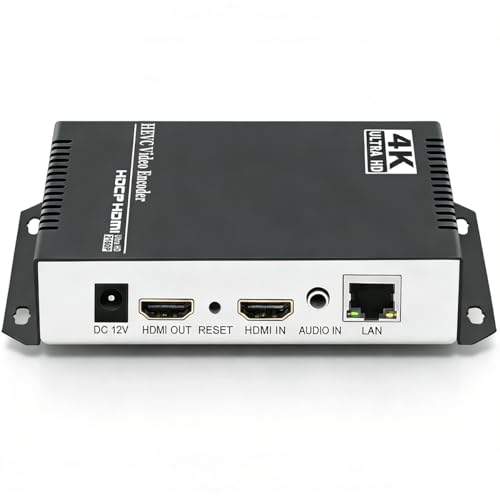
- 4K30 H.264/H.265 HDMI encoding
- Wide protocol and server compatibility
- Four streams, overlays, and adjustable bitrate
Best For: HDMI-to-Ethernet streaming and custom server delivery
Versatile HDMI Workhorse

- 4K30 HDMI encoding with loop-through
- Multi-protocol, multi-destination streaming
- Simultaneous recording and streaming
Best For: HDMI-based home studios needing flexible streaming and recording
Compact DisplayPort Value Pick

- 4K30 input and output support
- Four simultaneous protocol-based streams
- H.264/H.265 with useful overlays
Best For: Computer-based studios using compatible DisplayPort sources
Hybrid Production Centerpiece

- HDMI and SDI inputs with dual-input mixing
- Up to six simultaneous stream destinations
- 4K encoding and concurrent recording
Best For: Advanced HDMI/SDI home studios and small live productions
Multi-Channel Powerhouse

- Four HDMI inputs with mixed 4K30 and 1080p60 support
- Can output to up to 16 feeds
- LCD status display and broad protocol support
Best For: Multi-camera studios and advanced simulcasting
Compact Simplicity
1080p60 Browser-Managed Encoder

- Hardware H.265/H.264 encoding at 1080p60
- Browser setup requires no PC software
- Compact body with HDMI and 3.5mm audio support
Best For: Single-source creator and gaming setups
Flexible Single-Source Pick

- 1080p60 H.265/H.264 encoding
- Up to four protocol-based output streams
- Audio choice and extensive overlay controls
Best For: Branded single-source streams and simulcasting
Flexible 4K Protocol Encoder – URayCoder UHE265-1L-4K
For home studios that need broad platform support, this URayCoder encoder converts HDMI video into network streams using H.264 or H.265. It accepts 4K input at up to 30fps, supports multiple output protocols, and can send up to four streams simultaneously, making it a versatile choice among streaming encoders for home studios.
Best For: Creators who need multi-platform streaming, configurable overlays, and flexible protocol support from a standalone HDMI encoder.
Pros:
- Supports 4K at 30fps and up to 120fps at 2K or lower resolutions.
- Can output up to four streams using protocols such as RTMP(S), SRT, RTSP, HLS, and UDP.
- Offers text, logo, timestamp, cropping, rotation, and mirroring tools.
- Includes HDMI and line-in audio options plus lifetime warranty and technical support.
Cons:
- Uses a single HDMI input, limiting multi-camera production.
- Its extensive settings may be more than a simple one-platform stream requires.
This is a strong fit when protocol flexibility and simultaneous distribution matter more than built-in switching or recording. Its standalone design and web-based management also help reduce dependence on a streaming computer.
Compact NDI Game Encoder – Zowietek ZowieBox
The ZowieBox is a compact option for home studios, gaming setups, and IP video workflows. It combines HDMI encoding, decoding, zero-lag passthrough, and NDI conversion in a small enclosure, with support for RTMP(S), RTSP, and SRT streaming.
Best For: Gamers and studio operators who want a small HDMI-to-IP device with NDI, passthrough, and flexible power options.
Pros:
- Provides 4K capture with zero-lag HDMI passthrough for gameplay workflows.
- Supports NDI|HX3, HX2, and HX conversion for IP production setups.
- Works with RTMP(S), RTSP, and SRT and can be managed through a web interface.
- Offers USB-C power, PoE, DC output, a tripod mount, tally light, and LCD status screen.
Cons:
- Encoder and decoder modes cannot operate simultaneously.
- Full NDI signals and USB capture-card functionality are not supported.
Choose this model when physical size, gaming passthrough, and NDI compatibility are priorities. Its limitations are important for studios expecting full NDI or a conventional USB capture-card workflow.
All-in-One Production Encoder – Magewell Director Mini
The Magewell Director Mini is more than a basic encoder: it combines switching, recording, monitoring, and streaming in a standalone production system. With two HDMI inputs, USB and IP sources, a touchscreen, and support for H.264/H.265 up to 1080p60, it suits home studios producing more structured live shows.
Best For: Producers who need multi-source switching, graphics, recording, and streaming without relying on an external computer.
Pros:
- Combines source switching, encoding, recording, monitoring, and streaming in one device.
- Accepts two HDMI inputs, two USB-A sources, and up to three simultaneous IP sources.
- Includes a 5.44-inch AMOLED touchscreen for scene control and previewing.
- Supports graphics, media, webpages, chroma key, timers, scoreboards, and overlays.
Cons:
- Encoding is limited to up to 1080p60 rather than 4K.
- Its broader production feature set may be unnecessary for single-source streaming.
- Cellular connectivity requires a separate USB modem.
For a home studio that is growing into multi-camera or graphics-heavy production, the Director Mini offers a significantly broader workflow than a simple HDMI encoder. It is less compelling if your only requirement is sending one source to a platform.
Customizable 4K IP Encoder – URayCoder HEVC HDMI Encoder
This URayCoder hardware encoder is designed for turning an HDMI source into Ethernet-based video streams. It supports 4K input and output, H.264/H.265 compression, a wide range of protocols, and configurable overlays, making it a practical option for streaming encoders for home studios that need network flexibility.
Best For: Home studios sending HDMI video to OBS, streaming platforms, or custom servers through wired IP workflows.
Pros:
- Supports 4K at 30fps and up to 120fps at 2K or lower resolutions.
- Handles RTSP, RTMPS, HLS, UDP, SRT, HTTP, FLV, WebRTC, and other listed protocols.
- Can produce up to four video streams with different protocols simultaneously.
- Includes adjustable bitrate and resolution settings, overlays, audio options, and a lifetime warranty.
Cons:
- Designed around an HDMI source rather than multiple direct camera inputs.
- Its advanced protocol and customization options may require setup time.
This model is best viewed as a network distribution tool rather than a complete production switcher. It makes sense for creators who already have an HDMI camera, console, or other source and want control over how that feed reaches platforms or servers.
Versatile HDMI Workhorse – Ultra Encode HDMI Plus
The Magewell Ultra Encode HDMI Plus is a strong choice among streaming encoders for home studios that rely on HDMI cameras, switchers, or other video sources. It combines 4K30 encoding, loop-through monitoring, recording, and broad protocol support in a compact standalone unit.
Best For: Home studios needing HDMI-based streaming, local monitoring, recording, and flexible IP workflows.
Pros:
- Supports HDMI encoding up to 4096×2160p30 with loop-through output.
- Streams using RTMP, RTMPS, SRT, NDI|HX, HLS, and TS over UDP/RTP.
- Can stream and record simultaneously to internal, USB, or network storage.
- Includes overlays, scheduled recording, Wi-Fi, PoE, and optional USB modem support.
Cons:
- Designed for HDMI workflows and does not list an SDI input.
- 4K encoding is limited to 30 frames per second.
- 4G/5G USB modems are supported but not included.
Its combination of monitoring, recording, overlays, and multi-destination streaming makes it especially practical for a home studio that may expand into more advanced production or NDI-based workflows.
Compact DisplayPort Value Pick – 4K30 DisplayPort Encoder
This UNISHEEN DisplayPort encoder offers a compact way to add 4K streaming to a computer-centered home studio. It supports H.264 and H.265 encoding, multiple streaming protocols, and up to four simultaneous output streams for different servers.
Best For: Budget-conscious studios streaming from DisplayPort-equipped computers or other compatible sources.
Pros:
- Supports 4K input and output at up to 2160p30.
- Can output four streams simultaneously, with different protocols for each.
- Offers SRT, RTSP, RTMPS, UDP, and NVR support alongside H.264/H.265 codecs.
- Includes image adjustments and text, time, scrolling-caption, and PNG overlays.
Cons:
- Its listed video connectivity centers on DisplayPort rather than HDMI or SDI.
- 4K output is limited to 30 frames per second.
- The one-year limited warranty is shorter than some competing options in this roundup.
For a simple computer-based setup, the encoder’s small footprint and four-stream capability are appealing. Verify your source and connector requirements carefully before buying, since the product details specify DisplayPort connectivity.
Hybrid Production Centerpiece – Ultra Encode AIO
The Magewell Ultra Encode AIO is built for home studios that use both HDMI and SDI equipment. It supports 4K encoding, dual-input layouts, multi-destination streaming, and simultaneous recording, making it one of the more capable streaming encoders for home studios and small live-production setups.
Best For: Advanced studios combining HDMI and SDI sources with picture-in-picture or side-by-side production needs.
Pros:
- Accepts HDMI and SDI inputs and can mix them in picture-in-picture or side-by-side layouts.
- Supports HDMI up to 4096×2160p60 and SDI up to 4096×2160p30.
- Streams to up to six destinations using RTMP, RTMPS, SRT, NDI|HX, HLS, and other protocols.
- Records to SD card, USB storage, or network drives while streaming.
Cons:
- Its rack-mountable form factor and broader feature set may be more than a basic studio needs.
- SDI 4K encoding is limited to 30 frames per second.
- It is heavier and larger than the compact HDMI-only encoder in this roundup.
The AIO is the strongest fit when source flexibility matters more than minimal size. Its dual-input mixing, six-destination streaming, overlays, and recording options provide room for more elaborate studio productions.
Multi-Channel Powerhouse – 4K 4-Channel HDMI Encoder
For home studios that need to distribute several camera or HDMI sources, this ORIVISION model is a powerful option among streaming encoders for home studios. It accepts four HDMI inputs, supports mixed 4K and 1080p workflows, and can send streams to as many as 16 destinations.
Best For: Multi-camera studios, creators simulcasting to several platforms, and advanced IPTV or broadcast setups.
Pros:
- Handles up to two 4K30 inputs plus two 1080p60 inputs.
- Supports H.265, H.264, and MJPEG encoding.
- Offers RTMP, RTMPS, RTSP, SRT, UDP, HLS, and other protocol options.
- Built-in LCD monitoring, audio inputs, OSD overlays, and mirror/flip controls add flexibility.
Cons:
- Its four-channel feature set may be more than a simple single-camera studio needs.
- Advanced configuration and multi-platform streaming require networking knowledge.
This is the most capable choice here for a growing production space. The 16-feed maximum and four HDMI inputs provide substantial headroom, while the one-year warranty and remote technical support are useful for continuous operation.
Compact Simplicity – 1080p60 Browser-Managed Encoder
This compact UNISHEEN encoder is a practical starting point for streaming encoders for home studios. It converts one HDMI source to 1080p60 and uses browser-based setup, so you can configure it without dedicated PC software or drivers.
Best For: Solo creators, gaming or presentation setups, and small studios that want straightforward 1080p streaming.
Pros:
- Provides hardware H.265/H.264 encoding at up to 1080p60.
- Supports RTMP, RTMPS, RTSP, SRT, HLS, WebRTC, UDP, and additional protocols.
- Small palm-sized design suits shelves, monitor areas, or equipment racks.
- Includes HDMI audio, 3.5mm audio input, and OSD overlays for text, logos, or timestamps.
Cons:
- Has one HDMI input, limiting multi-camera expansion.
- It is limited to 1080p rather than 4K capture.
- Advanced configurations still require basic networking knowledge.
Choose this model when simplicity and size matter more than multiple inputs. Its browser setup, low-power design, and broad protocol support make it well suited to a dependable single-source studio stream.
Flexible Single-Source Pick – HEVC 1080p HDMI Encoder
For creators seeking adaptable streaming encoders for home studios, this URayCoder unit combines 1080p60 HDMI capture with extensive stream controls. It supports HEVC/H.265 and H.264, accepts HDMI or line-in audio, and can produce up to four streams using different protocols.
Best For: Home studios that want detailed branding, audio-source flexibility, and multi-platform output from one HDMI device.
Pros:
- Supports 1920×1080 video at up to 60 fps with H.265/H.264 encoding.
- Can output up to four streams using protocols such as RTMP(S), RTSP, SRT, HLS, and UDP.
- Offers text, scrolling captions, logos, timestamps, cropping, rotation, flipping, and mirroring.
- Accepts embedded HDMI audio or 3.5mm line-in audio.
Cons:
- Its single HDMI input is less suitable for multi-camera productions.
- Maximum video resolution is 1080p.
- The extensive settings may take longer to configure than a basic encoder.
This is a strong middle ground for a single-source studio that values customization. It lacks the multi-input capacity of the ORIVISION model, but its overlays, audio options, and four-stream output provide considerable flexibility for branded live content.
How We Picked the Best Streaming Encoders for Home Studios
We focused on features that have a direct effect on home-studio streaming: input compatibility, maximum resolution and frame rate, codec support, network protocols, reliability, and ease of setup. The selection includes straightforward HDMI encoders as well as more capable units with SDI, NDI, loop-through, recording, switching, or multiple input options.
We also considered whether each device can fit common workflows for YouTube Live, Facebook Live, private RTMP servers, IPTV, local network distribution, and production software. Standalone hardware can reduce the load on a streaming computer, but compatibility with your existing cameras, network, and destination platform remains essential.
Quick Comparison
| Feature | What to look for | Best suited to |
|---|---|---|
| HDMI input | Simple camera or switcher connection | Solo creators and basic studios |
| 4K support | 4K capture, passthrough, or downscaled streaming | High-resolution production |
| HEVC/H.265 | Lower bandwidth at comparable quality | Limited-upload or remote setups |
| NDI, SDI, or multiple inputs | Networked and multi-source workflows | Advanced home studios |
| Recording and loop-through | Local backups and flexible monitoring | Regular live producers |
Key Buying Factors for Streaming Encoders for Home Studios
Resolution, Frame Rate, and Codec
Match the encoder to the source device rather than choosing 4K automatically. A 1080p60 encoder may be the better value for webcams, mirrorless cameras, tutorials, and gaming. Choose 4K when your camera and workflow support it, or when you need high-quality local recording or passthrough. H.264 offers broad compatibility, while H.265 can reduce bandwidth but may have more limited playback and platform support.
Inputs and Signal Routing
Check whether you need HDMI, SDI, DisplayPort, or network sources. HDMI is common for cameras and consumer equipment; SDI is better suited to longer cable runs and production hardware. Loop-through is useful when you want to send the same signal to a monitor, switcher, or capture device without adding another splitter.
Protocols and Network Requirements
RTMP or RTMPS is the safest starting point for major streaming platforms. RTSP, SRT, HLS, UDP, WebRTC, and NDI can be valuable for local distribution, low-latency links, or professional production, but confirm that your destination supports the protocol. Wired Ethernet is strongly preferred for consistent live streaming.
Control, Recording, and Expansion
On-device screens, browser controls, presets, and recording can simplify operation. Multi-input encoders and compact switchers cost more but may replace several separate devices. Also verify audio embedding, power requirements, cooling, firmware support, and whether the unit can operate unattended.
Who Should Buy Which Streaming Encoders for Home Studios?
Choose a basic 1080p HDMI encoder if you need dependable single-camera streaming with minimal configuration. A 4K HDMI model makes more sense for newer cameras, higher-quality archives, or future-proofing. Look for NDI, SDI, multiple inputs, or integrated switching if your home studio includes several sources or networked production tools. Finally, prioritize H.265 or SRT when bandwidth efficiency and connection resilience matter more than universal compatibility.