
Choosing among streaming encoders for beginners can be challenging when product listings mix technical protocols, resolution claims, and professional production features. The right model should make it easy to connect a camera or HDMI source, reach your preferred platform, and troubleshoot problems without a steep learning curve.
This roundup compares ten options ranging from straightforward 1080p HDMI encoders to advanced 4K systems with NDI, recording, multistreaming, and mobile production features. Use the guide below to match the encoder’s connectivity and workflow to the way you plan to stream.
Best 10 Streaming Encoders for Beginners Picks for 2026
Flexible 4K Starter
URayCoder UHE265-1L-4K Encoder

- 4K input/output at up to 30fps
- Supports RTMP, SRT, HLS, RTSP, and more
- Up to four simultaneous protocol outputs
Best For: Beginners exploring 4K streaming and multiple platforms
All-in-One Beginner Studio

- Built-in 4K encoder, switcher, recorder, and touchscreen
- Handles horizontal and vertical streaming
- Supports four HDMI sources and cellular bonding
Best For: Beginners building multi-camera live productions
Simple 1080p Workhorse

- Streams up to 1080p60
- Embeds analog mixer audio with HDMI video
- Supports four-platform simultaneous broadcasting
Best For: Simple 1080p events and mixer-based audio setups
Broadcast-Ready 4K
Blackmagic Streaming Encoder 4K
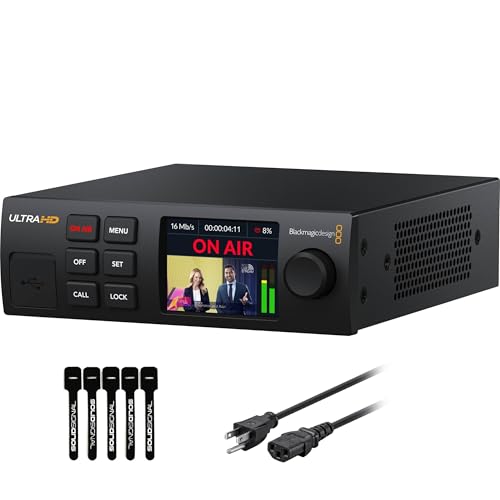
- Encodes up to 2160p60 in H.264 or H.265
- 12G-SDI input with standards conversion
- Ethernet and mobile connectivity with failover
Best For: Beginners entering SDI and professional live production
Compact NDI Game Streaming Pick
ZowieBox 4K HDMI Encoder/Decoder

- 4K pass-through for low-latency gameplay
- Supports NDI|HX, RTMP, SRT, and RTSP
- Compact design with PoE and web control
Best For: Gamers and creators building compact IP video setups
Simple 1080p Broadcast Choice

- Encodes HDMI at 1080p60
- Streams without a PC
- Supports RTMP, SRT, WebRTC, HLS, and RTSP
Best For: Basic church, campus, hotel, and LAN broadcasting
Advanced Production Upgrade

- Combines HDMI and SDI with dual-input mixing
- Encodes 4K and streams to up to six destinations
- Records while streaming with overlays and processing
Best For: Events and productions needing scalable HDMI/SDI workflows
Flexible Streaming Hub

- H.265/H.264 encoding up to 1080p60
- Supports four streams and numerous protocols
- Adds overlays and accepts HDMI or line-in audio
Best For: Beginners needing flexible, multi-platform HDMI streaming
Simple Setup Pick

- Browser setup requires no PC software
- Hardware encoding supports 1080p60
- Compact design with OSD and multiple protocols
Best For: First-time users wanting straightforward 1080p streaming
Future-Ready Choice

- Accepts 4K video at up to 30 fps
- Supports high frame rates at lower resolutions
- Provides broad protocol and overlay support
Best For: Beginners planning to grow into 4K streaming
Flexible 4K Starter – URayCoder UHE265-1L-4K Encoder
For beginners comparing streaming encoders for beginners, the URayCoder UHE265-1L-4K offers broad format support and a straightforward HDMI-to-network workflow. It accepts 4K HDMI video, supports H.265 and H.264, and can send streams through several common protocols.
Best For: Beginners who want 4K input, multi-platform streaming, and flexible protocol options without adding another computer to the encoder setup.
Pros:
- Supports 4K input and output at up to 30fps, plus up to 120fps at 2K and lower resolutions.
- Works with RTMP, RTMPS, RTSP, SRT, HLS, UDP, WebRTC, and other protocols.
- Can output up to four streams using different protocols and supports text, logos, timestamps, and image adjustments.
- Includes a lifetime warranty and technical support.
Cons:
- Its extensive settings and protocol choices may feel overwhelming to first-time streamers.
- It has one HDMI port, so it is not designed for multi-camera switching.
- 4K operation is limited to 30fps.
This is a versatile choice for learning dedicated hardware encoding, especially if you expect to experiment with different streaming platforms or network protocols. Beginners should be comfortable configuring network settings and stream destinations.
All-in-One Beginner Studio – YoloBox Ultra
The YoloBox Ultra is one of the more approachable streaming encoders for beginners because it combines encoding, switching, recording, and monitoring in one touchscreen unit. It can handle horizontal and vertical broadcasts without requiring a laptop, capture card, or separate streaming software.
Best For: New streamers, event operators, churches, schools, and creators who need multi-camera production with minimal additional equipment.
Pros:
- Combines a 4K encoder, switcher, recorder, and 8-inch touchscreen monitor.
- Supports four HDMI inputs plus USB-C and USB-A sources, with more than 10 possible sources.
- Offers picture-in-picture, overlays, scoreboards, instant replay, and auto-switching.
- Can combine up to five network connections using cellular, Wi-Fi, Ethernet, and USB modems.
Cons:
- Cellular bonding and some related services may involve additional charges.
- Its larger feature set may be more than needed for a simple single-camera stream.
- The manufacturer warranty is one year.
Although it costs more than a basic HDMI encoder, the Ultra reduces setup complexity by putting the core production tools in one device. It is a strong fit when ease of operation and multi-camera flexibility matter more than keeping the system minimal.
Simple 1080p Workhorse – J-Tech Digital JTECH-ENCH4A
For beginners seeking streaming encoders for beginners without paying for 4K production features, the J-Tech Digital JTECH-ENCH4A keeps the focus on 1080p HDMI streaming. It adds audio embedding, mobile control, and support for several widely used delivery protocols.
Best For: Beginners and small event teams that need reliable 1080p streaming with the option to bring in audio from a mixer.
Pros:
- Supports resolutions up to 1080p at 60Hz.
- Accepts analog audio alongside HDMI video, which is useful for mixer-based event audio.
- Supports RTMP, RTMPS, RTSP, RTP, HTTP, UDP, and TS protocols.
- Can broadcast to four streaming platforms simultaneously and includes app-based control.
Cons:
- It does not offer 4K encoding.
- It has one HDMI port and is not a multi-camera switcher.
- The warranty is limited to one year.
This model is a practical starting point for straightforward broadcasts, presentations, and live events. Its 1080p ceiling keeps the workflow simpler, while analog audio input gives beginners a useful upgrade path when HDMI audio is not enough.
Broadcast-Ready 4K – Blackmagic Streaming Encoder 4K
The Blackmagic Streaming Encoder 4K is aimed at users who want streaming encoders for beginners with a path toward more advanced broadcast workflows. It delivers up to 2160p60 encoding from an SDI source, supports SRT and RTMP, and includes Ethernet plus USB-C mobile connectivity.
Best For: Beginners working with SDI cameras or professional video systems who want a dedicated encoder that can grow into broadcast and remote-production applications.
Pros:
- Supports H.264 and H.265 streaming up to Ultra HD 2160p60.
- Includes 12G-SDI input, loop output, and automatic standards conversion.
- Offers Ethernet and smartphone tethering with automatic connection failover.
- Adds HDMI and SDI monitor outputs, webcam output, captions, timecode, and REST API control.
Cons:
- Its SDI-focused design may be excessive for beginners using only consumer HDMI cameras.
- The advanced broadcast features can require more setup knowledge than a basic encoder.
- The manufacturer warranty is one year.
This is the most expandable option in the group, but it is best suited to beginners already entering SDI-based production rather than casual webcam streaming. Its connection failover and standards conversion are especially valuable for more demanding live environments.
Compact NDI Game Streaming Pick – ZowieBox 4K HDMI Encoder/Decoder
For beginners comparing streaming encoders for beginners, the ZowieBox is a compact option that can handle PC-free gaming streams, HDMI capture, and IP video workflows. It supports up to 4K pass-through, multiple streaming protocols, and web-based control from a computer, phone, or tablet.
Best For: Gamers and creators who want a small, flexible encoder with NDI support and low-latency HDMI pass-through.
Pros:
- Supports up to 4K capture with zero-lag HDMI pass-through.
- Works as an RTMP, SRT, RTSP, or NDI|HX encoder or decoder.
- Offers USB-C power, PoE, tripod mounting, tally light, and LCD status display.
Cons:
- Encoder and decoder modes cannot operate simultaneously.
- Full NDI signals are not supported.
- USB capture card functionality is not currently supported.
The ZowieBox stands out when space, portability, and gaming-friendly pass-through matter. Its broad protocol support is useful as your setup grows, though beginners should note the limitations around simultaneous modes and USB capture.
Simple 1080p Broadcast Choice – Wilxisum HDMI Video Encoder
This Wilxisum unit is a straightforward choice for streaming encoders for beginners who need to convert an HDMI source into a network stream without relying on a PC. It accepts 1080p video at 60 frames per second and supports common platforms and protocols for live broadcast and local network viewing.
Best For: Churches, schools, hotels, small studios, and users who need an affordable 1080p HDMI-to-IP encoder for continuous streaming.
Pros:
- Encodes HDMI video at up to 1080p60 using H.264 or H.265.
- Supports RTMP, RTMPS, SRT, WebRTC, HLS, RTSP, and additional network formats.
- Can stream to three platforms simultaneously through RTMP and operate without a PC.
- Includes a two-year limited warranty and lifelong technical support.
Cons:
- Requires network setup through the encoder’s web interface and may need a default-IP adjustment.
- Limited to 1080p rather than 4K input.
Its compact enclosure and broad protocol list make this a practical entry point for basic HDMI-to-network streaming. It is less suited to advanced production, but its PC-free operation and multi-platform support can simplify scheduled or always-on broadcasts.
Advanced Production Upgrade – Magewell Ultra Encode AIO
For beginners researching streaming encoders for beginners who expect their production needs to expand, the Magewell Ultra Encode AIO provides a substantial feature set. It combines HDMI and SDI inputs, 4K encoding, multi-destination streaming, recording, overlays, and onboard processing in one device.
Best For: Live-production teams, event broadcasters, and advanced users who need HDMI/SDI flexibility, simultaneous recording, and multiple delivery destinations.
Pros:
- Accepts HDMI or SDI and can mix both sources in picture-in-picture or side-by-side layouts.
- Supports 4K encoding with H.264 or HEVC compression.
- Streams to up to six destinations using protocols including RTMP, RTMPS, SRT, NDI|HX, and HLS.
- Can record while streaming to SD cards, USB storage, or network drives.
Cons:
- Its rack-mountable 3.6-pound design is more substantial than beginner-focused compact encoders.
- The advanced feature set may be more than needed for a simple single-camera stream.
The Ultra Encode AIO is a strong long-term option if you need professional input flexibility and room for more complex broadcasts. Beginners may find it excessive for basic streaming, but onboard mixing, overlays, recording, and six-destination output can reduce the need for additional hardware.
Flexible Streaming Hub – URayCoder 1080p HDMI Encoder
For beginners comparing streaming encoders for beginners, this URayCoder model offers a broad feature set without requiring a computer to handle the encoding. It accepts HDMI video, supports 1080p at up to 60 fps, and can send streams through protocols including RTMP(S), RTSP, SRT, HLS, and UDP.
Best For: Beginners who want multi-platform streaming, customizable overlays, and flexible HDMI-to-network output.
Pros:
- Supports H.265 and H.264 encoding at up to 1080p60.
- Can output up to four streams using different protocols.
- Includes text, logo, timestamp, cropping, rotation, and mirroring tools.
- Offers HDMI or 3.5mm line-in audio and browser-based management.
Cons:
- Its extensive protocol and customization options may be more than a first-time streamer needs.
- It is limited to 1080p input and output rather than 4K.
- The supplied notes do not specify a software-update date.
This is a versatile choice for learning hardware-based streaming while leaving room for more advanced workflows. Its lifetime warranty and technical support also provide useful reassurance for buyers who expect to keep expanding their setup.
Simple Setup Pick – UNISHEEN 1080p60 HDMI Encoder
This UNISHEEN encoder is a practical entry point for streaming encoders for beginners because setup is handled through a web browser, with no drivers or computer software required. Its dedicated hardware supports 1080p60 H.265 or H.264 encoding and connects to common streaming and distribution protocols.
Best For: Beginners who prioritize compact hardware, browser-based setup, and reliable 1080p streaming.
Pros:
- Provides hardware H.265/H.264 encoding at 1080p60.
- Browser-based configuration avoids dedicated software and driver installation.
- Supports RTMP(S), RTSP, SRT, HLS, WebRTC, UDP, and other protocols.
- Includes HDMI audio, 3.5mm audio, and OSD text, logo, and timestamp overlays.
Cons:
- Advanced configurations still require basic networking knowledge.
- It has one HDMI input and does not provide 4K encoding.
- The warranty is limited to one year.
The compact design and DHCP-enabled default configuration should make initial installation less intimidating. Buyers should still expect to learn basic IP and stream-URL settings when moving beyond straightforward streaming.
Future-Ready Choice – URayCoder 4K HDMI Encoder
For beginners shopping among streaming encoders for beginners who may eventually add higher-resolution sources, this URayCoder model accepts 4K HDMI input and supports a wide range of network protocols. It can encode 4K at up to 30 fps, while lower resolutions can reach up to 120 fps according to the supplied specifications.
Best For: New streamers who want 4K source support, extensive protocol compatibility, and room to grow.
Pros:
- Supports 4K input and output at up to 30 fps.
- Supports up to 120 fps at 2K and lower resolutions.
- Works with RTMP(S), RTSP, SRT, HLS, WebRTC, ONVIF, and other protocols.
- Offers overlays, audio-source selection, video adjustments, and multi-stream output.
Cons:
- 4K operation is limited to 30 fps.
- The broad configuration options may feel complex for a first-time user.
- Higher-resolution workflows may require more network bandwidth and compatible equipment.
This model makes the most sense when 4K compatibility matters more than having the simplest possible setup. Its browser-accessible management and supplied lifetime support can help beginners start simply while retaining advanced options for future projects.
How We Picked These Streaming Encoders for Beginners
We focused on the features that matter most to first-time broadcasters: simple HDMI input, dependable network connectivity, support for common streaming protocols, practical resolution options, and compatibility with platforms such as YouTube, Facebook, Twitch, and custom RTMP services. We also considered whether each device suits a basic one-camera setup or a more advanced production workflow.
Because product listings can vary by seller and hardware revision, confirm the current specifications before buying. Check supported resolutions, audio inputs, included accessories, firmware requirements, and whether a control app or subscription is needed.
Quick Comparison
| Best For | Look For | Typical Choice |
|---|---|---|
| Simple first stream | HDMI input, RTMP, automatic setup | Basic 1080p encoder |
| Higher-quality video | 4K input, HEVC, reliable Ethernet | 4K HDMI encoder |
| Vertical and horizontal content | Flexible layouts and platform tools | All-in-one streaming system |
| Professional production | SDI, NDI, recording, multistreaming | Advanced production encoder |
Key Buying Factors for Streaming Encoders for Beginners
Input and Output Compatibility
Start with the source you already own. Most beginner setups use HDMI from a camera, laptop, game console, or switcher. If your equipment uses SDI, choose a model with SDI input or plan for a converter. Ethernet is generally preferable to Wi-Fi for consistent live transmission, while mobile connectivity can be useful for outdoor work.
Resolution, Codecs, and Frame Rate
1080p is usually the easiest starting point and requires less upload bandwidth. A 4K-capable encoder is worthwhile if you need high-resolution capture, future-proofing, or downscaled output, but it may add cost and configuration complexity. H.264 offers broad compatibility; H.265 or HEVC can reduce bandwidth but may not work with every destination or playback device.
Protocol and Platform Support
RTMP remains widely supported, while SRT can improve reliability over less predictable networks. HLS, RTSP, WebRTC, and NDI serve different distribution and production needs. Beginners should prioritize direct support for their chosen platform rather than buying a device with protocols they will never use.
Audio and Control
Check whether audio is embedded through HDMI, accepted through a separate input, or adjustable through an app. Remote browser controls, presets, status monitoring, and automatic reconnection can save time during a live broadcast.
Who Should Buy Which Streaming Encoders for Beginners?
Choose a basic 1080p HDMI encoder if you want the least complicated path from one camera or video source to a single streaming platform. Pick a 4K HDMI model if you value sharper source capture or HEVC efficiency and are comfortable checking compatibility. An all-in-one unit such as a portable production system is better for creators who need vertical video, multiple sources, overlays, or streaming without a computer. Buyers building a studio or broadcast workflow should consider advanced Magewell, Blackmagic, or NDI-equipped hardware with SDI, recording, multistreaming, or mixing support.
Finally, match the encoder to your upload speed. A stable wired connection, current firmware, and a test broadcast are often more important than buying the highest resolution available. For most newcomers, reliable 1080p streaming with straightforward controls is the best place to start.