
Choosing the right SSD enclosure can make a noticeable difference in editing speed, scratch-disk performance, and offload time.
Below, we’ve focused on fast, practical picks for creators who need dependable storage for demanding timelines, large media files, and smoother workflows.
Best 10 SSD Enclosures for Video Editing Picks for 2026
Premium 40Gbps Cooling Pick
ACASIS 40Gbps NVMe Enclosure with Fan

- Built-in fan helps reduce thermal throttling
- 40Gbps USB4/Thunderbolt 4/3 support
- Fits 2280/2260/2242/2230 M.2 drives
Best For: Editors who need portable high-speed storage with active cooling
Multi-Bay RAID Workhorse
ORICO 2.5-inch All-Flash Enclosure

- Five-bay design with up to 40TB total capacity
- Seven RAID modes for flexible storage setups
- Built-in USB, SD, and TF expansion ports
Best For: Creators who need multi-drive storage with RAID and card-reader convenience
Silent 40Gbps Speed Pick
UGREEN 40Gbps M.2 NVMe Enclosure
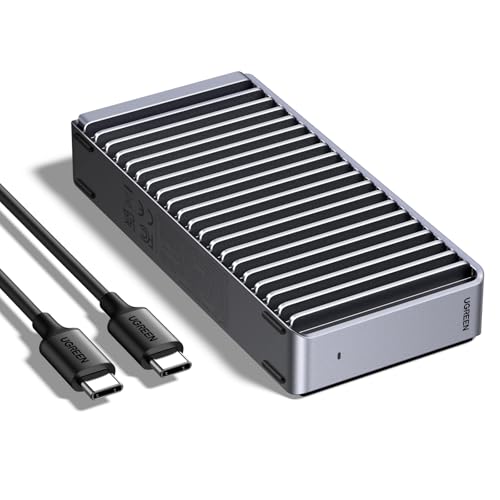
- Up to 3600MB/s with ASM2464PD chip
- Silent fin-based cooling design
- Supports USB4 and Thunderbolt 3/4
Best For: Users who want quiet, portable NVMe performance for editing and transfers
Mobile ProRes Capture Pick
ACASIS Magnetic 10Gbps NVMe Enclosure

- Compatible with 4K@60 ProRes recording on supported iPhones
- Magnetic attachment keeps it secured to the phone
- Built-in fan helps manage heat during capture
Best For: Mobile creators who need direct-to-SSD recording and portable editing support
80Gbps Performance Pick
UGREEN 80Gbps M.2 NVMe SSD Enclosure

- Up to 7000 MB/s with 80Gbps design
- 3D cooling with aluminum fin structure
- Supports up to 8TB M.2 NVMe drives
Best For: Power users moving large video libraries fast
4-Bay Desktop Speed

- 40Gbps connection for fast media transfers
- Holds four NVMe drives up to 32TB
- Active cooling with tool-free, hot-swap design
Best For: Editors who want a high-capacity desktop enclosure for fast video workflows
Portable Fan-Cooled Pick
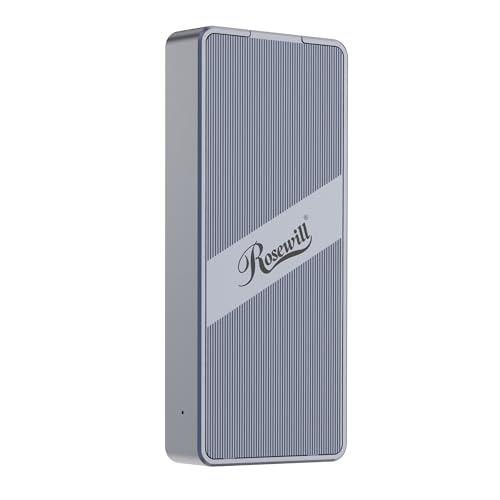
- 40Gbps speeds up to 3,187MB/s
- Built-in fan helps with sustained transfers
- Compact, lightweight design for travel
Best For: Mobile creators needing a compact, fan-cooled NVMe enclosure
Tool-Free USB4 Choice
Yottamaster USB4 NVMe Enclosure

- 40Gbps over Thunderbolt 4 and USB4
- Tool-free install with transparent cover
- Supports up to 8TB NVMe drives
Best For: Editors wanting a simple, tool-free enclosure with stable high-speed transfers
Premium 40Gbps Cooling Pick – ACASIS 40Gbps NVMe Enclosure with Fan
For ssd enclosures for video editing, this ACASIS model is built around sustained speed rather than just peak numbers. Its built-in fan, aluminum body, and heat-dissipation holes are aimed at reducing thermal throttling during long transfers, project backups, and other heavy workloads.
Best For: Editors who want a portable Thunderbolt/USB4 enclosure with active cooling for demanding Mac or PC workflows.
Pros:
- Built-in cooling fan plus ventilation holes to help manage heat under load
- 40Gbps USB4/Thunderbolt 4/3 compatibility for high-speed editing workflows
- Supports M.2 sizes 2280/2260/2242/2230 for wide drive compatibility
- Compact aluminum design that’s easy to carry in a laptop bag
Cons:
- Fan must be switched on manually
- SSD is not included
- Best results depend on a compatible high-performance drive and system
If your priority is keeping transfer speeds stable during long video-editing sessions, this enclosure is a strong fit. The combination of active cooling and 40Gbps connectivity makes it a practical choice for creators moving large media files frequently.
Multi-Bay RAID Workhorse – ORICO 2.5-inch All-Flash Enclosure
Among ssd enclosures for video editing, this ORICO unit stands out for creators who need more than a simple single-drive box. It combines multi-bay storage, RAID flexibility, and extra interface expansion, making it better suited to organizing footage, backups, and card dumps around a busy production setup.
Best For: Video editors and photographers who want a high-capacity, multi-drive enclosure with RAID options and built-in expansion ports.
Pros:
- Supports seven RAID modes, including RAID 0, 1, 3, 5, 10, JBOD, and CLEAR
- Up to 40TB total capacity across five bays, with up to 8TB per drive
- USB 3.2 Gen 2 interface offers up to 10Gbps with a PSSD
- Includes two 10Gbps USB ports plus SD and TF 3.0 card slots
Cons:
- Designed for 2.5-inch drives only; no 3.5-inch drives supported
- Bulkier than a single-drive portable enclosure
- Speed depends on whether you use a PSSD or SATA interface
This is a practical choice if your editing workflow depends on organizing large amounts of media in one place. The RAID options and multi-port layout make it especially useful for on-site production and backup-heavy setups.
Silent 40Gbps Speed Pick – UGREEN 40Gbps M.2 NVMe Enclosure
For ssd enclosures for video editing, this UGREEN model focuses on fast transfers and quiet operation. It pairs a 40Gbps connection with a fin-based cooling design, so it’s aimed at users who want strong performance for large media files without adding fan noise to a desk setup.
Best For: Editors who want a quiet, compact NVMe enclosure for fast file transfers on Mac, Windows, Linux, or Android.
Pros:
- ASM2464PD chip with speeds up to 3600MB/s
- Compatible with USB4 and Thunderbolt 3/4 connections
- Double-sided fin design improves heat dissipation without a fan
- Supports M.2 sizes 2230/2242/2260/2280 and drives up to 8TB
Cons:
- Needs Thunderbolt 4 cables and devices to reach top speed
- NVMe-only design; SATA NGFF and mSATA drives are not supported
- SSD is not included
This enclosure makes sense if you want a clean, silent setup for moving large video files quickly. Its compact aluminum build and broad platform support make it easy to slot into a mobile editing workflow.
Mobile ProRes Capture Pick – ACASIS Magnetic 10Gbps NVMe Enclosure
When your workflow involves shooting and moving footage on the go, this ACASIS option brings a different angle to ssd enclosures for video editing. It combines magnetic attachment, a built-in cooling fan, and 4K@60 HDMI support, with compatibility for direct ProRes recording on supported iPhone models.
Best For: Mobile creators, short-form video shooters, and iPhone ProRes users who want a compact recording and storage enclosure.
Pros:
- Supports 4K@60 ProRes recording on compatible iPhone 15/16/17 Pro and Pro Max models
- Built-in silent cooling fan and aluminum alloy body for better heat management
- Magnetic attachment helps keep the enclosure securely in place
- 10Gbps transfer speed for quick movement of photos, videos, and files
Cons:
- Requires formatting a new SSD before use with the phone
- External power is recommended for SSDs larger than 1TB or multiple-device setups
- SSD is not included
This is a specialized tool for creators who record directly to external storage instead of relying on internal phone space. If your editing workflow starts in the field, the magnetic design and ProRes support make it especially appealing.
USB4 Speed Pick – SABRENT Tool-Free USB4 NVMe Enclosure
If you want an SSD enclosure for video editing that prioritizes raw speed and easy handling, this SABRENT USB4 model is built for fast offloads and working with large media files. It supports PCIe NVMe drives only, covers 2230 to 2280 sizes, and adds active cooling to help keep transfer speeds steady during long sessions.
Best For: Editors who need a portable, tool-free USB4 enclosure for fast NVMe project storage and transfers.
Pros:
- Up to 3,900 MB/s over USB4, with up to 2,700 MB/s on Thunderbolt 3/4.
- Tool-free installation for PCIe NVMe drives in 2230/2242/2260/2280 sizes.
- Active cooling fan plus aluminum/ABS build for better thermal stability.
- Works with Thunderbolt 3/4, USB4, and USB-C on Windows and macOS.
Cons:
- Does not support SATA M.2 SSDs.
- Only compatible with PCIe NVMe drives.
For editors who value speed and convenience over broad drive compatibility, this is a strong portable enclosure. The cooling fan and USB4 support make it especially appealing for sustained transfers of large video files.
80Gbps Performance Pick – UGREEN 80Gbps M.2 NVMe SSD Enclosure
For video editing workflows that move very large media files, this UGREEN enclosure stands out with an 80Gbps design and a dual-chip layout aimed at stable high-speed transfers. It supports common M.2 NVMe sizes up to 8TB, while the aluminum body and fin-style cooling help manage heat during heavy file movement.
Best For: Power users who want maximum enclosure bandwidth and strong thermal design for large editing libraries.
Pros:
- Up to 7000 MB/s transfer speeds with an 80Gbps dual-chip design.
- Advanced 3D heat dissipation with aluminum alloy fins for better cooling.
- Supports M.2 2230/2242/2260/2280 drives up to 8TB.
- Compatible with Windows, macOS, Linux, and Android.
Cons:
- Not compatible with SATA (NGFF) or mSATA SSDs.
- Pre-installed heatsink SSDs are not supported.
- Some thicker SSDs may need a thinner thermal pad.
This is the pick for users who want more headroom than typical 40Gbps enclosures can offer. If your editing workflow involves large transfers and you want strong cooling in a compact shell, it is a compelling premium option.
Balanced Thunderbolt Pick – Cable Matters 40Gbps USB4 / Thunderbolt 4 SSD Enclosure
If you want a dependable SSD enclosure for video editing with strong 40Gbps performance, this Cable Matters model is tuned for fast transfers and practical daily use. It supports M.2 NVMe drives in several lengths, includes active fan cooling, and uses a foldable form factor that is easier to pack and carry.
Best For: Editors who want a portable 40Gbps enclosure with cooling and simple tool-free setup.
Pros:
- 40Gbps USB4 performance with tested speeds up to 3800MB/s read and 3600MB/s write.
- Active temperature-controlled fan helps maintain stable transfers.
- Tool-free mounting with rubber stopper for quick installation.
- Foldable, compact design with dual-color power indicator.
Cons:
- Supports single-sided M.2 NVMe SSDs only.
- Not compatible with double-sided drives like several high-capacity models listed by the maker.
This enclosure makes sense if you want a practical balance of speed, portability, and cooling without jumping to the highest-bandwidth tier. Just be sure your SSD is single-sided before buying.
4-Bay Desktop Speed – TERRAMASTER D4 SSD
If you need ssd enclosures for video editing with serious throughput and room to grow, the TERRAMASTER D4 is built for large media libraries and demanding timelines. Its 40Gbps connection, four NVMe bays, and active cooling make it a strong fit for editors moving 4K footage, project files, and backups between systems.
Best For: Editors who want a high-capacity, desk-friendly multi-SSD enclosure for fast video work and transfers.
Pros:
- 40Gbps connectivity with up to 3,224MB/s using four SSDs, or 1,608MB/s with a single SSD.
- Supports four M.2 NVMe 2280 drives for up to 32TB of storage.
- Active cooling with temperature-controlled fans and four internal sensors.
- Tool-free, hot-swappable bay access for quick drive changes.
Cons:
- No built-in RAID; any soft RAID setup requires third-party tools.
- Requires external power, so it is less portable than bus-powered enclosures.
For editors who prioritize capacity and sustained performance over ultra-portability, this enclosure offers a practical desktop workflow. The combination of four-drive expansion and quiet cooling makes it well suited to heavier post-production storage needs.
Portable Fan-Cooled Pick – Rosewill RNE-01
For editors looking at ssd enclosures for video editing on the move, the Rosewill RNE-01 focuses on speed, cooling, and a compact travel-friendly design. It uses a 40Gbps interface and built-in fan to help keep NVMe performance steady during longer transfers and editing sessions.
Best For: Mobile creators who need a compact, fan-cooled enclosure for quick transfers and cross-platform use.
Pros:
- 40Gbps throughput with up to 3,187MB/s read/write speeds.
- Built-in fan and vented design for sustained performance.
- Supports M.2 NVMe drives in 2230 to 2280 sizes, up to 8TB.
- Small, lightweight body that fits easily in a pocket or bag.
Cons:
- SSD is not included.
- Only one drive at a time, so it is not a bulk-storage solution.
This is a straightforward choice if you want a portable enclosure that can handle demanding file moves without getting in the way. The fan-cooled design and strong host compatibility make it a solid fit for mobile editing setups.
Tool-Free USB4 Choice – Yottamaster USB4 NVMe Enclosure
If you want ssd enclosures for video editing with a simple setup and strong sustained performance, the Yottamaster USB4 enclosure is designed for quick installs and steady 40Gbps transfers. Its transparent, tool-free design and ASM2464PD controller make it a practical option for editors working with 4K footage on compatible USB4 or Thunderbolt 4 systems.
Best For: Editors who want a tool-free USB4 enclosure with easy installation and stable high-speed transfers.
Pros:
- 40Gbps performance over Thunderbolt 4 and USB4 hosts.
- Tool-free installation with a clear transparent cover.
- ASM2464PD controller for stable transfers and built-in protection.
- Supports M.2 2230/2242/2260/2280 drives up to 8TB.
Cons:
- Best speeds depend on using a 40Gbps-rated cable and compatible host.
- Windows platform support is listed in the supplied details.
This enclosure keeps the setup process simple while still aiming at professional workloads. If you want quick SSD swaps and dependable performance for editing tasks, it delivers the core features that matter most.
How We Picked These SSD Enclosures for Video Editing
For video workflows, speed alone is not enough. We prioritized enclosure interface support, sustained transfer performance, thermal management, build quality, and compatibility with common editing setups. We also considered whether the enclosure makes sense for portable use, desktop use, or high-bandwidth post-production rigs.
Because SSD Enclosures for Video Editing often handle large file transfers and long read/write sessions, we gave extra weight to cooling and connection standards that reduce bottlenecks under load.
Quick Comparison: What Matters Most
If you mostly work with 4K footage and smaller project files, a solid 10Gbps USB enclosure may be enough. For heavier workloads, 40Gbps USB4/Thunderbolt 4 options are a better fit, especially when editing directly from the drive or moving large camera originals between systems. If your workflow includes very large multicam timelines, ProRes, or frequent offloads, higher-end thermal design and faster interfaces become much more important.
Key Buying Factors for SSD Enclosures for Video Editing
Interface Speed
Match the enclosure to your computer’s port support. A 40Gbps USB4 or Thunderbolt 4 enclosure can deliver a much smoother experience than a 10Gbps model, but only if your system supports it. If not, you may not see the full benefit.
Cooling and Sustained Performance
Video editing stresses storage for longer periods than basic file backup. Look for active cooling, heat-dissipating metal shells, or designs that are known to maintain performance during extended transfers and timeline scrubbing.
Drive Type and Capacity Support
Most creators will want an M.2 NVMe enclosure for speed, though some workflows may benefit from 2.5-inch or multi-bay storage. Check max supported capacity if you plan to use high-density SSDs for projects, proxies, or cache files.
Portability Vs. Desk Use
Travel editors may prefer compact, tool-free designs, while studio users may want larger enclosures with more cooling headroom. If you move between set, office, and home, durability and cable compatibility matter as much as raw speed.
Who Should Buy Which SSD Enclosures for Video Editing?
Choose a 10Gbps enclosure if you need a budget-friendly external SSD for proxy files, backups, or lighter 4K editing. Go with a 40Gbps USB4 or Thunderbolt 4 model if you edit high-bitrate footage directly from external storage and want better headroom for sustained performance. Consider a multi-bay or higher-capacity option if you manage large libraries, multiple projects, or shared media storage. For fast-turnaround creators, the best choice is usually the enclosure that matches your computer’s ports and your typical file sizes, not the fastest spec on paper.