
The best robotics sets turn screen time into hands-on problem-solving, combining construction, simple electronics, and coding in an engaging project.
We selected 10 robotics kits for different ages, skill levels, control methods, and budgets, including remote-controlled, app-enabled, solar-powered, and Arduino-compatible options.
Best 10 Robotics Sets Picks for 2026
Best Entry-Level Pick

- Quick, guided assembly
- Scratch and Arduino support
- Line-following and obstacle avoidance
Best For: Beginner coders ages 8 and up
Best for Advanced Features

- FPV camera and Wi-Fi module
- Line tracking and obstacle avoidance
- Arduino-compatible programming
Best For: STEM learners ages 12 and up
Best 3-in-1 Build

- 560 building blocks
- Three robot and vehicle models
- Remote, app, and programming play
Best For: Kids who enjoy rebuilding and mechanical play
Best for Construction Play

- 430 parts and five models
- Excavator, robot, and loader builds
- Remote and app control
Best For: Young construction-vehicle enthusiasts
Hands-On Starter
BeAndge 6-in-1 Robotics STEM Kit

- Six projects include a reptile robot, balance car, and bubble machine.
- Step-by-step instructions and a mini screwdriver are included.
- AA batteries and bubble solution must be supplied separately.
Best For: Guided STEM play for kids ages 8-12
Solar Learning Pick
Sillbird 12-in-1 Solar Robot Kit

- Builds 12 robot, car, and other models from 190 parts.
- Solar panel powers play outdoors or under strong artificial light.
- Multiple difficulty levels allow the kit to grow with the builder.
Best For: Renewable-energy exploration and repeat builds
Programmable Builder
NEXTJOY 5-in-1 Robot Building Kit

- 337-plus pieces create five customizable machines.
- Remote and iOS/Android app control are included.
- App-based features introduce basic programming concepts.
Best For: Builders ready for controlled and programmable robot play
Best Progressive Build
Sillbird 5-in-1 Programmable Robot Kit

- 488 pieces and five buildable models
- Remote and Bluetooth app control
- Up to 40 minutes of rechargeable play
Best For: Kids ages 8-13 learning construction and beginner programming
Best App Features
Opmind 5-in-1 STEM RC Robot Kit

- Five rebuildable robot-themed models
- App includes paths, gyroscope, and AI programming
- Remote supports 360-degree movement
Best For: Kids who want feature-rich app-controlled STEM play
Best Detailed Build
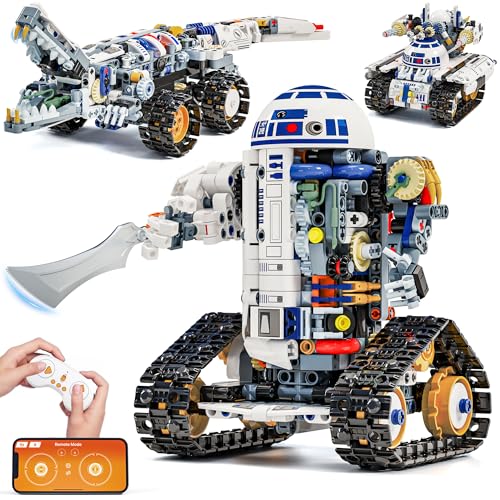
- 776 pieces create three mechanical models
- Four app modes plus remote control
- Up to 45 minutes of USB-C rechargeable play
Best For: Older kids who enjoy intricate construction and mechanical features
Best Entry-Level Pick – Makeblock mBot Coding Robot
For shoppers comparing robotics sets for beginners, the Makeblock mBot offers a straightforward introduction to building, electronics, and coding. Its guided assembly, Scratch and Arduino support, and interactive functions make it a practical choice for children ages 8 and up.
Best For: Kids who are new to robotics and want a buildable robot with beginner-friendly coding lessons.
Pros:
- Can be assembled in about 15 minutes with clear instructions.
- Supports Scratch and Arduino programming through mBlock software and related apps.
- Offers line-following, obstacle-avoidance, and remote-control play.
- Open-source design works with many Makeblock modules and LEGO parts.
Cons:
- AA batteries for the robot and a CR2025 battery for the remote are not included.
- Its entry-level design may be less challenging for experienced builders.
The mBot is a strong starting point for children who need an accessible path from hands-on construction to programming. Its expandable platform also leaves room for more advanced projects.
Best for Advanced Features – ELEGOO UNO R3 Smart Robot Car
Among robotics sets for hands-on coding practice, the ELEGOO UNO R3 Smart Robot Car stands out for combining Arduino programming with camera-based FPV video, sensors, and multiple control methods. It is suited to structured projects at home, in classrooms, or in coding clubs.
Best For: Older beginners and STEM learners who want a programmable robot car with sensors, app control, and live video.
Pros:
- Includes FPV video, line tracking, obstacle avoidance, and app or IR control.
- Keyed connectors and an illustrated tutorial help reduce wiring mistakes.
- Supports Arduino IDE programming and experimentation with movement and sensors.
- Includes a rechargeable 2000 mAh lithium-ion battery.
Cons:
- Recommended for ages 12 and up, with adult guidance for first-time builders.
- The feature-rich assembly may require more time and troubleshooting than simpler robot kits.
This kit offers more technical depth than a basic remote-control robot, making it a useful choice for learners ready to move from following instructions to modifying code and testing robotics ideas.
Best 3-in-1 Build – Kyanio STEM Robotics Kit
For families seeking robotics sets that combine construction and play, the Kyanio kit includes 560 building blocks and three robot or vehicle configurations. Remote control, app programming, and gear-driven features give children several ways to explore mechanical ideas.
Best For: Kids ages 8 to 14 who enjoy rebuilding models, remote-control play, and introductory programming activities.
Pros:
- Includes three build options: a machine gun robot, tracked vehicle, and mechanical cannon tank.
- Color-coded blocks and step-by-step instructions support the building process.
- Combines block construction, remote control, app programming, and mechanical gears.
- Includes a rechargeable battery and 2.4GHz remote-control technology.
Cons:
- The fantasy weapon-themed models may not suit every family’s preferences.
- Its emphasis on mechanical builds may provide less formal coding depth than Arduino-based kits.
The Kyanio is a versatile pick when variety and replay value matter most. It works well as a family or classroom activity where children can build, operate, and reconfigure the models.
Best for Construction Play – LECPOP 5-in-1 Robot Kit
The LECPOP 5-in-1 kit is one of the more construction-focused robotics sets, with 430 parts and multiple vehicle-style models. Children can build an excavator, robot, loader, and other configurations, then use the remote or app for interactive play.
Best For: Younger builders who are interested in construction vehicles, rebuilding projects, and app-controlled robotics activities.
Pros:
- Includes 430 building blocks and five model styles.
- Offers remote and mobile-app control with driving and 360-degree rotation.
- App features include gyro play, navigation paths, driving simulation, and STEM programming.
- Colorful instructions support assembly and hands-on problem solving.
Cons:
- Manufacturer age guidance is inconsistent in the supplied details, listing both 6–10 and 8–12.
- The kit is designed for one player.
- Its educational objective is listed broadly as creative thinking, so coding depth may be limited compared with dedicated programming kits.
This LECPOP set is a good fit when the main goal is building and imaginative construction play with added app features. It provides more model variety than a single-configuration robot while keeping the experience vehicle-focused.
Hands-On Starter – BeAndge 6-in-1 Robotics STEM Kit
For families comparing robotics sets for younger builders, the BeAndge 6-in-1 kit offers several compact science projects in one package. Children can assemble a reptile robot, balance car, bubble machine, fiber lamp, and buzzer wire game while practicing basic circuits and problem-solving.
Best For: Kids ages 8-12 who benefit from guided, hands-on STEM activities and parent-child building time.
Pros:
- Includes six projects with varied builds and activities.
- Step-by-step instructions and a mini screwdriver support assembly.
- Encourages motor skills, problem-solving, and circuit exploration.
- Gift-ready packaging and a lifetime warranty against manufacturer defects.
Cons:
- AA batteries and bubble solution are not included.
- The projects are better suited to guided building than advanced programming.
This is a practical entry point for children who want to build physical gadgets rather than focus on coding. Adult assistance may make the experience smoother, especially during the first assembly.
Solar Learning Pick – Sillbird 12-in-1 Solar Robot Kit
The Sillbird 12-in-1 is one of the more versatile robotics sets for children interested in building and renewable energy. Its 190 parts can be assembled into 12 models, including robots and cars, with solar power outdoors or a strong artificial light source indoors.
Best For: Kids ages 8-13 who want a reusable building challenge with an introduction to solar power.
Pros:
- Offers 12 models with increasing challenge levels.
- Uses sunlight or a strong indoor artificial light source instead of batteries.
- Large solar panel is designed to capture more sunlight.
- Clear instructions can support independent or family assembly.
Cons:
- Performance depends on sufficient sunlight or a strong light source.
- The 190-piece build may require patience from beginners.
Choose this kit when renewable energy is part of the appeal. It provides more model variety than a single-build robot, although indoor play may require careful positioning near a powerful light.
Programmable Builder – NEXTJOY 5-in-1 Robot Building Kit
For shoppers seeking robotics sets with more interactive control, this NEXTJOY kit combines 337-plus pieces with five machine designs. Children can build a camera robot, shield lion chariot, battle armor, high-speed shooter, or agricultural harvester, then control creations by remote or smartphone app.
Best For: Kids ages 8-12 who are ready to explore modular construction, remote control, and introductory app-based programming.
Pros:
- Includes five rebuildable models and more than 337 pieces.
- Supports remote control and iOS/Android app control.
- App introduces basic programming through custom actions and paths.
- Modular design encourages customization and repeated rebuilding.
Cons:
- The supplied notes do not specify whether batteries are included.
- Its many pieces and functions may be more demanding for younger builders.
This is the strongest choice here for children who want to move beyond static construction. The combination of rebuildable models and app features adds play value, but the larger project may be best tackled with time and careful attention to the manual.
Best Progressive Build – Sillbird 5-in-1 Programmable Robot Kit
For families comparing robotics sets, the Sillbird 5-in-1 kit stands out for its progressive building experience. The 488-piece set lets kids create a robot, dinosaur, car, tank, and other models, then control their builds by remote or Bluetooth app.
Best For: Kids ages 8-13 who enjoy building, beginner programming, and screen-free STEM play.
Pros:
- Five buildable models with varying difficulty levels
- Remote and app control with programming and path modes
- Colorful, step-by-step instructions support independent building
- Rechargeable battery provides up to 40 minutes of play
Cons:
- Only one model can be used as the active build at a time
- The kit contains many pieces, so sorting and assembly may take time
This is a versatile choice for children who want to grow from simple construction into app-controlled robotic play. Its multiple models and included rechargeable battery add lasting value.
Best App Features – Opmind 5-in-1 STEM RC Robot Kit
The Opmind kit is one of the more feature-focused robotics sets for kids who want both construction and interactive control. Its 443-piece set builds five models, while the app adds driving simulation, navigation paths, gyroscope control, and AI programming features.
Best For: Kids ages 8-13 who want varied app-based driving and STEM activities alongside model building.
Pros:
- Five models include a warrior robot, ninja, boar, chariot, and buggy
- App supports 360-degree rotation, path planning, and AI programming
- Remote control offers four-direction movement
- Rechargeable battery and ABS construction are specified
Cons:
- Product details list both 419 and 443 pieces
- The app’s broader features may require extra time to learn
- Instructions and included components are relatively limited in the listing
Choose this set if app interaction is a priority. It combines several rebuildable designs with more advanced control options than a basic remote-controlled building toy.
Best Detailed Build – 3-in-1 Glikid STEM Robot Kit
Among robotics sets, this 776-piece Glikid kit is suited to older children who enjoy a more involved construction project. It builds an automotive robot, track crocodile, or mechanical tank, with app and remote control plus four play modes, including STEM coding.
Best For: Kids ages 8-12 who want a detailed build, mechanical movement, and multiple control modes.
Pros:
- 776-piece kit creates three distinctive models
- Gear-linked blade motion adds an interactive mechanical effect
- App offers control, driving, path, and STEM coding modes
- Built-in battery supports up to 45 minutes of play and charges via USB-C
Cons:
- Only one of the three models can be built at a time
- Remote requires two AAA batteries, which are not included
- The larger piece count may make assembly more demanding
This is the strongest fit for a hands-on builder who values complexity and mechanical detail. The clear manual, app modes, and 45-minute battery estimate make it a well-rounded project and play set.
How We Picked These Robotics Sets
We focused on kits that offer a meaningful mix of building and STEM learning rather than simple push-button toys. Our comparison considered the number and variety of projects, recommended age range, control options, programming potential, included components, and likely adult assistance. We also looked for sets that can keep children engaged beyond the first build through alternate designs, programmable behavior, or expandable features.
Because product specifications and included accessories can vary by listing, check the current package contents, software requirements, and age guidance before ordering.
Quick Comparison
| Best For | Look For | Typical Advantage |
|---|---|---|
| First robotics project | Simple instructions and beginner controls | Less frustration during assembly |
| Creative building | Multiple designs or reconfigurable parts | More replay value |
| Remote-control play | Included remote and responsive motors | Immediate hands-on fun |
| App-based learning | Bluetooth or compatible mobile app | Convenient wireless control |
| Coding practice | Programmable controller and software support | Stronger long-term learning potential |
| Advanced projects | Arduino compatibility, sensors, and camera support | Greater room to experiment |
Key Buying Factors for Robotics Sets
Age, Difficulty, and Supervision
Match the kit to the child’s patience and building experience, not just the age printed on the box. Younger beginners usually need clear diagrams, fewer specialized parts, and occasional adult help. More advanced kits can be rewarding but may require troubleshooting, wiring, or computer setup.
Control and Programming
Remote control is usually the easiest starting point. App control adds convenience, while block-based or text-based programming offers deeper learning. Arduino-compatible kits are particularly useful for children who want to modify code, add sensors, or continue into more advanced electronics.
Project Variety and Parts
Multi-in-one kits can provide better value when the alternate builds are genuinely different and the instructions are easy to follow. Check whether batteries, a USB cable, tools, or a compatible phone are required but excluded. Solar models may be educational, although their performance depends on strong direct light.
Durability and Support
Look for sturdy connectors, accessible replacement parts, downloadable instructions, and reliable software support. A kit that is slightly less complex but easier to repair may deliver more useful playtime than a feature-heavy set that is difficult to troubleshoot.
Who Should Buy Which Robotics Sets?
Choose a straightforward beginner kit for a first-time builder or a child who wants quick results. Pick a multi-design building set for creative children who enjoy rebuilding and experimenting. App- and remote-controlled models suit kids who prioritize interactive play, while an Arduino-compatible robot is the better choice for learners ready to explore coding, sensors, and custom modifications.
For families buying a gift, confirm the child’s age, available workspace, device compatibility, and whether an adult can help with assembly. The right robotics set should be challenging enough to teach new skills without making the first project feel like homework.