
The right lighting can make a MacBook video call look noticeably clearer, more natural, and more professional. A good ring light reduces harsh shadows, brightens your face, and helps your webcam produce a more balanced image.
We selected 10 practical options for different workspaces and budgets, including compact clip-on lights, adjustable desktop models, and high-color-accuracy choices for frequent video callers.
Best 10 Ring Lights for Macbook Video Calls Picks for 2026
Best Budget Clip-On
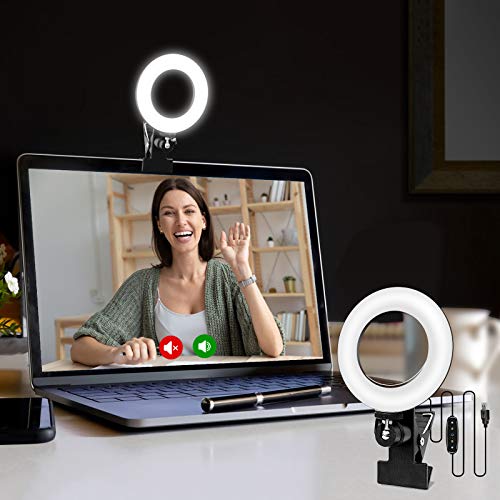
- Three color temperatures and five brightness levels
- Rotating monitor clip for flexible positioning
- USB powered and easy to carry
Best For: Affordable laptop and monitor lighting for everyday video calls
Best Premium USB Light

- Soft, wide light designed to reduce harsh shadows
- Three-way adjustable monitor mount
- G HUB app supports lighting presets and controls
Best For: Frequent video callers and creators seeking refined lighting control
Best High-CRI Stand Light
LitONES Video Conference Light
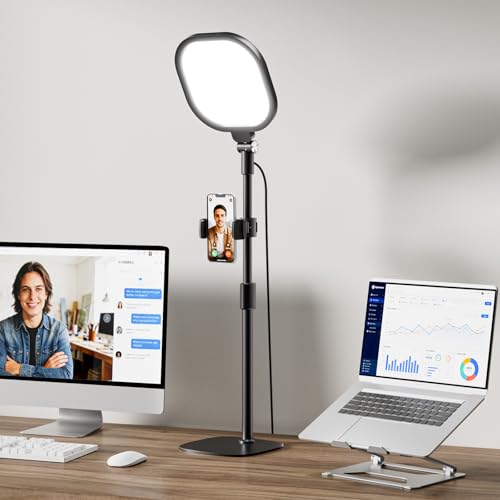
- CRI greater than 98 for accurate color rendering
- 30 modes with adjustable brightness and temperature
- Tall stand and rotating light head
Best For: Desktop setups needing broad, highly adjustable lighting
Best Versatile Clip Kit

- Clip and mini tripod included
- Five color modes and 10 dimming levels
- USB powered with flexible tilt and pan adjustments
Best For: Users who want both monitor-mounted and tabletop lighting
Best Eye-Care Pick
LitONES Soft Computer Ring Light

- Ultra-soft edge-lit panel reduces harsh shadows
- CRI 97.8 and 50 lighting combinations
- Screen-safe clip with flexible positioning
Best For: Long video calls and flattering laptop lighting
Best Adjustable Stand
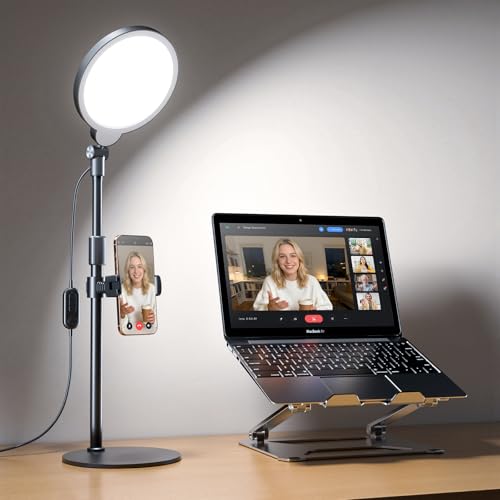
- 20.5- to 32-inch adjustable height
- 30 modes with 360-degree light rotation
- Stable base and built-in phone holder
Best For: Home offices needing flexible desk positioning
Best Travel Setup
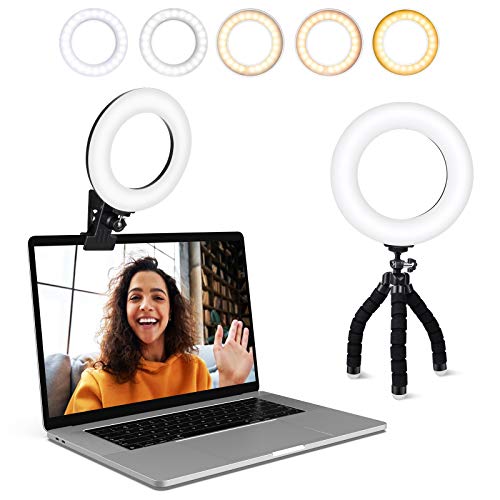
- Five color temperatures and five brightness levels
- Padded clamp plus flexible mini tripod
- USB powered with a 2-meter cable
Best For: Portable calls and flexible mounting
Best Desk Stand
LitONES Zoom Lighting for Computer

- Soft edge-lit illumination with CRI 97.8
- Three colors, 10 brightness levels, and adjustable height
- Stable metal base with rotating light head
Best For: Stable home-office video lighting beside a MacBook or monitor
Best Clip-On Pick
Anautin Adjustable Laptop Ring Light

- Clips onto screens up to 0.98 inches thick
- 360-degree rotation and 170-degree tilt
- USB powered with 2600K-6500K lighting
Best For: Compact MacBook and monitor video-call setups
Best Portable Design
Evershop Mini Laptop Ring Light

- Lightweight, foldable 5-inch light and stand
- Three colors with adjustable brightness and CRI above 98
- Supports laptop, phone, and tablet setups
Best For: Portable video-call and recording setups
Best Budget Clip-On – Compact Cyezcor Ring Light
If you want simple ring lights for MacBook video calls, the Cyezcor Video Conference Lighting Kit offers a lightweight clip-on design with adjustable color temperature and brightness. Its USB power lets you connect it to a laptop, display, power bank, or phone charger.
Best For: Remote workers and students who want an affordable, portable light that attaches directly to a laptop or monitor.
Pros:
- Three color temperatures from 3200K to 6800K
- Five brightness levels and 48 LED beads
- Rotating clip allows flexible positioning
- USB powered for convenient use with laptops and displays
Cons:
- Provides fewer adjustment levels than some competing lights
- Clip-on design may not suit users who prefer a freestanding light
This is a practical entry-level choice for improving face lighting during MacBook calls without adding much bulk to your workspace. Its straightforward controls and portable size make it especially convenient for everyday meetings.
Best Premium USB Light – Logitech Litra Glow
The Logitech Litra Glow is a strong option among ring lights for MacBook video calls when you want broad, soft illumination rather than harsh direct light. Its frameless diffuser, adjustable mount, and USB-powered design are suited to laptops and desktop computers.
Best For: MacBook users, streamers, and remote professionals who want soft, adjustable lighting with convenient computer-based controls.
Pros:
- TrueSoft technology is designed for balanced, full-spectrum light and natural-looking skin tones
- Wide diffuser helps reduce harsh shadows
- Mount adjusts for height, tilt, and rotation
- G HUB app can control brightness, color temperature, power, and presets
Cons:
- USB-powered design requires access to a compatible power source
- Its app-based controls may be more than casual callers need
Litra Glow is a polished choice for people who regularly appear on camera. The adjustable mount and software controls offer more placement and customization flexibility than a basic clip-on light.
Best High-CRI Stand Light – LitONES Video Conference Light
For shoppers considering ring lights for MacBook video calls but wanting a larger, freestanding setup, the LitONES video conference light provides a 7-by-7-inch light head, adjustable stand, and extensive lighting controls. It is designed to sit behind a laptop, monitor, or on a desktop.
Best For: Home-office users and creators who want a freestanding light with broad coverage, high color accuracy, and many adjustment options.
Pros:
- CRI greater than 98 is designed to render skin tones and colors accurately
- 30 lighting modes with three color temperatures and 10 brightness levels
- Stand adjusts from 20.5 to 28.5 inches
- Light head and phone holder rotate 360 degrees
Cons:
- Freestanding design takes more space than a clip-on MacBook light
- Its larger stand may be less convenient for highly portable setups
The LitONES is the most studio-oriented option in this group. Its tall adjustable stand and high-CRI output make it a good fit when consistent, natural-looking lighting matters more than minimal size.
Best Versatile Clip Kit – NEEWER BR60 Ring Light
The NEEWER BR60 is a flexible pick among ring lights for MacBook video calls, combining a monitor clip with a compact desk tripod. It offers five lighting modes, 10-level dimming, and USB power for laptops, displays, power banks, and phone chargers.
Best For: MacBook users who want one small light that can clip to a monitor or operate on a tabletop tripod.
Pros:
- Five lighting modes from warm to cool white
- 10-level dimming from 10% to 100%
- Includes both a monitor clip and mini desk tripod
- 170-degree clip tilt plus tripod pan and tilt adjustments
Cons:
- Clip is intended for screens or monitors under 1 inch thick
- NEEWER advises against using the clip directly on smartphones
The BR60 stands out for versatility. Use the clip for direct MacBook or monitor lighting, then switch to the tripod when you need a tabletop setup for video recording, makeup, or other close-up work.
Best Eye-Care Pick – LitONES Soft Computer Ring Light
For ring lights for MacBook video calls, the LitONES is a strong choice when comfortable, flattering illumination matters. Its diffused edge-lit panel, high color accuracy, flexible positioning, and screen-safe clip make it well suited to long meetings without using desk space.
Best For: Long video calls, remote work, and users who prioritize soft, natural-looking light.
Pros:
- Ultra-soft diffused panel helps reduce glare, hotspots, and harsh shadows.
- CRI 97.8 supports natural-looking on-camera color.
- Offers 50 combinations across five color temperatures and 10 brightness levels.
- Screen-safe hanging clip, 360-degree rotation, and 180-degree tilt suit laptop setups.
Cons:
- Requires a suitable 5V 2A USB power source to avoid flickering.
- Its compact hanging design may provide less height adjustment than a full desk stand.
The LitONES stands out for MacBook users who want portable, space-saving lighting with particularly soft output. Its memory feature and simple four-button control also make repeat call setup convenient.
Best Adjustable Stand – Yarrashop Desk Ring Light
The Yarrashop is a practical option among ring lights for MacBook video calls if you prefer a freestanding desk setup. Its tall adjustable stand, rotating light head, stable base, and built-in phone holder provide more positioning flexibility than a clip-only light.
Best For: Home offices, creators, and users who want a height-adjustable light that can also hold a phone.
Pros:
- Height adjusts from 20.5 to 32 inches for flexible placement around a monitor.
- 360-degree horizontal and 180-degree vertical rotation help aim light precisely.
- Provides 30 lighting modes using three color temperatures and 10 brightness levels.
- Stable anti-scratch base and built-in adjustable phone holder add desk versatility.
Cons:
- Requires a 5V 2A USB power source; adapter is not included.
- Freestanding base takes more desk space than a laptop clip.
This model is best when you want a conventional desk lamp format rather than a light mounted directly to your MacBook. The broad height range is useful for changing between seated calls, streaming, and phone recording.
Best Travel Setup – ACMEZING Clip-On Video Light
The ACMEZING offers a flexible, portable approach to ring lights for MacBook video calls. It includes both a padded laptop or monitor clamp and a mini flexible tripod, while five color temperatures and five brightness levels let you adapt the light for calls, streaming, or travel.
Best For: Portable video-call lighting, travelers, and users who want multiple mounting options.
Pros:
- Five color temperatures from 3200K to 6500K and five brightness levels support varied settings.
- Padded metal clamp is designed to stay stable without scratching surfaces.
- Included octopus tripod can grip, wrap, or stand on different surfaces.
- USB powered with a 2-meter cable and compact, lightweight design.
Cons:
- Five brightness levels offer less fine control than some competing models.
- Its compact ring light may provide less output flexibility than a larger desk light.
Choose the ACMEZING when portability and mounting flexibility are more important than maximum adjustment range. The included clamp and tripod make it easy to move between a MacBook, monitor, desk, or other nearby setup.
Best Desk Stand – LitONES Zoom Lighting for Computer
If you want ring lights for macbook video calls but prefer a freestanding setup, the LitONES desk light offers a stable alternative to a clip-on design. Its edge-lit panel provides soft, even illumination, while adjustable height, color temperature, brightness, and rotation help you fine-tune the light around your workspace.
Best For: Home-office users who want a stable, adjustable light beside or behind a MacBook or monitor.
Pros:
- Soft edge-lit illumination with a stated CRI of 97.8
- Three color temperatures and 10 brightness levels
- Adjustable 22- to 32.5-inch height and 360-degree head rotation
- Sturdy metal base with a non-slip, scratch-resistant pad
Cons:
- Freestanding base takes more desk space than a clip-on light
- Requires a 5V/2A USB power source
This is a strong choice when stability and positioning flexibility matter more than minimal size. The included phone holder and three-year after-sales service also add versatility for calls, recording, and streaming.
Best Clip-On Pick – Anautin Adjustable Laptop Ring Light
For shoppers seeking ring lights for macbook video calls without adding a separate stand, the Anautin R5 clips directly onto laptops and desktop monitors up to 0.98 inches thick. Its USB design, long cable, and adjustable light angle make it a straightforward option for calls, streaming, and everyday remote work.
Best For: MacBook and monitor users who want a compact clip-on light with flexible positioning.
Pros:
- Clip-on design fits screens up to 2.5 cm thick
- 360-degree rotation and 170-degree up/down tilt
- 64 high-CRI LEDs with 2600K-6500K color adjustment
- USB powered with a 2-meter cable and cable-management tape
Cons:
- Five brightness levels offer less adjustment than some competing lights
- Compatibility is limited to screens within the stated thickness range
The Anautin is practical when you want light positioned near the webcam and do not want a base occupying desk space. Check your MacBook or monitor thickness before buying, then use the rotation and tilt controls to reduce unwanted shadows.
Best Portable Design – Evershop Mini Laptop Ring Light
The Evershop is a portable option for ring lights for macbook video calls, combining a small 5-inch light head with an adjustable stand rather than relying on a traditional clip alone. It folds for storage, supports laptops and desktop screens, and can also hold a phone or tablet for broader video-call and recording use.
Best For: Travelers and users who want a foldable light that can support a laptop, phone, or tablet setup.
Pros:
- Lightweight 7.1-ounce design with a foldable bracket and base
- Three lighting colors and adjustable brightness with stated CRI above 98
- Adjustable stand fits notebook and desktop computers
- USB powered from a computer, laptop, power bank, or charging plug
Cons:
- Its 5-inch light head provides a smaller coverage area than larger desk lights
- The stand adds more setup components than a simple screen clip
This model stands out for portability and multi-device flexibility. Its foldable construction is useful for commuting or travel, while the phone and tablet support lets one light serve more than just MacBook calls.
How We Picked the Best Ring Lights for Macbook Video Calls
We focused on features that matter during real video meetings: reliable monitor or desk mounting, adjustable brightness, useful color-temperature settings, compact designs, and simple controls. We also considered portability, stand flexibility, webcam clearance, and whether a light can work comfortably with a MacBook display.
Because lighting needs vary, this list includes small clip-on models for everyday calls, desktop lights for fixed workstations, and more adjustable options for streaming or content creation. High color-rendering ratings were also considered where provided, since accurate light can produce more natural skin tones.
Quick Comparison
| Type | Best For | What to Look For |
|---|---|---|
| Monitor clip-on | Small desks and frequent calls | Secure grip, screen clearance, USB power |
| Desktop light with stand | Permanent home offices | Adjustable height, angle, and brightness |
| Portable mini light | Travel and flexible setups | Lightweight build and compact storage |
| High-CRI LED light | Streaming and polished video | Accurate color and smooth dimming |
Key Buying Factors for Ring Lights for Macbook Video Calls
Mounting and MacBook Compatibility
A clip-on light should hold securely without covering the webcam or placing excessive pressure on the display. Check the clip design and dimensions, especially if your MacBook has a thin lid or a case. Desktop models avoid screen pressure but require more surface area.
Brightness and Color Adjustment
Look for multiple brightness levels so you can compensate for daylight, overhead lighting, or a dim room. Adjustable color temperature is useful for matching warm household bulbs or cool window light. A soft, diffused ring generally looks more flattering than a harsh bare LED panel.
Power and Controls
Most compact video-call lights use USB power, making them convenient with a MacBook dock, charger, or power bank. Confirm whether the cable is long enough for your setup and whether controls are placed on the cable, light, or stand. Inline controls are often easiest to reach during a call.
Size, Positioning, and Eye Comfort
A larger light can spread illumination more evenly, while a small light is easier to travel with. The light should sit near eye level and slightly in front of you. Avoid aiming it directly at your eyes at maximum brightness; indirect positioning or lower intensity can reduce glare and fatigue.
Who Should Buy Which Ring Lights for Macbook Video Calls?
Choose a monitor clip-on model if you want the simplest solution for Zoom, Teams, or FaceTime and have limited desk space. These are usually the best starting point for everyday MacBook calls.
Choose a desktop model with a stand if your workspace stays in one place or you want more control over height and angle. Stands are also useful when the light must sit beside, rather than on, the laptop.
Choose a high-CRI or multi-mode light if you stream, record presentations, or want consistently accurate skin tones. Choose a portable mini light if you move between rooms, offices, or travel locations. Before buying, prioritize a secure mount, adjustable brightness, and a position that leaves your MacBook webcam unobstructed.