
Resin printers can produce highly detailed miniatures, prototypes, models, and display pieces without requiring a premium budget. The best resin printers under $500 combine sharp LCD resolution with dependable leveling, manageable maintenance, and a build volume suited to your projects.
This roundup compares 10 selected models across entry-level and advanced features, including high-resolution mono screens, smart sensors, enclosed designs, connectivity options, and beginner-friendly setup tools. Use the buying guide below to narrow the list by print quality, workflow, and intended use.
Best 10 Resin Printers Under 500 Picks for 2026
Best Detail on a Compact Budget

- 7-inch 10K LCD with 17 μm XY resolution
- Uniform LighTurbo matrix light source
- Beginner-friendly leveling and print recovery
Best For: Detailed desktop models and first-time resin printing
Best for Larger Detailed Models

- 10-inch 12K mono LCD
- Large 250 mm vertical build capacity
- Uniform COB and Fresnel light system
Best For: Large, intricate models and batch printing
Best Beginner-Friendly Smart Features

- Pre-leveled platform for easier startup
- 9K LCD with 18 μm XY resolution
- USB, WiFi, and Creality Cloud transfers
Best For: Beginners, miniatures, and connected desktop workflows
Best Multi-Color Alternative

- AMS supports up to 16 colors
- Up to 500 mm/s printing speed
- Enclosed printer with automatic bed leveling
Best For: Multi-color filament printing rather than resin printing
Best Beginner-Friendly Pick
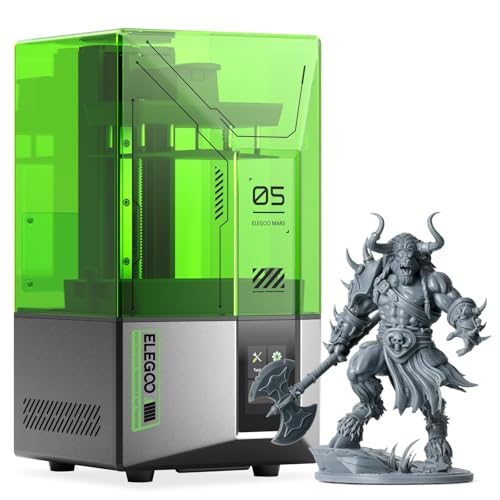
- One-click automatic leveling
- 4K mono LCD with COB lighting
- Sensors for residue, resin, and leveling issues
Best For: Beginners seeking easy setup and detailed prints
Best High-Resolution Combo

- 16K mono LCD with 14×19 μm pixels
- Large 211.68 × 118.37 × 200 mm build volume
- Automated heating and resin management
Best For: Large, highly detailed prints and hands-off resin handling
Best Feature-Rich Value

- Automatic leveling with intelligent sensing
- 4K mono LCD at up to 70 mm/h
- Adhesion-focused and maintenance-friendly design
Best For: Hobbyists wanting simple operation and print safeguards
Best High-Resolution Pick
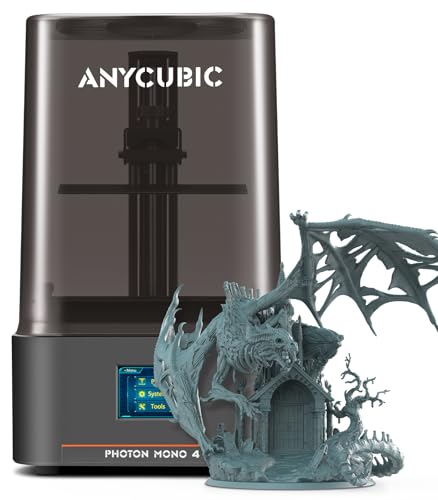
- 10K screen with 17 x 17μm pixel precision
- 1.5-second exposures with stabilized lighting
- Assembled, calibrated, and power-failure recovery
Best For: Beginners and hobbyists seeking detailed prints with an easy setup
Best Beginner Mini
MALYAN S100 Mini Resin 3D Printer

- Automatic calibration and leveling
- Magnetic build plate for easier removal
- Compact 115 x 65 x 110 mm print area
Best For: First-time users printing small models
Best Larger-Volume Option

- 10K detail with 17 x 17μm XY pixels
- 153.4 x 87 x 165 mm build volume
- One-year warranty and lifetime technical support
Best For: Hobbyists needing more room without giving up fine detail
Best Detail on a Compact Budget – Anycubic Photon Mono 4
For shoppers comparing resin printers under 500, the Anycubic Photon Mono 4 is a compact option focused on fine detail. Its 7-inch 10K screen, uniform light source, and practical 153.4 x 87 x 165 mm build volume suit everyday models and detailed projects.
Best For: Beginners and makers who want high-resolution prints in a compact desktop footprint.
Pros:
- 10K resolution with 17 x 17 μm XY pixel size for detailed models.
- LighTurbo matrix lighting helps produce smooth, consistent surfaces.
- Laser-engraved platform is designed to improve adhesion while keeping removal manageable.
- Four-point leveling and power-loss print recovery support easier operation.
Cons:
- Anycubic APP service is not supported.
- Its build volume is smaller than larger-format resin printers.
The Photon Mono 4 stands out when print detail and beginner-friendly setup matter more than maximum capacity or app support.
Best for Larger Detailed Models – ELEGOO Saturn 3
Among resin printers under 500, the ELEGOO Saturn 3 is built for users who need both fine detail and a generous workspace. Its 10-inch 12K display and 218.88 x 122.88 x 250 mm build volume support larger, intricate models.
Best For: Makers printing larger miniatures, props, and detailed projects in batches.
Pros:
- 12K resolution and 19 x 24 μm XY resolution support highly detailed prints.
- Large build volume provides more room for ambitious models.
- COB light source and Fresnel lens deliver uniform 405 nm illumination.
- Laser-carved build plate is designed for strong print adhesion.
Cons:
- At 33 pounds, it is substantially heavier than compact alternatives.
- The larger chassis requires more workspace.
The Saturn 3 is a strong capacity-first choice for users who want high-resolution resin printing without moving to an even larger machine.
Best Beginner-Friendly Smart Features – Creality HALOT-X1 Neo
For buyers looking at resin printers under 500, the Creality HALOT-X1 Neo emphasizes an easy start without giving up fine detail. Its pre-leveled platform, 9K LCD, flexible file transfer, and AI-assisted 2D-to-3D feature make it approachable for new desktop makers.
Best For: Beginners, miniature creators, tabletop gamers, and DIY users who value simple setup and flexible workflows.
Pros:
- Factory pre-leveled platform supports plug-and-play setup.
- 9K resolution and 18 μm XY pixels suit miniatures and intricate models.
- Files can be transferred by USB, 2.4GHz WiFi, or Creality Cloud.
- Works with HALOT BOX, CHITUBOX, and Lychee Slicer.
Cons:
- The 153.36 x 77.76 x 160 mm build volume is comparatively compact.
- AI model generation is listed as taking as fast as 3.5 hours, so it is not an instant workflow.
The HALOT-X1 Neo makes the most sense for users who prioritize approachable setup, connected file handling, and miniature-scale precision.
Best Multi-Color Alternative – Bambu Lab P1S Combo
Although the Bambu Lab P1S Combo is a filament printer rather than a resin model, it is a relevant alternative for shoppers comparing 3D printers under 500 who want multi-color output. The enclosed P1S includes an AMS system, automatic bed leveling, and high-speed printing for supported filaments.
Best For: Users who prioritize multi-color or multi-material filament printing over resin-specific detail.
Pros:
- AMS enables multi-color and multi-material printing, with support for up to 16 colors.
- Rated speeds reach 500 mm/s with 20,000 mm/s² acceleration.
- Enclosed design supports a range of filaments, including PLA, PETG, TPU, PVA, PET ABS, and ASA.
- Automatic bed leveling and a stated 15-minute setup simplify operation.
Cons:
- It is not a resin printer and does not provide resin-specific LCD resolution.
- Connecting the Bambu Lab AMS is required for the multi-color capability.
- Carbon- or glass-fiber-reinforced polymers are not recommended.
Choose the P1S Combo only if your priority is fast, enclosed, multi-color filament printing; resin shoppers seeking liquid-resin detail should consider the other options here.
Best Beginner-Friendly Pick – ELEGOO Mars 5
If you want one of the more approachable resin printers under 500, the ELEGOO Mars 5 emphasizes simple setup and print monitoring. Its one-click automatic leveling, self-check routine, and 4K monochrome LCD make it a practical choice for users who want detailed prints without extensive calibration.
Best For: Beginners and hobbyists who prioritize easy setup, reliable safeguards, and detailed models.
Pros:
- One-click automatic leveling simplifies initial setup.
- 4K mono LCD and COB lighting support detailed, high-fidelity prints.
- Mechanical sensors detect residue, resin shortages, and leveling failures.
- Overheat protection automatically stops printing above the stated temperature threshold.
Cons:
- Its listed build size and 14.52-pound weight may be less suitable for larger projects.
- The notes do not specify a high-speed print mode or automated resin handling.
The Mars 5 is a sensible entry point for resin printing when convenience matters as much as resolution. Its automatic checks and protective features can reduce setup mistakes and wasted material.
Best High-Resolution Combo – Creality Halot-X1 Combo
Among resin printers under 500, the Creality Halot-X1 Combo stands out for its listed 16K resolution, large build volume, and integrated resin-management features. It is designed for users who want professional-grade detail with less manual handling of resin and leveling.
Best For: Experienced hobbyists and makers printing larger, highly detailed models with an emphasis on automation.
Pros:
- 10.1-inch 16K mono LCD provides 14×19 μm pixel size and fine detail.
- 211.68 × 118.37 × 200 mm build volume accommodates larger models.
- Intelligent resin heating, RFID parameter recognition, feeding, recycling, and weight monitoring streamline material handling.
- Fixed build plate, dual rails, and dual lead screws support stable 0.01 mm Z-axis positioning.
Cons:
- At 38 pounds, it is substantially heavier than the other listed options.
- Its 16.93 × 16.54 × 21.06-inch footprint requires considerable workspace.
- The combo’s advanced systems may be more functionality than beginners need.
The Halot-X1 Combo is the feature-heavy option in this group. Its resolution, build capacity, and resin automation are compelling, but buyers should plan for a larger and heavier machine.
Best Feature-Rich Value – ELEGOO Mars 5 MSLA
The ELEGOO Mars 5 MSLA is a strong contender among resin printers under 500 for buyers who want practical convenience features without moving to a larger-format machine. It combines automatic leveling, intelligent issue detection, a 6.6-inch 4K mono screen, and a build plate designed for adhesion.
Best For: Hobbyists who want a compact, user-friendly printer with automatic setup and built-in print safeguards.
Pros:
- Automatic leveling with an intelligent sensor and spring helps simplify setup.
- 6.6-inch 4K mono LCD delivers 4098×2560 resolution and 35×35 μm XY resolution.
- Sensor system detects low resin, foreign objects, film replacement needs, and overheating.
- Laser-engraved build plate, one-touch locking, and dual pouring spouts improve day-to-day handling.
Cons:
- Print speed is listed at up to 70 mm/h, which may not suit buyers prioritizing maximum throughput.
- Successful printing still requires correct machine settings, adequate supports, and prompt tank cleaning.
- The listed dimensions and 19.11-pound weight may limit portability.
This Mars 5 MSLA balances resolution and usability with a useful set of sensors and maintenance-friendly touches. It is especially appealing if you want a straightforward workflow but still expect careful preparation and cleanup.
Best High-Resolution Pick – ANYCUBIC Photon Mono 4
For shoppers comparing resin printers under 500, the ANYCUBIC Photon Mono 4 stands out for detailed models, quick exposure times, and a straightforward setup. Its 10K screen and stabilized light source are aimed at producing fine features with smoother surfaces.
Best For: Beginners and hobbyists who prioritize high-resolution prints and easy startup.
Pros:
- 10K 9024 x 5120 resolution with 17 x 17μm pixel precision
- 1.5-second exposures and a stabilized LighTurbo matrix light source
- Factory assembled and calibrated, with a quick four-point leveling check
- Power-failure recovery helps resume interrupted prints
Cons:
- The supplied notes do not specify a wash-and-cure system or included resin
- Its compact build may be better suited to smaller projects than oversized models
The Photon Mono 4 is a strong choice when print detail and convenience matter most. The upgraded laser-engraved platform also supports adhesion while reducing the risk of shedding and warping.
Best Beginner Mini – MALYAN S100 Mini Resin 3D Printer
Among resin printers under 500, the MALYAN S100 is a compact entry-level option designed to simplify the initial setup. Its automatic calibration and leveling, magnetic build plate, and small footprint make it approachable for first-time users.
Best For: Beginners who want a compact printer with automatic leveling and easy platform removal.
Pros:
- Automatic calibration and leveling at the start of a print
- Magnetic build plate simplifies removal and cleanup
- Parallel LED lighting helps reduce layer lines and grid lines
- Laser-engraved platform is designed to improve model adhesion
Cons:
- The 115 x 65 x 110 mm build volume limits project size
- Its 2K screen offers less stated resolution than the 10K models in this roundup
- Printing parameters should be matched to the resin being used
The S100 makes a practical starter pick for small models and users who value convenience over maximum build capacity. Automatic leveling and the removable magnetic plate can reduce some of the routine setup work.
Best Larger-Volume Option – ANYCUBIC Photon Mono 4
If you are comparing resin printers under 500 for a little more working room, this ANYCUBIC Photon Mono 4 combines a 10K mono screen with a 153.4 x 87 x 165 mm build volume. It is designed for detailed, efficient printing while retaining beginner-friendly setup features.
Best For: Hobbyists who want high detail plus more vertical space for daily projects and larger models.
Pros:
- 10K 9024 x 5120 screen with 17 x 17μm XY pixel size
- 153.4 x 87 x 165 mm build volume supports larger projects
- 1.5-second exposure times with uniform LighTurbo matrix lighting
- Supports print recovery after a sudden power outage
Cons:
- The supplied notes do not mention included resin or a wash-and-cure station
- Its 20-inch listed dimension may require more storage space than the compact models
This version is the better fit when the smaller MALYAN S100 feels restrictive but detailed output remains a priority. Its redesigned platform is intended to balance reliable adhesion with easier model removal, and the printer includes a one-year warranty plus lifetime technical support.
How We Picked the Best Resin Printers Under 500
We focused on the features that most directly affect print quality, reliability, and ownership cost. Key considerations included LCD resolution and pixel size, build volume, leveling design, touchscreen controls, connectivity, curing and washing workflow, replacement-part availability, and suitability for beginners. We also considered whether each printer offers a meaningful advantage for miniatures, functional prototypes, larger models, or everyday hobby use.
Specifications can vary by retailer, firmware version, and bundle, so confirm the included accessories and current dimensions before ordering. Resin, cleaning supplies, gloves, ventilation equipment, and post-processing tools are often sold separately.
Quick Comparison
| What to Compare | Why It Matters | Best For |
|---|---|---|
| Resolution and pixel size | Controls fine surface detail and edge definition | Miniatures, jewelry patterns, and detailed models |
| Build volume | Determines the size or number of parts printed at once | Large models and batch production |
| Leveling and sensors | Can reduce setup errors and failed first layers | Beginners and frequent users |
| Connectivity | Makes file transfer and printer monitoring easier | Convenient home workflows |
| Bundle contents | Affects the real cost of getting started | Buyers seeking a complete setup |
Key Buying Factors for Resin Printers Under $500
Resolution Versus Build Volume
Higher resolution is useful for small details, but it does not automatically make a printer better for every project. A compact high-resolution model may suit tabletop miniatures, while a larger machine with slightly lower pixel density may be more practical for helmets, terrain, and multi-part prototypes. Check both the XY resolution and the actual build dimensions.
Ease of Setup and Reliability
Auto-leveling, a rigid build platform, mechanical sensors, and clear exposure controls can make a bigger difference than headline resolution. Beginners should prioritize predictable first layers, accessible replacement parts, and straightforward slicer support. A printer that is easier to calibrate may save more time than a faster but less forgiving alternative.
Safety, Ventilation, and Post-Processing
Resin printing requires gloves, eye protection, spill control, and adequate ventilation. Printed parts must be washed and UV-cured, and liquid resin should be handled according to the manufacturer’s instructions. Budget for a wash-and-cure station or compatible post-processing equipment if you want a cleaner, simpler workflow.
Operating Costs
Compare resin consumption, replacement release films, screen protectors, build plates, and shipping costs. A low purchase price can become less attractive if consumables are difficult to source. Also check whether the printer supports the resin types you plan to use, including standard, tough, water-washable, or specialty formulations.
Who Should Buy Which Resin Printers Under 500?
Choose a compact entry-level model if you are new to resin printing, have limited workspace, or mainly create miniatures and small decorative parts. Models with smart sensors and simplified leveling are especially useful for beginners who want fewer setup variables.
Choose a higher-resolution or larger-format printer if fine detail, batch printing, or larger models is more important than the smallest footprint. A bundle with connectivity or additional workflow hardware may be worthwhile for frequent users, but verify exactly what is included before paying extra.
Finally, make sure resin printing is the right technology for your projects. It excels at detail and smooth surfaces, while enclosed filament printers are often better for durable functional parts, larger objects, and lower-mess everyday printing.