
Resin 3D printers can help schools produce highly detailed models for STEM, art, engineering, and design projects. The right choice balances print quality with supervision, ventilation, cleanup, and ease of use.
We selected 10 classroom-relevant options, from compact entry-level machines to fast, high-resolution printers designed for more demanding programs.
Best 10 Resin Printers for Schools Picks for 2026
Best Accessible High-Detail Option

- 7-inch 10K LCD for detailed models
- 1.5-second exposure times
- Factory-tested with power-loss recovery
Best For: Classrooms needing compact, detailed resin printing
Best Large-Format Performance

- Large 16K build area
- Automatic resin heating and leveling
- AI camera, Wi-Fi transfer, and 150mm/h speed
Best For: Makerspaces producing large, detailed models
Best Compact Starter Printer
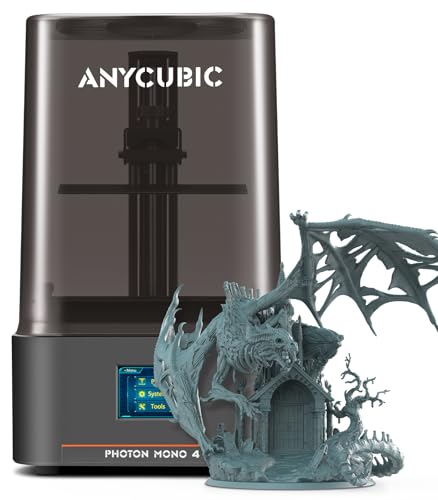
- Compact 10 x 10 x 15-inch design
- 10K detail with 1.5-second exposure
- Assembled and factory-calibrated
Best For: Beginner-friendly classrooms with limited workspace
Easy-Start Classroom Pick
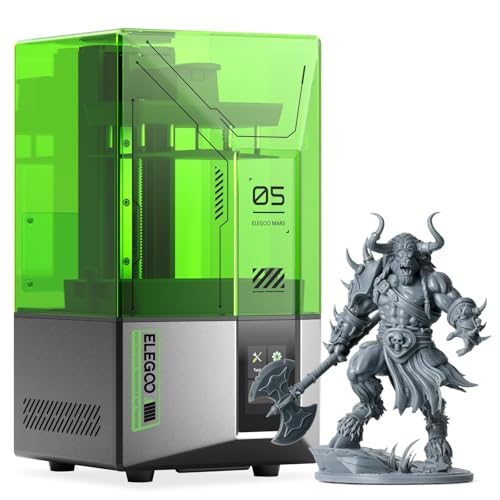
- One-click automatic leveling
- 4K mono LCD for detailed models
- Resin, residue, and overheat alerts
Best For: Classrooms needing simple setup and detailed prints
Advanced Materials Pick
ANYCUBIC Photon P1 Dual-Color Printer

- Dual-color and dual-material printing
- Automatic leveling with AI monitoring
- Supports viscosity up to 8,000 cps
Best For: Makerspaces and advanced technical programs
Fast Detail Pick

- Up to 70mm/h print speed
- 6.6-inch 4K mono LCD
- Automatic leveling and issue detection
Best For: School labs producing detailed models regularly
Beginner Detail Pick

- 9K resolution with 18μm XY detail
- Factory pre-leveled for easier setup
- USB, WiFi, and cloud file transfer
Best For: Introductory classroom projects and detailed small models
All-Season Workflow Pick

- 16K detail with 14 × 19μm pixels
- Heating supports printing down to 0°C/32°F
- Remote monitoring and smart workflow features
Best For: Dedicated maker spaces needing consistency and oversight
Fast Automation Pick

- Prints at speeds up to 150mm/h
- 16K detail with 14 × 19μm resolution
- AI camera and smart sensors monitor issues
Best For: Busy school labs prioritizing speed and print oversight
Best Complete Resin Printing Setup – Saturn 4 Ultra 16K with Wash and Cure
For schools seeking resin printers for schools with a more complete workflow, this ELEGOO bundle pairs the Saturn 4 Ultra 16K printer with a Mercury Plus V3.0 wash and cure station. It combines a large build area, automatic resin heating, and high-speed printing with a dedicated post-processing station.
Best For: Schools that want a high-detail printer and a matching wash-and-cure setup for classroom projects.
Pros:
- 16K printing with an 8.33 x 4.66 x 8.66-inch build size
- Smart tank heating helps maintain resin at 30°C
- 150mm/h printing speed
- Included Mercury Plus V3.0 has a 7.5-liter capacity
Cons:
- The bundle is larger and more involved than a printer-only setup
- Resin printing still requires separate handling and cleanup procedures
This is the strongest all-in-one option here for a school that needs both detailed printing and dedicated post-processing equipment, provided the classroom can accommodate the larger setup.
Best Accessible High-Detail Option – Anycubic Photon Mono 4
For resin printers for schools that prioritize detailed models in a compact format, the Anycubic Photon Mono 4 offers a 7-inch 10K monochrome LCD, stable matrix lighting, and a moderate build volume. Its factory assembly and power-loss recovery can also simplify routine use.
Best For: Classrooms and school makerspaces that need fine detail without moving up to a larger printer.
Pros:
- 10K resolution with 17 x 17μm pixel precision
- 1.5-second single-layer exposure times
- Build platform is designed to improve adhesion while simplifying removal
- Supports power-restored print resumption
Cons:
- Its 6.04 x 3.42 x 6.49-inch build volume is smaller than the Saturn models
- It is a printer-only purchase, without a supplied wash-and-cure station
The Mono 4 is a practical choice when desk space and straightforward setup matter more than maximum capacity. Its tested and calibrated design may be especially useful for schools introducing resin printing to new users.
Best Large-Format Performance – ELEGOO Saturn 4 Ultra 16K
Among resin printers for schools, the ELEGOO Saturn 4 Ultra 16K stands out for its large build area, automatic resin heating, and monitoring features. Wi-Fi transfer, automatic leveling, and a 150mm/h speed rating are designed to make higher-volume printing more manageable.
Best For: School makerspaces producing large or highly detailed models and monitoring prints between class activities.
Pros:
- 16K LCD with 14 x 19μm XY resolution
- Large 8.33 x 4.66 x 8.66-inch printing area
- AI camera supports monitoring and time-lapse recording
- Automatic leveling, power-on resume, and Wi-Fi transfer
Cons:
- At 35.4 pounds, it is less portable than the smaller options
- The printer does not include a wash-and-cure station
- Its advanced monitoring features may require additional setup and supervision
This model is well suited to a dedicated makerspace rather than a small classroom desk. Its combination of capacity, detail, and automated checks can help support ambitious student projects.
Best Compact Starter Printer – Anycubic Photon Mono 4 10K
For resin printers for schools where compact dimensions and quick startup are priorities, this Anycubic Photon Mono 4 provides 10K detail in a printer measuring 10 x 10 x 15 inches. It arrives assembled, tested, and factory-calibrated, making the initial setup relatively straightforward.
Best For: Beginner-friendly classroom demonstrations and school workspaces with limited room.
Pros:
- 7-inch 10K screen with 17 x 17μm pixel precision
- Stable LighTurbo lighting and 1.5-second exposures
- Upgraded build plate is designed to improve adhesion
- Factory-calibrated and ready to start after a quick leveling check
Cons:
- Its build volume is more limited than the Saturn 4 Ultra models
- No wash-and-cure station is included
The Photon Mono 4 is a sensible entry point for schools that want detailed resin prints without a large machine footprint. Plan for appropriate resin handling and post-processing equipment as part of the classroom workflow.
Easy-Start Classroom Pick – ELEGOO Mars 5 Resin Printer
For schools seeking resin printers for schools that are simple to set up, the ELEGOO Mars 5 emphasizes one-click automatic leveling and built-in checks. Its 4K monochrome LCD and COB light source are designed for detailed models, while monitoring features help reduce avoidable printing problems.
Best For: Classrooms that prioritize straightforward operation, detailed prints, and safety-oriented monitoring.
Pros:
- One-click automatic leveling helps reduce setup work.
- 4K mono LCD and COB lighting reproduce fine details.
- Residue detection, resin alerts, and leveling-failure alarms can help prevent wasted prints.
- Overheat protection pauses printing and sounds an alarm above 80°C.
Cons:
- Its listed build and printer dimensions may limit larger classroom projects.
- Resin printing still requires appropriate settings and handling procedures.
The Mars 5 is a practical choice when ease of setup matters. Automatic leveling and self-check features can simplify demonstrations and student projects, while the 4K display supports high-detail results.
Advanced Materials Pick – ANYCUBIC Photon P1 Dual-Color Printer
Among resin printers for schools, the ANYCUBIC Photon P1 stands out for projects involving two colors or materials. Its factory-calibrated automatic leveling, AI monitoring, and support for high-viscosity resins give advanced classrooms more room for experimentation.
Best For: Technical programs, makerspaces, and advanced classes exploring multi-material or professional resin applications.
Pros:
- Dual-color or dual-material printing supports more creative designs.
- Factory-calibrated Smart Leveling 3.0 reduces manual setup.
- AI checks build-plate installation and bottom-layer separation, with resin and residue monitoring.
- Handles resins with viscosity up to 8,000 cps.
Cons:
- At 39 pounds, it is relatively heavy to move between classroom spaces.
- Its larger listed dimensions require substantial placement space.
- Advanced material capabilities may be more than introductory classes need.
The Photon P1 is best suited to schools with a dedicated lab and a curriculum that can take advantage of dual-material printing or specialized resins. Its automated checks are useful for shared equipment, but the printer’s size and advanced feature set warrant planned installation.
Fast Detail Pick – ELEGOO Mars 5 MSLA Printer
For schools comparing resin printers for schools, this ELEGOO Mars 5 MSLA model combines automatic leveling with a 6.6-inch 4K monochrome LCD. Its listed print speed of up to 70mm/h, intelligent sensor, and classroom-friendly hardware touches make it suitable for repeat student projects.
Best For: School labs that want detailed, relatively fast prints with guided setup and maintenance features.
Pros:
- Automatic leveling and a laser-engraved build plate support easier setup and adhesion.
- 4K LCD provides 4098×2560 resolution and 35×35μm XY resolution.
- Prints at speeds of up to 70mm/h.
- Sensors monitor low resin, foreign objects, release-film replacement, and overheating.
Cons:
- The manufacturer advises users to configure settings and add suitable supports in slicing software.
- The resin tank should be cleaned promptly after printing.
- Its listed dimensions may require a dedicated workspace.
This Mars 5 balances accessible controls with useful production features for a school lab. It can be a strong fit for classes producing detailed models regularly, provided students receive instruction on supports, settings, and resin-tank care.
Beginner Detail Pick – Creality HALOT-X1 Neo
For schools seeking resin printers for schools that are approachable for beginners, the Creality HALOT-X1 Neo combines a pre-leveled platform with detailed 9K output. Its compact footprint and flexible file-transfer options make it practical for classroom maker spaces and student projects.
Best For: Schools teaching introductory resin printing, miniatures, figurines, and intricate desktop models.
Pros:
- 9K LCD with 18μm XY resolution for fine details.
- Factory pre-leveled platform supports a plug-and-play start.
- USB, 2.4GHz WiFi, and Creality Cloud provide flexible transfer options.
- AI-powered 2D-to-3D model generation can support creative projects.
Cons:
- Its 153.36 × 77.76 × 160 mm build volume is suited to smaller models.
- The supplied notes do not identify automatic resin heating or monitoring features.
The HALOT-X1 Neo is a strong fit when ease of setup, compact size, and high-resolution detail matter more than a large build area or advanced automation.
All-Season Workflow Pick – UniFormation GK3T
The UniFormation GK3T is one of the resin printers for schools to consider when consistent operation and streamlined handling are priorities. It pairs 16K detail with factory pre-leveling, resin heating, remote monitoring, and features designed to reduce mess during the print workflow.
Best For: Schools with dedicated maker spaces that need high-detail output, remote oversight, and more controlled printing conditions.
Pros:
- 16K resolution and 14 × 19μm pixel size capture fine model details.
- Factory pre-leveling, smart resin feeding, and an anti-drip platform simplify operation.
- Built-in heating supports resin fluidity in temperatures as low as 0°C/32°F.
- App-based remote control, progress updates, and timelapse monitoring add visibility.
Cons:
- At 52.8 pounds, it is substantially heavier than the compact Creality option.
- The supplied notes do not state its maximum print speed or build volume.
The GK3T is compelling for schools that can accommodate its larger, heavier chassis and want a more managed print-to-post-processing workflow.
Fast Automation Pick – ELEGOO Saturn 4 Ultra 16K
For resin printers for schools where throughput matters, the ELEGOO Saturn 4 Ultra 16K offers printing speeds up to 150mm/h alongside very high resolution. Its tilt-release system, mechanical sensing, AI camera, and heated resin tray are designed to support faster, more observable operation.
Best For: School labs and maker spaces producing detailed models on a regular schedule.
Pros:
- Print speeds up to 150mm/h with fast and slow modes.
- 16K LCD and 14 × 19μm XY resolution support detailed output.
- AI camera can identify empty build plates and model warping.
- Resin tray heating maintains resin at a stated 25°C, while power-loss recovery adds resilience.
Cons:
- Its 40.7-pound weight and 26.1-inch listed dimension require substantial space.
- The supplied notes do not describe a factory pre-leveling system.
The Saturn 4 Ultra 16K is a strong productivity choice for schools that value speed and automated checks, provided the workspace can support its larger chassis.
How We Picked the Best Resin Printers for Schools
We focused on the factors that matter most in educational environments: dependable print performance, resolution, build volume, setup simplicity, useful automation, and the availability of wash-and-cure equipment. We also considered whether a printer is practical for supervised classroom use, where predictable workflows and straightforward maintenance are often more valuable than maximum specifications.
Because resin printing involves liquid photopolymer, uncured resin, alcohol washing, and UV curing, this list is intended for schools with appropriate ventilation, protective equipment, staff training, and a designated processing area.
Quick Comparison
| Priority | What to look for | Best fit |
|---|---|---|
| Detailed miniatures | High LCD resolution and fine XY resolution | Art, modeling, and advanced design classes |
| Easy classroom operation | Automatic or assisted leveling, sensors, and clear interfaces | Shared labs and supervised student projects |
| Higher throughput | Fast exposure and lift speeds plus a larger build area | Engineering programs and production-oriented labs |
| Complete workflow | A compatible wash-and-cure station and organized cleanup process | Schools building a dedicated resin-printing setup |
Key Buying Factors for Resin Printers for Schools
Safety and Workflow
Plan the entire process, not just the printer purchase. Schools need ventilation, nitrile gloves, eye protection, spill control, resin storage, washing supplies, and a reliable UV-curing method. A printer that is easy to monitor and clean can reduce staff workload.
Resolution and Build Volume
Higher resolution helps with small text, miniatures, scientific models, and intricate prototypes, but it may increase file preparation and print time. A larger build plate supports more parts per batch, while a compact machine may be easier to isolate and manage.
Reliability and Usability
Features such as pre-leveled or assisted platforms, mechanical sensors, consistent exposure controls, Wi-Fi or USB transfer, and clear error feedback can make a significant difference when multiple users share equipment. Check replacement film, vat, screen, and platform availability before buying.
Operating Costs
Budget for resin, gloves, cleaning solvent, release film, filters, paper towels, replacement screens, and failed prints. Standardize materials and slicer profiles where possible so teachers can provide repeatable instructions.
Who Should Buy Which Resin Printers for Schools?
Choose a compact entry-level model for introductory STEM or art programs with modest print sizes. A high-resolution Saturn-class printer is better for advanced labs that need detailed models or multiple small parts per batch. Fast, larger-format options suit engineering and fabrication programs where throughput matters. Schools wanting a more complete setup should consider a printer paired with a compatible wash-and-cure station.
For younger students, keep operation staff-managed and use the printer as a demonstration or supervised production tool. For older students and technical programs, establish written procedures for slicing, handling uncured resin, washing, curing, waste disposal, and equipment inspection before allowing independent work.