
A quiet laptop can make studying, video calls, writing, and office work noticeably more comfortable. The best models balance low fan noise with dependable performance, useful battery life, and a keyboard and display suited to long sessions.
We selected 10 quiet laptops across affordable, business, and productivity-focused categories. The lineup includes compact 14-inch systems, spacious 17.3-inch models, Snapdragon Copilot+ PCs, and practical Windows laptops for students and home users.
Best 10 Quiet Laptops Picks for 2026
Best Large-Screen Quiet Laptop

- 16-inch WUXGA IPS display
- 16GB RAM and 512GB SSD
- Snapdragon X with AI-focused NPU
Best For: Large-screen productivity and everyday multitasking
Best Budget Quiet Laptop

- 15.6-inch HD touchscreen
- Ryzen 3 with 8GB LPDDR5 RAM
- Privacy shutter and mic mute button
Best For: Basic home, school, and everyday computing
Best Compact Quiet Laptop
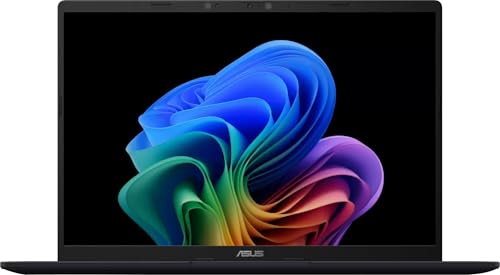
- 14-inch WUXGA anti-glare display
- 16GB RAM with 512GB SSD
- Copilot+ PC with Snapdragon X
Best For: Portable productivity, school, and business use
Best Office Quiet Laptop

- 15.6-inch Full HD IPS display
- Microsoft Office included
- 16GB RAM, numeric keypad, and Ethernet
Best For: Office work, school tasks, and everyday productivity
Best Quiet Performance
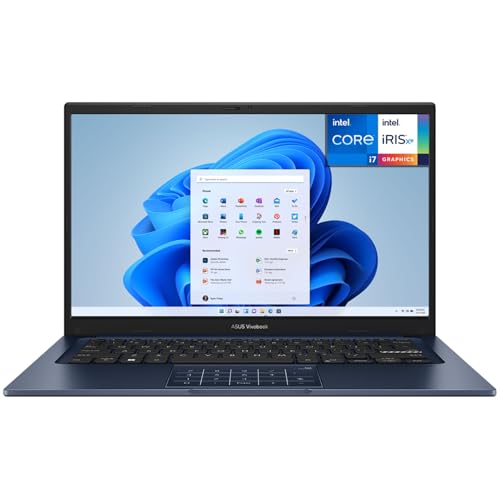
- 13th Gen Intel Core i7 processor
- 12GB RAM and 512GB NVMe SSD
- 14-inch Full HD anti-glare display
Best For: Portable business and study performance
Best Ultra-Quiet Budget Pick

- Ultra-quiet design with Windows 11 Pro
- 16GB RAM and 512GB SSD
- Listed battery life up to 11 hours
Best For: Quiet office, school, and basic productivity
Best Quiet Large-Screen Laptop

- 17.3-inch Full HD display
- 512GB SSD with Wi-Fi 6
- Numeric keypad and webcam privacy cover
Best For: Large-screen home and study use
Quiet Workhorse

- Ultra-quiet design for focused work
- 16GB RAM and 1TB SSD
- Windows 11 Pro with Wi-Fi 6 and Ethernet
Best For: Students, home offices, and everyday business tasks
Lightweight Communicator

- 3.75-pound, 0.7-inch portable design
- 12th Gen Core i3 processor
- AI noise-canceling technology for calls
Best For: Mobile students and everyday productivity users
Office-Ready Upgrade

- Full HD IPS display for comfortable office viewing
- Core 3 100U with up to 4.7 GHz boost
- Windows 11 Pro, privacy shutter, and numeric keypad
Best For: Business users and students needing office-focused features
Best Large-Screen Quiet Laptop – ASUS Vivobook 16 Snapdragon X
The ASUS Vivobook 16 is a strong quiet laptop option for shoppers who want a spacious display, modern Qualcomm performance, and efficient multitasking. Its 16GB of RAM, 512GB SSD, and 16-inch WUXGA screen suit everyday work, browsing, streaming, and productivity.
Best For: Users who want a large screen and capable everyday performance in a quiet-blue Copilot+ PC.
Pros:
- 16-inch 1920 x 1200 IPS display with 16:10 aspect ratio, 300-nit brightness, and 60Hz refresh rate
- Eight-core Snapdragon X processor with Qualcomm Hexagon NPU for AI-focused tasks
- 16GB RAM and 512GB PCIe 4.0 SSD support responsive multitasking and ample storage
- Integrated Adreno graphics and Windows 11 Home provide a modern everyday computing setup
Cons:
- The display is non-touch and has a listed 45% color gamut
- At 3.9 pounds, it is less portable than smaller laptops
Choose this Vivobook if screen space and memory matter more than maximum portability. It offers a well-rounded configuration for productivity and entertainment, with efficient Qualcomm hardware suited to quiet everyday use.
Best Budget Quiet Laptop – HP 15.6-inch Ryzen 3 Touch
The HP 15.6-inch laptop is a practical quiet laptop choice for basic home, school, and everyday computing. Its Ryzen 3 processor, touchscreen, SSD storage, and Windows 11 Home in S mode cover common tasks while keeping the configuration straightforward.
Best For: Students and home users who need an affordable touchscreen laptop for browsing, documents, streaming, and video calls.
Pros:
- 15.6-inch HD touchscreen supports pinch, tap, and swipe controls
- AMD Ryzen 3 7320U provides four cores, eight threads, and boost speeds up to 4.1GHz
- PCIe NVMe SSD is faster than a traditional hard drive, while 8GB LPDDR5 memory supports daily multitasking
- Physical camera shutter, microphone mute button, Wi-Fi 6, and Bluetooth 5.4 add useful convenience features
Cons:
- 128GB of storage is limited for large media libraries and many applications
- The 1366 x 768 display is less sharp than Full HD or WUXGA alternatives
- Windows 11 Home in S mode may restrict software installation choices
This HP makes the most sense when price, touchscreen convenience, and basic productivity are priorities. Buyers who need more storage or a sharper screen should consider a higher-tier option.
Best Compact Quiet Laptop – ASUS Vivobook 14 Snapdragon X
The ASUS Vivobook 14 is a compact quiet laptop with a useful balance of portability and capability. It combines a 14-inch WUXGA display, Snapdragon X processor, 16GB of RAM, and a 512GB SSD for work, study, streaming, and general productivity.
Best For: Students, business users, and frequent travelers who want a lightweight-looking 14-inch Copilot+ PC configuration with generous memory and storage.
Pros:
- 14-inch 1920 x 1200 anti-glare display provides crisp 16:10 visuals
- Snapdragon X processor, integrated Adreno graphics, and 16GB RAM support smooth multitasking
- 512GB SSD offers fast boot times, quick file access, and useful capacity
- Includes Windows 11 Home, Copilot+ PC features, Windows Hello, and a one-year manufacturer warranty
Cons:
- It has integrated graphics rather than a dedicated GPU
- Some listed specifications are inconsistent, including the stated 5-pound weight for a 14-inch model
This Vivobook is a sensible pick for users who value a smaller footprint without giving up 16GB of memory or 512GB of storage. Verify final dimensions and configuration details before purchase if portability is critical.
Best Office Quiet Laptop – Lenovo V15 Business Laptop
The Lenovo V15 is a practical quiet laptop for office work, school assignments, and everyday browsing. It pairs a Full HD anti-glare IPS display with 16GB of RAM, a 256GB SSD, Microsoft Office, and a useful selection of wired and wireless connections.
Best For: Budget-conscious users who need a straightforward business or school laptop with Office included, a numeric keypad, and Ethernet.
Pros:
- 15.6-inch 1920 x 1080 anti-glare IPS display offers clear Full HD visuals and wide viewing angles
- 16GB DDR4 RAM supports everyday multitasking
- Microsoft Office is included with Word, Excel, PowerPoint, Outlook, OneNote, and OneDrive access
- Ports include USB-C, USB-A, HDMI, Ethernet, and Wi-Fi 5, plus a numeric keypad and webcam privacy shutter
Cons:
- Intel Celeron N4500 is a basic dual-core processor designed for everyday tasks
- 256GB of storage may feel limited for large files and media collections
- The keyboard is not backlit
This Lenovo emphasizes practical office features rather than demanding performance. It is a good fit for documents, email, web browsing, and streaming, but users running intensive software should look for a faster processor.
Best Quiet Performance – ASUS Vivobook 14
The ASUS Vivobook 14 is a strong choice among quiet laptops for work, study, and everyday multitasking. Its 13th Gen Intel Core i7 processor, 12GB of RAM, and 512GB SSD provide responsive performance in a compact 14-inch design.
Best For: Business users, students, and anyone who wants portable performance with a Full HD anti-glare display.
Pros:
- Powerful 13th Gen Intel Core i7-1355U processor with up to 5.0GHz turbo speed
- 12GB of RAM and a 512GB NVMe SSD support smooth everyday multitasking
- Compact 14-inch Full HD anti-glare display and 1.4 kg weight suit mobile work
Cons:
- Integrated Intel UHD Graphics are intended for everyday use rather than demanding graphics workloads
- The display is rated at 250 nits with 45% NTSC color coverage
This Vivobook stands out when you want a relatively portable quiet laptop without giving up processor headroom. Its practical port selection, Windows 11 Home, and business-oriented design make it a versatile daily workstation.
Best Ultra-Quiet Budget Pick – HP 15.6-inch Laptop
The HP 15.6-inch laptop is aimed at shoppers who prioritize quiet laptops, long battery life, and practical productivity features. It combines an ultra-quiet design with 16GB of RAM, a 512GB SSD, Windows 11 Pro, and Microsoft Office.
Best For: Students and business users who need a large screen, numeric keypad, extended battery life, and everyday office capability.
Pros:
- Ultra-quiet design is well suited to offices, classrooms, and shared spaces
- 16GB RAM and 512GB SSD provide useful capacity for everyday productivity
- Up to 11 hours of listed battery life, with a full-size keyboard and numeric keypad
- Windows 11 Pro with Microsoft Office supports common work and school tasks
Cons:
- Intel N100 processor is designed for basic productivity rather than demanding workloads
- The listed native resolution is 1366 x 768, below Full HD
- At 5 pounds, it is less portable than smaller laptops
This HP is a sensible quiet laptop for documents, browsing, email, and light office work. Its large display and numeric keypad are convenient, though the lower-resolution screen and entry-level processor make it less suitable for intensive creative or computational tasks.
Best Quiet Large-Screen Laptop – ASUS Vivobook 17
The ASUS Vivobook 17 offers a spacious 17.3-inch Full HD display in a quiet blue chassis, making it an appealing option among quiet laptops for home work and entertainment. Its Intel Core 3 processor, 8GB RAM, and 512GB SSD cover everyday computing needs.
Best For: Home users and students who want a large Full HD screen, numeric keypad, and comfortable everyday usability.
Pros:
- Large 17.3-inch Full HD display provides ample room for documents and media
- 512GB SSD and Wi-Fi 6 offer practical storage and modern wireless connectivity
- ErgoSense keyboard includes numeric keys, while the webcam cover adds privacy
- Fast charging can reach 60% in as little as 49 minutes according to the supplied details
Cons:
- 8GB of RAM may be limiting for heavier multitasking
- The 17.3-inch format and 0.78-inch thickness are less travel-friendly
- Integrated graphics are aimed at everyday use rather than demanding gaming or design work
This Vivobook 17 is a practical choice when screen size matters more than maximum portability. Its Full HD NanoEdge display, numeric keypad, privacy cover, and fast-charging feature make it particularly useful as a home or desk-based quiet laptop.
Quiet Workhorse – Lenovo V15 G2
The Lenovo V15 G2 is a practical pick for shoppers seeking quiet laptops for school, home office, and everyday business tasks. Its 16GB of RAM, 1TB SSD, Full HD screen, and Windows 11 Pro setup prioritize smooth routine productivity and useful storage.
Best For: Students, home-office users, and small-business work involving browsing, documents, video calls, and office applications.
Pros:
- Ultra-quiet design suited to focused work environments.
- 16GB RAM and a spacious 1TB PCIe SSD.
- Useful connectivity, including Wi-Fi 6, Ethernet, HDMI, USB-C, and a numeric keypad.
- Windows 11 Pro, TPM 2.0, and a camera privacy shutter add business-friendly features.
Cons:
- The integrated Intel UHD Graphics are intended for everyday use rather than demanding graphics work.
- The 15.6-inch display uses TN technology and is rated at 250 nits.
- The keyboard is not backlit.
Choose this Lenovo when quiet operation, generous storage, and business-oriented features matter more than high-end performance or display quality. The N6000 platform is best matched with routine productivity workloads.
Lightweight Communicator – ASUS Vivobook 15
The ASUS Vivobook 15 is a lightweight option for shoppers comparing quiet laptops for everyday school, personal, or business use. It combines a 12th Gen Core i3 processor with a Full HD NanoEdge display, a slim 3.75-pound chassis, and AI noise-canceling technology for clearer communication.
Best For: Students and mobile users who need a straightforward laptop for documents, web browsing, video calls, and general productivity.
Pros:
- Lightweight 3.75-pound design with a 0.7-inch profile.
- 12th Gen Intel Core i3-1215U processor with up to 4.4 GHz boost speed.
- 15.6-inch Full HD display with slim NanoEdge bezels.
- AI noise-canceling technology is designed to reduce unwanted voice-call noise.
Cons:
- 8GB RAM and 128GB SSD provide less headroom than the other listed options.
- Windows 11 Home in S mode may limit software installation choices.
- Connectivity is based on Wi-Fi 5 and Bluetooth 4.1 rather than newer wireless standards.
This Vivobook makes sense when portability and communication features are priorities. Its storage capacity is modest, so users who keep many large files locally may need external or cloud storage.
Office-Ready Upgrade – ASUS Vivobook 15 Pro
The ASUS Vivobook 15 is a business-focused choice for shoppers seeking quiet laptops with a sharper IPS display and newer Core 3 processing. It includes Windows 11 Pro, 8GB DDR5 memory, a numeric keypad, privacy shutter, and a bundled storage setup listed as a 256GB SSD plus a 512GB docking set.
Best For: Office users, businesses, and students who value Windows 11 Pro, an IPS screen, modern ports, and privacy features.
Pros:
- 15.6-inch 1920×1080 IPS display for clear text and images.
- Intel Core 3 100U offers six cores, eight threads, and up to 4.7 GHz boost speed.
- Windows 11 Pro, camera privacy shutter, and numeric keypad suit office work.
- Includes USB-C, two USB-A 3.2 ports, HDMI, and a headphone/microphone jack.
Cons:
- The supplied specifications contain conflicting memory details, listing 8GB installed RAM while also describing expandability up to 40GB.
- The listed 42Wh battery capacity may be limiting for extended unplugged sessions.
- The product details list a 6-pound weight, which is heavier than many portable 15-inch laptops.
This ASUS is a sensible fit for office productivity when display comfort, Windows 11 Pro, and connectivity are more important than minimum weight. Verify the included storage and memory configuration before ordering because the supplied listing describes these specifications inconsistently.
How We Picked These Quiet Laptops
We focused on laptops with efficient processors, integrated graphics, solid-state storage, and configurations that are well suited to everyday workloads. Processor families include Qualcomm Snapdragon, Intel Core, Intel N-series, and AMD Ryzen chips. These systems are generally better suited to quiet productivity than gaming laptops with high-power CPUs and dedicated graphics.
We also considered memory and storage, screen size and resolution, operating-system features, connectivity, and the intended audience. Because fan noise can vary with room temperature, software, workload, and power settings, “quiet” should be treated as a practical design goal rather than a guaranteed noise level.
Quick Comparison
| Best For | What to Look For |
|---|---|
| Students and basic home use | 8GB RAM, an SSD, comfortable keyboard, and dependable battery life |
| Office and business work | 16GB RAM, Windows 11 Pro or business features, strong connectivity, and a Full HD display |
| Multitasking | 16GB RAM, at least 512GB SSD storage, and a modern Core, Ryzen, or Snapdragon processor |
| Large-screen productivity | 15.6- or 17.3-inch display with Full HD resolution and a practical port selection |
Key Buying Factors for Quiet Laptops
Processor and Cooling
Efficient processors are central to a quiet design because they can complete everyday tasks without generating as much heat. Snapdragon systems can be especially appealing for web, office, and battery-focused use, while Intel Core and Ryzen models offer broad Windows compatibility. Check the exact processor before buying; similarly named chips can differ substantially in speed.
Memory and Storage
Choose 8GB RAM for browsing, documents, streaming, and light schoolwork. Sixteen gigabytes is a better long-term choice for frequent multitasking, large spreadsheets, many browser tabs, or creative applications. An SSD improves startup and app-loading times, while 512GB gives considerably more working room than 128GB or 256GB.
Display, Battery, and Ports
A Full HD display is preferable for most work because it provides sharper text than a basic HD panel. Larger screens improve productivity but add weight and may reduce portability. Review battery claims cautiously, and check whether the laptop includes USB-C, HDMI, Wi-Fi 6, Ethernet, or other ports you actually use.
Who Should Buy Which Quiet Laptops?
Choose a 14-inch ASUS Vivobook if portability matters and your workload centers on documents, browsing, calls, and streaming. A 15.6-inch model is a balanced choice for home offices, students, and general business use. Select a 17.3-inch Vivobook when screen space is more important than carrying convenience.
Look for 16GB RAM and at least 512GB of storage if you expect to keep the laptop for several years or regularly multitask. Budget models with 8GB RAM and 128GB storage can work for light use, but they offer less headroom. Snapdragon Copilot+ options are attractive for efficient mobile productivity, while Intel and AMD models may be the safer choice for maximum application and peripheral compatibility.