
Choosing the right enclosure can turn a spare M.2 drive into a fast, reliable external SSD. The best picks balance speed, cooling, compatibility, and easy installation.
Below, you’ll find portable SSD enclosures suited for everything from everyday file backups to high-speed creative workflows and tougher travel use.
Best 10 Portable SSD Enclosures Picks for 2026
Tool-Free NVMe Pick
SABRENT USB-C NVMe Enclosure & Reader

- Tool-free flip-open installation
- Aluminum cooling for steadier transfers
- Supports NVMe drives up to 8TB
Best For: Portable NVMe storage, cloning, and quick SSD swaps
Rugged Dual-Format Choice
ASUS TUF Gaming A1 External Enclosure
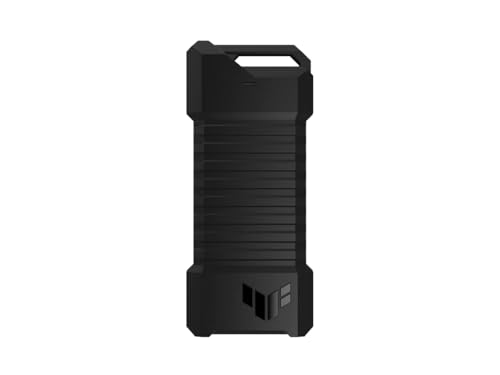
- Supports NVMe PCIe and SATA SSDs
- IP68 and MIL-STD-810H rated durability
- Q-latch makes installation easier
Best For: Rugged portable storage and mixed SSD compatibility
High-Speed USB4 Option
UGREEN 40Gbps M.2 NVMe Enclosure

- Up to 3600MB/s with compatible hardware
- USB4 and Thunderbolt 3/4 support
- Advanced fin-based cooling design
Best For: Fast NVMe transfers on USB4 or Thunderbolt setups
Budget-Friendly Sandwich Design

- Tool-free sandwich-style installation
- 10Gbps USB 3.2 Gen 2 with UASP
- Includes USB-C cable and USB-A adapter
Best For: Easy portable NVMe storage with broad OS support
Budget 10Gbps Option

- Up to 10Gbps with UASP support
- Includes USB-C to C and USB-C to A cables
- Works with Windows, Mac, and Linux
Best For: Everyday NVMe storage on a compact budget-friendly enclosure
Tool-Free All-Rounder
SABRENT Tool-Free NVMe & SATA Enclosure

- Supports both NVMe and SATA M.2 drives
- Tool-free installation for quick swaps
- Slim aluminum build with thermal pad
Best For: Anyone who needs one enclosure for mixed M.2 drive types
Premium RGB Pick
ASUS ROG Strix Arion Aluminum NVMe Enclosure

- 10 Gbps USB 3.2 Gen 2 performance
- Aluminum alloy body with thermal pads
- Includes USB-C to C and USB-C to A cables
Best For: style-conscious NVMe users who want cooling and cable flexibility
Travel-Friendly Choice
UGREEN Tool-Free 10Gbps NVMe Enclosure

- Tool-free design for fast SSD installation
- USB 3.2 Gen 2 with up to 10Gbps speeds
- Includes silicone case and two cable types
Best For: travelers who want a slim, simple NVMe enclosure
Cooling-Focused Pick
Plugable Dual-Cooling 10Gbps NVMe Enclosure

- Auto-on fan plus aluminum passive cooling
- USB 3.2 Gen 2 supports up to 10Gbps
- Tool-free setup with UASP and TRIM support
Best For: heavy file transfers where thermal control matters most
Tool-Free NVMe Pick – SABRENT USB-C NVMe Enclosure & Reader
If you’re comparing portable ssd enclosures for fast, simple NVMe storage, this SABRENT model is built around convenience and steady 10Gbps performance. The flip-open, tool-free design makes SSD swaps quick, while the aluminum top and thermal pad help move heat away during long transfers.
Best For: Users who want a compact, tool-free NVMe enclosure for everyday portable storage, cloning, and troubleshooting.
Pros:
- Tool-free flip-open design makes installation fast and easy
- Aluminum top and direct thermal pad contact help with heat management
- Supports M.2 NVMe drives in 2230, 2242, 2260, and 2280 sizes up to at least 8TB
- USB-C plug-and-play with no drivers or external power needed
Cons:
- NVMe only, so it will not work with M.2 SATA SSDs
- Top speed is limited to 10Gbps, not higher-speed USB4 class performance
This is a practical pick if you want a straightforward enclosure that balances portability, cooling, and easy upgrades. It is especially appealing for creators, gamers, and anyone moving large files on USB-C devices.
Rugged Dual-Format Choice – ASUS TUF Gaming A1 External Enclosure
Among portable ssd enclosures, the ASUS TUF Gaming A1 stands out for durability as much as speed. It supports both NVMe PCIe and SATA M.2 drives, uses a Q-latch for easier installation, and is rated for IP68 water and dust resistance plus MIL-STD-810H drop resistance.
Best For: Buyers who want a tough enclosure that can handle travel, gaming setups, and mixed-drive compatibility.
Pros:
- Supports both M.2 NVMe PCIe and SATA SSDs
- Q-latch design simplifies SSD installation
- IP68 water/dust resistance and MIL-STD-810H drop resistance
- USB-C 3.2 Gen 2×1 interface offers up to 10Gbps
Cons:
- Heavier than many ultra-slim enclosures at 249 g
- Still capped at 10Gbps rather than faster USB4 speeds
If protection matters as much as portability, this enclosure is an easy one to justify. Its dual-format support also gives you more flexibility if you move drives between different systems or older SSDs.
High-Speed USB4 Option – UGREEN 40Gbps M.2 NVMe Enclosure
If you want portable ssd enclosures with more headroom than standard 10Gbps models, this UGREEN enclosure is aimed at speed-focused users. It uses an ASM2464PD chip and can reach up to 3600MB/s when paired with the required USB4 or Thunderbolt 4 setup, while its finned cooling design is built for sustained use.
Best For: Power users who need high-speed NVMe external storage for large files, editing, or demanding transfers.
Pros:
- Up to 3600MB/s with compatible USB4 or Thunderbolt 4 devices and cables
- Double-sided fin design and 3D cooling system improve heat dissipation
- Supports M.2 NVMe sizes 2230, 2242, 2260, and 2280
- Works with Windows, Mac OS, Linux, and Android systems
Cons:
- To hit top speed, Thunderbolt 4 cables and devices are required
- NVMe only, so SATA and mSATA drives are not supported
This is the right call if raw transfer speed is the priority and your device ecosystem can take advantage of it. It is compact too, but its real value comes from pairing with the right high-bandwidth hardware.
Budget-Friendly Sandwich Design – FIDECO M.2 NVMe SSD Enclosure
For shoppers narrowing down portable ssd enclosures with simple setup and solid everyday speed, the FIDECO model keeps the focus on ease of use. Its sandwich-style build is tool-free, supports common NVMe sizes, and uses the thermal pad contact to help the drive stay cooler during transfers.
Best For: Users who want an easy-to-carry NVMe enclosure with broad OS compatibility and straightforward installation.
Pros:
- Tool-free sandwich design makes SSD installation quick
- Supports M.2 NVMe drives in 2230, 2242, 2260, and 2280 sizes
- USB 3.2 Gen 2 and UASP support up to 10Gbps
- Includes a USB-C cable with an attached USB-A adapter for travel convenience
Cons:
- Does not support M.2 SATA SSDs
- Requires initialization for new SSDs before they are recognized
This enclosure is a practical all-rounder if you want a small, travel-ready NVMe adapter without extra complexity. It gives you the essentials: tool-free access, standard 10Gbps speeds, and wide system compatibility.
USB4 Speed Pick – SABRENT USB4 NVMe SSD Enclosure
If you want portable ssd enclosures with serious transfer speed, this SABRENT USB4 model is built for creators and power users who move large files often. It supports PCIe NVMe drives only and is designed for fast, stable performance over USB4, Thunderbolt, and compatible USB-C connections.
Best For: Professionals who need a fast, tool-free NVMe enclosure for laptops and desktop workflows.
Pros:
- Up to 3,900 MB/s over USB4, with 2,700 MB/s on Thunderbolt 3/4
- Tool-free installation for 2230, 2242, 2260, and 2280 PCIe NVMe drives
- Works with Thunderbolt 3/4, USB4, and USB-C on Windows and macOS
- Active cooling fan and aluminum/ABS build help keep the drive stable
Cons:
- Does not support SATA M.2 SSDs
- Best performance depends on using a compatible high-speed host connection
This is a strong choice if speed and convenience matter more than broad drive compatibility. The cooling fan and tool-free design make it especially practical for frequent swapping and long file transfers.
Budget 10Gbps Option – ORICO M.2 NVMe SSD Enclosure
This ORICO pick is a practical choice if you want portable ssd enclosures with straightforward 10Gbps performance and wide device support. It is designed for PCIe NVMe M.2 drives only, includes both USB-C to USB-C and USB-C to USB-A cable options, and aims for easy plug-and-play use across common systems.
Best For: Everyday NVMe portable storage with broad host compatibility and a compact carry-friendly design.
Pros:
- USB 3.1 Gen 2 connection with up to 10Gbps theoretical speed
- Supports NVMe M.2 drives in 2230, 2242, 2260, and 2280 sizes up to 8TB
- Includes USB-C to USB-C and USB-C to USB-A cables
- Works with Windows, Mac, and Linux with no driver required
Cons:
- Does not support M.2 SATA or M.2 PCIe AHCI SSDs
- Assembly uses a small screw and requires careful installation
For users who want a compact enclosure without stepping up to USB4 pricing, this is a sensible middle-ground option. It focuses on core NVMe performance and broad everyday compatibility rather than premium extras.
Tool-Free All-Rounder – SABRENT Tool-Free NVMe & SATA Enclosure
Among portable ssd enclosures, this SABRENT model stands out for drive flexibility because it supports both M.2 NVMe and M.2 SATA SSDs. The 10Gbps USB 3.2 Type-C interface and tool-free design make it a convenient pick for users who want quick swaps and simple bus-powered operation.
Best For: Users who need one enclosure that can handle both NVMe and SATA M.2 drives.
Pros:
- Supports both M.2 NVMe and M.2 SATA SSDs
- Tool-free installation makes swapping drives fast
- Up to 10Gbps and about 1000MB/s in real-world transfers
- Ultra-slim aluminum build with thermal pad for heat transfer
Cons:
- Does not fit 2.5-inch SATA or mSATA drives
- No room for drives with a pre-installed heatsink
This is the most versatile option in the group if you already own a mix of M.2 SSD types. It trades USB4-level speed for wider compatibility and a simple, travel-friendly design.
Premium RGB Pick – ASUS ROG Strix Arion Aluminum NVMe Enclosure
If you want a portable SSD enclosure that feels more premium than basic plastic models, the ASUS ROG Strix Arion is built around an aluminum alloy body with thermal pads and USB 3.2 Gen 2 connectivity. It supports M.2 PCIe NVMe drives in 2230, 2242, 2260, and 2280 sizes, and includes both USB-C to C and USB-C to A cables for flexible use.
Best For: Users who want a stylish, high-speed NVMe enclosure with built-in cooling support and RGB lighting.
Pros:
- USB 3.2 Gen 2 interface supports transfer speeds up to 10 Gbps
- Aluminum alloy case with thermal pads helps pull heat away from the SSD
- Includes USB-C to C and USB-C to A cables
- Supports 2230/2242/2260/2280 M.2 NVMe drives
Cons:
- M.2 NVMe SSD is not included
- Only supports PCIe NVMe M Key / B+M Key drives
- RGB lighting may be unnecessary if you want a simple enclosure
This is a strong pick if you care about both performance and presentation. Among portable SSD enclosures, it stands out for its included cables, heat-management design, and ROG styling.
Travel-Friendly Choice – UGREEN Tool-Free 10Gbps NVMe Enclosure
The UGREEN option is a practical choice if you want portable SSD enclosures that are quick to set up and easy to carry. It uses USB 3.2 Gen 2 for up to 10Gbps speeds, supports M.2 NVMe drives in 2230 through 2280 sizes, and comes with a tool-free buckle design plus a silicone case for extra protection on the go.
Best For: Travelers and everyday users who want a slim, tool-free NVMe enclosure with broad compatibility.
Pros:
- Tool-free installation makes SSD swaps quick and simple
- Supports up to 10Gbps with USB 3.2 Gen 2
- Includes a silicone case, thermal pad, USB-C cable, and USB-C to USB-A cable
- Compatible with Windows, macOS, Linux, Android, and iOS
Cons:
- Does not support SATA NGFF SSDs or mSATA SSDs
- 10Gbps performance requires a matching USB C 3.2 Gen2 data cable
- Single-drive enclosure only
This enclosure is a solid all-rounder for portable use, especially if you value convenience and compatibility. The tool-free design and included carry protection make it easy to recommend for frequent travelers.
Cooling-Focused Pick – Plugable Dual-Cooling 10Gbps NVMe Enclosure
If heat is your main concern, this Plugable model is one of the more performance-focused portable SSD enclosures in the group. It combines a full aluminum alloy body with an intelligent temperature-controlled fan, supports USB 3.2 Gen 2 speeds up to 10Gbps, and includes TRIM and UASP support for efficient data handling.
Best For: Users moving large files who want active and passive cooling in a tool-free NVMe enclosure.
Pros:
- Dual cooling system includes an auto-on fan and aluminum heat dissipation
- Supports up to 10Gbps over USB 3.2 Gen 2
- Tool-free, driver-free setup for quick SSD swaps
- Includes USB-C and USB-A cables; compatible with Windows, macOS, Linux, and Android
Cons:
- Does not support NGFF SATA SSDs
- Fan-based design may be more than some users need
- Only fits M-Key and B+M Key NVMe drives in 2242, 2260, and 2280 sizes
For sustained transfers and thermal control, this enclosure is the most specialized option here. It makes sense if you want a portable shell designed to stay cool under heavier workloads.
How We Picked Portable SSD Enclosures
We focused on Portable SSD Enclosures that offer a strong mix of real-world speed, build quality, and broad SSD support. That means looking at interface limits, thermal design, tool-free access, and whether the enclosure supports common M.2 sizes and key types. We also favored models with clear compatibility for both NVMe and, where relevant, SATA drives.
Quick Comparison
In this category, the biggest differences come down to connection speed and use case. 10Gbps enclosures are usually the best value for everyday backups and general storage. USB4 and 40Gbps models are better for users who need higher sustained throughput with modern systems. If you travel often or work in demanding environments, rugged and water-resistant options may matter more than raw speed.
Key Buying Factors for Portable SSD Enclosures
Interface Speed
Match the enclosure’s interface to your drive and computer. A fast SSD in a 10Gbps enclosure will still be capped by that connection, while USB4 or 40Gbps enclosures can unlock more of the drive’s potential on supported hardware.
Drive Compatibility
Check whether the enclosure supports NVMe only or both NVMe and SATA. Also confirm the supported M.2 sizes, especially 2230, 2242, 2260, and 2280, since not every case handles all lengths.
Thermals and Build
Metal bodies, thermal pads, and airflow-friendly designs help reduce throttling during large transfers. For Portable SSD Enclosures used in video editing or long backups, cooling can matter as much as peak benchmark numbers.
Ease of Installation
Tool-free designs, latching mechanisms, and clear internal mounting systems make drive swaps quicker and reduce hassle. That is especially useful if you rotate drives frequently or are upgrading an existing SSD.
Who Should Buy Which Portable SSD Enclosures?
If you want the best budget-friendly everyday option, choose a solid 10Gbps enclosure with tool-free setup. If your workflow involves large media files, prioritize USB4 or 40Gbps Portable SSD Enclosures for higher headroom. If you need versatility, consider a model that supports both NVMe and SATA. For frequent travel or rough handling, pick a rugged enclosure with stronger protection and a durable shell.
In short, the best enclosure is the one that matches your drive, your device ports, and how you actually use storage day to day.