
The best portable capture cards make it easier to stream console gameplay, record camera footage, or add a second video source without carrying a bulky desktop setup.
These 10 options range from compact USB models to high-bandwidth HDMI 2.1 hardware, so the right choice depends on your resolution, frame-rate, passthrough, and connectivity needs.
Best 10 Portable Capture Cards Picks for 2026
Best Docking-Style Pick

- 1080p60 video capture
- 4K60 HDMI output
- 100W charging hub with three USB ports
Best For: Traveling gamers and creators who need capture and charging together
Best for Camera Streaming

- 1080p60 and 4K capture
- Supports multiple camera types
- Ultra-low-latency USB 3.0 connection
Best For: Creators using cameras for streams, calls, and recordings
Best Value Multi-Device Option
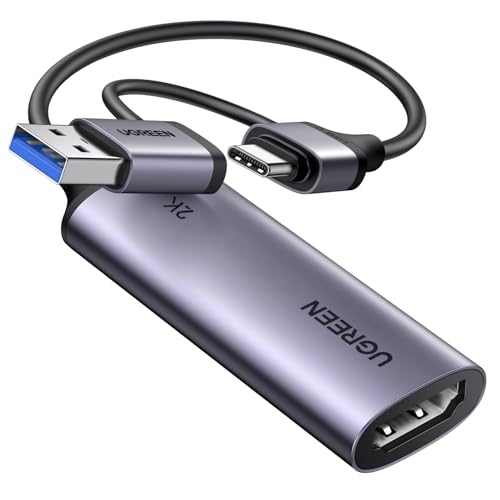
- 4K input with 2K30 output
- 1080p60 support
- USB-A and USB-C connectivity
Best For: Multi-platform streamers using computers, tablets, phones, or consoles
Best for High-Refresh Gaming

- 4K144 capture and passthrough
- HDMI 2.1 with VRR passthrough
- Up to 1080p240 capture
Best For: Gamers with high-refresh PC or console setups
Best Plug-and-Play Pick
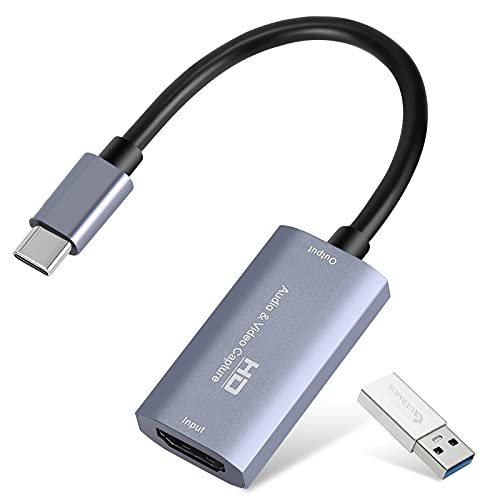
- 1080p60 or 2K30 output
- Compact, bus-powered aluminum design
- Compatible with major platforms and software
Best For: Traveling streamers and simple recording setups
Best Compact 4K-Input Option

- Accepts 4K HDMI input
- Records 1080p60 or 2K30
- Works across computers, consoles, cameras, and software
Best For: Gamers and mobile streamers needing broad compatibility
Best for Console Streaming

- 4K60 HDMI loop-out
- 1080p60 or 2K30 USB capture
- 3.5mm mic input for commentary
Best For: Console streamers using passthrough and voice commentary
Compact Value Pick

- 1080p HDMI capture for streaming and recording
- Driver-free Windows, macOS, and Linux setup
- Lightweight design for indoor or outdoor use
Best For: Casual streamers, meetings, and basic console capture
Flexible Pass-Through Pick

- 4K60 HDMI pass-through with 1080p60 capture
- USB 3.0 low-latency connection
- Mic input and wide software compatibility
Best For: Gamers and streamers needing pass-through and commentary
Creator-Friendly Pick

- 4K HDMI pass-through with 1080p60 recording
- Built-in mic and headphone ports
- Compact design for home or on-the-go gaming
Best For: Console creators recording and streaming with live commentary
Best Docking-Style Pick – AVerMedia Elite Go
The AVerMedia Elite Go combines a portable capture card with a useful charging hub for streamlined gaming and travel setups. It captures 1080p video at 60fps, supports 4K60 HDMI output, and includes 100W GaN charging for compatible devices.
Best For: Gamers and creators who want portable capture plus device charging in one compact setup.
Pros:
- Captures Full HD video at 60fps.
- Supports 4K60 HDMI output for compatible displays.
- Includes 100W GaN charging and three USB ports.
- Works with PCs, Macs, consoles, handhelds, smartphones, and tablets.
Cons:
- Its 0.54 kg weight is higher than many basic USB capture devices.
- The supplied details do not specify 4K recording capture.
Choose this portable capture card if you value an all-in-one travel dock more than the smallest possible footprint. Its 1080p60 capture is well suited to everyday streaming, while the charging features add flexibility around a gaming or mobile workstation.
Best for Camera Streaming – Elgato Cam Link 4K
The Elgato Cam Link 4K is a focused choice for turning a DSLR, mirrorless camera, camcorder, action camera, or compatible iPhone into a computer video source. This compact USB 3.0 capture card supports 1080p60 and up to 4K capture, with ultra-low latency for streaming and recording.
Best For: Camera-based streaming, video calls, and creators who want a camera-to-computer connection.
Pros:
- Supports 1080p60 and 4K capture modes.
- Works with DSLR, mirrorless, camcorder, action cameras, and iPhone sources.
- Ultra-low latency helps keep video and audio synchronized.
- Compatible with PC, Mac, iPad, OBS, Zoom, and Discord.
Cons:
- It is designed around HDMI camera sources rather than a broader docking or charging role.
- 4K performance requires a compatible camera and the latest Cam Link 4K model.
For creators shopping for portable capture cards primarily for camera input, the Cam Link 4K keeps the setup simple and compact. It is especially practical when low-latency camera output matters more than console-focused extras.
Best Value Multi-Device Option – UGREEN 2K Capture Card
The UGREEN 2K capture card offers flexible connectivity for portable streaming across computers, tablets, phones, and consoles. It accepts up to 4K input, outputs up to 2K at 30Hz, and also supports 1080p at 60fps through USB 3.0.
Best For: Streamers who need broad device compatibility and both USB-A and USB-C connections.
Pros:
- Supports 4K input, 2K30 output, and 1080p60 capture.
- Includes both USB-A and USB-C interfaces.
- Works with Windows, macOS, Linux, iPadOS 17 or later, and compatible phones and tablets.
- Supports OBS, XSplit, QuickTime, PotPlayer, and VLC.
Cons:
- It only supports one-way HDMI input to USB output.
- Console sources may require HDCP to be disabled.
- iPadOS compatibility requires version 17 or later.
This is one of the more adaptable portable capture cards for mixed-device setups, particularly when USB-A and USB-C flexibility is useful. Its 2K30 output is a practical middle ground, while 1080p60 remains available for smoother everyday streaming.
Best for High-Refresh Gaming – Elgato 4K X
The Elgato 4K X is built for demanding gaming setups that need HDMI 2.1, high-refresh passthrough, and very low latency. It supports 4K144 capture and passthrough, up to 1080p240 capture, HDR10, and VRR passthrough when paired with suitable hardware and a USB 3.2 Gen 2 connection.
Best For: High-refresh console and PC gamers who want advanced passthrough and capture features.
Pros:
- Supports 4K144 capture and passthrough.
- HDMI 2.1 enables high-frame-rate 1080p capture up to 240fps.
- VRR passthrough helps support smoother gameplay.
- Works with OBS, Streamlabs, Twitch Studio, Zoom, Teams, and other apps.
Cons:
- Full performance requires a USB 3.2 Gen 2 port and capable source hardware.
- USB 3.2 Gen 1 works with reduced capture resolution.
- Its system requirements are more demanding than those of basic capture cards.
Among portable capture cards, the 4K X is the strongest fit for users who prioritize refresh rate and modern HDMI 2.1 features. It costs more in system requirements and setup complexity, but it is designed to preserve a high-end gaming experience while streaming.
Best Plug-and-Play Pick – 1080p60 USB-C Capture Card
This compact option is a practical choice among portable capture cards for recording gameplay, meetings, or camera footage. It accepts up to 4K input and can output up to 1080p at 60fps or 2K at 30fps through USB 3.0, with USB-C and USB connectivity for flexible setups.
Best For: Travelers, casual streamers, and users who want a small capture card without drivers or external power.
Pros:
- Supports 1080p at 60fps and 2K at 30fps output.
- Compact aluminum-alloy design with no external power requirement.
- Works with Windows, macOS, Linux, Android, OBS, Zoom, and common HDMI devices.
Cons:
- It is intended for capture only, not direct HDMI screen casting.
- USB 3.0 is recommended for the best bandwidth and resolution.
- Audio setup in OBS may require restarting the software.
Choose this model when portability and straightforward setup matter most. Its broad compatibility is useful, but users should verify their USB connection and capture software settings before recording.
Best Compact 4K-Input Option – VIXLW U168-1 Capture Card
The VIXLW U168-1 is one of the more versatile portable capture cards for gamers, streamers, and mobile recording setups. Its USB 3.0 interface accepts HDMI input up to 4K at 30Hz and records at 1080p 60fps or 2K 30fps, while USB-C connectivity supports compatible computers and tablets.
Best For: Gamers and streamers using consoles, cameras, Windows PCs, Macs, or compatible Android and iPad setups.
Pros:
- Supports 4K HDMI input with 1080p60 or 2K30 recording.
- Plug-and-play design requires no driver or external power.
- Compatible with OBS, Zoom, VLC, Twitch Studio, and multiple operating systems.
- Lightweight design is suited to outdoor streaming and mobile setups.
Cons:
- Tablets may require OTG to be enabled.
- Users should test the HDMI source with a monitor before recording.
- Its listed capture resolution is limited to 1080p, despite 4K input support.
This is a strong fit for buyers who need broad device compatibility in a compact package. Confirm OTG support and available processing power when pairing it with a tablet or mobile workflow.
Best for Console Streaming – 4K60 Loop-Out Capture Card
This model stands out among portable capture cards for console setups because it combines 4K60 HDMI loop-out with USB 3.0 capture. It records up to 1080p at 60fps or 2K at 30fps and adds a 3.5mm mic input for commentary during gameplay or interviews.
Best For: Console streamers who want 4K passthrough and a dedicated microphone connection.
Pros:
- Supports 4K60 HDMI input and loop-out.
- Captures 1080p60 or 2K30 through USB 3.0.
- Includes 3.5mm mic-in for voice commentary.
- Supports USB-A and USB-C connections and works with OBS and major consoles.
Cons:
- The mic input does not record party chats.
- Audio changes in OBS may require restarting the software.
- It requires suitable system hardware for 1080p capture.
For console players, the 4K loop-out is the key advantage because it allows high-resolution passthrough while recording through USB. The added mic input also makes it more useful for commentary-focused streams than simpler capture-only designs.
Compact Value Pick – Portable 1080p Capture Card
For shoppers comparing portable capture cards, this compact HDMI-to-USB option covers straightforward 1080p recording and streaming without requiring a driver. It works with common consoles, cameras, laptops, and third-party software on Windows, macOS, and Linux.
Best For: Casual streamers, online meetings, and gamers who want a lightweight plug-and-play capture card.
Pros:
- Captures HDMI video up to 1080p and supports real-time streaming.
- Plug-and-play compatibility with Windows, macOS, and Linux.
- Works with PS5, Xbox, Nintendo Switch, cameras, and other HDMI-output devices.
- Compact 0.02 kg design with 12-month warranty and lifetime technical support.
Cons:
- Uses USB 2.0 rather than USB 3.0.
- Does not list HDMI loop-out or dedicated microphone and headphone ports.
This is a sensible entry-level choice when portability and simple setup matter more than advanced pass-through or audio features. Its 1080p-focused output fits basic recording, presentations, and live streaming.
Flexible Pass-Through Pick – 4K HDMI Capture Card
Among portable capture cards, this USB 3.0 model stands out for combining 4K60 HDMI pass-through with 1080p60 capture. Its loop-out, microphone input, and broad software compatibility make it a flexible option for gaming, meetings, and live production.
Best For: Gamers and streamers who need low-latency HDMI pass-through, external microphone input, and USB 3.0 capture.
Pros:
- Supports 4K60 HDMI input and loop-out while capturing up to 1080p60.
- USB 3.0 connection is designed for low-latency capture.
- Includes a 3.5mm microphone input for commentary and interviews.
- Compatible with OBS, Streamlabs, XSplit, Zoom, VLC, and multiple operating systems.
Cons:
- Does not support 4K120 or 4K144 input.
- The microphone input accepts a 3.5mm microphone headset and does not record party chats.
- Warranty coverage is listed as 60 days.
Choose this model if smooth gameplay monitoring and flexible audio connections are priorities. It offers more production-oriented features than basic USB 2.0 capture cards, though its capture output remains limited to 1080p60 or 2K30 depending on the mode.
Creator-Friendly Pick – Monster 4K Capture Card
For portable capture cards aimed at gaming creators, the Monster model pairs 4K HDMI pass-through with 1080p60 recording over USB 3.0. Built-in microphone and headphone ports also support live commentary and game-audio monitoring during streams.
Best For: Console gamers and content creators who want a compact capture setup with integrated audio connections.
Pros:
- Provides smooth 4K HDMI pass-through while recording at 1080p60.
- USB 3.0 supports fast video transfer for recording and streaming.
- Built-in microphone and headphone ports support commentary and audio monitoring.
- Compatible with PS5, Xbox, Nintendo Switch, Windows, macOS, and Linux.
Cons:
- Recording resolution is specified as 1080p, not 4K.
- The supplied notes do not mention a warranty or included cables.
- Its console-focused feature set may be more than needed for simple presentations.
This is a strong fit for creators who want a small gaming capture device with audio controls built in. It preserves a 4K pass-through gaming experience while delivering the more manageable 1080p60 format commonly used for streaming and recording.
How We Picked These Portable Capture Cards
We focused on capture cards that are practical for mobile streaming, gaming, recording, and camera use. The selection includes USB-C and USB 3.0 models, cards with 4K passthrough, devices capable of 1080p60 capture, and higher-end hardware designed for modern HDMI 2.1 sources.
We also considered compatibility with consoles, computers, cameras, and common streaming software. Because product specifications can vary by input, output, and software configuration, always confirm the manufacturer’s supported resolutions before buying.
Quick Comparison
- Best for high-end gaming: Elgato 4K X, with HDMI 2.1 support and very high refresh-rate passthrough.
- Best for camera use: Elgato Cam Link 4K, built specifically for DSLR, camcorder, and action-camera feeds.
- Best for a portable console setup: AVerMedia Elite Go, with USB-C connectivity, 4K60 output, and charging support.
- Best for everyday 1080p streaming: A USB 3.0 capture card with 1080p60 recording and 4K passthrough.
- Best for flexible budgets: UGREEN and other compact USB capture models that support 1080p60 capture or 2K recording.
Key Buying Factors for Portable Capture Cards
Capture Resolution and Frame Rate
1080p60 is still the practical standard for smooth gameplay and live streaming. Choose a model with 4K capture if you need to record ultra-high-resolution footage, but remember that some cards accept 4K input while recording at 1080p or 2K.
Passthrough Performance
Passthrough sends the source signal to a TV or monitor while the card captures video. Check both resolution and refresh rate. A card may support 4K passthrough but limit high-refresh gaming, while HDMI 2.1 models can handle newer consoles and gaming PCs more effectively.
Connection and Compatibility
USB 3.0 and USB-C connections provide the bandwidth needed for high-quality capture. Confirm that your computer has the required port and that the card works with your operating system, console, camera, and preferred software such as OBS Studio.
Audio and Camera Features
For microphones, headsets, and camera workflows, look for dedicated audio inputs or headphone monitoring. Camera users should also verify clean HDMI output, since on-screen menus or battery indicators can appear in the captured feed.
Who Should Buy Which Portable Capture Cards?
Streamers on the move should prioritize a compact USB-C model with simple plug-and-play setup. Console gamers should look for reliable 1080p60 capture, 4K passthrough, and compatibility with their specific console. Competitive gamers should consider HDMI 2.1 and high-refresh passthrough to avoid compromising the display experience.
Creators using cameras will generally get the best results from a dedicated camera capture interface with clean HDMI support. Casual users can save money with a basic USB 3.0 model, provided its capture resolution and audio features meet their needs.