
Digitizing a box of family photos is far easier when a scanner can feed multiple prints, handle mixed sizes, and save organized files with minimal supervision. The right model can also reduce repetitive cropping, sorting, and rescanning.
This roundup compares 10 photo scanners with batch scanning, from dedicated photo feeders to versatile document scanners and flatbeds that prioritize film or image quality. Use the guide below to match scanning speed, format flexibility, connectivity, and software to your archive.
Best 10 Photo Scanners with Batch Scanning Picks for 2026
Best Overall

- Batch-scans up to 36 photos
- Duplex capture preserves notes on photo backs
- Wi-Fi, OCR, and cloud backup support
Best For: Large family photo collections and mixed photo-document scanning
Best Document-Focused Pick

- 25 ppm color scanning
- Two-sided scanning
- 50-sheet standard capacity
Best For: Fast duplex document scanning with occasional photo use
Best High-Speed Legacy Pick
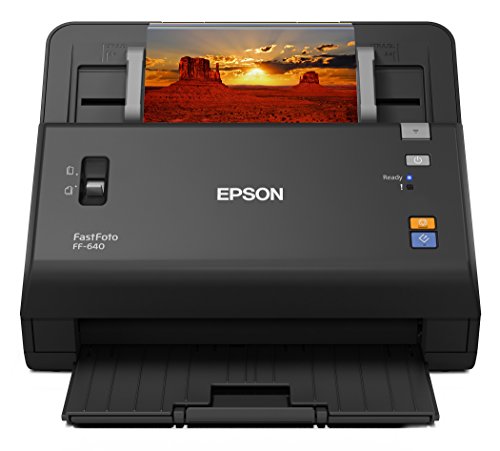
- Scans up to one photo per second
- 30-photo auto-feed tray
- Up to 600 dpi photo scans
Best For: Large collections of standard prints and panoramic photos
Best Compact Budget Option

- Scans 4 x 6 photos in about two seconds
- Supports photos up to 8 x 10 inches
- Includes faded-image enhancement tools
Best For: Simple home photo digitizing with one-at-a-time feeding
Best Compact ADF Scanner

- 50-sheet feeder for batch tasks
- Duplex scanning in one pass
- Compact 600 dpi USB design
Best For: Compact document and card scanning
Best Flatbed for Film and Photos

- 6400 dpi optical resolution
- Scans film, slides, and negatives
- Processes multiple photos at once
Best For: Photo and film restoration projects
Best Wireless Photo ADF

- Up to 100 photos per minute
- 100-document or 36-photo feeder
- Wi-Fi 6, USB-C, and cloud support
Best For: Fast, connected photo batch scanning
Best Wireless Workflow

- Up to 40 pages per minute with duplex capture
- Continuous mode combines unlimited pages into one file
- Wireless scanning supports cloud applications
Best For: Connected home-office batch scanning
Best for Large Photo Archives
Visioneer PH70 High-Speed Photo Scanner

- Scans up to 110 photos per minute at 300 dpi
- ADF holds up to 50 standard 4x6 photos
- Includes OneTouch and photo-tagging software
Best For: High-volume 4x6 photo digitization
Best Overall – Epson FastFoto FF-680W
The Epson FastFoto FF-680W is a strong all-around choice for photo scanners with batch scanning. It can scan up to 36 photos at once, process photos at up to one per second at 300 dpi, and handle mixed sizes, including Polaroids, panoramas, postcards, and images up to 8 x 10 inches.
Best For: Families digitizing large photo collections while also scanning documents and preserving handwritten notes.
Pros:
- Batch-scans up to 36 photos and supports duplex capture.
- Includes enhancement tools for color restoration, red-eye reduction, cropping, rotation, and de-skewing.
- Offers USB and Wi-Fi connectivity, OCR, and automatic Dropbox and Google Drive backup.
- Supports 300 dpi sharing, 600 dpi TIFF archiving, and up to 1200 dpi enlargements.
Cons:
- At 8.2 pounds, it is less portable than simpler photo scanners.
- Its broad feature set may be more than occasional users need.
The FF-680W stands out when speed, batch capacity, photo care, and flexible output options all matter. Its carrier sheet and SafeTouch technology also add useful protection for delicate originals.
Best Document-Focused Pick – Fujitsu ScanSnap iX500
The Fujitsu ScanSnap iX500 is a practical option for shoppers comparing photo scanners with batch scanning who also need a document-oriented machine. It delivers 25 pages per minute in color, supports two-sided scanning, and includes a 50-sheet standard capacity.
Best For: Users who want fast duplex document scanning with occasional photo digitization needs.
Pros:
- Scans color pages at up to 25 pages per minute.
- Supports two-sided scanning for more efficient document workflows.
- Offers USB or Wi-Fi connection options to a computer.
- Includes a 50-sheet standard capacity.
Cons:
- The supplied specifications identify it as a document scanner rather than a dedicated photo scanner.
- The notes do not specify photo-focused enhancement or restoration features.
The iX500 is best viewed as a document-first choice among batch-capable scanners. Its duplex performance and larger sheet capacity make it more suitable for paperwork than for a photo-archiving project centered on specialized image tools.
Best High-Speed Legacy Pick – Epson FastFoto FF-640
The Epson FastFoto FF-640 is designed for quickly converting sizable photo collections. Among photo scanners with batch scanning, it offers scanning speeds of up to one photo per second at 300 dpi and an auto-feed tray that accommodates 30 photos at a time.
Best For: Users digitizing thousands of standard prints who want a dedicated high-speed photo scanning system.
Pros:
- Scans photos at up to one per second under the stated test conditions.
- Auto-feed tray holds up to 30 photos.
- Supports photos from wallet size through panoramic formats.
- Provides scans up to 600 dpi and includes a carrier sheet.
Cons:
- Connection is USB rather than wireless.
- The supplied notes do not list duplex capture or OCR.
- Its 8.8-pound weight makes it less convenient to move.
The FF-640 is a focused speed-and-volume tool for photo projects. It makes the most sense when a dedicated auto-feeder and rapid throughput are more important than wireless features or broader document functionality.
Best Compact Budget Option – Plustek ePhoto Z300
The Plustek ePhoto Z300 is a straightforward choice for shoppers seeking photo scanners with batch scanning at a smaller scale. It scans a 4 x 6 photo in about two seconds at 300 dpi, supports several common photo sizes, and is designed to digitize photos one at a time through its feeder.
Best For: Home users who want a compact USB scanner for steadily converting everyday prints.
Pros:
- Scans 4 x 6 photos in about two seconds at 300 dpi.
- Supports 3 x 5, 4 x 6, 5 x 7, 8 x 10, letter, and A4 media.
- Offers 300 dpi and 600 dpi settings with up to 600 dpi optical resolution.
- Includes image enhancement tools for faded photos.
Cons:
- Its standard capacity is one sheet, so it is not an automatic multi-photo batch feeder.
- USB is the listed connection type, with no wireless option specified.
- Scanning is slower than the dedicated high-speed Epson models in this group.
The Z300 is better for an orderly, one-photo-at-a-time workflow than unattended batch scanning. Its small footprint, broad media support, and simple enhancement tools make it a useful entry-level option for home archiving.
Best Compact ADF Scanner – Ambir ImageScan Pro 820ix-AS
Ambir ImageScan Pro 820ix-AS 20ppm High-Speed ADF Scanner for Windows PC and Mac
Check Price On AmazonIf you need photo scanners with batch scanning for cards and paper documents, the Ambir ImageScan Pro 820ix-AS is a compact ADF option. Its 50-sheet feeder, duplex scanning, and 20 ppm speed are suited to recurring document-digitizing tasks, though the supplied specifications focus on paper media rather than film or photo restoration.
Best For: Home offices, small businesses, and users who need compact batch scanning for documents, cards, and identification materials.
Pros:
- 50-sheet automatic feeder supports bulk scanning.
- Duplex scanning captures both sides in one pass.
- Compact footprint and 600 dpi resolution.
- Enhanced TWAIN driver supports broad software compatibility.
Cons:
- Designed for paper media rather than negatives, slides, or film.
- Requires a USB connection and has Windows 7 listed as the minimum system requirement.
The 820ix-AS is a practical choice when batch productivity and a small footprint matter more than specialized photo features. Its ADF and duplex capability make it particularly useful for organized document archives.
Best Flatbed for Film and Photos – Epson Perfection V550
The Epson Perfection V550 is a flatbed choice for photo scanners with batch scanning, especially when you want to scan several prints at once or work with slides and negatives. Its 6400 dpi optical resolution, transparency unit, and photo-restoration tools make it more versatile for archival projects than a document-focused ADF scanner.
Best For: Photo enthusiasts digitizing prints, 35mm film, slides, and negatives with detailed restoration and cropping features.
Pros:
- 6400 dpi optical resolution supports enlargements up to 17 x 22 inches.
- Built-in transparency unit scans 35mm slides, negatives, and film.
- Scans multiple photos at once and saves each as a separate file.
- Digital ICE and Easy Photo Fix help restore older images.
Cons:
- Flatbed design has a one-sheet standard capacity and is not an ADF.
- Larger and heavier than the compact document scanner in this roundup.
- Uses a Hi-Speed USB 2.0 connection.
The V550 is the stronger fit for mixed photo and film collections. Its batch capability comes from scanning multiple flatbed photos together, while its film hardware and restoration features add value for family archives.
Best Wireless Photo ADF – ScanSnap iX2500 Photo Edition
For users comparing photo scanners with batch scanning, the ScanSnap iX2500 Photo Edition combines a high-capacity feeder with photo-specific accessories and wireless connectivity. It can scan up to 100 photos per minute, holds up to 36 photos or 100 documents, and includes carrier sheets for delicate prints.
Best For: Quickly digitizing large photo collections while also handling documents, receipts, business cards, and other everyday media.
Pros:
- Scans up to 100 photos per minute.
- ADF holds up to 36 photos or 100 documents.
- Includes three photo carrier sheets for delicate prints.
- Supports Wi-Fi 6, USB-C, cloud services, and multiple device types.
Cons:
- Listed resolution is 600 dpi, below the Epson V550’s 6400 dpi.
- Photo capacity is lower than its document capacity.
- Newer operating-system requirements may limit compatibility with older devices.
The iX2500 is the most productivity-oriented option here for high-volume photo batches. Its touchscreen profiles, automatic organization, and wireless workflow make it convenient for users who want to scan and manage files across computers, mobile devices, and cloud services.
Best All-Around Choice – Canon imageFORMULA RS40
If you need photo scanners with batch scanning for mixed household archives, the Canon imageFORMULA RS40 combines a 60-sheet automatic feeder with support for photos, documents, receipts, cards, and IDs. It scans both sides at once at up to 40 items per minute and works with Windows and Mac.
Best For: Families digitizing varied photo collections and everyday paperwork from one compact scanner.
Pros:
- Scans up to 40 items per minute with duplex scanning.
- Handles varying media, including Polaroids, photos, receipts, cards, and documents.
- Includes photo enhancement features such as red-eye correction and face smoothing.
- Supports JPG, TIF, BMP, PNG, PDF, and PPTX output formats.
Cons:
- Uses a USB connection rather than built-in wireless networking.
- The listed color depth is 8 bpp.
The RS40 is a flexible choice when your batch-scanning workload includes more than standard 4×6 photos. Its broad media support and bundled enhancement software make it especially practical for mixed photo and document projects.
Best Wireless Workflow – Brother ImageCenter ADS-2800W
The Brother ImageCenter ADS-2800W is a document-focused option for photo scanners with batch scanning, offering single-pass duplex capture at up to 40 pages per minute. Its 50-sheet capacity, continuous scan mode, and wireless cloud connections suit larger multi-page jobs.
Best For: Home offices and small workgroups that want batch scanning with wireless and cloud-oriented workflows.
Pros:
- Scans single- and double-sided materials in one pass.
- Continuous scan mode can combine unlimited pages into one file.
- Handles photos, receipts, business cards, and embossed plastic cards.
- Supports wireless scanning to cloud applications, including Google Drive.
Cons:
- The supplied compatibility information lists older operating systems and Windows 7 as the minimum requirement.
- Its standard sheet capacity is 50, smaller than some batch-focused models.
- The listed resolution is 300 dpi.
This Brother model makes the most sense when connected workflows matter as much as scanning speed. Continuous scan mode and wireless Web Connect features are useful for multi-page projects, while its media handling extends beyond ordinary documents.
Best for Large Photo Archives – Visioneer PH70 High-Speed Photo Scanner
For high-volume photo projects, the Visioneer PH70 is a strong pick among photo scanners with batch scanning. It can digitize up to 110 photos per minute at 300 dpi, with an ADF that holds up to 50 standard 4×6 photos or 120 documents.
Best For: Users converting large collections of standard 4×6 family photos with minimal feeder refills.
Pros:
- Scans up to 110 photos per minute at 300 dpi.
- Holds up to 50 standard 4×6 photos or 120 documents in its feeder.
- OneTouch software provides customizable one-click scanning presets.
- Includes mobile scanning through iOS and Android apps.
Cons:
- The supplied minimum system requirement is Windows 7.
- Uses USB rather than wireless connectivity on the scanner itself.
- Photo batch capacity is lower than its 120-document capacity.
The PH70 stands out for throughput and feeder capacity, making it the most archive-oriented choice of the three. Its facial recognition and tagging software can also help organize a large digitized photo library after scanning.
How We Picked the Best Photo Scanners with Batch Scanning
We focused on scanners that can process multiple photos or documents in a workflow, rather than models designed only for occasional single-page scans. Our comparison considers feeder design, real-world handling of prints, duplex capability, scan speed, resolution, image enhancement, software, operating-system support, and connectivity.
Because photo collections vary widely, we also included dedicated photo scanners, ADF document scanners with photo features, and flatbed models for delicate originals, negatives, and unusual formats. A fast feeder is useful, but it should not outweigh safe handling or image quality when originals are valuable.
Quick Comparison
| Best For | Look For |
|---|---|
| Large stacks of standard prints | Automatic photo feeder, gentle transport, and batch enhancement |
| Photos plus paperwork | ADF, duplex scanning, OCR, and flexible file handling |
| Old, delicate, or unusual originals | Flatbed glass, adjustable resolution, and careful manual placement |
| Wireless household use | Wi-Fi, broad computer compatibility, and simple scan destinations |
| Film and negatives | Dedicated transparency holders and high optical resolution |
Key Buying Factors for Photo Scanners with Batch Scanning
Feeder Capacity and Photo Handling
Check the supported photo sizes, thickness range, feeder capacity, and whether prints can be loaded in a stack. A photo-specific feeder may be more convenient for standard prints, while a conventional ADF can be better for documents and mixed media. For irreplaceable or curled photos, confirm that the transport path is gentle and easy to clear.
Speed, Duplex Scanning, and Workflow
Published pages-per-minute figures usually reflect document settings, so photo throughput may be lower at higher resolutions. Duplex scanning matters mainly when processing documents, receipts, or two-sided records. Look for batch naming, automatic cropping, rotation, color correction, and multi-page PDF support if you want a mostly hands-off archive workflow.
Image Quality and Resolution
For ordinary prints, a good optical scan around 300 to 600 dpi is often sufficient. Higher optical resolution is more useful for cropping, enlarging small prints, or scanning film. Avoid choosing a model based only on an inflated interpolated resolution figure; sensor quality, lighting, color accuracy, and software processing are equally important.
Connectivity and Compatibility
USB is dependable for a dedicated computer, while Wi-Fi is convenient for shared household use. Verify compatibility with your operating system and preferred scanning software before buying. OCR, searchable PDFs, cloud destinations, and editable file formats can be valuable when the scanner will handle more than photos.
Who Should Buy Which Photo Scanners with Batch Scanning?
Choose a dedicated high-speed photo feeder if you have hundreds or thousands of standard prints and want the quickest path to a digital archive. A general ADF scanner is a stronger fit for households that will scan photos, paperwork, receipts, and forms throughout the year. Select a flatbed when preserving delicate originals, scanning negatives, or maximizing control over image placement matters more than speed.
For mixed collections, prioritize format flexibility and software over headline speed. For a small archive, a slower model with better film support or simpler controls may offer better value. Whichever scanner you choose, clean the feed path, keep originals dust-free, scan to a backed-up destination, and use consistent file names and folders from the start.