
Turning aging prints and film into shareable digital files does not require a professional archive setup. The best photo scanners under $300 can handle everyday snapshots, documents, slides, or negatives while fitting comfortably into a home office.
This roundup compares flatbed, dedicated film, automatic photo, and portable scanning options so you can choose based on image quality, speed, format support, and ease of use.
Best 10 Photo Scanners Under 300 Picks for 2026
Best for Film and Photo Restoration

- Scans photos, slides, negatives, and medium-format film
- 6400 dpi resolution with 48-bit color depth
- Easy Photo Fix and Digital ICE support restoration
Best For: Film scanning, enlargements, and restoration
Best Compact Everyday Scanner

- 4800 dpi resolution for photo and document scans
- Lightweight 500 g construction
- Compact design with low 4.5-watt power use
Best For: Everyday scanning in small workspaces
Best for Simple Photo Restoration

- 4800 dpi optical resolution for detailed scans
- One-touch scanning and up to 10-second letter scans
- Easy Photo Fix and removable high-rise lid
Best For: Home photo, artwork, and document scanning
Best for Fast USB-C Scanning

- Scans in as fast as 8 seconds
- 4800 x 4800 dpi with 48-bit color depth
- USB Type-C, EZ buttons, and searchable PDF support
Best For: Fast photo and document scanning
Best Standalone Photo Scanner

- 600 dpi scanning for photos up to 8.5 x 11 inches
- Scans directly to an SD card without a PC
- Includes a five-in-one memory-card reader
Best For: Simple, computer-free photo digitizing
Best for Slides and Negatives
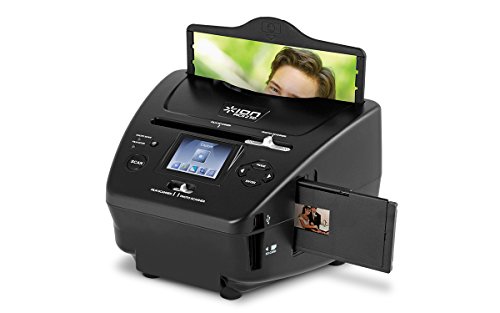
- Scans photos, 35mm slides and 35mm negatives
- Saves scans to the included SD card
- Includes a color viewing screen and editing software
Best For: Mixed print and film photo collections
Best High-Resolution Flatbed

- Up to 4800 dpi optical resolution
- Scans photos, artwork, books and documents
- Easy Photo Fix restores color to faded photos
Best For: Detailed home photo and document scanning
Album-Friendly Pick

- Copies photos without removing them from albums
- Also scans slides and 35mm negatives
- 5-inch color screen with CMOS and LED imaging
Best For: Album-mounted photos and mixed photo media
Best Heavy-Duty Pick

- True 1200 dpi optical resolution
- Scans photos and documents
- Includes one year of Tag That Photo software
Best For: Detailed Windows photo scans and organized archives
Portable Wand Scanner

- Lightweight 170-gram handheld design
- Three resolution settings up to 900 dpi
- Saves JPG or PDF files to Micro SD
Best For: Portable, on-the-go photo and document scanning
Best for Film and Photo Restoration – Epson Perfection V500
For shoppers comparing photo scanners under 300, the Epson Perfection V500 stands out as a versatile flatbed model for photos, slides, negatives, and medium-format film. Its 6400 dpi resolution, Easy Photo Fix, and Digital ICE technology make it especially suited to restoring and enlarging older images.
Best For: Film scanning, photo enlargements, and restoring faded or scratched images.
Pros:
- Scans photos, slides, negatives, and medium-format film.
- 6400 dpi resolution and 48-bit color depth support detailed scans.
- Easy Photo Fix restores faded photos, while Digital ICE helps remove dust and scratches.
- LED light source eliminates warm-up time.
Cons:
- Uses a USB connection rather than a newer connection standard.
- At 4000 g, it is less lightweight than the compact scanners in this roundup.
The V500 is the strongest choice here when film and restoration features matter more than portability. Its broad media support adds flexibility for digitizing a varied photo collection.
Best Compact Everyday Scanner – Canon CanoScan LiDE 400
If you want one of the more compact photo scanners under 300, the Canon CanoScan LiDE 400 offers a lightweight design for basic document and photo scanning. Its 4800 dpi resolution and low 4.5-watt power use make it a practical fit for home desks and occasional scanning tasks.
Best For: Everyday photo and document scanning in a small home or office workspace.
Pros:
- 4800 dpi resolution supports detailed photo scans.
- Lightweight 500 g design is easy to move or store.
- Compact dimensions suit space-constrained desks.
- Uses relatively low power at 4.5 watts.
Cons:
- Standard sheet capacity is limited to one sheet.
- The supplied details list document scanning but do not mention film or negative support.
The LiDE 400 is a straightforward option for users who mainly need a slim, lightweight scanner for prints and documents. It is less suitable for a film-digitizing workflow.
Best for Simple Photo Restoration – Epson Perfection V19 II
The Epson Perfection V19 II is a sensible pick among photo scanners under 300 for users who want detailed scans without a complicated setup. It combines 4800 dpi optical resolution, one-touch controls, a removable high-rise lid, and Easy Photo Fix in a compact, USB-powered design.
Best For: Home users scanning photos, artwork, books, and letter-sized documents.
Pros:
- 4800 dpi optical resolution delivers clear, detailed photo scans.
- Easy Photo Fix restores color to faded photos with one click.
- One-touch buttons simplify scanning, with letter-sized scans listed at up to 10 seconds.
- Removable high-rise lid accommodates books and thicker materials.
Cons:
- Media support is listed for documents and photos, not film or negatives.
- USB power may require a nearby compatible computer or USB power source.
The V19 II balances image quality and ease of use well. Choose it for routine photo and document projects, especially when simple restoration and a compact footprint are priorities.
Best for Fast USB-C Scanning – Canon CanoScan LiDE 400 Slim
Canon CanoScan LiDE 400 Slim Scanner, 7.7" x 14.5" x 0.4", Document & Photo Scanner, Black
Check Price On AmazonFor shoppers seeking photo scanners under 300 with convenient controls, the Canon CanoScan LiDE 400 Slim pairs 4800 x 4800 dpi scanning with fast operation and a single USB Type-C cable for data and power. Its EZ buttons, auto scan mode, and PDF functions make it useful for both photos and documents.
Best For: Fast home scanning, photo enhancement, and searchable multi-page PDFs.
Pros:
- Scans in as fast as 8 seconds, according to the supplied details.
- 4800 x 4800 dpi resolution and 48-bit color depth support detailed images.
- USB Type-C cable handles both data and power.
- EZ buttons, auto scan mode, and PDF buttons streamline common tasks.
Cons:
- Standard sheet capacity is limited to one sheet.
- The supplied details list letter-size and photo media, not film or negatives.
- At 3.6 pounds, it is heavier than the 500 g Canon model listed above.
The LiDE 400 Slim is a strong everyday choice when speed and workflow shortcuts matter. Its photo-enhancement tools and PDF features give it broader practical utility than a basic flatbed scanner.
Best Standalone Photo Scanner – Pandigital PANSCN06
For shoppers comparing photo scanners under 300, the Pandigital PANSCN06 is a straightforward option for digitizing photos without a computer. It scans images up to 8.5 x 11 inches at 600 dpi and saves them directly to an SD card.
Best For: Users who want simple, PC-free photo scanning and convenient SD-card transfers.
Pros:
- Scans photos up to 8.5 x 11 inches at 600 dpi.
- Works without a PC by scanning directly to an SD card.
- Built-in five-in-one reader supports SD, MS, MSPRO, MMC and XD cards.
- Transfers scans easily to a digital photo frame or computer.
Cons:
- Requires USB connectivity for computer use.
- Windows 7 is listed as the minimum system requirement.
The PANSCN06 emphasizes convenience over advanced features. Its standalone operation and broad memory-card support make it practical for quickly converting a personal photo collection.
Best for Slides and Negatives – ION Pics 2 SD Photo Scanner
Among photo scanners under 300, the ION Pics 2 SD stands out for handling more than standard prints. It scans 35mm negatives, 35mm slides, and 3×5, 4×6, and 5×7-inch photos directly to the included SD card.
Best For: Digitizing mixed collections of prints, slides and 35mm negatives without a computer.
Pros:
- Supports 35mm negatives, 35mm slides and multiple photo sizes.
- Scans to the included SD card with no computer required.
- Uses a 5.1 MP scanner with up to 2500 dpi resolution.
- Color screen allows you to view pictures during use.
Cons:
- The listed warranty is 90 days.
- Software features require a computer for editing and transfer workflows.
The Pics 2 SD is a flexible choice for families with both older film materials and printed photos. Its standalone design simplifies transfers, while the included software adds editing capability when connected to a computer.
Best High-Resolution Flatbed – Epson Perfection V39 II
For buyers seeking photo scanners under 300 that can also handle everyday documents, the Epson Perfection V39 II is a versatile flatbed model. It offers up to 4800 dpi optical resolution, USB power, and support for photos, artwork, books and documents.
Best For: Home users who want detailed photo scans alongside general document and artwork scanning.
Pros:
- Provides up to 4800 dpi optical resolution for detailed scans.
- Scans photos, artwork, books, documents and other materials.
- Easy Photo Fix technology helps restore color to faded photos.
- Includes one-touch scanning, removable high-rise lid and USB power.
Cons:
- USB connectivity is required for operation.
- Flatbed scanning handles one standard sheet at a time.
The V39 II is the most broadly capable option here for users who want a traditional flatbed scanner. Its high optical resolution and photo-restoration feature suit detailed archival work, while ScanSmart adds cloud and stitching functions.
Album-Friendly Pick – Rapid Photo Album Scanner
For shoppers comparing photo scanners under 300, the Sharper Image Rapid Photo Album Scanner stands out for copying pictures without removing them from an album. Place it over the image, press a button, and use the 5-inch color screen to review results. It also handles slides and 35mm negatives.
Best For: Digitizing album-mounted photos, slides, and 35mm negatives with minimal handling.
Pros:
- Scans photos without requiring removal from albums.
- Also supports slides and 35mm negatives.
- Uses a CMOS sensor and LED lighting for glare-free results.
- Includes a 5-inch color viewing screen.
Cons:
- USB is the listed connection type.
- Windows 7 is the only listed minimum system requirement.
This is a practical choice when preserving album pages matters more than document-scanning versatility. Its built-in screen and support for film media add convenience for family-photo projects.
Best Heavy-Duty Pick – Visioneer 7800 Photo Scanner
Among photo scanners under 300, the Visioneer 7800 is a conventional flatbed option with true 1200 dpi optical resolution for detailed photo scans. It connects by USB, scans photos and documents, and includes a one-year Tag That Photo subscription for organizing images with facial recognition and keyword tagging.
Best For: Windows users who want high-resolution flatbed scanning plus photo-library organization tools.
Pros:
- True 1200 dpi optical resolution is designed to preserve photo detail.
- Scans both photos and documents in color or black and white.
- Includes one year of Tag That Photo software.
- Supports multiple cropping options and local or synchronized photo libraries.
Cons:
- Tag That Photo is listed as a one-year subscription.
- USB is the listed connection type.
- The listed minimum system requirement is Windows 7.
The 7800 is a strong fit for organized home archives or photo projects where image detail and cataloging features are both important. Its flatbed design also makes it more suitable for documents than a photo-only scanner.
Portable Wand Scanner – AOZBZ 900DPI Handheld Scanner
For portable photo scanners under 300, the AOZBZ 900DPI Handheld Image Scanner offers a compact scanning wand that saves JPG or PDF files to a Micro SD card. It provides 300, 600, and 900 dpi modes, works with USB 2.0, and includes a 16GB SD card for mobile scanning.
Best For: Travelers and users who need a lightweight handheld scanner for occasional photos or documents.
Pros:
- Compact 170-gram design is easy to carry.
- Offers selectable 300, 600, and 900 dpi resolutions.
- Saves scans in JPG or PDF format.
- Supports Micro SD storage up to 32GB and includes a 16GB card.
Cons:
- Handheld scanning requires steady movement across the image.
- Its listed scanner type is document rather than dedicated photo.
- The supplied minimum system requirement lists Windows XP.
This model prioritizes portability and independent storage over flatbed convenience. It makes sense for quick, on-the-go captures, especially when carrying a full-size scanner is impractical.
How We Picked the Best Photo Scanners Under 300
We focused on the features that matter most when converting physical memories into useful digital files: optical resolution, supported media, color accuracy, scanning speed, software, connectivity, and overall convenience. We also considered whether each scanner is better suited to occasional family projects, regular document and photo work, or specialized film digitization.
Resolution claims were treated as only one part of the decision. A high dpi rating is helpful for cropping and enlargements, but sensor quality, software controls, and the condition of the original often have an equal or greater effect on the final image.
Quick Comparison
- Best for versatile home scanning: Epson Perfection V500 Photo Scanner.
- Best for a slim everyday flatbed: Canon CanoScan LiDE 400.
- Best for straightforward photo scanning: Epson Perfection V19 II or V39 II.
- Best for slides and negatives: ION Pics 2 SD.
- Best for fast album projects: Sharper Image Rapid Photo Album Scanner.
- Best for portability: AOZBZ 900DPI Handheld Image Scanner.
Key Buying Factors for Photo Scanners Under $300
Flatbed Versus Feed-Through Design
Flatbed scanners are generally the safer choice for delicate, mounted, oddly sized, or valuable photographs because the original rests on glass. Feed-through and rapid album scanners can save substantial time with loose, similarly sized prints, but they may be less suitable for fragile or curled photos.
Resolution and Image Quality
Look for optical resolution rather than relying on an interpolated maximum. Around 600 dpi is sufficient for most sharing and ordinary reprints; higher optical resolution is useful when enlarging small prints or capturing film. Confirm that the scanner produces the file types and color depth your editing software can use.
Film and Negative Support
If you need to digitize slides or negatives, choose a model with dedicated holders or film-scanning hardware. A standard document flatbed may scan transparent originals poorly or require additional accessories. Dedicated film scanners can be more convenient, even when their controls are less flexible than those on a full flatbed.
Software, Connectivity, and Storage
Check operating-system compatibility, included drivers, and whether editing, dust removal, or OCR tools are provided. USB-powered models simplify setup, while scanners that save directly to an SD card can be useful when working away from a computer. Verify cable and power requirements before buying.
Who Should Buy Which Photo Scanners Under 300?
Choose a versatile flatbed if you want one device for family photos, documents, artwork, and occasional enlargements. A slim Canon or Epson model makes sense for a small desk and routine scanning. Pick a film-capable option if slides and negatives are central to the project rather than an occasional extra.
For large boxes of loose prints, an automatic or rapid photo scanner can reduce handling time. For travel, estate work, or quick scans without a desk, a handheld model is the practical choice, although it usually involves more manual alignment and may produce less consistent results than a flatbed.
Before ordering, measure your workspace, confirm the supported media sizes, and decide where your files will be stored. The right scanner is the one that matches your originals and workflow—not necessarily the model with the highest advertised dpi.