
Digitizing a family photo collection can protect irreplaceable memories while making them easier to share, organize, and back up. The right scanner depends on more than resolution: speed, handling, software, and the condition and size of your originals all matter.
We’ve gathered 10 options for different archiving styles, including automatic photo feeders, compact sheetfed scanners, and high-resolution flatbeds for delicate or valuable prints.
Best 10 Photo Scanners for Family Archives Picks for 2026
Best High-Volume Pick

- Batch-scans up to 36 photos
- Duplex capture preserves handwritten notes
- Wi-Fi, OCR, and cloud backup
Best For: Large family archives and mixed photo-document collections
Best Simple Photo Feeder

- Scans 4 x 6 photos in about two seconds
- Supports several photo and paper sizes
- Includes one-click image enhancement
Best For: Straightforward home photo scanning
Best Compact All-Rounder

- Compact design saves desk space
- Wireless or USB connectivity
- Scans photos, documents, cards, and more
Best For: Small workspaces with mixed scanning needs
Best Professional Detail
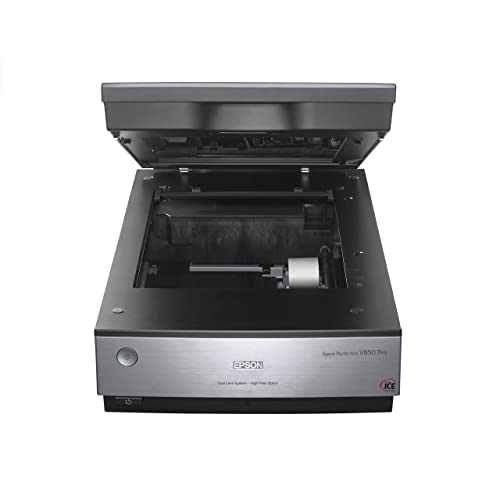
- 6400 dpi scanning for fine detail
- 4.0 Dmax supports tonal range
- Dual-lens system and Digital ICE
Best For: High-quality, detail-focused photo preservation
Best High-Speed Organizer
ScanSnap iX2500 Wireless or USB

- 45 ppm double-sided scanning with a 100-sheet feeder
- Wi-Fi 6, USB-C, touchscreen profiles, and cloud support
- Automatic optimization and file organization
Best For: Large mixed family archives needing fast, organized scanning
Best Flatbed for Detailed Photos

- 4800 dpi optical resolution for detailed photo scans
- Easy Photo Fix helps restore faded photo color
- Removable lid handles thicker originals
Best For: Individual photos, artwork, books, and delicate originals
Best Photo Feeder

- Scans up to 100 photos per minute
- Includes three photo carrier sheets for delicate prints
- Holds up to 36 photos or 100 documents
Best For: High-volume photo archives with mixed household documents
Simple SD-Card Scanning
Pandigital Personal Photo Scanner

- 600 dpi scanning for photos up to 8.5 x 11 inches
- Saves directly to SD card without a PC
- Includes five-in-one memory-card reader
Best For: No-PC family photo digitizing
High-Detail Photo Preservation

- 4800 x 4800 dpi with 48-bit color depth
- Color restore and dust-removal enhancements
- USB Type-C connection with automatic scan mode
Best For: Detailed desktop photo archiving
Portable Batch Scanning

- Lightweight 3-ounce sheetfed design
- 15 ppm one-sided scanning for small batches
- Works with photos, receipts, cards, and documents
Best For: Portable mixed photo and document scanning
Best High-Volume Pick – Epson FastFoto FF-680W
For families digitizing large collections, the Epson FastFoto FF-680W is a practical choice among photo scanners for family archives. It can scan up to 36 photos at once, reach up to one photo per second at 300 dpi, and capture handwritten notes on the back through duplex scanning.
Best For: Families processing thousands of mixed-size photos and documents quickly.
Pros:
- Batch-scans up to 36 photos and reaches up to 45 ppm/90 ipm for documents.
- Supports photos up to 8 x 10 inches, Polaroids, panoramas, and postcards.
- Offers auto enhancement, color restoration, red-eye reduction, de-skew, crop, and rotate tools.
- Includes Wi-Fi, USB, OCR, and automatic backup or sharing to Dropbox and Google Drive.
Cons:
- Its 11.7-inch square footprint and 8.2-pound weight require dedicated space.
- The automatic document feeder has a listed standard capacity of 10 sheets.
The FF-680W stands out when speed and workflow flexibility matter more than compact size. Its carrier sheet and SafeTouch technology also add useful protection when handling delicate originals.
Best Simple Photo Feeder – Plustek ePhoto Z300
The Plustek ePhoto Z300 offers a straightforward approach to photo scanners for family archives. Insert photos one at a time, scan a 4 x 6 photo in about two seconds at 300 dpi, and use the included enhancement functions to refresh faded images.
Best For: Families wanting an uncomplicated scanner for common print sizes.
Pros:
- Scans 4 x 6 photos in about two seconds and 8 x 10 photos in about five seconds at 300 dpi.
- Supports 3 x 5, 4 x 6, 5 x 7, and 8 x 10 photos, plus letter and A4 paper.
- Uses a CCD sensor with optical resolution up to 600 dpi.
- Image enhancement tools can restore old, faded pictures with a mouse click.
Cons:
- Photos are inserted one at a time rather than batch-fed.
- USB is the listed connection type, with no wireless connectivity noted.
The Z300 is a sensible fit for a focused photo-digitizing project where ease of use and a small 1.5 kg form factor matter. Its one-at-a-time design is less convenient for very large archives than a batch scanner.
Best Compact All-Rounder – ScanSnap iX1300
The ScanSnap iX1300 is a compact option for photo scanners for family archives when photos share space with receipts, cards, and documents. Its wireless or USB connectivity, duplex scanning, and automatic image corrections make it useful for everyday household digitizing.
Best For: Small workspaces and families scanning photos alongside general paperwork.
Pros:
- Space-saving design measures 4.5 inches deep by 11.7 inches wide by 3.3 inches high.
- Scans at up to 30 ppm with duplex operation, automatic de-skew, color optimization, and blank-page removal.
- Handles documents, photos, thick items, and plastic cards.
- Connects by USB or Wi-Fi and can send scans to computers, mobile devices, and cloud services.
Cons:
- It is primarily positioned as a document and receipt scanner rather than a dedicated photo scanner.
- Its listed standard sheet capacity is 20 sheets, so large photo batches may require reloading.
The iX1300 is appealing when desk space is limited and one scanner needs to handle varied household media. Choose it for versatility and convenience rather than specialized photo-archive features.
Best Professional Detail – Epson Perfection V850 Pro
For archivists prioritizing image quality, the Epson Perfection V850 Pro is a high-end choice among photo scanners for family archives. Its 6400 dpi resolution, 4.0 Dmax tonal range, dual-lens system, and Digital ICE are designed for detailed scans with smooth gradations and fine shadow detail.
Best For: Serious preservation work where maximum detail and tonal quality are priorities.
Pros:
- Provides 6400 dpi resolution for high-detail photo scanning.
- Offers a 4.0 Dmax tonal range for smooth gradations and fine shadow detail.
- Dual-lens technology selects between lenses for optimized results.
- Uses a CCD sensor and includes Digital ICE for restoration-oriented scanning.
Cons:
- At 20.9 pounds and nearly 20 inches wide, it needs substantial dedicated workspace.
- USB is the listed connection type, with no wireless option noted.
- Its listed operating-system support is for older Windows and macOS versions.
The V850 Pro is best suited to careful, quality-focused scanning rather than fast, unattended batch work. Its size and USB-only setup are trade-offs for users seeking a more exacting archival workflow.
Best High-Speed Organizer – ScanSnap iX2500 Wireless or USB
For families digitizing mixed paperwork and occasional prints, the ScanSnap iX2500 is a fast, connected option among photo scanners for family archives. Its 100-sheet feeder, double-sided scanning, automatic file organization, and Wi-Fi or USB connectivity make it suited to large scanning sessions.
Best For: Families scanning documents, receipts, business cards, and photos while wanting automated organization and flexible wireless or wired connections.
Pros:
- Scans up to 45 pages per minute with double-sided scanning.
- 100-sheet feeder with multi-feed and skew detection to help reduce jams and paper damage.
- Wi-Fi 6, USB-C, touchscreen profiles, automatic optimization, and cloud support.
Cons:
- Its 600 dpi resolution is lower than the Epson flatbed’s listed 4800 dpi.
- The automatic document feeder is less purpose-built for delicate or unusual photo originals than a flatbed.
- At 7.7 pounds, it is not the lightest option for occasional use.
The iX2500 stands out when archive work includes substantial document volume. Choose it for speed, workflow automation, and sharing rather than maximum flatbed-style photo detail.
Best Flatbed for Detailed Photos – Epson Perfection V19 II
The Epson Perfection V19 II is a compact flatbed choice for family photo projects where image detail matters. Its listed 4800 dpi optical resolution, removable high-rise lid, and Easy Photo Fix restoration make it practical for prints, artwork, books, and documents.
Best For: Families preserving individual prints, faded photographs, artwork, and bound or thicker originals with a flatbed scanner.
Pros:
- 4800 dpi optical resolution for detailed photo scans and enlargements.
- Easy Photo Fix can restore color to faded photos with one click.
- Removable high-rise lid accommodates thicker originals, and USB power supports portability.
- Scans letter-sized documents in as quickly as 10 seconds.
Cons:
- The flatbed holds one item at a time, so large batches require more hands-on work.
- USB is the only listed connection type; wireless scanning is not specified.
- Its compact format is better suited to individual originals than high-volume feeder work.
For carefully scanning treasured prints, the V19 II offers the strongest listed resolution in this group. It is the more deliberate choice for photo quality, though less efficient for a large stack of mixed materials.
Best Photo Feeder – ScanSnap iX2500 Photo Edition
The ScanSnap iX2500 Photo Edition is designed specifically for families scanning batches of prints alongside everyday paperwork. It includes three photo carrier sheets, photo-focused setup guidance, a 100-sheet document feeder, and capacity for up to 36 photos at a time.
Best For: Family archives centered on batches of loose photos that also include documents, receipts, and other household records.
Pros:
- Scans up to 100 photos per minute according to the supplied notes.
- Includes three photo carrier sheets for delicate prints and photo scanning profiles.
- Supports up to 36 photos or 100 documents in its feeder.
- Offers Wi-Fi 6, USB-C, touchscreen profiles, automatic optimization, and cloud support.
Cons:
- Its listed 600 dpi resolution is below the Epson V19 II’s 4800 dpi.
- Photo capacity is lower than its document capacity, at up to 36 photos.
- The 7.7-pound feeder-style design is less compact than a basic flatbed.
The Photo Edition is the most directly targeted option here for high-volume family photo digitization. Its included carrier sheets and photo capacity add useful archive support, while the feeder and cloud features keep mixed scanning efficient.
Simple SD-Card Scanning – Pandigital Personal Photo Scanner
For family archives, the Pandigital Personal Photo Scanner offers a straightforward way to digitize photos without a computer. It scans images up to 8.5 x 11 inches at 600 dpi and saves directly to an SD card, making it convenient for basic photo preservation and sharing.
Best For: Families wanting no-PC photo scanning with direct SD-card storage.
Pros:
- Scans photos up to 8.5 x 11 inches at 600 dpi.
- Works without a PC and saves directly to an SD card.
- Includes a five-in-one card reader for SD, MS, MSPRO, MMC, and XD cards.
- USB connection supports transfer to a computer or digital photo frame.
Cons:
- Windows 7 is listed as the minimum system requirement.
- Its 24 bpp color depth is more basic than higher-resolution archival scanners.
This is a practical choice when convenience matters most. Direct-to-card scanning reduces setup, though users seeking extensive editing or maximum image detail may prefer a more advanced model.
High-Detail Photo Preservation – Canon CanoScan LiDE 400
Canon CanoScan LiDE 400 Slim Scanner, 7.7" x 14.5" x 0.4", Document & Photo Scanner, Black
Check Price On AmazonFor family archives where image detail matters, the Canon CanoScan LiDE 400 combines 4800 x 4800 dpi resolution with photo-focused enhancements. Its slim design, USB Type-C connection, and automatic scan mode make it a capable desktop option for photos and documents.
Best For: Families seeking detailed scans and convenient photo restoration features.
Pros:
- 4800 x 4800 dpi resolution and 48-bit color depth support detailed scans.
- Color restore and dust-removal enhancements help improve photo appearance.
- USB Type-C provides both data and power through one cable.
- EZ buttons and auto scan mode simplify everyday use.
Cons:
- Requires a computer connection rather than standalone memory-card storage.
- At 3.6 pounds, it is less portable than compact sheetfed models.
The LiDE 400 is a strong fit for careful, high-detail family archiving. Its flatbed design and enhancement tools are especially useful when preserving older prints, while PDF features add versatility for household documents.
Portable Batch Scanning – HP HPPS100 USB Scanner
The HP HPPS100 is a lightweight sheetfed option for family archives that include photos alongside receipts, cards, and paperwork. It connects by USB, scans one side at up to 15 pages per minute, and works with Windows and MacOS through HP WorkScan software.
Best For: Portable, mixed-media scanning with small batches of photos and documents.
Pros:
- Compact 3-ounce design is easy to carry between home and office.
- 15 ppm simplex scanning supports small- to medium-sized batches.
- Handles photos and media ranging from 2 x 2.9 inches to 8.5 x 14 inches.
- HP WorkScan includes auto-scan, size detection, cropping, editing, and cleanup tools.
Cons:
- One-sided scanning requires manually turning materials for double-sided originals.
- The listed 300 dpi resolution is lower than dedicated high-resolution flatbed scanners.
- USB connection and software use require a computer.
This model makes sense for families digitizing varied paperwork and occasional photos, particularly when portability is important. For valuable prints where maximum detail is the priority, a higher-resolution flatbed scanner may be a better complement.
How We Picked the Best Photo Scanners for Family Archives
We compared these scanners by looking at the needs that matter most for home archiving: photo-handling speed, scan quality, connectivity, ease of use, software features, and versatility. We also considered whether each model is better suited to large batches, occasional scanning, documents, negatives, or fragile originals.
Automatic-feed models can save substantial time when processing hundreds of standard prints, while flatbed scanners are generally the safer choice for delicate photos, albums, thick originals, and maximum control over image quality. Product capabilities can vary by operating system, software version, and scan settings, so confirm compatibility before buying.
Quick Comparison
- Best for large collections: Epson FastFoto FF-680W, with high-speed photo and document feeding.
- Best for simple photo batches: Plustek ePhoto Z300, designed around quick 4×6-inch photo scanning.
- Best for flexible everyday scanning: ScanSnap iX1300 or iX2500 series models.
- Best for demanding image quality: Epson Perfection V850 Pro.
- Best affordable flatbed option: Epson Perfection V19 II or Canon CanoScan LiDE 400.
- Best for portability: HPPS100 sheetfed scanner or Pandigital Personal Photo Scanner.
Key Buying Factors for Photo Scanners for Family Archives
Scanner Type and Workflow
Choose an automatic feeder if your priority is scanning a large stack of loose prints with minimal supervision. Flatbeds take longer but offer better control for fragile, curled, mounted, or oddly sized photos. Sheetfed portable models are convenient for occasional use but may require more careful feeding.
Resolution and Image Quality
For most printed family photos, optical resolution around 600 dpi is sufficient for sharing and ordinary reprints. Higher-resolution models are useful when cropping heavily, enlarging small prints, or preserving fine detail. Look for true optical resolution rather than relying on interpolated figures.
Photo Safety and Software
Check whether the scanner includes protective sleeves, gentle feed handling, dust and scratch correction, color restoration, or automatic cropping and rotation. These features can reduce editing time, but review automatic corrections on important originals before processing an entire batch.
Connectivity and File Management
Wi-Fi can make scanning more convenient across multiple computers and mobile devices, while USB is often simpler and more dependable for a dedicated archive workstation. Plan a consistent naming system and save master scans in a lossless format before creating smaller sharing copies.
Who Should Buy Which Photo Scanners for Family Archives?
Buy the Epson FastFoto FF-680W if you have boxes of loose photos and value speed. Choose the Plustek ePhoto Z300 for a focused, straightforward 4×6-inch workflow. The ScanSnap models suit households that want one scanner for photos and documents, with the iX2500 options offering a newer high-speed platform.
Select the Epson V850 Pro when image quality, advanced control, or specialized originals matters most. The Epson V19 II and Canon LiDE 400 are sensible choices for occasional flatbed scanning on a budget. For compact or portable use, consider the Pandigital or HP sheetfed models, provided their simpler workflows match your collection.