
Building a digital archive requires more than high resolution. The right scanner should match the size, condition, and variety of the photos, negatives, documents, and other originals you need to preserve.
These 10 photo scanners for archival collections cover fast batch scanning, detailed flatbed work, film digitization, oversized materials, and straightforward home archiving. Use the guide below to narrow the choices by workflow, image quality, and long-term flexibility.
Best 10 Photo Scanners for Archival Collections Picks for 2026
Best High-Volume Choice

- Batch-scans up to 36 photos
- Duplex capture preserves handwritten notes
- Supports 600 dpi TIFF archival output
Best For: Large personal or small archival photo collections
Best Simple Photo Feeder

- Scans 4 x 6 photos in about two seconds
- Supports photos up to 8 x 10 inches
- Includes one-click enhancement tools
Best For: Straightforward home photo digitization
Best Professional Detail
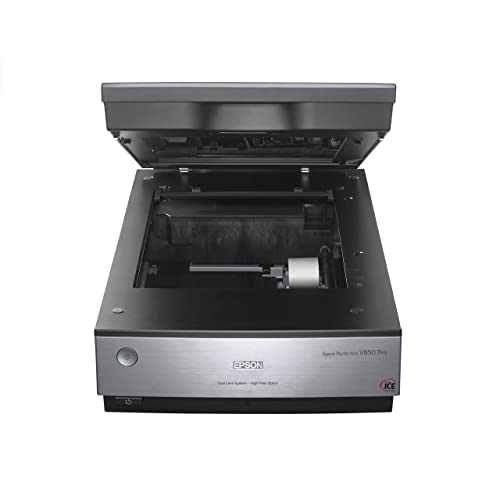
- 6400 dpi scanning resolution
- 4.0 Dmax supports tonal detail
- Dual-lens CCD scanning system
Best For: High-detail archival and professional scanning
High-Detail Archival Pick
Epson Perfection V800 Photo Scanner

- 6400 dpi resolution for detailed scans
- 4.0 Dmax for smooth tonal transitions
- Dual-lens system for photos and slides
Best For: Detailed photo and slide archival work
Compact Everyday Choice

- 4800 x 4800 dpi photo scanning
- One-cable USB Type-C connection
- Automatic scanning and photo enhancements
Best For: Compact home photo and document scanning
Large-Format Archive Workhorse
Epson Expression 13000XL Large-Format Scanner

- Scans reflective media up to 12.2 x 17.2 inches
- Batch scanning for multiple images
- SilverFast Ai software and color restoration
Best For: Large originals and higher-volume archival workflows
High-Resolution Film & Photo Pick

- 6400 dpi optical resolution
- Built-in 35mm film and slide scanning
- Digital ICE and Easy Photo Fix restoration
Best For: Mixed photo, slide, negative, and document archives
Compact Everyday Archive Scanner

- 4800 dpi optical resolution
- Compact USB-powered flatbed design
- Easy Photo Fix and one-touch scanning
Best For: Print photos, artwork, books, and documents
Medium-Format Film Archive Choice

- Scans 35mm and medium-format film
- 6400 x 9600 dpi maximum resolution
- Includes Digital ICE and film holders
Best For: Extensive archives with prints, slides, negatives, and medium-format film
Best High-Volume Choice – Epson FastFoto FF-680W
For photo scanners for archival collections, the Epson FastFoto FF-680W stands out when you need to digitize large batches efficiently. It scans up to 36 photos at once, supports duplex capture for handwritten notes, and offers 600 dpi TIFF output for archiving.
Best For: Families, researchers, and small archives processing large collections of mixed-size photographs.
Pros:
- Scans photos at up to one photo per second at 300 dpi.
- Batch-scans up to 36 photos and handles sizes through 8 x 10 inches.
- Includes auto enhancement, color restoration, red-eye reduction, and de-skew tools.
- Wireless connectivity, OCR document scanning, and cloud backup support add flexibility.
Cons:
- Its automated feeder may require extra care with especially delicate originals.
- Windows 7 or later is listed as the minimum system requirement.
The FF-680W is a practical archival workhorse, particularly when speed and batch handling matter more than a flatbed-only workflow.
Best Simple Photo Feeder – Plustek ePhoto Z300
The Plustek ePhoto Z300 is a straightforward option among photo scanners for archival collections. Its single-photo feed is faster than a flatbed workflow for many users, with support for common photo sizes and optical resolution up to 600 dpi.
Best For: Home archivists who want an easy way to digitize substantial numbers of standard-size prints.
Pros:
- Scans a 4 x 6 photo in about two seconds at 300 dpi.
- Supports 3 x 5, 4 x 6, 5 x 7, and 8 x 10 photos, plus letter and A4 paper.
- Can process approximately 1,000 photos in an afternoon according to the supplied notes.
- Includes one-click image enhancement and restoration functions.
Cons:
- Photos must be inserted one at a time.
- Its listed optical resolution tops out at 600 dpi.
Choose the Z300 for uncomplicated, relatively quick digitization of ordinary prints; it is less suited to workflows requiring batch feeding or advanced archival controls.
Best Professional Detail – Epson Perfection V850 Pro
For archival collections where image quality takes priority, the Epson Perfection V850 Pro offers a high-resolution flatbed approach. Its 6400 dpi resolution, CCD sensor, 4.0 Dmax, and dual-lens system are designed for detailed scans with smooth tonal gradations.
Best For: Professionals and serious archivists digitizing important originals where fine detail and tonal range are priorities.
Pros:
- Provides 6400 dpi resolution for highly detailed scans.
- Offers a 4.0 Dmax rating for shadow detail and tonal gradations.
- Uses a dual-lens system to select the appropriate lens for scanning.
- Supports Windows and Mac operating systems listed in the supplied notes.
Cons:
- At 20.9 pounds, it is substantially heavier than the sheet-fed alternatives.
- USB connectivity requires a computer-based setup.
- A flatbed workflow is generally slower for very large collections.
The V850 Pro is the quality-focused choice in this group, but its size, weight, and flatbed design make it better for careful, high-value scanning than rapid throughput.
Best Mixed-Media Workflow – Canon imageFORMULA RS40
The Canon imageFORMULA RS40 is a versatile pick among photo scanners for archival collections that also include documents and memorabilia. Its automatic feeder scans both sides at up to 40 items per minute and accepts varied media such as photos, Polaroids, receipts, cards, and IDs.
Best For: Users organizing mixed photo-and-document archives with Windows or Mac computers.
Pros:
- Scans both sides of photos and documents through an automatic feeder.
- Handles varied sizes and media, including Polaroids, cards, receipts, and documents.
- Includes software for enhancement, red-eye correction, face smoothing, and document editing.
- Supports Windows and Mac, with output options including JPG, TIF, BMP, PNG, PDF, and PPTX.
Cons:
- USB is the listed connection type, with no wireless connectivity noted.
- Its listed optical resolution options reach 600 dpi; 1200 dpi is interpolated.
- The automatic feeder may be less appropriate for unusually fragile originals.
The RS40 makes sense when an archive contains more than photographs, combining efficient feeding with broad media and file-format support.
High-Detail Archival Pick – Epson Perfection V800 Photo Scanner
For photo scanners for archival collections, the Epson Perfection V800 is designed for detailed work where tonal range and color accuracy matter. Its 6400 dpi resolution, CCD sensor, 48-bit color depth, and dual-lens system support high-quality scans of photos and film.
Best For: Archival users scanning photographs, slides, and other media who want fine detail and smooth shadow gradations.
Pros:
- 6400 dpi resolution captures precise color and detail.
- 4.0 Dmax supports smooth gradations and fine shadow detail.
- Dual Lens System selects between two lenses for optimized results.
- Supports photo and slide media with 48-bit color and 16-bit grayscale depth.
Cons:
- At 20.9 pounds, it is relatively heavy for a flatbed scanner.
- Its listed operating-system compatibility is centered on older Windows and Mac OS X versions.
The V800 is a strong choice when scan quality takes priority over portability. Its specialized optical system and broad media support make it particularly suitable for careful archival digitization.
Compact Everyday Choice – Canon CanoScan LiDE 400
Canon CanoScan LiDE 400 Slim Scanner, 7.7" x 14.5" x 0.4", Document & Photo Scanner, Black
Check Price On AmazonThe Canon CanoScan LiDE 400 is a practical option for photo scanners for archival collections when desk space and ease of use are important. It combines 4800 x 4800 dpi resolution with USB Type-C data and power, automatic scan mode, and built-in enhancement tools.
Best For: Home archivists and casual users scanning letter-size documents and photos in a compact workspace.
Pros:
- 4800 x 4800 dpi resolution preserves photo detail.
- USB Type-C provides data and power through one cable.
- Color restoration and dust removal help improve older photos.
- EZ Buttons and Auto Scan Mode simplify routine scanning.
Cons:
- CIS sensor and 4800 dpi resolution are less specialized than the higher-end archival models here.
- Its standard sheet capacity is one sheet at a time.
- Designed for letter-size media rather than large-format originals.
With a 3.6-pound body and slim profile, the LiDE 400 is easy to keep available for frequent scanning. It is best suited to straightforward photo and document projects rather than large-format or advanced film workflows.
Large-Format Archive Workhorse – Epson Expression 13000XL Large-Format Scanner
For photo scanners for archival collections involving oversized originals or batch projects, the Epson Expression 13000XL offers a large 12.2 x 17.2-inch reflective-media area. Its CCD sensor, 2400 x 4800 dpi resolution, 3.8 Dmax, and included SilverFast Ai software are geared toward professional scanning workflows.
Best For: Archives, studios, and institutions digitizing large photographs, artwork, or multiple images at a time.
Pros:
- Large-format bed accommodates reflective media up to 12.2 x 17.2 inches.
- Batch scanning supports multiple images in one workflow.
- Micro Step Drive technology and 3.8 Dmax support clarity and tonal detail.
- Easy Photo Fix provides one-touch color restoration and automatic dust removal.
Cons:
- Its 31.5-pound weight and large footprint require substantial workspace.
- Transparency scanning requires an optional unit sold separately.
- Its 2400 dpi resolution is lower than the V800’s listed 6400 dpi resolution.
The 13000XL is built for capacity and oversized materials rather than casual desktop use. Its batch capability, large bed, and professional software make it a compelling fit for organized archival digitization projects.
High-Resolution Film & Photo Pick – Epson Perfection V550
For photo scanners for archival collections that also need to handle film, the Epson Perfection V550 combines 6400 dpi optical resolution with a built-in transparency unit. It supports photos, documents, 35mm slides, negatives, and film, making it a versatile choice for mixed archival media.
Best For: Home archivists digitizing prints alongside 35mm slides, negatives, and film.
Pros:
- 6400 dpi optical resolution supports detailed enlargements up to 17 x 22 inches.
- Built-in transparency unit scans 35mm slides, negatives, and film.
- Digital ICE helps reduce the appearance of dust and scratches on film.
- Easy Photo Fix, batch photo scanning, and ABBYY OCR add useful workflow features.
Cons:
- At 9.6 pounds, it is less portable than compact flatbed models.
- USB 2.0 connectivity may feel dated for newer computer setups.
The V550 is a strong all-purpose archival scanner when film support and restoration tools matter as much as print quality. Its CCD sensor, 48-bit color depth, and film capabilities make it especially useful for varied family or institutional collections.
Compact Everyday Archive Scanner – Epson Perfection V19 II
If your photo scanners for archival collections need to stay simple and compact, the Epson Perfection V19 II is a practical flatbed option. Its 4800 dpi optical resolution handles photos, artwork, books, and letter-sized documents, while USB power helps keep the setup uncluttered.
Best For: Home and office users scanning everyday prints, artwork, and documents.
Pros:
- 4800 dpi optical resolution provides detailed photo scans and supports enlargements.
- Compact, lightweight design measures 9.9 by 9.9 by 1.5 inches and weighs 3.1 pounds.
- One-touch buttons simplify scanning, with letter-sized scans in as quickly as 10 seconds.
- Easy Photo Fix can restore color to faded photos with one click.
Cons:
- It is designed for documents and photos and does not list film or slide scanning support.
- USB connectivity and Windows 7 minimum requirements may limit convenience with some systems.
The V19 II is best suited to print-focused archiving rather than film preservation. Its small footprint, USB-powered operation, removable high-rise lid, and straightforward controls make it easy to use for routine digitization projects.
Medium-Format Film Archive Choice – Epson Perfection V600
For photo scanners for archival collections that include multiple film formats, the Epson Perfection V600 offers a broad scanning range. Its transparency unit handles 35mm mounted slides, negatives, and medium-format film, while 6400 x 9600 dpi maximum resolution supports high-resolution digital files and large enlargements.
Best For: Serious home archivists digitizing prints, 35mm film, mounted slides, and medium-format originals.
Pros:
- Scans 35mm mounted slides, up to 12 negatives, and medium-format film up to 6 x 22 cm.
- 6400 x 9600 dpi maximum resolution supports enlargements up to 17 x 22 inches.
- Digital ICE, Easy Photo Fix, and ArcSoft PhotoStudio support cleanup and restoration.
- Four customizable buttons streamline scanning, copying, email attachments, and PDFs.
Cons:
- Its 19-inch depth and 4100-gram weight require a dedicated workspace.
- It uses wired USB 2.0 connectivity rather than a newer connection standard.
- Its film-focused feature set may be more than needed for print-only collections.
The V600 is the most capable option here for varied film archives, especially when medium-format material is part of the collection. Its holders, transparency unit, restoration software, and 48-bit color depth provide a well-rounded archival workflow.
How We Picked the Best Photo Scanners for Archival Collections
We selected scanners across the main archival workflows: high-volume print digitization, careful flatbed scanning, film and negative conversion, document preservation, and large-format reproduction. We considered optical resolution, sensor and color capabilities, scanning speed, feeder design, software support, connectivity, and the ability to handle different media sizes.
For archival work, advertised maximum resolution is only one part of the decision. Consistent color, gentle handling, dust and scratch correction, reliable software, and repeatable results can matter more than a headline DPI figure. The best choice depends on whether you are preserving family snapshots, rare prints, negatives, records, or a mixed collection.
Quick Comparison
| Best For | What to Prioritize | Shortlist |
|---|---|---|
| Large photo batches | Automatic feeding, speed, and batch software | Epson FastFoto FF-680W, Canon RS40 |
| High-detail prints and film | Flatbed stability, optical resolution, and film holders | Epson V850 Pro, V800, V600, V550 |
| Simple photo scanning | Easy operation and compact design | Plustek ePhoto Z300, Epson V19 II |
| Documents and occasional photos | Versatility, footprint, and OCR support | Canon LiDE 400 |
| Oversized originals | Large-format bed and professional image quality | Epson Expression 13000XL |
Key Buying Factors for Photo Scanners for Archival Collections
Scanner Type and Workflow
Sheet-fed scanners are efficient for loose, uniform prints but require care with fragile, curled, thick, or valuable originals. Flatbed scanners take longer, yet they provide a safer approach for delicate photographs, albums, artwork, and mixed-size materials. A flatbed is usually the more flexible archival tool, while a feeder is better for volume.
Resolution and Image Quality
Look for optical resolution rather than interpolated resolution. Moderate settings are often sufficient for ordinary prints, while higher optical resolution helps with cropping, enlargements, small originals, and film. Good color depth and accurate tonal reproduction are equally important for faded or richly detailed photographs.
Film, Negatives, and Restoration Features
If the collection includes slides or negatives, confirm that the scanner includes the correct holders and supports the formats you have. Infrared-based dust and scratch correction can reduce cleanup time, but it may not work with every film type. Preserve an untouched master scan before applying restoration adjustments.
Software, File Formats, and Storage
Choose software that supports batch naming, resolution control, cropping, color correction, and common archival formats. Save lossless master files such as TIFF when storage allows, then create JPEG copies for sharing. Plan backups before scanning a large collection.
Who Should Buy Which Photo Scanners for Archival Collections?
Choose the Epson FastFoto FF-680W or Canon RS40 if your priority is scanning hundreds or thousands of loose photos quickly. They are practical for organized family archives and mixed document projects.
Choose the Epson V850 Pro, V800, V600, or V550 if image quality, flatbed handling, film support, or enlargement potential matters most. These models suit more careful workflows where each original deserves individual attention.
Choose the Plustek ePhoto Z300 or Epson V19 II for straightforward home photo scanning with a smaller footprint. They make sense for casual-to-moderate collections that do not require advanced film or oversized-media support.
Choose the Canon LiDE 400 for a compact everyday scanner that handles documents as well as photos. For artwork, maps, newspapers, or other oversized originals, the Epson Expression 13000XL is the more appropriate specialist option.