
If you need desktop-level performance in a compact footprint, mini PCs with 64GB RAM are the sweet spot for demanding work and smooth multitasking. They can handle heavy browser loads, creative apps, coding, virtualization, and even light gaming without taking over your desk.
This roundup focuses on the strongest options for 2026, with an eye on speed, expandability, connectivity, and the best fit for different kinds of buyers.
Best 10 Mini PCs with 64gb RAM Picks for 2026
AI Workstation Pick

- Core Ultra 9 285H, 16C/16T, up to 5.4GHz
- 64GB DDR5 RAM with up to 128GB support
- OCuLink, USB4, Wi-Fi 7, and quad 4K display support
Best For: Creators and power users wanting compact AI-focused performance
Gaming Productivity Pick

- Ryzen 7 H 255 with 8 cores and 16 threads
- 64GB DDR5 RAM and 1TB PCIe 4.0 SSD
- Triple display output with HDMI 2.1, DP 2.1, and USB4
Best For: Balanced work, media, and light-to-moderate gaming
Business Value Pick

- Core i7-12700T with 12 cores and 20 threads
- 64GB DDR4 RAM and 1TB NVMe SSD
- Triple 4K display support and Windows 11 Pro
Best For: Business users needing a compact, complete office PC
AI Expansion Pick

- Ryzen AI 9 HX 470 with up to 86 TOPS AI performance
- OCuLink and USB4 for eGPU and fast peripherals
- Upgradeable DDR5 memory and dual SSD slots
Best For: AI-focused users who want upgradeability and eGPU support
Ultra-Expand Workstation

- Ryzen 9 9955HX with 16 cores / 32 threads
- Dual 10G SFP+ and dual 2.5G LAN ports
- Triple 8K output and broad SSD support
Best For: Workstation users who want extreme networking and expansion
AI Gaming Pick

- Core Ultra 9 285H with Intel AI Boost NPU
- 64GB DDR5 and 3x M.2 expansion slots
- Oculink and quad-screen 8K display support
Best For: Users wanting AI features, gaming potential, and expansion
Network-First Workstation

- Core i9-13900H with 14 cores / 20 threads
- Dual 10G SFP+ plus dual 2.5G LAN ports
- PCIe x16 slot with RTX 3050 support
Best For: Advanced users who need fast networking and expansion
Flagship AI & LLM Powerhouse
GMKtec AI Mini PC Ryzen Al Max+ 395

- 16-core Ryzen AI Max+ 395 with 32 threads
- Uses a 64GB shared memory pool for AI and gaming
- Wi-Fi 7, 2.5GbE, and quad-display output
Best For: AI workloads, local LLMs, and heavy multitasking
Quiet Everyday Performer
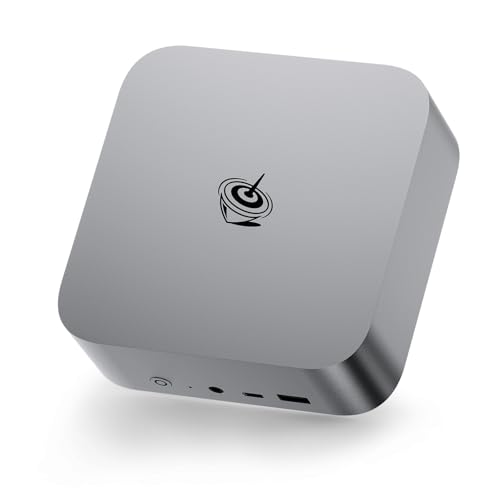
- 8-core Ryzen 7 H255 with up to 4.9GHz boost
- 64GB DDR5 plus dual PCIe 4.0 SSD slots
- Quiet MSC2.0 cooling with Radeon 780M graphics
Best For: Quiet productivity, editing, and multitasking
AI Workstation with Expandability

- Core Ultra 9 285H with up to 5.4GHz boost
- 99 TOPS AI performance plus Arc 140T graphics
- 64GB DDR5, 2TB SSD, and OCuLink support
Best For: Creative workloads, AI tasks, and eGPU expansion
AI Workstation Pick – MINISFORUM M1 Pro-285H
If you’re comparing mini pcs with 64gb ram for demanding work, the MINISFORUM M1 Pro-285H is built around a Core Ultra 9 285H, fast DDR5 memory, and a 2TB SSD. It aims at users who want a compact machine for content creation, light gaming, and multi-monitor productivity without giving up modern connectivity.
Best For: Creators and power users who want an AI-ready mini PC with strong expandability.
Pros:
- Intel Core Ultra 9 285H with 16 cores and 16 threads for heavy multitasking
- 64GB DDR5 RAM, with support for up to 128GB and dual PCIe 4.0 M.2 slots
- OCuLink support, USB4, Wi-Fi 7, and Bluetooth 5.4 for modern expansion and connectivity
- Quad-display output including HDMI 2.1, DP 1.4, and dual USB4
Cons:
- Built-in graphics are best suited to light gaming rather than top-tier AAA settings
- Higher-end feature set may be more than casual users need
This model stands out if your priority is performance density: strong CPU power, fast storage, and flexible expansion in a small footprint.
Gaming Productivity Pick – Beelink SER9 MAX
For shoppers looking at mini pcs with 64gb ram, the Beelink SER9 MAX combines an AMD Ryzen 7 H 255 processor with 64GB DDR5 and a 1TB PCIe 4.0 SSD. It is positioned as a compact workstation for video editing, photo editing, office work, virtualization, and 4K viewing.
Best For: Users who want a balanced mini PC for work, media, and light-to-moderate gaming.
Pros:
- AMD Ryzen 7 H 255 with 8 cores and 16 threads for everyday productivity and heavier apps
- 64GB DDR5 RAM plus 1TB PCIe 4.0 SSD for quick loading and multitasking
- Triple-display output via HDMI 2.1, DP 2.1, and USB4
- Includes AMD Radeon 780M graphics and a rich port selection, including 10Gbps LAN
Cons:
- Wi-Fi 6 and Bluetooth 5.2 are less current than newer wireless standards
- The compact size and broad feature set may be overkill for basic office use
The SER9 MAX is a practical choice when you want strong memory, solid graphics support, and flexible display output in a small desktop.
Business Value Pick – HP Prodesk 400 Mini PC
If you need mini pcs with 64gb ram for office-heavy workloads, the HP Prodesk 400 Mini PC keeps things simple and effective. Its Intel Core i7-12700T, 64GB DDR4 memory, and 1TB NVMe SSD are aimed at multitasking, data processing, and business productivity in a very small footprint.
Best For: Office users and business buyers who want a compact, ready-to-work desktop.
Pros:
- Intel Core i7-12700T with 12 cores and 20 threads for demanding business tasks
- 64GB DDR4 RAM and 1TB PCIe NVMe SSD for responsive everyday performance
- Supports up to three 4K displays through HDMI 2.1 and dual DisplayPort 1.4
- Includes Windows 11 Pro, HP keyboard, mouse, and vertical stand
Cons:
- Uses DDR4 rather than newer DDR5 memory
- Focused on business use, so it is less specialized for gaming or high-end creator workflows
This is the most straightforward pick in the group if you want dependable performance, triple-monitor support, and a complete office bundle.
AI Expansion Pick – Reatan X8 Mini PC
Among mini pcs with 64gb ram alternatives, the Reatan X8 stands out for AI and expansion-minded users, even though this configuration ships with 48GB RAM rather than 64GB. It pairs a Ryzen AI 9 HX 470 with an NPU, Radeon 890M graphics, OCuLink, and USB4, making it a flexible compact system for creators, programmers, and advanced multitaskers.
Best For: Users who prioritize AI features, upgrade paths, and eGPU support over a factory 64GB config.
Pros:
- Ryzen AI 9 HX 470 with 12 cores, 24 threads, and up to 86 TOPS AI performance
- OCuLink plus USB4 for strong external GPU and high-speed connectivity options
- Upgradeable DDR5 memory and dual M.2 SSD slots for long-term flexibility
- Wi-Fi 7, Bluetooth 5.4, and 2.5G LAN for modern networking
Cons:
- Ships with 48GB RAM, not 64GB
- Best value depends on whether you will actually use the AI and expansion features
If you want a compact machine with serious expansion headroom, this is a strong option—but it is not a true 64GB RAM model out of the box.
Ultra-Expand Workstation – MS-A2 64GB Ryzen 9
If you want mini pcs with 64gb ram for heavy multitasking, the MINISFORUM MS-A2 is built more like a compact workstation than a basic desktop. Its Ryzen 9 9955HX, triple 8K display support, and enterprise-friendly storage options make it a strong fit for demanding office, lab, and creator workloads.
Best For: Users who need fast networking, lots of expansion, and workstation-style performance in a mini PC.
Pros:
- AMD Ryzen 9 9955HX with 16 cores / 32 threads for demanding multitasking.
- Two 10G SFP+ ports plus two 2.5G LAN ports for very fast wired networking.
- Triple 8K output over HDMI and USB-C for multi-monitor setups.
- Expandable storage support includes M.2 2280/22110 and U.2 compatibility.
Cons:
- Integrated Radeon 610M graphics are fine for productivity, not high-end gaming.
- The networking and storage features are more specialized than most buyers need.
This is a mini PC for buyers who value connectivity and expansion almost as much as CPU speed. If your priority is a compact system that can sit in a serious workstation role, the MS-A2 stands out.
AI Gaming Pick – EVO-T1 Ultra 9 285H
For shoppers comparing mini pcs with 64gb ram, the GMKtec EVO-T1 focuses on balanced speed, AI features, and gaming-ready expandability. The Core Ultra 9 285H, Intel Arc 140T graphics, Oculink, and quad-screen support make it a versatile small system for work and play.
Best For: Buyers who want a compact AI-focused mini PC that can also handle gaming and multi-display setups.
Pros:
- Intel Core Ultra 9 285H with 16 cores and up to 5.4 GHz turbo.
- 64GB DDR5 memory paired with fast PCIe 4.0 storage and 3x M.2 expansion slots.
- Oculink support adds a strong option for eGPU-style expansion.
- Quad-screen 8K display support is useful for multitasking and creative work.
Cons:
- The integrated Arc 140T is capable, but it is still not a replacement for a full discrete GPU.
- Many of its best features are geared toward users who will actually use expansion ports and multi-monitor output.
The EVO-T1 is a smart pick if you want a mini PC that feels future-ready without going full workstation. It offers a strong blend of CPU performance, AI support, and practical upgrade paths.
Network-First Workstation – MS-01 i9 13900H
If your shortlist of mini pcs with 64gb ram includes systems for serious networking and work tasks, the MINISFORUM MS-01 is one of the most specialized options here. With a Core i9-13900H, dual 10G SFP+ ports, dual 2.5G LAN, USB4 display support, and even a PCIe x16 slot, it is built for users who need more than a standard compact PC.
Best For: Network-heavy users, workstation buyers, and tinkerers who want PCIe expansion in a small chassis.
Pros:
- Intel Core i9-13900H with 14 cores / 20 threads for strong general performance.
- Two 10G SFP+ ports and two 2.5G LAN ports for high-speed wired connectivity.
- Two USB4 outputs plus HDMI support for triple-display use.
- Includes a PCIe x16 slot and support for RTX 3050 expansion.
Cons:
- Built-in Iris Xe graphics are fine for productivity, not heavy GPU workloads by themselves.
- Its networking and expansion features make it more niche than a typical mini PC.
The MS-01 is a strong fit when connectivity and expandability are the priority. It is less about simple everyday use and more about giving advanced users a compact platform with real workstation flexibility.
Flagship AI & LLM Powerhouse – GMKtec AI Mini PC Ryzen Al Max+ 395
If you want one of the most capable mini pcs with 64gb ram for AI work, this GMKtec model is built around AMD’s Ryzen AI Max+ 395 and a large shared memory pool. It is designed to handle local LLMs, demanding multitasking, and even gaming, while also offering fast connectivity and broad display support for a compact workstation setup.
Best For: AI workloads, local LLM use, and high-performance compact desktops
Pros:
- Ryzen AI Max+ 395 with 16 Zen 5 cores, 32 threads, and up to 5.1GHz
- Massive integrated Radeon 8060S-class iGPU that can use the full 64GB pool for AI and gaming
- Quad-screen support with HDMI 2.1, DisplayPort 1.4, and dual USB4 ports
- Wi-Fi 7, 2.5GbE LAN, and Bluetooth 5.4 for modern connectivity
Cons:
- Premium performance focus may be more than casual users need
- Shared-memory design is optimized for AI and graphics, not upgrade simplicity
- Large feature set may come at a higher price than basic mini PCs
This is the most specialized option in the group, especially if your priority is AI acceleration, local model work, and strong integrated graphics in a small chassis. It stands out for users who want maximum capability rather than a simple office box.
Quiet Everyday Performer – Beelink SER9 MAX Ryzen 7 H255
The Beelink SER9 MAX is a strong pick among mini pcs with 64gb ram if you want a balanced machine for work, editing, and light gaming. Its Ryzen 7 H255 processor, Radeon 780M graphics, and quiet cooling make it a practical desktop replacement for users who need speed without a noisy fan profile.
Best For: Quiet productivity, 4K media work, and everyday multitasking
Pros:
- Ryzen 7 H255 8-core/16-thread processor with up to 4.9GHz boost
- 64GB DDR5 memory and dual PCIe 4.0 M.2 slots for up to 8TB storage
- Radeon 780M graphics for 4K editing, playback, and AAA gaming support
- Low-noise MSC2.0 cooling and broad port selection, including USB4
Cons:
- Wi-Fi 6 rather than the newer Wi-Fi 7 standard
- Integrated graphics are strong, but still below dedicated GPU performance
- Single 10Gbps LAN may be unnecessary for simpler home setups
For most buyers, this is the most straightforward all-around option: fast, quiet, and easy to slot into a home office or media setup. It offers the right mix of memory, storage expandability, and graphics power without pushing into ultra-niche territory.
AI Workstation with Expandability – MINISFORUM M1 Pro AI Mini PC
If you’re shopping for mini pcs with 64gb ram and want more workstation-style flexibility, the MINISFORUM M1 Pro is an impressive option. It pairs Intel’s Core Ultra 9 285H with 64GB DDR5, a 2TB SSD, quad-display support, and an OCuLink port for users who may want to add an external GPU later.
Best For: Creative work, AI-accelerated tasks, and future upgrade paths
Pros:
- Intel Core Ultra 9 285H with 16 cores, 16 threads, and up to 5.4GHz
- 99 TOPS total AI performance from CPU, NPU, and Intel Arc 140T GPU
- 64GB DDR5-5600 memory and 2TB PCIe 4.0 SSD included
- OCuLink, dual USB4, Wi-Fi 7, and quad-display output support
Cons:
- OCuLink depends on an available M.2 2280 PCIe 4.0 slot
- Its feature richness may be unnecessary for basic office use
- Performance-oriented design is likely overkill for simple browsing or streaming
This model is best viewed as a compact AI workstation rather than a basic mini PC. If you want strong integrated performance now and the option to add an external GPU later, it offers one of the most flexible setups here.
How We Picked the Best Mini PCs with 64gb RAM
We looked for Mini PCs with 64gb RAM that combine modern processors, fast SSD storage, and practical expansion options. Priority went to systems with strong CPU performance, solid cooling, useful I/O such as USB4, HDMI, OCuLink, 2.5G LAN, or 10G networking, and configurations that make sense for demanding everyday use.
We also favored models that balance performance with usability, since the best choice is not always the fastest chip on paper. For most buyers, thermals, port selection, and upgrade flexibility matter just as much as raw benchmark numbers.
Quick Comparison
Some Mini PCs with 64gb RAM are built for all-around productivity, while others lean toward workstation tasks, multi-monitor output, or external GPU support. Intel Core Ultra and Ryzen AI-class systems tend to suit mixed work and AI-assisted tasks, while higher-core workstation chips are better for heavier parallel workloads. If you need lots of displays or high-speed networking, look closely at the I/O rather than the CPU alone.
Key Buying Factors for Mini PCs with 64gb RAM
Processor Class
Match the chip to your workload. A premium mobile CPU is usually enough for office work, content creation, and development. If you run VMs, compile software, or process large files regularly, a higher-core workstation processor can be worth the extra cost.
Storage and Expansion
64GB RAM helps with multitasking, but storage speed affects responsiveness too. Look for PCIe 4.0 NVMe SSDs, extra M.2 slots, and room for future upgrades if you expect your needs to grow.
Connectivity
For docks, external GPUs, and multi-monitor rigs, ports matter. USB4, OCuLink, HDMI, DisplayPort, and dual LAN can dramatically change how useful a mini PC is in a home office or studio.
Thermals and Acoustics
More performance usually means more heat. A well-designed cooling system is important if you want sustained speed under load without distracting fan noise.
Who Should Buy Which Mini PCs with 64gb RAM?
If you want an everyday powerhouse, choose a balanced model with strong integrated graphics and modern USB4 connectivity. If your work depends on multiple displays or fast networking, a workstation-style mini PC is the better fit. Creators and advanced users who want external GPU support should prioritize OCuLink or similarly flexible expansion.
For most people, Mini PCs with 64gb RAM are ideal when you want a small system that still feels fast years from now. Choose based on your workload first, then compare ports, storage, and upgradability to avoid paying for power you will not use.