
Choosing the right microscope camera for live viewing can make close-up work faster, clearer, and far less frustrating. Whether you need a screen-based model for soldering or a USB camera for PC viewing, the best choice depends on how you plan to use it.
This roundup focuses on practical options with solid image quality, useful magnification, and real-time viewing features that matter for labs, classrooms, electronics, and hobby inspection.
Best 10 Microscope Cameras for Live Viewing Picks for 2026
Best for Measurement-Ready Live Viewing
AmScope 5MP USB Microscope Camera
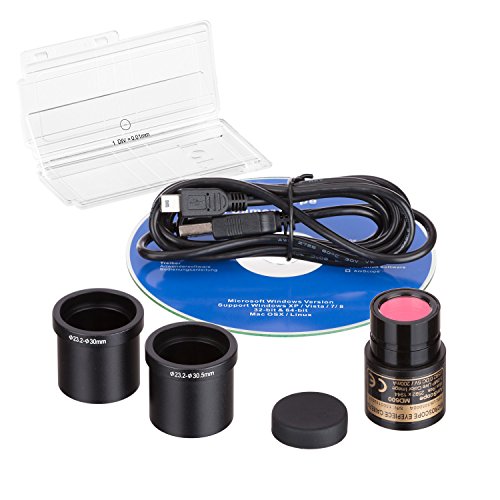
- 5MP live video and still-image capture
- Calibration kit included for precise measurements
- Fits 23mm, 30mm, and 30.5mm mounts
Best For: Students, hobbyists, and lab users who need live viewing plus measurement tools.
Best for Live Viewing on a Big Screen
TOMLOV DM9 7" Digital Microscope

- 7-inch rotatable LCD for easier live viewing
- 12MP camera with 1080P recording
- PC view support plus included 16GB card
Best For: Hobbyists and repair users who want a comfortable screen-based microscope for live viewing.
Best for Zoom Flexibility
16MP USB Camera with 4X Manual Zoom
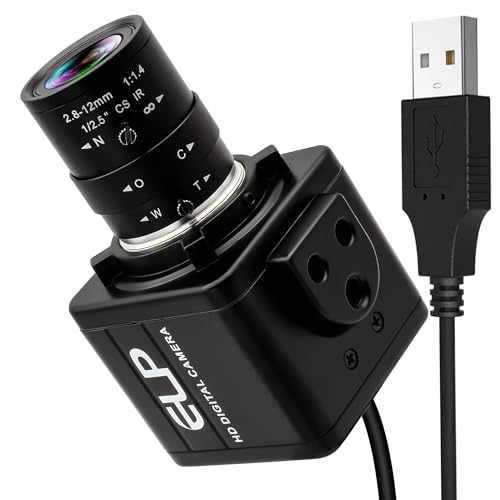
- 16MP sensor for crisp live detail
- 2.8-12mm lens with 4X manual zoom
- Plug-and-play support for Windows, Linux, and Jetson Nano
Best For: Users who need a flexible USB microscope camera for live inspection, streaming, and machine vision.
Best for Kids Learning
Odatay 4K 1000X Handheld Microscope

- 200x–1000x zoom with a live-view-friendly low setting
- 4K camera, 2.4-inch screen, and photo/video capture
- Includes slides, TF card, and a portable carry design
Best For: Kids, families, and classrooms that want a simple handheld microscope for live viewing and STEM exploration.
Best for Industrial Live Video
37MP 1080P 60FPS USB HDMI Microscope Camera

- 1080P HDMI live viewing at up to 60FPS
- USB connection for computer viewing and capture
- Includes mounting adapter and basic image controls
Best For: Industrial benches, labs, and repair stations needing live HDMI viewing with USB support.
Best for Live PC Viewing
Elikliv 4.3-Inch LCD Coin Microscope

- 4.3-inch LCD with 8 adjustable LED lights
- Windows and MacBook PC viewing support
- Height-adjustable stand with rechargeable battery
Best For: Coins, electronics, and hobby users who want standalone LCD viewing plus PC live display.
Best for Classroom Live Viewing
TOMLOV DM301 Pro 7" Microscope

- Large 7" IPS screen for comfortable live viewing
- WiFi app control plus TV/PC output
- Dual LED lighting and built-in measurement scale
Best For: Students, teachers, and families who want a large-screen digital microscope for live demos and slide viewing.
Best for WiFi Live Viewing
Skybasic Wireless Digital Microscope

- WiFi and USB live viewing support
- 8 adjustable LED lights for clearer detail
- Portable handheld design for easy carry
Best For: Casual users and hobbyists who want a portable microscope camera for live viewing on phones or computers.
Best for Coins & Soldering
Andonstar AD210 10.1" Digital Microscope

- Large 10.1-inch IPS screen for comfortable live viewing
- Good working distance and sturdy stand for coins and soldering
- Includes bottom light stage, slide kit, and 32GB card
Best For: Coin collectors and electronics hobbyists who want a large-screen digital microscope with recording.
Best for Portable Live Viewing
4.3-Inch LCD Digital Microscope

- 4.3-inch screen for direct live viewing
- 1080P video and 10MP image capture
- Built-in battery plus included 32GB card
Best For: Hobbyists and repair users who want a portable, screen-based microscope for quick inspection and recording.
Best for Measurement-Ready Live Viewing – AmScope 5MP USB Microscope Camera
If you want one of the more practical microscope cameras for live viewing, this AmScope 5.0 MP USB model is a solid pick for streaming, still capture, and measurement-focused work. It connects by USB, supports common Windows versions, and includes software tools that make it easier to edit images, measure specimens, and document findings.
Best For: Students, hobbyists, and lab users who want a straightforward live-view camera with calibration tools and broad mount compatibility.
Pros:
- 5MP capture with live video streaming and still-image output
- Includes calibration kit for more accurate measurements
- Windows software adds stitching, EDF, and measurement features
- Fits 23mm, 30mm, and 30.5mm microscope eyepiece sizes
Cons:
- Windows-focused compatibility may limit Mac users
- USB camera is better for documentation than high-end imaging
- Software features may take some setup time for beginners
Overall, this is a dependable choice if you need microscope cameras for live viewing with extra measurement capability built in. It is especially appealing when you want a simple USB setup that can handle both visual monitoring and basic analysis without adding much complexity.
Best for Live Viewing on a Big Screen – TOMLOV DM9 7" Digital Microscope
If you want one of the more practical microscope cameras for live viewing, the TOMLOV DM9 stands out for its 7-inch rotatable LCD, solid 12MP imaging, and easy plug-in workflow. It’s a good fit for people who want a screen-first microscope for coins, soldering, and casual inspection without relying on a phone or complicated setup.
Best For: Hobbyists, students, and repair users who want a larger built-in display for comfortable live viewing and close inspection.
Pros:
- 7-inch rotatable screen makes live viewing easier and reduces neck strain.
- 12MP camera with 1080P video gives sharp detail for coins, electronics, and small objects.
- PC view support lets you mirror the microscope on Windows or macOS for a bigger display.
- Includes 16GB storage and adjustable LED lighting for recording and viewing out of the box.
Cons:
- Not as portable as compact handheld microscopes.
- True magnification depends on working distance and screen size, so results vary by use case.
Overall, the DM9 is a strong pick if your priority is comfortable live inspection rather than lab-grade imaging. Among microscope cameras for live viewing, it offers a useful balance of screen size, lighting, and simple computer connectivity for everyday hobby and repair work.
Best for Zoom Flexibility – 16MP USB Camera with 4X Manual Zoom
If you need microscope cameras for live viewing that can switch between wide framing and tighter detail shots, this 16MP USB camera is built for that kind of flexibility. The 2.8-12mm CS-mount lens gives you manual zoom and focus control, while UVC plug-and-play support keeps setup simple on Windows, Linux, and Jetson Nano.
Best For: Users who want a high-resolution USB microscope camera with adjustable zoom for inspection, streaming, and machine vision setups.
Pros:
- 16MP sensor captures sharp, detailed live images
- 4X optical manual zoom helps adapt to different working distances
- Plug-and-play UVC compatibility makes setup straightforward
- Works with OpenCV, Lightburn, and common streaming software
Cons:
- Manual zoom and focus require hands-on adjustment
- CS-mount lens design may be less convenient than fixed-focus options
- Not the simplest choice if you want a true no-tuning microscope camera
For buyers comparing microscope cameras for live viewing, this model stands out for its combination of resolution and optical flexibility. It is a practical pick when you need a camera that can handle both inspection-style closeups and broader live framing without changing hardware.
Best for Kids Learning – Odatay 4K 1000X Handheld Microscope
If you want one of the more kid-friendly microscope cameras for live viewing, the Odatay 4K handheld model is built for simple exploration at home, in class, or outdoors. Its 200x–1000x range, built-in screen, and photo/video capture make it easy to inspect bugs, plants, and other small objects without needing a separate device.
Best For: Young learners who want a portable, easy-to-use microscope for live viewing, STEM activities, and basic image capture.
Pros:
- 200x–1000x magnification with a low setting for longer-distance viewing
- 4K camera, 2.4-inch screen, and built-in photo/video functions
- Includes 32GB TF card, 12 prepared slides, and a protective case
- Lightweight handheld design with lanyard and tripod support
Cons:
- Small 2.4-inch screen may feel cramped for extended viewing
- Best suited to entry-level use rather than advanced microscopy
Overall, this is a practical starter pick for families and classrooms that want microscope cameras for live viewing without a complicated setup. It leans more toward fun, portable learning than lab-grade performance, which is exactly what many kids need.
Best for Industrial Live Video – 37MP 1080P 60FPS USB HDMI Microscope Camera
If you need microscope cameras for live viewing with both HDMI and USB connectivity, this 37MP industrial camera is built for straightforward real-time display and capture. It’s a practical pick for bench work, inspections, and classroom demos where live output matters more than advanced imaging features.
Best For: Industrial users, repair benches, and labs that want a camera for live HDMI viewing plus basic USB computer use.
Pros:
- HDMI output supports smooth 1080P live viewing at up to 60FPS.
- USB connection offers simple computer use and 2MP video output.
- Includes a conversion adapter for easier mounting on compatible microscopes.
- Useful controls like digital zoom, brightness adjustment, and freeze function.
Cons:
- USB video resolution is limited compared with the advertised photo spec.
- Best suited to industrial-style setups rather than casual plug-and-play use.
- C mount compatibility may require checking your microscope before buying.
For microscope cameras for live viewing, this model stands out for its HDMI workflow and inspection-friendly controls, but it makes the most sense if you already have a compatible microscope and want a reliable on-screen view.
Best for Live PC Viewing – Elikliv 4.3-Inch LCD Coin Microscope
If you want microscope cameras for live viewing that make inspection easy on the eyes, this Elikliv model is a practical pick. Its built-in 4.3-inch LCD gives you a real-time image without needing to hunch over a laptop, and the PC connection adds a bigger shared view when you want to analyze or present details.
Best For: Coins, electronics, and hobby users who want a simple handheld microscope with both standalone viewing and PC live display.
Pros:
- 4.3-inch LCD shows clear live images with 8 adjustable LED lights for better visibility
- Windows and MacBook compatible for larger-screen viewing and easy image/video sharing
- Height-adjustable stand helps fine-tune focus and working distance
- Rechargeable design supports portable use for up to 3 hours
Cons:
- Actual magnification varies a lot with screen size and distance from the subject
- Not as flexible as a true optical microscope for advanced lab work
- Best results depend on stable positioning and good lighting setup
This is a strong value if you need microscope cameras for live viewing in a compact, easy-to-use format. It’s especially appealing for coin collectors, electronics repair, and STEM demos where a built-in screen and PC output are more useful than maximum raw magnification.
Best for Classroom Live Viewing – TOMLOV DM301 Pro 7" Microscope
If you want microscope cameras for live viewing that are easy to share in a classroom, home lab, or family science setup, the TOMLOV DM301 Pro is a strong all-in-one pick. Its 7-inch IPS display, WiFi app control, and TV/PC output make it simple to watch specimens in real time without a complicated setup.
Best For: Students, teachers, and families who want a large-screen digital microscope for live demos, slide viewing, and basic biology work.
Pros:
- 7″ IPS screen gives a bright, comfortable live-viewing experience
- WiFi app support makes wireless control and media capture easy
- USB/HD output works well for TVs, laptops, and classroom sharing
- Dual LED lighting and built-in scale help with clearer specimen observation
Cons:
- Bulkier than compact handheld microscopes
- 1200X claims are more useful for learning than lab-grade research
- Some users may prefer a simpler model if they only need occasional viewing
This is a practical choice if you want microscope cameras for live viewing with a larger screen and easy sharing features. It is especially appealing for entry-level biology lessons, group demonstrations, and anyone who wants a microscope that feels ready to use right out of the box.
Best for WiFi Live Viewing – Skybasic Wireless Digital Microscope
If you want microscope cameras for live viewing that can stream directly to a phone or computer, this Skybasic handheld model is a practical pick. It pairs WiFi and USB connectivity with a simple app-based setup, making it easy to view, capture, and share close-up images without needing a full lab-style microscope.
Best For: Casual users, students, and hobbyists who want a portable microscope camera for quick live viewing on iPhone, Android, Mac, or Windows.
Pros:
- WiFi and USB support for flexible live viewing on mobile devices or computers
- 8 adjustable LEDs help improve clarity on small objects and detailed surfaces
- One-button photo and video capture is convenient for fast documenting
- Portable handheld design is easy to carry for field use and kids’ projects
Cons:
- Not ideal for professional biology or precision lab work
- Requires a close working distance and fixed-focus positioning for sharp images
- WiFi app setup can be finicky if you don’t use the latest software version
This is a strong everyday choice for microscope cameras for live viewing if you care more about convenience, portability, and easy sharing than advanced optical performance. It fits casual inspection tasks well, especially when you want a simple way to view specimens live on a screen.
Best for Coins & Soldering – Andonstar AD210 10.1" Digital Microscope
If you want one of the more versatile microscope cameras for live viewing, the Andonstar AD210 is a practical all-in-one pick. Its large 10.1-inch IPS screen, adjustable stand, and included bottom light make it easy to inspect coins, solder joints, and slides without constantly changing setups.
Best For: Coin collectors, electronics repair, and hobbyists who want a large-screen digital microscope with live viewing and recording.
Pros:
- Large 10.1-inch IPS display with a wide viewing angle for comfortable live inspection
- Strong fit for coin work thanks to the long working distance and sturdy metal stand
- Useful for soldering and biology projects with bottom light stage and slide kit
- Includes a 32GB card for easy photo and video capture
Cons:
- Bigger footprint than compact USB microscopes
- Less portable if you need a travel-friendly setup
- Screen-based viewing is great for live use, but not the same as a traditional eyepiece microscope
Overall, the AD210 stands out if you want microscope cameras for live viewing that can handle multiple jobs well. It is especially appealing for shoppers who value a big screen, stable stand, and easy recording in one kit.
Best for Portable Live Viewing – 4.3-Inch LCD Digital Microscope
If you want microscope cameras for live viewing without needing a laptop, this LCD digital microscope is a practical pick. Its 4.3-inch screen, built-in battery, and included SD card make it easy to inspect objects, capture images, and record video right out of the box.
Best For: Hobbyists, students, and repair users who want a self-contained microscope for on-the-spot viewing and recording.
Pros:
- 4.3-inch LCD display keeps live viewing simple and portable
- 1080P video and up to 10MP capture for clear close-up detail
- Built-in battery and 32GB card support use away from a computer
- 8 adjustable LEDs help brighten coins, boards, jewelry, and more
Cons:
- Not designed for cell or medical microscopy
- Higher magnification claims may be less useful without steady positioning
- Handheld use is convenient, but a stable setup still improves results
For buyers comparing microscope cameras for live viewing, this model stands out for convenience rather than lab-grade precision. It is a good fit when you want a compact screen-based microscope that can inspect small objects, save footage, and travel easily.
How We Picked These Microscope Cameras for Live Viewing
We looked for models that balance clarity, ease of use, and flexible viewing. Priority went to cameras and digital microscopes with dependable real-time display, usable resolution, stable mounting options, and controls that make focusing or capturing images straightforward. We also considered whether a model works well on its own, with a PC, or both.
Quick Comparison
The best Microscope Cameras for Live Viewing generally fall into three groups: standalone LCD microscopes for simple desk use, USB or HDMI cameras for computer-connected workflows, and wireless or portable models for fast viewing on the move. Standalone units are usually easiest for beginners, while PC-connected cameras tend to offer better integration for recording, software use, and lab-style setups.
Key Buying Factors for Microscope Cameras for Live Viewing
Display and Connectivity
Decide whether you want an integrated screen, USB output, HDMI output, or wireless viewing. LCD models are convenient for quick inspection, while USB and HDMI options are better if you want to use a larger monitor or software tools.
Resolution and Frame Rate
Higher resolution helps with still detail, but frame rate matters for smooth motion and easier focusing. For live work, a balanced camera often performs better than one that only advertises a very high megapixel count.
Working Distance and Magnification
Make sure the camera leaves enough room between the lens and your subject. For electronics, coins, and general inspection, working distance can matter more than maximum magnification.
Lighting and Stability
Built-in LEDs, adjustable stands, and a steady base improve live viewing dramatically. Good lighting reduces glare and helps reveal fine detail without constant repositioning.
Compatibility
If you plan to use the camera with a PC, check operating system support, software requirements, and whether the included mount matches your microscope or workstation.
Who Should Buy Which Microscope Cameras for Live Viewing?
Choose a standalone LCD microscope if you want the easiest all-in-one setup for hobbies, coins, repairs, or kids’ learning. Pick a USB or HDMI microscope camera if you need computer viewing, recording, or more advanced workflows. Wireless and portable models are best for casual use, classroom movement, or quick inspections where convenience matters most.
For most buyers, the right choice comes down to one question: do you want the simplest screen-based live view, or a camera that integrates with your computer setup? Start there, then match resolution, lighting, and working distance to your actual tasks.