
Choosing the right microscope camera kit with software can make the difference between blurry guesswork and crisp, shareable images you can actually use.
Below, we’ve rounded up 10 strong options for students, hobbyists, repair work, and lab use, with an eye on image quality, setup simplicity, and software support.
Best 10 Microscope Camera Kits with Software Picks for 2026
Best for Kids’ STEM Learning
AmScope IQCREW 85+ Piece Camera Kit

- Color USB camera and kid-friendly software for live viewing and edits
- 85+ piece bundle includes slides, tools, and experiment materials
- Metal frame, dual lights, and 120x–1200x magnification
Best For: Families and young beginners who want a complete microscope kit with camera capture and simple software.
Best for Multi-OS Compatibility
Swiftcam 16MP Microscope Camera Kit

- 16MP camera for high-detail microscope imaging
- USB 3.0 for fast computer transfer
- Software included for Windows, Mac, and Linux
Best For: Users who need a flexible microscope camera kit with broad OS support and included adapters.
Best for Classroom Screen Sharing
TOMLOV DM301 Pro 7" Microscope

- 7" IPS screen with adjustable viewing angle
- WiFi app support for wireless capture and zoom
- 8MP photos, 1080P video, and TV/PC output
Best For: Students, teachers, and hobbyists who need easy screen sharing and simple digital capture.
Best for Measurement-Ready Imaging
AmScope MU500-CK 5MP USB Camera Kit

- 5MP camera for stills and live video
- Software adds stitching, EDF, and measurement tools
- Calibration kit included for more accurate readings
Best For: Users who need a microscope camera kit with calibration tools and measurement-focused software support.
Best for Lab-Style Imaging
White Binocular Microscope with USB Camera

- USB camera for PC photo and video capture
- 40X-2000X magnification with WF10x and WF25x eyepieces
- Dual LED lights plus fine focus control
Best For: Students and hobbyists who want a binocular microscope with USB imaging for basic documentation.
Best for Still Imaging
AmScope 5MP USB Microscope Camera Kit
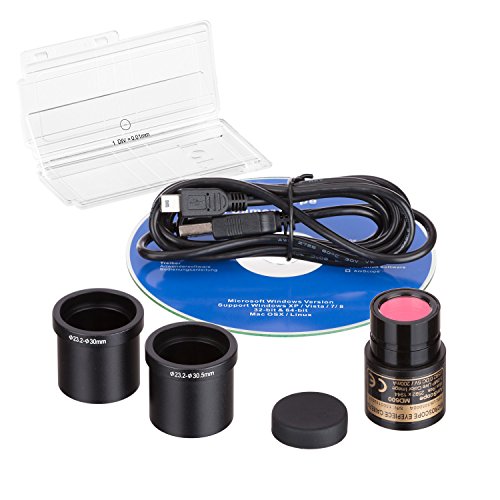
- 5.0 MP sensor for clear still captures
- USB live video and image preview support
- Calibration kit included for measurements
Best For: Students, hobbyists, and lab users who need a simple microscope camera for still images and basic calibration.
Best for Imaging and Teaching
SWIFT SW380T Trinocular Microscope Kit

- 5.0 MP camera with included Mac/Windows software
- Trinocular head for viewing, recording, and live capture
- Comes with slides, cover slips, and a smartphone adapter
Best For: Students, educators, and hobbyists who want a microscope-camera bundle for slide imaging and documentation.
Best for Coins and Repairs
Andonstar AD210 10.1" LCD Microscope

- 10.1-inch IPS screen with 1080P video and 12MP photos
- Includes coin, soldering, and biological slide accessories
- 32GB card and card reader make saving captures simple
Best For: Coin collectors and electronics repair users who want a versatile bench microscope with easy image capture.
Best for Classroom Imaging
AmScope B120 Binocular Microscope with 5MP Camera
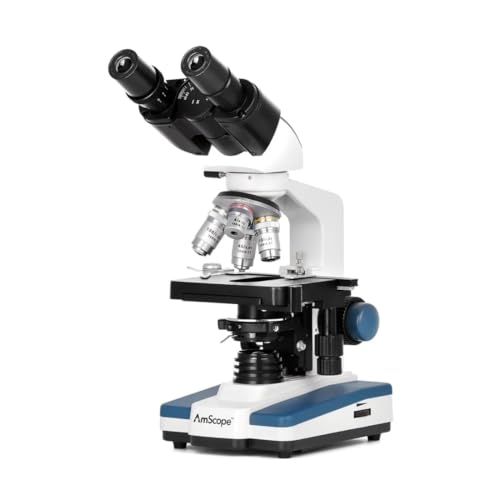
- 5MP USB camera with software for capture and analysis
- 40X-2500X magnification for learning and basic lab work
- LED lighting and binocular head improve viewing comfort
Best For: Students, educators, and entry-level lab users who need a microscope and camera bundle for imaging.
Best Simple Pick
Trinocular 40X-5000X Microscope with HD USB Camera

- Trinocular head supports USB camera capture and documentation
- Wide magnification range suits teaching, hobby, and lab use
- Includes dual mechanical stage plus a large accessory kit
Best For: Students, hobbyists, and small labs that want a trinocular microscope with imaging support.
Best for Kids’ STEM Learning – AmScope IQCREW 85+ Piece Camera Kit
If you’re comparing microscope camera kits with software, this AmScope IQCREW bundle stands out for turning a microscope into a guided STEM activity. It combines a real metal-frame student microscope, a color USB camera, and kid-friendly editing software so children can view slides, capture images, and learn the basics in one package.
Best For: Families, homeschoolers, and young beginners who want a complete microscope kit with camera capture and simple software for school projects.
Pros:
- Includes a color USB2.0 camera plus interactive software for live viewing and image editing
- 85+ piece accessory kit gives kids slides, tools, and experiment materials right away
- Metal microscope body, dual light sources, and 120x–1200x magnification add real versatility
- Rugged storage case helps keep all the pieces organized between uses
Cons:
- Software and camera setup may take a little help from an adult
- Designed for kids and beginners, so it won’t replace a lab-grade microscope
As a starter option, this kit is a strong fit if you want microscope camera kits with software that emphasize hands-on learning over pro-level imaging. The bundled slides, capture tools, and guided software make it easier for kids to explore specimens and save their results.
Best for Multi-OS Compatibility – Swiftcam 16MP Microscope Camera Kit
If you want microscope camera kits with software that can move between Windows, Mac, and Linux setups, this Swiftcam is a practical all-in-one option. Its 16MP sensor, USB 3.0 connection, and included reduction lens make it a solid fit for capturing full-color photos and video from a trinocular port or eyetube.
Best For: Users who need a flexible microscope camera kit with broad OS support, included adapters, and software in the box.
Pros:
- 16MP resolution for detailed stills and video capture
- USB 3.0 helps speed up image transfer to your computer
- Included adapters support 23.2mm, 30mm, and 30.5mm tube sizes
- Software included for Windows, Mac, and Linux
Cons:
- Requires a compatible microscope port or eyetube setup
- Software experience may vary by operating system
Overall, this kit is a good fit if you need microscope camera kits with software that emphasize compatibility and straightforward mounting over advanced imaging extras. The reduction lens and adapter set make it easier to match the camera to common microscope configurations.
Best for Classroom Screen Sharing – TOMLOV DM301 Pro 7" Microscope
If you want microscope camera kits with software that are easy to use in class, at home, or in a small lab, the TOMLOV DM301 Pro is a practical all-in-one pick. Its 7-inch IPS screen, WiFi app support, and TV/PC output make it simple to inspect specimens, capture media, and share views with a group without extra setup.
Best For: Students, teachers, and hobbyists who need a digital microscope with a built-in screen, app connectivity, and easy display sharing.
Pros:
- 7″ IPS display with adjustable viewing angle for comfortable extended use
- App support with wireless viewing, zooming, and photo/video capture on iOS and Android
- 8MP photos, 1080P video, and USB/HD output for larger displays
- Dual LED lighting and built-in measurement scale for clearer, more precise observation
Cons:
- Not the most compact option for travel or tight storage
- Wireless features depend on app and device compatibility
- Better suited to learning and general specimen viewing than advanced lab workflows
This is a strong fit if you want microscope camera kits with software that prioritize ease of sharing over complexity. The screen, app controls, and measurement tools make it especially useful for classroom demos and beginner-friendly science exploration.
Best for Measurement-Ready Imaging – AmScope MU500-CK 5MP USB Camera Kit
If you want one of the more practical microscope camera kits with software, the AmScope MU500-CK focuses on capture, measurement, and compatibility. Its 5MP USB camera handles stills and live video, while the included software adds editing, stitching, EDF, and measurement tools for more serious lab or classroom workflows.
Best For: Users who need a microscope camera kit with included calibration tools and measurement-focused software support across multiple operating systems.
Pros:
- 5MP sensor captures still images and streams live video
- Windows software includes stitching, EDF, editing, and measurement features
- Included calibration kit helps improve measurement accuracy
- Wide compatibility with Windows, Mac OS X, Linux, and common imaging standards
Cons:
- Software feature set is strongest on Windows
- May require adapter selection to match your microscope mount
Overall, this is a strong pick for buyers who care more about reliable measurement and documentation than flashy extras. Among microscope camera kits with software, it stands out for its calibration kit and broad device support.
Best for Lab-Style Imaging – White Binocular Microscope with USB Camera
If you want one of the more capable microscope camera kits with software for home study, lab work, or classroom use, this binocular model covers the essentials well. It combines 40X-2000X magnification, dual LED lighting, and a USB electronic eyepiece so you can capture photos and videos on a PC while examining specimens.
Best For: Students, hobbyists, and beginner researchers who want a binocular microscope with built-in USB imaging for documentable observations.
Pros:
- USB 2.0 camera eyepiece supports photo and video capture on a computer.
- Wide 40X-2000X magnification range with WF10x and WF25x eyepieces.
- Dual LED lighting helps improve visibility across different sample types.
- Coaxial and fine focus controls make sharp adjustments easier.
Cons:
- Software experience may depend on the PC and camera setup.
- Bulkier than simple handheld or entry-level digital microscopes.
As a practical starter lab scope, it stands out for users who need both optical magnification and a straightforward imaging setup. If you’re comparing microscope camera kits with software, this one is appealing for its binocular viewing comfort and built-in USB capture workflow rather than advanced microscopy extras.
Best for Still Imaging – AmScope 5MP USB Microscope Camera Kit
If you want one of the more practical microscope camera kits with software for turning a scope into a simple digital imaging setup, this AmScope 5.0 MP USB still and live video camera is a solid pick. It combines a calibration kit with USB capture support, making it easier to document specimens, measure features, and share images without a complicated workflow.
Best For: Students, hobbyists, and lab users who need a straightforward USB microscope camera for still images, live preview, and basic calibration.
Pros:
- 5.0 MP sensor supports detailed still captures for documentation
- USB connection keeps setup simple on compatible computers
- Includes a calibration kit for measurement-oriented work
- Useful for both live viewing and image capture tasks
Cons:
- Software experience may vary depending on your operating system
- Not ideal if you need advanced imaging features or pro-grade video
Overall, this is a straightforward option if your priority is reliable still imaging and calibration rather than high-end video features. Among microscope camera kits with software, it stands out for buyers who want a simple, affordable workflow for capturing and measuring microscope images.
Best for Imaging and Teaching – SWIFT SW380T Trinocular Microscope Kit
If you want one of the more complete microscope camera kits with software, the SWIFT SW380T is built around a trinocular head, a 5.0 MP camera, and included Mac/Windows software for capture, stitching, EDF, and measurement. It’s a practical pick for students, clinicians, and hobbyists who want both a strong optical microscope and a ready-to-use imaging workflow.
Best For: Buyers who need a trinocular compound microscope with camera software for slides, teaching, and documenting specimens.
Pros:
- Includes a 5.0 MP camera with editing and measurement software for Mac and Windows
- Trinocular head supports live viewing, recording, and image capture
- Wide magnification range and two-layer mechanical stage help with detailed slide work
- Smartphone adapter, slides, cover slips, and cleaning paper add extra value
Cons:
- Software support is limited to older Mac/Windows versions listed by the seller
- Higher magnification claims may be more than most users will routinely need
As a package, this SWIFT model stands out in microscope camera kits with software because it combines imaging tools, slide accessories, and a user-friendly compound microscope in one setup. If you want a kit that can handle both observation and documentation, it’s a solid all-in-one option.
Best for Coins and Repairs – Andonstar AD210 10.1" LCD Microscope
If you want microscope camera kits with software-friendly capture features in a large-screen desktop format, the Andonstar AD210 is a practical all-in-one pick. Its 10.1-inch IPS display, 1080P video, 12MP stills, and included 32GB card make it easy to document coins, solder joints, and slide samples without extra accessories.
Best For: Coin collectors, electronics repair hobbyists, and users who want a versatile microscope with easy photo/video capture and a big built-in screen.
Pros:
- Large 10.1-inch IPS display with wide viewing angles
- Useful 1cm to 26cm working distance for coins and soldering
- Includes bottom light stage, slide kit, 32GB card, and card reader
- Sturdy stand with ample height and easier vertical adjustment
Cons:
- Bulkier than compact handheld microscope options
- Not the best choice if you need advanced PC software controls
- Designed more for bench use than portable field inspection
Overall, the AD210 is a strong value for buyers who want a versatile desktop microscope that can cover coins, soldering, and slides in one kit. It fits the needs of microscope camera kits with software-oriented workflows best when you mainly want simple capture, easy review, and a large built-in display rather than a laptop-dependent setup.
Best for Classroom Imaging – AmScope B120 Binocular Microscope with 5MP Camera
If you want one of the more practical microscope camera kits with software for teaching, lab work, or first-time digital capture, this AmScope B120 bundle is a strong value. It pairs a binocular compound microscope with a 5MP USB camera and software, so you can view samples directly and save images for review, reporting, or demos.
Best For: Students, educators, and entry-level lab users who want a ready-to-use microscope and camera setup for image capture and analysis.
Pros:
- Includes a 5MP USB camera with professional software for capturing and analyzing images
- Wide 40X-2500X magnification range suits lessons, basic lab tasks, and clinic use
- LED illumination with fly-eye lens helps deliver bright, daylight-balanced viewing
- Binocular Siedentopf head makes longer sessions more comfortable
Cons:
- Better suited to educational and general lab use than advanced research workflows
- Setup and software learning may take a little time for first-time users
This is a smart pick if you need microscope camera kits with software that balance image capture, ease of use, and overall value. It is especially appealing for classrooms and hands-on training where both live viewing and digital documentation matter.
Best Simple Pick – Trinocular 40X-5000X Microscope with HD USB Camera
If you want microscope camera kits with software in a more lab-ready package, this trinocular model stands out for its wide magnification range, dual mechanical stage, and included HD USB camera support. It’s a practical choice for buyers who want both visual observation and image capture without moving up to a full research-grade setup.
Best For: Students, hobbyists, and small labs that need a trinocular microscope for live viewing, photo capture, and basic documentation.
Pros:
- Trinocular head with HD USB camera support for imaging and documentation
- Wide 40X-5000X range with 195 achromatic objectives for detailed viewing
- Dual mechanical stage and coaxial focus controls improve sample handling
- Useful accessory pack included for getting started right away
Cons:
- High top-end magnification is partly dependent on eyepiece combinations
- Software experience may vary depending on the USB camera setup
- Bulkier than simpler entry-level microscopes
This is a strong fit if you want a feature-rich trinocular scope that can serve as part of microscope camera kits with software for teaching, inspection, or documentation. It’s less about portability and more about giving you a flexible lab-style platform with imaging capability built in.
How We Picked These Microscope Camera Kits with Software
We focused on Microscope Camera Kits with Software that offer a practical balance of image quality, compatibility, and day-to-day usability. Priority went to models with dependable USB connectivity, included calibration tools, and software that supports capture, measurement, or live viewing without unnecessary complexity.
We also considered the types of users most likely to benefit: beginners who want easy setup, educators who need classroom-friendly kits, and more advanced buyers who need better optics, trinocular support, or smoother computer integration.
Quick Comparison: What Sets These Kits Apart
The main differences usually come down to camera resolution, microscope type, display style, and software experience. Some kits are built around a dedicated digital screen for immediate viewing, while others rely on a USB camera and desktop software for more control and recording features.
If you want the simplest path, look for all-in-one digital microscopes. If you need more precision, especially for documentation or measurements, a traditional compound microscope paired with a USB camera and calibration kit is often the better long-term choice.
Key Buying Factors for Microscope Camera Kits with Software
Camera Resolution and Sensor Quality
Higher megapixels can help, but sensor quality and optics matter just as much. A well-matched 5MP or 16MP setup may outperform a higher-numbered camera with weak glass or poor software.
Software Features
Look for software that supports live view, photo and video capture, calibration, and basic measurements. The best Microscope Camera Kits with Software make it easy to document specimens, solder joints, or teaching samples without a steep learning curve.
Compatibility
Check whether the software works with your operating system before buying. Some kits are Windows-focused, while others offer broader Mac support. USB 2.0 versus USB 3.0 can also affect performance and frame rate.
Microscope Format
Binocular, trinocular, compound, and LCD digital microscopes all serve different needs. Trinocular models are especially useful if you plan to use the camera regularly, since they keep the camera mounted without interfering with eyepiece viewing.
Who Should Buy Which Microscope Camera Kits with Software?
Students and beginners often do best with simpler kits that combine a microscope, camera, and software in one package. Educators may prefer systems that are easy to set up, durable, and straightforward to demonstrate on a classroom computer or screen.
Hobbyists, electronics repair users, and lab buyers should lean toward kits with stronger optics, better measurement tools, and more stable software. If you need regular documentation, choose a setup that makes capturing, calibrating, and sharing images easy from day one.