
The best mechanical keyboard for productivity with Bluetooth should make long work sessions more comfortable without complicating your desk. Layout, switch feel, wireless reliability, and device switching matter just as much as typing speed.
We compared 10 options across compact, tenkeyless, 75%, and full-size designs, including low-profile models, Mac-friendly keyboards, and feature-rich boards with knobs, displays, or programmable controls.
Best 10 Mechanical Keyboard for Productivity with Bluetooth Picks for 2026
Best Clicky Full-Size Pick
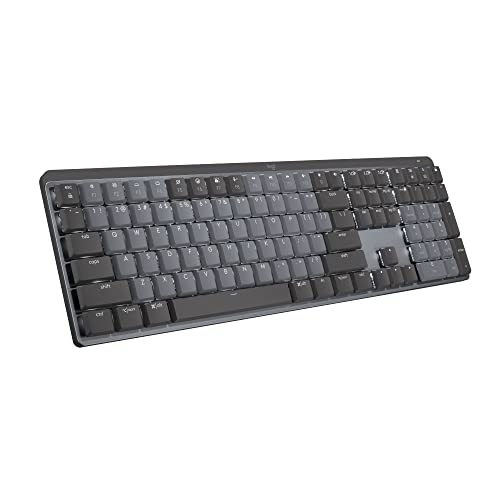
- Low-profile clicky mechanical switches
- Bluetooth pairing for up to three devices
- Smart backlighting and USB-C charging
Best For: Full-size productivity setups that prefer audible clicky feedback
Best Feature-Packed Value

- Three connection modes, including Bluetooth 5.0
- Connects with up to five devices
- 96% layout with numpad and programmable controls
Best For: Flexible work-and-gaming setups needing customization
Best Quiet Full-Size Pick
Logitech MX Mechanical Tactile
- Quieter tactile mechanical switches
- Bluetooth and Logi Bolt support for three devices
- Up to 15 days of battery life with backlighting
Best For: Multi-device office work where quieter typing matters
Best Tenkeyless Productivity Pick

- Compact 87-key layout with navigation keys
- Bluetooth 5.1 for up to three devices
- Up to 200 hours with backlight off
Best For: Mac and Windows users who want a compact tactile keyboard
Feature-Rich Pick

- 98-key layout includes a dedicated numpad
- Bluetooth, 2.4GHz, and USB-C connectivity
- Smart display, knob, and hot-swappable switches
Best For: Numpad users who want extensive controls and customization
Low-Profile Productivity Pick

- Bluetooth 5.1 connects up to three devices
- Slim 84-key layout works with Mac and Windows
- QMK and Launcher support key remapping
Best For: Multi-device users who prefer a thin, portable keyboard
Quiet Customization Pick
Kisnt KN85 Wireless Mechanical Keyboard

- 75% layout saves desk space
- Bluetooth, 2.4GHz, and USB-C connectivity
- Hot-swappable switches and dampened typing sound
Best For: Small desks and shared workspaces needing flexible wireless use
Best Mac Productivity Pick
Logitech MX Mechanical Mini for Mac
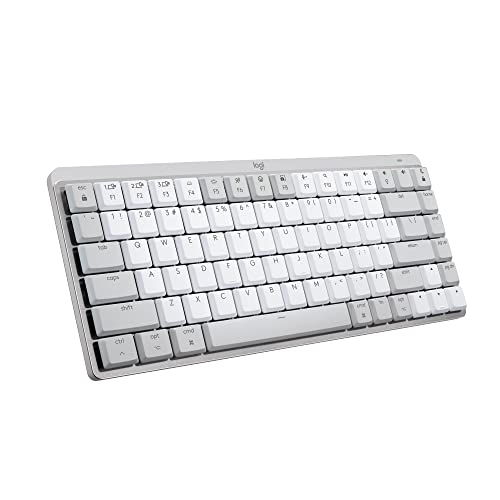
- Quiet tactile low-profile switches
- Mac-focused layout and smart backlighting
- Bluetooth pairing for up to three devices
Best For: Mac users seeking compact, quiet wireless productivity
Best Full-Size Value Option
RisoPhy Triple-Mode Mechanical Keyboard

- Full 104-key layout with number pad
- Bluetooth, 2.4GHz, and USB-C modes
- Programmable keys and customizable RGB
Best For: Multi-device users who need full-size productivity keys
Best Low-Profile Full-Size Pick

- Quiet low-profile red switches
- 107 keys with number pad and volume knob
- Bluetooth, 2.4GHz, and wired USB
Best For: Full-size spreadsheet and office work with laptop-style typing
Best Clicky Full-Size Pick – Logitech MX Mechanical Clicky
For shoppers seeking a mechanical keyboard for productivity with bluetooth, the Logitech MX Mechanical Clicky combines a full-size layout, low-profile switches, multi-device pairing, and adaptive backlighting. Its audible click and tactile feedback suit users who enjoy a more pronounced typing response.
Best For: Office users who want a full-size wireless keyboard with clicky feedback, Bluetooth support, and programmable workflow features.
Pros:
- Clicky mechanical switches provide audible feedback and a familiar mechanical feel.
- Pairs with up to three devices through Bluetooth Low Energy or the included Logi Bolt receiver.
- Smart backlighting adjusts automatically, and USB-C charging provides up to 15 days of battery life with typical lighting use.
- Logi Options+ supports function-key customization and Flow cross-computer control.
Cons:
- The audible click may be distracting in shared workspaces.
- The full-size design takes more desk space than a compact or tenkeyless keyboard.
This is a productivity-focused choice for people who value a number pad, multi-device flexibility, and an assertive clicky typing experience. Choose the tactile version instead if quieter operation matters more.
Best Feature-Packed Value – AULA S99 Wireless Keyboard
The AULA S99 is a versatile option for a mechanical keyboard for productivity with bluetooth, offering Bluetooth 5.0 alongside 2.4GHz wireless and USB-C wired modes. Its near-full-size layout includes a number pad, programmable controls, and RGB lighting for users who want work and gaming flexibility.
Best For: Buyers who want multiple connection modes, a number pad, customizable controls, and a keyboard that can move between office and gaming use.
Pros:
- Supports Bluetooth 5.0, 2.4GHz wireless, and USB-C wired connectivity.
- Can connect with up to five devices and switch between them using key combinations.
- Includes a 96% layout with a separate number pad, adjustable kickstand, and programmable M1/M2/M3 keys.
- RGB lighting, a rotary knob, and macro customization provide extensive personalization.
Cons:
- Its gaming-oriented RGB and macro features may be more than a straightforward office setup needs.
- The supplied compatibility details emphasize Windows, so users on other operating systems should verify support.
- The notes identify the keyboard description as membrane despite the clicky-switch listing, so buyers should confirm the exact switch configuration.
The S99 stands out for connectivity and customization rather than a minimalist office design. It is a practical fit when one keyboard needs to cover productivity, media controls, and gaming-style customization.
Best Quiet Full-Size Pick – Logitech MX Mechanical Tactile
The Logitech MX Mechanical Tactile is a strong mechanical keyboard for productivity with bluetooth when you want precise feedback without the louder sound of clicky switches. It pairs a low-profile full-size layout with smart illumination, multi-device support, and USB-C recharging.
Best For: Professionals who want a quieter full-size mechanical keyboard for typing across multiple computers and operating systems.
Pros:
- Tactile Quiet switches provide a noticeable bump with less noise than clicky switches.
- Bluetooth pairing supports up to three devices, with an included Logi Bolt receiver also available.
- Low-profile keys, adaptive backlighting, and a full-size layout support extended office use.
- Battery life reaches up to 15 days with backlighting on or up to 10 months with it off.
Cons:
- The full-size footprint is less space-efficient than a tenkeyless keyboard.
- It offers single-color backlighting rather than RGB lighting.
Among these options, this is the more office-friendly MX Mechanical variant. Its tactile response preserves mechanical feedback while reducing the likelihood of disturbing nearby coworkers.
Best Tenkeyless Productivity Pick – Keychron K8 Brown
The Keychron K8 is a practical mechanical keyboard for productivity with bluetooth for users who prefer a more compact tenkeyless design. Its 87-key layout keeps navigation keys while freeing desk space, and it supports Bluetooth 5.1 for up to three devices as well as USB-C wired operation.
Best For: Mac and Windows users who want a compact mechanical keyboard with tactile Brown switches, dedicated navigation keys, and long battery life.
Pros:
- Tenkeyless 87-key layout retains direct access to Home, End, and Page Up keys.
- Connects with up to three devices over Bluetooth 5.1 and also supports USB-C wired mode.
- Tactile Brown switches offer feedback, with a stated 50 million keystroke lifespan.
- The 4000 mAh battery can last up to 200 hours with the backlight off.
Cons:
- It lacks a dedicated number pad, which may slow number-heavy workflows.
- The white backlight provides less lighting customization than RGB models.
- It is not water resistant according to the supplied specifications.
The K8 is a balanced choice for a smaller desk or a shared Mac-and-Windows workspace. Its strong wireless battery life and retained navigation cluster make it especially suitable for writing, coding, and general office tasks.
Feature-Rich Pick – RK Royal Kludge S98
The RK Royal Kludge S98 is a strong mechanical keyboard for productivity with Bluetooth if you want a nearly full-size layout without giving up wireless flexibility. Its 98 keys include a numpad, while the smart display and multifunction knob put useful status information and common controls close at hand.
Best For: Workstations that need a numpad, media controls, and multiple connection options.
Pros:
- Bluetooth 5.0, 2.4GHz wireless, and USB-C wired connectivity support flexible setups.
- Smart display can show information such as date, connection mode, layout, and battery status.
- Sound-dampening layers, a top-mount design, and pre-lubed linear switches aim for a smoother, quieter typing experience.
- Hot-swappable PCB and durable double-shot PBT keycaps support long-term customization.
Cons:
- Its 3-pound, 98-key design takes more desk space than compact productivity keyboards.
- The extensive RGB, display, and gaming-oriented features may be more than a minimalist office setup needs.
Choose the S98 when numeric input and on-keyboard controls matter as much as Bluetooth convenience. It is especially appealing for spreadsheet work and users who enjoy customizing sound, switches, and lighting.
Low-Profile Productivity Pick – Keychron K3 Version 2
The Keychron K3 Version 2 is a compact mechanical keyboard for productivity with Bluetooth built around a slim 75% layout. It connects to up to three devices, supports both Mac and Windows, and combines low-profile red switches with a lightweight aluminum-reinforced design.
Best For: Multitaskers who switch between laptops, tablets, phones, and desktop computers.
Pros:
- Bluetooth 5.1 supports connections with up to three devices and quick workflow switching.
- Compact 84-key layout retains function keys, arrows, and multimedia controls while saving desk space.
- Mac and Windows compatibility includes extra keycaps for both operating systems.
- QMK firmware and the Keychron Launcher enable remapping, macros, and shortcuts.
Cons:
- The low-profile design uses a compact layout rather than a dedicated numpad.
- White backlighting is less adjustable than RGB lighting.
- It is not water resistant.
The K3 is a practical choice for mobile and multi-device productivity, particularly if you prefer a thinner keyboard that fits easily into a modern laptop or hybrid-work setup. Its programmable controls add useful flexibility for repetitive tasks.
Quiet Customization Pick – Kisnt KN85 Wireless Mechanical Keyboard
The Kisnt KN85 is a mechanical keyboard for productivity with Bluetooth that balances a space-saving 75% layout with tri-mode connectivity. Its gasket mount, dampening construction, and pre-lubed linear switches are designed to produce a softer, quieter typing sound, while the rechargeable battery supports wireless work across several devices.
Best For: Small desks, shared spaces, and users who want a customizable wireless typing experience.
Pros:
- Bluetooth 5.0, 2.4GHz wireless, and USB-C provide three connection methods.
- Compact 85-key layout keeps function keys and arrows while freeing desk space.
- Gasket mounting, foam, and pre-lubed linear switches are designed for a cushioned, thocky sound.
- Hot-swappable 3-pin and 5-pin support enables solder-free switch changes, while Windows software supports remapping and macros in wired or 2.4GHz mode.
Cons:
- The 75% layout omits a dedicated number pad.
- Programming software is limited to Windows and wired or 2.4GHz modes.
- Animated RGB effects can reduce battery life, and the keyboard requires a lengthy initial charge.
The KN85 makes sense for productivity-focused users who value desk space and a quieter, more cushioned typing feel. Consider it a particularly flexible option if you want to move between Bluetooth, wireless-dongle, and wired workflows.
Best Mac Productivity Pick – Logitech MX Mechanical Mini for Mac
The Logitech MX Mechanical Mini for Mac is a compact choice if you want a mechanical keyboard for productivity with Bluetooth. Its Mac-focused layout, low-profile tactile switches, smart backlighting, and multi-device pairing are designed for focused daily work.
Best For: Mac users who want quiet tactile feedback and a space-saving wireless setup.
Pros:
- Mac-optimized layout with compatibility for macOS, iPadOS, and iOS.
- Tactile Quiet switches provide noticeable feedback without much noise.
- Bluetooth Low Energy supports switching among up to three Macs or iPads.
- Smart illumination activates when your hands approach and adjusts to lighting.
Cons:
- The compact layout may not suit users who need a number pad.
- Its feature set and layout are primarily tailored to Apple devices.
With up to 15 days of battery life with backlighting enabled, or up to 10 months with it disabled, this is a polished productivity keyboard for Mac-focused desks. The compact form factor also helps preserve workspace while retaining a mechanical typing feel.
Best Full-Size Value Option – RisoPhy Triple-Mode Mechanical Keyboard
The RisoPhy is a practical mechanical keyboard for productivity with Bluetooth when you need a full-size layout and flexible connectivity. It combines 104 programmable keys, a number pad, Bluetooth, 2.4GHz wireless, and USB-C wired operation for work and gaming.
Best For: Users who want a full-size, customizable keyboard that can move between office devices and gaming setups.
Pros:
- Full 104-key layout supports spreadsheets, data entry, and familiar desktop typing.
- Triple-mode connectivity works through Bluetooth, 2.4GHz wireless, or USB-C.
- Can connect with up to five devices for flexible multi-device use.
- Programmable keys, macros, RGB lighting, and PBT keycaps add customization.
Cons:
- The full-size design takes more desk space than a compact productivity keyboard.
- Its gaming-oriented RGB features may be more elaborate than some office users need.
Linear red switches are described as smooth and quiet, making the keyboard suitable for fast office typing as well as gaming. If you value a number pad and extensive customization over a minimalist footprint, the RisoPhy offers a versatile setup.
Best Low-Profile Full-Size Pick – X9 Slim Mechanical Keyboard
The X9 Slim is a strong fit for a mechanical keyboard for productivity with Bluetooth if you prefer laptop-like key travel without giving up a number pad. Its low-profile red switches, full-size 107-key layout, aluminum top case, and multiple connection options target quiet, efficient daily typing.
Best For: Mac and PC users who want a slim full-size keyboard for spreadsheets, data entry, and everyday work.
Pros:
- Low-profile linear red switches provide smooth, quiet keystrokes.
- 107-key layout includes a number pad, shortcut keys, Copilot key, and volume knob.
- Supports Bluetooth for two devices, 2.4GHz wireless, and wired USB.
- Aluminum top case helps provide a stable typing surface.
Cons:
- Its single-color backlight offers less customization than RGB models.
- The full-size layout is less space-efficient than a compact keyboard.
A 2,000mAh rechargeable battery provides days of wireless use, while the white backlight has three brightness levels for dim rooms. The X9 Slim is particularly compelling for productivity-focused users who want a quiet, familiar laptop-style feel in a full-size desktop design.
How We Picked the Best Mechanical Keyboard for Productivity with Bluetooth
We evaluated each keyboard for productivity-focused features rather than gaming specifications alone. Our comparison considered Bluetooth connectivity, wired and 2.4GHz alternatives, layout efficiency, switch options, key feel, backlighting, battery practicality, software or programmability, and compatibility with common computers and tablets.
We also included a range of sizes. Compact and 75% keyboards save desk space, tenkeyless models retain useful navigation keys, and full-size boards are better for frequent spreadsheet or number-entry work. Because product configurations can vary, check the current listing for switch type, operating-system support, included accessories, and exact layout before ordering.
Quick Comparison
- Best for office multitasking: Logitech MX Mechanical models, with productivity-oriented layouts and multi-device features.
- Best for Mac users: Logitech MX Mechanical Mini Mac and Keychron’s Mac-compatible options.
- Best compact choices: Keychron K3, Keychron K8, and the other 75% or tenkeyless boards.
- Best for number-heavy work: The full-size RisoPhy and X9 models, or the full-size Logitech option.
- Best for customization: Boards offering hot-swappable switches, programmable keys, RGB controls, or a rotary knob.
Key Buying Factors for a Mechanical Keyboard for Productivity with Bluetooth
Layout and Desk Space
A 75% keyboard keeps the function row and arrow keys while removing most unused space. Tenkeyless models are a comfortable middle ground. Choose full-size if you regularly enter figures, perform accounting tasks, or rely on a dedicated number pad.
Switch Feel and Noise
Tactile switches provide a noticeable bump without the sharper sound of clicky switches. Linear switches feel smooth and may suit fast, quiet typing. Clicky switches can be enjoyable but may be distracting in shared offices. Low-profile designs generally reduce travel and create a flatter laptop-like posture.
Wireless Flexibility
Bluetooth is convenient for laptops, tablets, and multiple devices, while 2.4GHz can offer a more responsive desktop connection. USB-C wired mode is useful when charging, troubleshooting, or avoiding wireless interference. Confirm how many devices the keyboard can pair with and how switching is performed.
Compatibility and Controls
Mac-specific legends can improve usability, while Windows and Mac support is helpful in mixed-device households. Backlighting, a volume knob, programmable keys, and hot-swappable switches are valuable only if they match your workflow. Also verify whether customization software supports your operating system.
Who Should Buy Which Mechanical Keyboard for Productivity with Bluetooth?
Choose a Logitech MX Mechanical model if seamless office use, established productivity features, and multi-device switching are your priorities. Pick the Mini Mac version when you want a compact layout designed around Apple hardware. Keychron models are strong choices for users who want a broad layout range, Mac compatibility, and a more customizable typing setup.
For a compact enthusiast-style board with extra controls, consider the RK Royal Kludge S98 or a 75% option such as the Kisnt KN85. Select the AULA, RisoPhy, or X9 when you prefer a larger layout, RGB lighting, and gaming-style versatility. Ultimately, the right Mechanical Keyboard for Productivity with Bluetooth is the one whose switch sound, layout, and device support fit your daily work—not simply the one with the longest feature list.