
The best mechanical keyboard for productivity and coding should make long work sessions more comfortable without slowing down your workflow. Switch feel, layout, connectivity, and programmability all matter, especially when you move between writing, spreadsheets, terminals, and development tools.
We selected 10 capable options, including quiet low-profile keyboards, compact wireless models, and customizable boards with dedicated number pads and control knobs.
Best 10 Mechanical Keyboard for Productivity and Coding Picks for 2026
Quietly Capable Clicky Pick
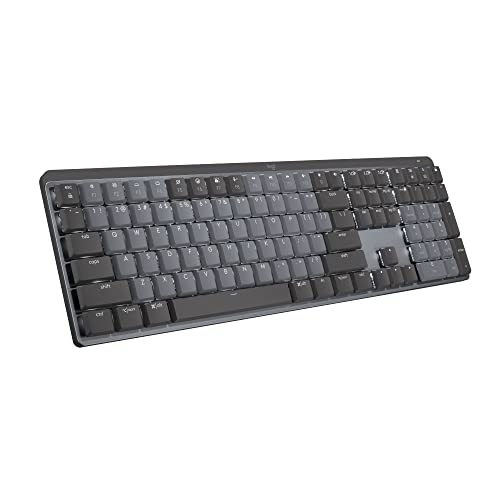
- Low-profile clicky switches with full-size layout
- Pairs with up to three devices
- Smart backlight and USB-C charging
Best For: Developers and office users who prefer audible feedback
Mac-Centered Tactile Workhorse
Satechi SM3 Mechanical Keyboard

- 108-key layout with numeric keypad
- Brown switches and quieter low-profile design
- Connects to up to four devices
Best For: Mac-focused professionals needing a full-size work keyboard
Customizable Coding Compact

- 96% layout keeps a number pad
- QMK remapping and macro support
- Hot-swappable switches with three connection modes
Best For: Programmers and power users who want customization
Quiet Full-Size Office Specialist

- Quiet low-profile linear red switches
- Full-size 108-key aluminum design
- Three-device connectivity and programmable macros
Best For: Shared offices and programmers wanting quiet full-size typing
Customizable Wired Workhorse

- 96% layout keeps the numpad and F-keys
- QMK, Launcher, macros, and programmable knob
- Hot-swappable switches with PBT keycaps and RGB
Best For: Custom wired coding and productivity setups needing a numpad
Low-Profile Multidevice Option

- Low-profile 100% layout with tactile banana switches
- Bluetooth 5.2 for three devices plus USB-C wired mode
- QMK customization, acoustic foams, and long battery life
Best For: Full-size cross-platform work with a slim, wireless design
Best All-Rounder
AULA F99 96% Wireless Mechanical Keyboard

- 96% layout keeps arrows and number pad
- Tri-mode connectivity supports up to five devices
- Hot-swappable switches and 8000mAh battery
Best For: Productivity users who need a number pad and flexible wireless connections
Best Compact Office Layout
AULA F75 75% Wireless Mechanical Keyboard

- 75% layout preserves arrow keys in a smaller footprint
- Tri-mode connection supports up to five devices
- Control knob handles lighting, volume, and playback
Best For: Space-conscious coders and office users who want quick media controls
Best Feature-Rich 75% Pick
AULA F75 Pro Wireless Mechanical Keyboard

- Compact 75% layout includes arrow keys
- Side-printed PBT keycaps and hot-swap support
- Knob controls lighting, volume, and playback
Best For: Users wanting a customizable compact keyboard with durable keycaps
Quietly Capable Clicky Pick – Logitech MX Mechanical Clicky
The Logitech MX Mechanical Clicky is a strong mechanical keyboard for productivity and coding if you prefer audible feedback, a full-size layout, and low-profile keys. Its smart backlight, multi-device pairing, and customizable controls are practical for long work sessions.
Best For: Developers and office users who want clicky feedback, a number pad, and seamless switching between up to three devices.
Pros:
- Clicky switches provide tactile feedback and a gratifying audible response.
- Low-profile, full-size design supports comfortable, precise typing.
- Pairs with up to three devices and works across Windows, macOS, Linux, and ChromeOS.
- Smart illumination adjusts automatically, while USB-C charging provides up to 15 days of battery life with backlighting enabled.
Cons:
- Audible clicky switches may be distracting in shared workspaces.
- Its full-size footprint takes up more desk space than compact layouts.
- Backlighting is single-color rather than RGB.
This is a polished choice for coding and office productivity when you value familiar mechanical feedback and device flexibility. Choose a quieter model if shared-space noise is a concern.
Mac-Centered Tactile Workhorse – Satechi SM3 Mechanical Keyboard
The Satechi SM3 is a practical mechanical keyboard for productivity and coding, combining a full-size 108-key layout with a number pad, low-profile brown switches, and multiple connection options. Its quieter operation and aluminum construction suit structured office setups.
Best For: Mac-focused professionals who need a tactile full-size keyboard that can also connect to Windows devices, tablets, or other USB-C hardware.
Pros:
- Full-size layout includes a numeric keypad for spreadsheets and data entry.
- Low-profile brown switches offer tactile feedback with quieter operation.
- Supports dual Bluetooth, a 2.4GHz receiver, and wired USB-C connections for up to four devices.
- Rechargeable 2500mAh battery, aluminum construction, and 14 white backlight patterns add everyday convenience.
Cons:
- Backlighting is white rather than multicolor RGB.
- The full-size design is less compact for small desks or mobile setups.
- Its dedicated Mac orientation may require swapping keycaps for Windows use.
The SM3 balances tactile typing, connectivity, and a quieter profile well for productivity-heavy workflows. It is especially appealing if you regularly move between a Mac and other devices while still wanting a number pad.
Customizable Coding Compact – Keychron V5 Max 96%
The Keychron V5 Max is a flexible mechanical keyboard for productivity and coding when you want a compact layout without giving up a number pad. QMK programmability, hot-swappable switches, and 2.4GHz, Bluetooth, and USB-C connectivity make it adaptable to changing workflows.
Best For: Programmers and power users who want remappable keys, switch customization, and a 96% layout for macOS, Windows, or Linux.
Pros:
- 96% layout retains a number pad while using less space than a traditional full-size board.
- QMK Launcher lets you remap keys and create macro commands.
- Hot-swappable sockets support many 3-pin and 5-pin MX-style switches without soldering.
- Offers 2.4GHz wireless, Bluetooth 5.1 for up to three devices, and wired USB-C connectivity.
Cons:
- Its customization features may be more than casual typists need.
- The supplied Gateron Jupiter Red switches are linear, so they may provide less tactile feedback than brown or clicky alternatives.
- RGB lighting and wireless features can add setup complexity compared with a basic wired keyboard.
The V5 Max is a strong fit for coding workflows that benefit from macros, remapping, and a familiar number pad. Its hot-swappable design also gives it more long-term flexibility than a fixed-switch keyboard.
Quiet Full-Size Office Specialist – ProtoArc K310 Pro
The ProtoArc K310 Pro is a practical mechanical keyboard for productivity and coding if you want a full-size layout with smooth, quiet linear switches. Multi-device connectivity, programmable macros, adjustable backlighting, and a rechargeable battery make it suited to everyday work across platforms.
Best For: Office users and programmers who need a quiet full-size keyboard that can switch among computers, tablets, and mobile devices.
Pros:
- Low-profile linear red switches provide smooth typing with reduced noise.
- Full-size 108-key layout includes a number pad and aluminum top case.
- Connects with Bluetooth or a USB receiver to support up to three devices.
- Offers macro customization, 10 adjustable backlight effects, and USB-C recharging.
Cons:
- Linear switches provide less tactile feedback than tactile or clicky options.
- Macro customization currently requires a 2.4GHz USB connection, and Safari is not supported for detection.
- The keyboard is not water resistant.
The K310 Pro emphasizes quiet, comfortable productivity rather than enthusiast-level customization. It is a sensible choice for shared offices or home workspaces where a number pad and broad device compatibility matter.
Comfort-Focused Wireless Pick – Logitech Alto Keys K98M
The Logitech Alto Keys K98M is a practical mechanical keyboard for productivity and coding when you want a compact layout, a dedicated numpad, and wireless flexibility. Its gasket mount, clicky Marble switches, concave keys, and programmable Action Keys are designed for comfortable, personalized typing during long work sessions.
Best For: Wireless office setups, coding desks that still need a numpad, and users who prefer clicky mechanical feedback.
Pros:
- Compact 98-key layout retains a dedicated numpad and F-keys.
- Gasket mount helps absorb vibrations for a more comfortable typing feel.
- Bluetooth and Logi Bolt connectivity support flexible multi-device setups.
- Programmable Action Keys and up to 12 months of wireless use add productivity convenience.
Cons:
- White-only backlighting offers less lighting customization than RGB models.
- Clicky switches may be louder than quieter tactile or linear options.
- USB-C charging is supported, but wireless battery life varies with usage and settings.
The Alto Keys K98M stands out for combining a numpad-friendly layout with a compact footprint and wireless operation. It is a strong fit if comfortable clicky typing and productivity shortcuts matter more than extensive lighting effects.
Customizable Wired Workhorse – Keychron V5 8K
The Keychron V5 8K is a capable mechanical keyboard for productivity and coding if you want a compact full-featured layout with extensive customization. Its 96% design keeps the numpad and function keys, while QMK, hot-swappable switches, a programmable knob, and the Launcher configurator support tailored workflows.
Best For: Programmers and power users who want wired responsiveness, remapping options, a numpad, and hardware customization.
Pros:
- 96% layout saves desk space without removing the numpad or F-keys.
- QMK and the Launcher web app enable remapping, macros, and workflow customization.
- Hot-swappable PCB supports 3-pin and 5-pin switches without soldering.
- PBT keycaps and south-facing RGB lighting support durability and flexible illumination.
Cons:
- It is wired rather than wireless, limiting cable-free flexibility.
- The 8000 Hz polling rate requires relatively recent Intel or AMD processors.
- RGB and configuration features may be more than basic office users need.
For coding and productivity, the V5 8K offers a useful balance of desk efficiency and customization. Its high polling rate is a specialized feature, but the compact numpad layout, programmable controls, and hot-swap support are broadly useful for demanding workflows.
Low-Profile Multidevice Option – Keychron K5 Version 2
The Keychron K5 Version 2 is a low-profile mechanical keyboard for productivity and coding that combines a complete 100% layout with a slim, travel-friendly design. Bluetooth 5.2, USB-C wired mode, QMK customization, acoustic foams, and tactile banana switches make it suited to flexible all-day workspaces.
Best For: Users who want a full-size low-profile keyboard for multi-device work across Mac, Windows, Linux, phones, or tablets.
Pros:
- Full 100% layout preserves the familiar numpad and function-key arrangement.
- Bluetooth 5.2 supports up to three paired devices, with USB-C wired connectivity available.
- QMK and the Launcher web app provide deep remapping and layer customization.
- Acoustic foams and a rechargeable battery support quieter, longer work sessions.
Cons:
- Low-profile switches have a different feel from standard-height mechanical switches.
- White backlighting provides less lighting customization than RGB keyboards.
- The full-size footprint is wider than compact 96% or 98% alternatives.
The K5 Version 2 is a well-rounded choice when laptop-like height and wireless convenience are priorities without giving up a full layout. Its multi-device support and QMK tools make it especially practical for developers moving between systems.
Best All-Rounder – AULA F99 96% Wireless Mechanical Keyboard
For a mechanical keyboard for productivity and coding, the AULA F99 combines a compact 96% layout with dedicated arrow keys and a number pad. Its tri-mode connectivity, smooth pre-lubed linear switches, and customizable hot-swap design make it practical for switching between work, study, and gaming.
Best For: Users who want a compact full-function keyboard with wireless flexibility, a number pad, and customization options.
Pros:
- Tri-mode Bluetooth 5.0, 2.4GHz wireless, and USB-C connectivity with support for up to five devices
- 96% 99-key layout retains arrow keys and the number pad while saving desk space
- Hot-swappable 3-pin and 5-pin switch support, pre-lubed linear switches, and programmable macros
- 8000mAh battery, double-shot PBT keycaps, gasket structure, and layered sound dampening
Cons:
- The 96% layout is less compact than a 75% keyboard
- Its linear switches may not suit users who prefer tactile typing feedback
- RGB and macro customization require using the keyboard’s driver for the full feature set
The F99 is the most versatile option here for coding and productivity users who rely on a number pad but still want a cleaner footprint than a traditional full-size board. Choose it when device switching and battery capacity matter as much as typing feel.
Best Compact Office Layout – AULA F75 75% Wireless Mechanical Keyboard
The AULA F75 is a space-saving choice for a mechanical keyboard for productivity and coding, offering an 81-key 75% layout that preserves the arrow keys. Its tri-mode connection, hot-swappable switches, and dedicated control knob add flexibility for both desk work and gaming.
Best For: Coders and office users who want a compact keyboard with arrow keys, wireless connectivity, and quick media controls.
Pros:
- 75% layout saves desk space while retaining the necessary arrow keys
- Bluetooth 5.0, 2.4GHz wireless, and USB wired modes support up to five devices
- Hot-swappable 3-pin and 5-pin design with pre-lubricated stabilizers and Reaper switches
- Multi-function knob controls lighting in gaming mode and volume or playback in office mode
Cons:
- It does not include a dedicated number pad
- The 4000mAh battery is smaller than the F99’s stated capacity
- Some macro and lighting customization depends on the downloadable driver
The F75 offers a strong balance for users who value desk space and still want navigation keys for coding. The knob is particularly useful for quickly adjusting volume or playback without leaving the keyboard.
Best Feature-Rich 75% Pick – AULA F75 Pro Wireless Mechanical Keyboard
The AULA F75 Pro is a compact mechanical keyboard for productivity and coding with an 81-key 75% layout, arrow keys, and a programmable control knob. It adds side-printed PBT keycaps to the tri-mode wireless design, making it a flexible option for work, coding, and gaming setups.
Best For: Users seeking a compact, customizable keyboard with wireless versatility, media controls, and durable PBT keycaps.
Pros:
- Tri-mode Bluetooth 5.0, 2.4GHz, and USB-C connectivity can handle up to five devices
- Hot-swappable 3-pin and 5-pin PCB supports future switch changes without soldering
- Side-printed PBT keycaps, pre-lubed stabilizers, and Reaper switches support a smooth typing setup
- Control knob manages lighting, volume, and playback, with programmable keys and RGB effects
Cons:
- Its 75% layout omits a dedicated number pad
- The 4000mAh battery is more limited in stated capacity than the F99’s 8000mAh battery
- Advanced macro and lighting controls require the F75 Pro driver
The F75 Pro is a polished choice when you want the compact footprint of a 75% board without giving up customization or quick controls. It is especially appealing if side-printed PBT keycaps and a flexible wireless setup fit your workspace priorities.
How We Picked the Best Mechanical Keyboard for Productivity and Coding
We evaluated these keyboards around the needs of office work, software development, and extended daily use. Our priorities were typing comfort, switch options, useful layouts, reliable wired and wireless connectivity, backlighting, customization, and practical desk ergonomics. We also considered whether each model suits a particular workflow rather than treating one layout or switch type as universally best.
The selection spans full-size and near-full-size boards, 96% layouts with number pads, compact 75% and 65%-style designs, and low-profile options. Features such as hot-swappable switches, QMK support, multi-device pairing, and 2.4GHz wireless were weighed according to their usefulness for productivity—not simply their presence on a specification sheet.
Quick Comparison
Best for a familiar office layout: Logitech MX Mechanical and Satechi SM3 offer straightforward productivity-focused designs.
Best for number-pad users: Keychron V5 Max, Keychron V5 8K, Logitech Alto Keys K98M, and AULA F99 preserve compact dimensions while retaining a numpad.
Best for customization: Keychron V5 models and the AULA F99, F75, and F75 Pro provide hot-swappable switches and enthusiast-friendly features.
Best for quiet, low-profile typing: ProtoArc K310 Pro and Keychron K5 Version 2 are sensible choices when desk noise or a slim profile matters.
Key Buying Factors for a Mechanical Keyboard for Productivity and Coding
Layout and Navigation
A 96% keyboard keeps the function row, arrows, navigation keys, and number pad in a relatively compact footprint. It is ideal for spreadsheets and code-heavy work involving frequent navigation. A 75% board saves more space but typically requires function-layer shortcuts for some keys, while low-profile designs can feel more familiar to laptop users.
Switch Feel and Noise
Linear switches provide smooth, consistent presses and are often a good general-purpose choice. Tactile switches add a noticeable bump that can help with deliberate typing. Clicky switches offer audible feedback but may be distracting in shared spaces. For an office or open room, prioritize quiet or damped options and check whether replacement switches are available.
Connectivity and Software
Bluetooth is convenient for switching between devices, while 2.4GHz wireless usually offers a more responsive desktop connection. USB-C wired mode is valuable for reliability and charging. Programmable boards with QMK or companion software can reduce repetitive shortcuts, remap awkward keys, and create coding-specific layers.
Ergonomics and Lighting
Look for adjustable feet, a comfortable front height, stable keycaps, and a layout that keeps frequently used keys easy to reach. Backlighting is useful in dim rooms, but RGB should be treated as an optional feature rather than a performance benefit.
Who Should Buy Which Mechanical Keyboard for Productivity and Coding?
Choose the Logitech MX Mechanical or Satechi SM3 if you want a polished, conventional productivity keyboard with minimal setup. Pick the ProtoArc K310 Pro or Keychron K5 Version 2 for a quieter, slimmer workstation. For developers and spreadsheet users who need a number pad without a full-size footprint, the Keychron V5 Max, Keychron V5 8K, Logitech Alto Keys K98M, or AULA F99 are strong fits.
Choose the AULA F75 or F75 Pro if desk space, wireless flexibility, and a customizable 75% layout matter most. The Pro model is especially appealing if you want an integrated knob and additional programming flexibility. Overall, the best Mechanical Keyboard for Productivity and Coding is the one whose layout matches your daily shortcuts, whose switch sound suits your environment, and whose connectivity works reliably across your devices.