
Finding the right laser projector under $2,000 means balancing image quality, brightness, throw distance, gaming performance, and installation flexibility. The models in this roundup cover compact home theaters, bright-room viewing, gaming, golf simulation, and professional-style installations.
Use the comparison details and buying advice below to narrow the list by room size, screen placement, ambient light, and the features you will actually use.
Best 10 Laser Projectors Under 2000 Picks for 2026
Best All-Around 4K Pick

- 4K HDR with triple-laser color
- Google TV and licensed Netflix built in
- Portable gimbal with autofocus and keystone
Best For: Flexible home theater and gaming
Best Bright 4K Home Theater
- Native 4K UHD resolution
- 3,500-lumen laser brightness with HDR
- Filmmaker Mode for movie presentation
Best For: Bright, permanent home cinema setups
Best for Bright Large Venues

- 5,000 ANSI lumens with native 1080p
- 1.6x optical zoom and extensive image adjustment
- LAN control plus 360-degree projection
Best For: Classrooms, meeting halls, and golf simulators
Best Short-Throw Value

- Compact short-throw Full HD design
- 3,500-lumen laser brightness
- Works with consoles, laptops, and mobile devices
Best For: Small-room gaming and home cinema
Premium 4K Pick

- 4K resolution with 10-bit HDR processing
- 2,500 lumens and 800,000:1 dynamic contrast
- 120Hz gaming with ALLM and sub-20ms input lag
Best For: Dedicated home theaters and gaming setups
Short-Throw Gaming Pick
- 4,200 ISO lumens for bright Full HD images
- Short-throw projection from about 2.6 feet
- 30,000-hour laser source with IP6X dust protection
Best For: Bright gaming rooms and golf simulators
High-Brightness Installation Pick

- 5,500 ANSI lumens with Full HD resolution
- Optical zoom, keystone, and four-corner adjustment
- 360-degree projection and up to a 300-inch image
Best For: Classrooms, meeting rooms, auditoriums, and golf simulators
Best for Bright Business Displays

- 4,500 lumens with native 1080p resolution
- Up to 30,000-hour DuraCore laser source
- Flexible portrait, 360-degree, and network-controlled installation
Best For: Business presentations, classrooms, and digital signage
Best Short-Throw Pick

- 0.49 short-throw ratio for close placement
- 4,200 lumens and native 1080p output
- HDR/HLG, four-corner adjustment, and 360-degree projection
Best For: Short-throw home, office, and classroom setups
Best Dust-Resistant Value

- 4,600 lumens with Full HD 1080p clarity
- IP6X dust resistance and up to 30,000-hour laser life
- 1.1x zoom plus portrait and 360-degree projection
Best For: Bright meeting rooms, classrooms, and multipurpose spaces
Best All-Around 4K Pick – JMGO N1S 4K Upgrade
For shoppers comparing laser projectors under 2000, the JMGO N1S 4K Upgrade combines 4K HDR picture quality, triple-laser color, built-in Google TV, and a portable gimbal design. Its 1,700 ISO-lumen output and 200-inch image support make it a flexible choice for movie nights, gaming, and travel.
Best For: Home entertainment users who want 4K streaming, vivid color, and easy repositioning.
Pros:
- 4K UHD, HDR10, and triple-laser color performance
- Google TV with officially licensed Netflix and Google Cast
- Integrated gimbal, autofocus, and automatic keystone correction
- 17ms latency, HDMI 2.1, and built-in 3D support
Cons:
- Brightness is lower than some large-room business projectors
- Color calibration may require troubleshooting if tint appears
The N1S 4K Upgrade is especially compelling when convenience matters as much as image quality. Its compact 4.4-pound design and integrated streaming platform reduce setup friction, while the flexible stand supports wall, ceiling, and outdoor viewing.
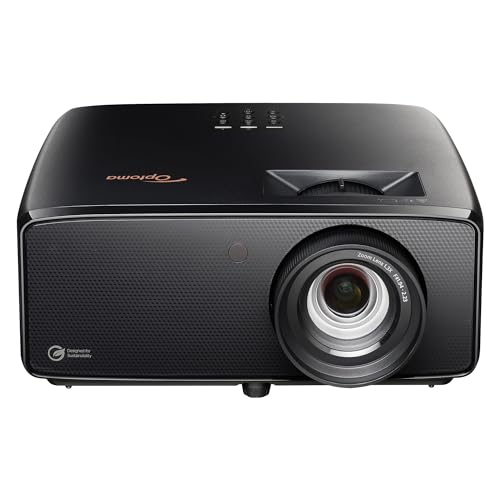
Best Bright 4K Home Theater – Optoma UHZ36
The Optoma UHZ36 is a strong contender among laser projectors under 2000 for viewers who prioritize bright 4K home-theater images. Its 3,500-lumen output, HDR support, and Filmmaker Mode are designed to preserve detail and the intended look of movies in a variety of viewing environments.
Best For: Home cinema users seeking bright 4K HDR projection with flexible placement.
Pros:
- Native 3840 x 2160 4K UHD resolution
- 3,500-lumen brightness and HDR support
- Filmmaker Mode preserves the director’s original vision
- Supports tabletop or ceiling mounting and screens up to 300 inches
Cons:
- Weighs 10.4 pounds, making it less portable
- Supplied notes identify RCA connectivity rather than a broad range of audio connections
With a claimed 30,000-hour laser light-source life and PureEngine/PureMotion enhancement features, the UHZ36 is built around sustained home-theater performance. Its mounting flexibility also makes it suitable for a more permanent installation.
Best for Bright Large Venues – ViewSonic LS741HD
For laser projectors under 2000 intended for classrooms, meeting halls, or other bright spaces, the ViewSonic LS741HD stands out with 5,000 ANSI lumens and native 1080p resolution. Its optical zoom, installation adjustments, and network controls make it better suited to professional environments than casual portable use.
Best For: Bright classrooms, meeting rooms, large venues, and golf simulator installations.
Pros:
- 5,000 ANSI lumens for high-ambient-light spaces
- 1.6x optical zoom, H/V keystone, and four-corner adjustment
- 360-degree and portrait projection support
- LAN control, instant power, and 24/7 operation capability
Cons:
- Native resolution is 1080p rather than 4K
- Stationary design is less convenient for mobile viewing
The LS741HD is a practical installation projector where brightness, control, and placement flexibility matter more than compactness. Its Golf Mode and broad adjustment options add specialized value for simulator and commercial applications.
Best Short-Throw Value – Optoma GT2000HDR
The Optoma GT2000HDR is a useful option for shoppers seeking laser projectors under 2000 in a compact short-throw format. Its 3,500-lumen brightness and Full HD resolution support large images from relatively short distances, making it well suited to gaming, home cinema, and rooms where projector space is limited.
Best For: Gamers and movie watchers who need a compact short-throw projector.
Pros:
- Short-throw design supports large images in smaller rooms
- 3,500 ANSI lumens with 1080p Full HD output
- Compact portable form factor with a laser light source
- Compatible with gaming consoles, laptops, smartphones, and tablets
Cons:
- Not a native 4K projector
- Supplied notes list limited vertical keystone correction
- External power supply may add cable clutter
The GT2000HDR focuses on practical room-saving performance rather than maximum resolution. Its short-throw format and high brightness can make it easier to create a large screen without placing the projector far back in the room.
Premium 4K Pick – Epson Home Cinema LS5000
For shoppers comparing laser projectors under 2000, the Epson Home Cinema LS5000 focuses on high-quality 4K presentation, HDR support, and gaming-friendly responsiveness. Its 2,500-lumen output, 120Hz refresh rate, and flexible lens shift make it a strong fit for dedicated home cinema spaces and modern gaming setups.
Best For: Home theater enthusiasts and gamers who want 4K detail, HDR processing, and flexible installation.
Pros:
- Native 3840 x 2160 resolution with Epson 4K Display Technology and full 10-bit HDR processing.
- 2,500 lumens of both color and white brightness, plus an 800,000:1 dynamic contrast ratio.
- 120Hz refresh rate, ALLM, and input lag below 20ms support responsive gaming.
- Manual horizontal and vertical lens shift, up to a 300-inch image, and eARC-equipped HDMI connectivity.
Cons:
- Its 2,500-lumen brightness is lower than the brighter 1080p models in this roundup.
- The projector uses manual lens shift rather than automated adjustment.
The LS5000 is the image-quality-focused option here. Choose it when 4K clarity, HDR, contrast, and gaming features matter more than maximum brightness for large or ambient-light-heavy rooms.
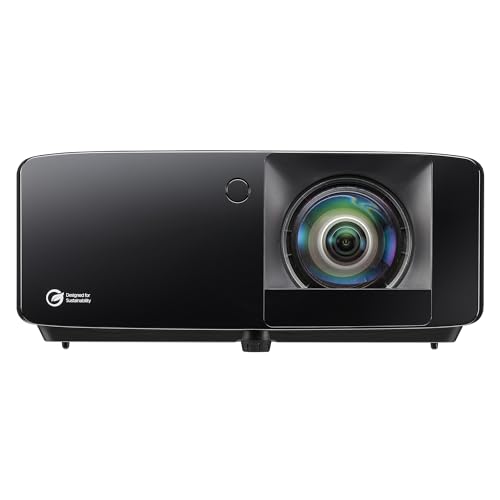
Short-Throw Gaming Pick – Optoma GT2400HDR
Among laser projectors under 2000, the Optoma GT2400HDR stands out for combining high brightness with a short-throw design. Its Full HD resolution, 4,200-lumen output, low-input-lag gaming focus, and golf-simulation suitability make it practical where screen size and projector placement are important.
Best For: Gamers, golf-simulation users, and rooms that need a bright image from a short distance.
Pros:
- 4,200 ISO-lumen brightness helps produce a visible image in brighter environments.
- Short-throw setup supports projection from approximately 2.6 feet, with images up to 300 inches.
- 30,000-hour DuraCore laser light source and IP6X-rated dust protection support long-term use.
- Full HD 1080p resolution with gaming and golf-simulation positioning.
Cons:
- Its native resolution is 1920 x 1080 rather than 4K.
- The supplied notes do not specify the exact input-lag figure or HDR processing details.
The GT2400HDR is a sensible choice when brightness and short-throw flexibility take priority over maximum resolution. It is especially well suited to gaming rooms and golf simulators that need a large image without a long throw distance.
High-Brightness Installation Pick – ViewSonic LS740HD
For buyers seeking laser projectors under 2000 for larger rooms or installed spaces, the ViewSonic LS740HD emphasizes brightness and placement flexibility. Its 5,500 ANSI lumens, Full HD resolution, optical zoom, and extensive adjustment options suit classrooms, meeting rooms, auditoriums, and golf-simulation setups.
Best For: Bright business, education, presentation, and golf-simulation environments requiring flexible installation.
Pros:
- 5,500 ANSI lumens deliver high-brightness Full HD projection for larger or well-lit spaces.
- 1.3x optical zoom, H/V keystone, and four-corner adjustment simplify positioning.
- Supports 30- to 300-inch images, portrait mode, and 360-degree projection.
- Laser phosphor light source offers up to 30,000 hours in Dynamic Eco mode.
Cons:
- Native resolution is 1920 x 1080, so it does not provide 4K detail.
- Its stationary, installation-oriented design may be more than needed for casual portable use.
- The supplied notes list a 20,000-hour light-source operating life elsewhere, while Dynamic Eco is specified at up to 30,000 hours.
The LS740HD is the brightest and most installation-flexible model in this selection. It makes the most sense when visibility, adjustment options, and room-filling projection are more important than 4K resolution or compact home-theater design.
Best for Bright Business Displays – Optoma ZH406
The Optoma ZH406 is a strong option for laser projectors under 2000 when bright, maintenance-conscious performance matters more than compact home-cinema features. Its native 1080p resolution, 4,500-lumen brightness, HDR support, and installation flexibility suit rooms with ambient light.
Best For: Business presentations, classrooms, digital signage, and larger installations requiring network control.
Pros:
- Bright 4,500-lumen output supports lights-on viewing.
- DuraCore laser source offers up to 30,000 hours of operation and IPX6 dust resistance.
- Manual 1.6x zoom, four-corner correction, and 16% vertical lens shift simplify installation.
- Supports portrait and 360-degree projection, plus Crestron, Extron, AMX, and Telnet control.
Cons:
- Its feature set is oriented more toward business and signage than casual home use.
- It uses manual rather than motorized lens adjustments.
Choose the ZH406 if dependable operation, strong brightness, and centralized management are priorities. Built-in 15-watt speakers also help simplify presentation setups.
Best Short-Throw Pick – ViewSonic LS710HD
The ViewSonic LS710HD stands out among laser projectors under 2000 for spaces where the projector must sit close to the screen. Its 0.49 short-throw ratio, 4,200-lumen brightness, and native 1080p output make it practical for home, office, and presentation environments.
Best For: Short-throw setups, home offices, classrooms, and rooms where reducing projector-to-screen distance is important.
Pros:
- 0.49 short-throw ratio helps produce a large image from a close position.
- Bright 4,200-lumen laser projection with native 1080p resolution.
- Four-corner adjustment, 15-degree horizontal and vertical keystone, and 360-degree projection aid setup flexibility.
- HDR/HLG support and HDMI, USB, and Ethernet connectivity broaden its use cases.
Cons:
- Short-throw placement can require more careful positioning to avoid shadows or alignment issues.
- The supplied details list a 20,000-hour light-source life, lower than some competing models in this roundup.
The LS710HD is the most targeted choice here for close-range projection. It combines short-throw convenience with bright Full HD output and useful image-correction tools.
Best Dust-Resistant Value – Optoma ZH401e
The Optoma ZH401e is a practical contender among laser projectors under 2000 for bright, dependable Full HD projection. Its 4,600-lumen output, IP6X dust resistance, and maintenance-free DuraCore laser source make it well suited to meeting rooms, classrooms, and multipurpose spaces.
Best For: Lights-on business and education environments where durability, brightness, and straightforward installation are priorities.
Pros:
- 4,600-lumen brightness supports clear viewing in ambient light.
- Native 1080p resolution and a 300,000:1 contrast ratio deliver detailed images.
- IP6X dust resistance and a DuraCore laser source rated for up to 30,000 hours help reduce maintenance.
- 1.1x zoom, 360-degree projection, portrait mode, and multiple mounting options support flexible installation.
Cons:
- The regular-throw design is less suited to very short placement distances.
- Its supplied connectivity is more limited than models offering broader presentation-focused inputs.
The ZH401e makes sense when reliable high-brightness projection is the goal. Its dust-resistant design and external power supply add practical appeal for demanding installations.
How We Picked the Best Laser Projectors Under 2000
We selected these models based on the features that matter most in real-world projector setups: resolution, rated brightness, laser lifespan, throw distance, input lag, HDR support, installation controls, connectivity, and overall versatility. The list includes both 1080p and 4K-capable options because a higher resolution is not always the best choice for a bright room, gaming setup, or short-throw installation.
Brightness claims can vary by testing standard and picture mode, so treat lumen ratings as a starting point rather than a guarantee of identical performance. Screen size, wall color, room lighting, and image settings all affect the final result.
Quick Comparison
| Best For | What to Prioritize | Models to Consider |
|---|---|---|
| 4K movie viewing | High contrast, HDR, and accurate image processing | JMGO N1S 4K Upgrade, Optoma UHZ36, Epson LS5000 |
| Gaming and simulation | Low input lag, short throw, and strong brightness | Optoma GT2000HDR, Optoma GT2400HDR |
| Bright rooms | Higher brightness and flexible image adjustments | ViewSonic LS741HD, LS740HD, Optoma ZH401e |
| Permanent installation | Long laser life, network control, and alignment features | Optoma ZH406, ViewSonic LS710HD |
Key Buying Factors for Laser Projectors Under 2000
Resolution and Image Quality
Native 1080p is sufficient for sports, gaming, streaming, and many large-screen rooms. Choose a 4K-oriented projector when you sit close to a large screen, watch high-quality movies, or want finer detail. HDR support is useful, but its impact depends on brightness and contrast as well as the source content.
Brightness and Room Lighting
For a dedicated dark theater, extreme brightness is less important than contrast and color performance. Living rooms, multipurpose spaces, and daytime viewing benefit from brighter models, though direct sunlight can overwhelm almost any projector. A suitable screen can improve perceived contrast and reduce the effect of ambient light.
Throw Distance and Installation
Short-throw models are ideal when the projector must sit close to the wall or screen, helping reduce shadows and placement problems. Regular-throw projectors offer more flexibility in rooms with ceiling mounts or rear shelves. Check the throw ratio and zoom range before buying, and confirm that the available keystone, lens shift, or four-corner adjustment meets your installation needs.
Gaming, Connectivity, and Maintenance
Gamers should look for low input lag, appropriate refresh-rate support, and enough HDMI inputs for consoles and streaming devices. Laser light sources generally start quickly and avoid frequent lamp replacement, while features such as network control, dust resistance, and long rated life are valuable for permanent or commercial-style installations.
Who Should Buy Which Laser Projectors Under 2000?
Choose the JMGO N1S 4K Upgrade for a flexible smart setup with built-in Google TV and a strong focus on easy entertainment. The Optoma UHZ36 or Epson LS5000 suits buyers prioritizing 4K-style home cinema performance. For gaming, sports, or golf simulation, the Optoma GT2000HDR and GT2400HDR offer the most relevant short-throw and low-lag features.
Buy a ViewSonic LS741HD or LS740HD when brightness and installation flexibility matter most. The LS710HD is a good fit for rooms needing a particularly short throw. For business, classroom, or fixed-installation use, consider the Optoma ZH406 or ZH401e, especially when long maintenance intervals, network control, or dust resistance are priorities.