
Choosing among today’s laser engravers means balancing laser power, work area, material compatibility, safety, and ease of use. The right machine can handle everything from personalized gifts and craft projects to repeatable small-business production.
This roundup compares 10 standout models across diode, CO2, infrared, and fiber technologies, including enclosed machines, high-speed systems, and versatile dual-laser platforms.
Best 10 Laser Engravers Picks for 2026
Best Large-Project Laser Engraver

- 40W laser with a spacious 23.93-by-15.16-inch bed
- Rotary bundle and AutoPassthrough support varied projects
- Enclosed Class 1 design with guided software
Best For: Large projects, curved items, and guided operation
Best Dual-Laser Production Engraver

- 20W fiber and diode lasers cover metals and nonmetals
- Up to 10,000mm/s engraving speed
- Camera-assisted batch production with optional conveyor
Best For: Business customization and mixed-material production
Best Budget-Friendly DIY Laser Engraver

- 10W output for wood, acrylic, leather, and more
- 17-by-16-inch work area with fine spot focus
- Supports LightBurn, LaserGRBL, Wi-Fi, USB, and SD
Best For: Hobby projects and first-time users
Best High-Power Metal Laser Engraver

- 60W MOPA fiber and 40W diode lasers
- Supports metal color, deep, 3D, and cutting work
- AI cameras and speeds up to 15,000mm/s
Best For: Professional metal customization and high-volume production
Portable Precision Pick
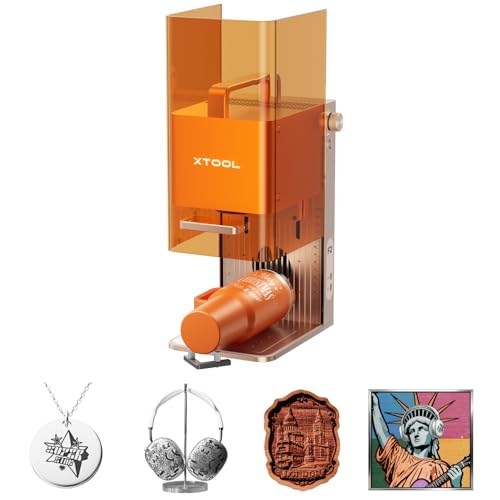
- 15W diode plus 5W IR laser versatility
- 6000mm/s maximum engraving speed
- 50MP camera for precise small-item alignment
Best For: Portable personalization services and small-batch products
Desktop CO2 Workhorse

- 55W CO2 laser for thick acrylic and wood
- 26 × 14-inch bed with 118-inch passthrough
- Dual cameras and LiDAR autofocus
Best For: Workshops and businesses handling large cutting and engraving jobs
Best Enclosed Laser Engraver

- Dual cameras support accurate material placement
- Class 1 enclosure is designed for home crafting
- Optional modules expand printing and engraving capabilities
Best For: Home DIY makers wanting a guided, enclosed crafting machine
Best Starter Laser Engraver Bundle

- Includes enclosure, honeycomb bed, tools, and 13 materials
- Smart camera helps preview and place designs
- Compatible with several popular design platforms
Best For: Beginners and hobbyists wanting a ready-to-start bundle
Best Color Laser Engraver
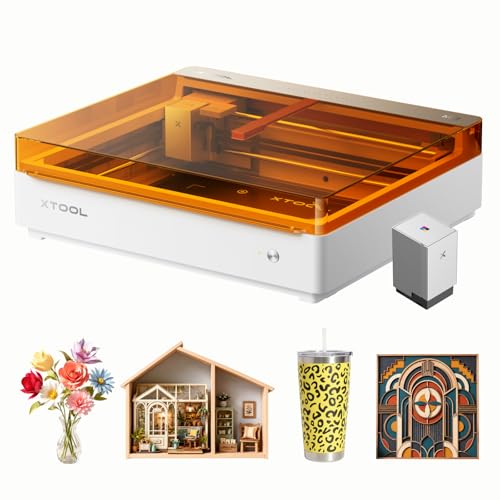
- Includes the CMYK inkjet printing module
- Combines color printing, engraving, and cutting
- Dual cameras support precise print-to-cut alignment
Best For: Crafters creating colorful personalized projects and décor
Best Large-Project Laser Engraver – xTool S1 40W Rotary Bundle
For makers who need room to work, the xTool S1 is one of the more capable laser engravers in this group. Its 40W laser, 23.93-by-15.16-inch bed, rotary bundle, and up to 600mm/s engraving speed suit large signs, batches of small items, and curved projects.
Best For: Large wood, acrylic, and metal projects, tumblers, curved items, and users who want an enclosed, guided setup.
Pros:
- 40W output can cut up to 18mm cherry wood in a single pass, according to the supplied specifications.
- Large work area and AutoPassthrough support projects up to 118 inches long.
- Auto-focus, xTool Creative Space, material presets, tutorials, and AI design tools simplify setup.
- Enclosed Class 1 design includes flame sensors, lid-open protection, and an emergency stop.
Cons:
- At 86.8 pounds, it is a substantial machine to position.
- The large feature set may be more than occasional hobby users need.
The S1 stands out when workspace, guided software, and safer enclosed operation matter as much as cutting power. The rotary bundle also makes it a flexible choice for both flat and curved work.
Best Dual-Laser Production Engraver – xTool F1 Ultra 20W
The xTool F1 Ultra combines 20W fiber and diode lasers to cover metals and many nonmetal materials in one machine. With speeds up to 10,000mm/s, a 16MP camera, and optional conveyor compatibility, it is aimed at shops and sellers handling repeat customization work.
Best For: In-store personalization, metal engraving, mixed-material work, 3D embossing, and small-batch production.
Pros:
- Fiber laser handles metals such as stainless steel, brass, titanium, gold, silver, and copper.
- Diode laser works with wood, acrylic, leather, glass, rubber, and fabric.
- Supports 3D embossing, deep engraving, and up to 220-by-220mm desktop work area.
- Camera-assisted batch workflows and optional Auto Conveyor support production use.
Cons:
- The Auto Conveyor is sold separately.
- It is a Class 4 laser, so workspace safety procedures require particular attention.
- Its desktop work area is smaller than the S1’s bed for oversized flat projects.
This is a specialized choice for users who need fast, detailed metal work alongside diode-laser materials. Its production-focused features are compelling for businesses, but less essential for basic hobby engraving.
Best Budget-Friendly DIY Laser Engraver – Creality Falcon 10W
The Creality Falcon 10W is a straightforward open-frame option for DIY users who want laser engravers for wood, paper, leather, acrylic, glass, and selected metal projects. Its 10W output, 0.06-by-0.06mm spot, and support for popular software provide a practical starting point for home workshops.
Best For: Beginners and hobbyists making signs, decorations, leather goods, and other small-to-medium projects.
Pros:
- 10W output can cut 5mm basswood or 3mm black acrylic in one pass under the supplied specifications.
- 17-by-16-inch working area accommodates a useful range of DIY projects.
- Works with LightBurn and LaserGRBL, with USB, Wi-Fi, and SD card transfer options.
- Quick assembly, tool-free focusing plate, one-year parts replacement, and ongoing technical support.
Cons:
- The open-frame design is less enclosed than the xTool S1 or F1 Ultra.
- Its 10W output is less suited to heavy cutting than the higher-powered models here.
- Eye protection is provided by an anti-UV acrylic filter, but the machine still requires careful placement and operation.
The Falcon is a sensible entry point for users who value accessible software and a relatively quick setup. It offers useful precision and workspace without the complexity or production emphasis of the dual-laser machines.
Best High-Power Metal Laser Engraver – xTool F2 Ultra 60W
The xTool F2 Ultra is the most powerful and specialized option in this laser engravers roundup. Its 60W MOPA fiber laser and 40W diode laser support metal cutting, color marking, deep engraving, and work on wood, acrylic, leather, glass, rubber, and fabric.
Best For: Professional metal customization, color engraving, deep 3D work, mixed-material production, and high-volume orders.
Pros:
- 60W MOPA fiber laser supports color engraving, 3D embossing, deep engraving, and cutting up to 2mm metal.
- 40W diode laser cuts up to 23mm wood and 20mm acrylic according to the supplied notes.
- Can produce more than 100 consistent metal colors using preset color files.
- Dual 48MP AI cameras support 0.2mm positioning accuracy, auto-detection, and one-click preview.
Cons:
- This is a Class 4 laser and requires a carefully controlled operating environment.
- The optional auto conveyor is needed to expand the work area for automated batch processing.
- Its capabilities and industrial focus may be excessive for casual crafting.
The F2 Ultra is built for demanding production rather than occasional personalization. Choose it when advanced metal effects, high output, and dual-laser versatility justify a substantial professional investment.
High-Power Pick – LONGER Ray5 20W
The LONGER Ray5 20W is a strong choice for shoppers comparing laser engravers for larger wood, acrylic, leather, and metal projects. Its 400 × 365mm work area, 24,000mm/min maximum speed, and 20W laser module suit demanding creative or small commercial workloads.
Best For: Makers and small studios that need high cutting power, a roomy work area, and flexible online or offline control.
Pros:
- 20W output can cut 15mm pine in one pass and thicker materials with multiple passes.
- Large 400 × 365mm working area supports varied project sizes.
- Supports USB, TF card, Wi-Fi, app control, LaserGRBL, LightBurn, and LaserBurn.
- Includes a touchscreen, protective enclosure, safety goggles, and multiple safety systems.
Cons:
- The 10.98-pound machine is less portable than compact desktop options.
- Its advanced cutting and color-engraving capabilities may be more than casual users need.
Choose the Ray5 if cutting capacity and workspace matter more than an especially compact footprint. The touchscreen, broad software support, and included enclosure also make it a practical upgrade-friendly option.
Portable Precision Pick – xTool F2 Dual Laser
The xTool F2 is one of the most versatile compact laser engravers for personalized products and on-site work. Its 15W diode and 5W IR lasers cover different materials, while the built-in 50MP camera helps position designs accurately on small items.
Best For: Sellers, makers, and pop-up businesses that need fast metal marking, small-item personalization, and portable batch production.
Pros:
- Dual lasers support color marking on metal, 3D embossing, and thicker-material cutting.
- Engraves at speeds up to 6000mm/s and can complete a card engraving in about 3 seconds.
- Built-in 50MP camera provides workspace visualization and up to 0.1mm alignment accuracy.
- Fully enclosed, fully assembled, and relatively portable at 4.6kg.
Cons:
- The compact format is aimed more at small items than large-format projects.
- Slide Extension, RA3, and purifier capabilities require optional accessories where applicable.
The F2 stands out when speed, precision, and portability are priorities. Its dual-laser setup is particularly useful for businesses switching between metal marking and diode-based engraving or cutting.
Desktop CO2 Workhorse – xTool P2S 55W
The xTool P2S 55W is a substantial option for shoppers who need a desktop CO2 laser engraver and cutter with serious cutting capacity. Its 26 × 14-inch bed, passthrough support, autofocus, and 55W output are designed for larger, repeatable projects.
Best For: Workshops and businesses cutting acrylic, wood, and other compatible materials while also engraving glass, ceramic, slate, and coated metals.
Pros:
- 55W CO2 output cuts all acrylic colors up to 20mm and black walnut up to 18mm in one pass.
- Large bed, 118-inch Auto-Passthrough, and riser base accommodate long or tall projects.
- Dual 16MP cameras, LiDAR autofocus, smart fill batch processing, and 3D curve engraving support production work.
- Includes AI fire detection, automatic locking, emergency stop, air assist, and powerful exhaust.
Cons:
- At 130.7 pounds and over 44 inches long, it needs substantial dedicated space.
- Its higher-power CO2 design is likely excessive for simple hobby engraving.
The P2S is best viewed as a production-oriented desktop system rather than a lightweight starter machine. Its large work envelope, strong cutting performance, and automation features make it compelling for repeat orders and oversized materials.
Best Enclosed Laser Engraver – xTool M2 10W
The xTool M2 is one of the more versatile laser engravers for home crafting, combining a 10W diode laser with dual-camera positioning in a fully enclosed Class 1 design. Its optional CMYK inkjet and 3W IR modules expand its capabilities, but they are sold separately.
Best For: Home DIY makers who prioritize enclosed safety, guided placement, and flexible work with wood, leather, felt, fabric, paper, and other materials.
Pros:
- Dual cameras and “Place & Go” positioning help reduce setup guesswork and material waste.
- Class 1 enclosed design with real-time monitoring suits home use.
- xTool Studio includes templates and an AI image generator for a beginner-friendly workflow.
- Supports more than 300 materials when using its available capabilities and accessories.
Cons:
- The CMYK inkjet and RA3 Lite Rotary accessories are not included.
- The 3W IR laser and CMYK module are optional upgrades rather than standard features.
This standalone M2 is a strong choice for makers who want a polished, enclosed machine and may expand later. Choose the included configuration if you mainly need diode-laser engraving and cutting; shoppers wanting color printing should consider the bundled color version instead.
Best Starter Laser Engraver Bundle – BlazeX M3 10W
The BlazeX M3 is a 10W laser engraver bundle aimed at beginners and hobbyists who want the core accessories included. It pairs smart camera positioning with a protective enclosure, honeycomb bed, tools, and 13 engraving materials.
Best For: Beginners and hobbyists seeking an accessory-rich setup with software compatibility across LightBurn, LaserGRBL, and CutLabX.
Pros:
- Smart camera preview helps position designs before engraving.
- Includes an enclosure, honeycomb bed, tool kit, and 13 materials.
- Class 1 safety features include lid and tilt sensors, plus fan-assisted smoke and odor exhaust.
- Supports Windows, macOS, iOS, and Android compatibility through listed software.
Cons:
- Rotary, riser, air-assist, and purifier accessories require additional purchases.
- The supplied notes do not specify the machine’s working-area dimensions.
With its camera and starter materials, the M3 is convenient for getting projects underway without assembling a separate accessory package. Its upgrade ecosystem also leaves room for cylindrical engraving and improved cutting workflows as your projects become more demanding.
Best Color Laser Engraver – xTool M2 10W Color Craft
The xTool M2 Color Craft stands out among laser engravers by including the CMYK inkjet printing module alongside its 10W laser. It is built for print-to-cut projects on materials such as cardstock, felt, leather, wood, fabric, and paper, with dual cameras helping align designs.
Best For: Crafters who want full-color printing, laser engraving, and precision cutting in one enclosed machine.
Pros:
- Includes the CMYK inkjet module and a deluxe material kit.
- Combines full-color printing, engraving, and cutting in one workflow.
- Dual cameras support real-time workspace previews and accurate placement.
- Class 1 enclosure and real-time monitoring are suited to home craft spaces.
Cons:
- The 3W IR laser is sold separately.
- The machine’s 36.7-pound weight and large package dimensions may require dedicated workspace.
For projects where color matters, this bundled M2 is more complete than the standalone version because the CMYK module is included. It is a practical fit for personalized gifts, home décor, and creative small-business workflows that benefit from integrated print-to-cut operation.
How We Picked These Laser Engravers
We selected models that cover a useful range of power levels, laser types, workspaces, features, and budgets. The lineup includes entry-level diode machines, enclosed craft-focused systems, high-speed engravers, and more capable CO2 and fiber platforms. We also considered practical features such as cameras, autofocus, ventilation, safety certification, rotary compatibility, software support, and the materials each machine is designed to process.
Specifications can vary by configuration, so confirm the included accessories, enclosure, exhaust setup, and regional safety requirements before buying.
Quick Comparison
| Best For | What to Prioritize | Recommended Type |
|---|---|---|
| Beginners and occasional crafts | Enclosure, camera alignment, simple software | Enclosed diode engraver |
| Wood, leather, and coated materials | Diode power and usable bed size | 10W–20W diode |
| Metal marking | Infrared or fiber capability | IR, fiber, or dual-laser model |
| Acrylic and faster cutting | Higher power and ventilation | CO2 laser |
| High-volume production | Speed, autofocus, camera workflow, reliability | High-power or dual-laser system |
Key Buying Factors for Laser Engravers
Laser Type and Power
Diode lasers are generally versatile for wood, leather, paper, and some coated materials. CO2 systems are better suited to cutting and engraving acrylic, wood, and other nonmetallic materials at higher speed. Infrared and fiber lasers are more appropriate for direct marking on many metals and hard surfaces. Higher wattage can improve cutting performance, but it does not automatically make a machine better for every material.
Work Area and Speed
Measure your typical projects before choosing a bed size. A larger work area reduces repositioning for signs and panels, while a compact machine may be easier to place and use. Advertised maximum speed is only one consideration; acceleration, autofocus, software, and material settings affect real-world throughput.
Safety, Ventilation, and Ease of Use
An enclosed Class 1 design is usually the easiest choice for home workshops and shared spaces. Open-frame machines require stricter eye protection, fire precautions, supervision, and ventilation. Every laser can produce smoke or hazardous fumes, so plan for an appropriate exhaust or filtration setup and never leave an active job unattended.
Software and Workflow Features
Built-in cameras, autofocus, material presets, rotary support, and alignment tools can save substantial setup time. Check operating-system compatibility, file formats, replacement-part availability, and whether important features require a subscription or separate accessory.
Who Should Buy Which Laser Engravers?
Choose a Compact Enclosed Model for Home Crafts
Beginners and hobbyists should favor an enclosed machine with a camera, straightforward software, and strong safety features. These models are convenient for gifts, small signs, leather goods, and occasional personalization.
Choose a Diode Workhorse for Wood Projects
If your main materials are wood, leather, and coated items, a 10W–20W diode engraver offers a practical balance of cost, detail, and cutting ability. Choose a larger bed when you regularly make signs or batches.
Choose Dual-Laser or Fiber Technology for Metal
For jewelry, tools, tumblers, and detailed metal marking, prioritize an IR, fiber, or dual-laser machine rather than relying on a standard diode laser. Confirm the supported metal types and whether a rotary attachment is included.
Choose CO2 or High-Power Systems for Production
Frequent cutting, larger materials, acrylic work, and business use justify a faster, higher-power platform with dependable exhaust, camera alignment, and room for future accessories.