
Choosing among the many laser engravers for beginners can be difficult when product listings use similar power ratings and broad material claims. The right machine depends on your workspace, project size, preferred materials, and comfort with setup and software.
These 10 options cover compact starter machines, larger-frame engravers, higher-power models, and machines with features for cutting, precision work, or rotary projects. Use the guide below to narrow the list to a practical fit.
Best 10 Laser Engravers for Beginners Picks for 2026
Large-Area Precision Pick

- 400 x 400mm work area
- 0.08mm compressed focus
- Supports GRBL and LightBurn
Best For: Beginners making larger wood, acrylic, and leather projects
Small-Space Starter

- Pre-assembled and portable
- 150 x 130mm work area
- Not intended for metal engraving or cutting
Best For: Small, detailed craft projects and first-time users
Fast Wireless Maker Pick

- 300 x 300mm work area
- Up to 30,000mm/min listed speed
- Wi-Fi and air-assist support
Best For: Connected hobby, craft, and small-business projects
Best All-in-One Starter Kit

- Enclosure, honeycomb bed, tools, and materials included
- 10W laser with stated 0.01mm precision
- Class 1 safety features and multi-platform software
Best For: Beginners seeking a ready-to-use enclosed desktop laser
Best for Larger Beginner Projects

- 300 x 300mm work area for larger designs
- AI-assisted Acmerstudio software included
- Expandable with rotary, riser, enclosure, and air assist
Best For: Beginners planning signs, gifts, and growing projects
Best for Fast, Guided Setup

- Six-screw assembly and one-touch focusing
- Mobile, AI, and offline workflow options
- Optional IR head for bare-metal marking
Best For: Beginners and small businesses wanting simple repeatable workflows
Best All-in-One Pick

- Includes rotary roller, risers, enclosure, honeycomb bed, and materials.
- 10W laser supports engraving and cutting across many materials.
- Class 1 design includes automatic safety-stop features.
Best For: Beginners wanting a complete flat- and cylindrical-engraving setup
Best Large-Format Starter
Creality Falcon 5W Laser Engraver
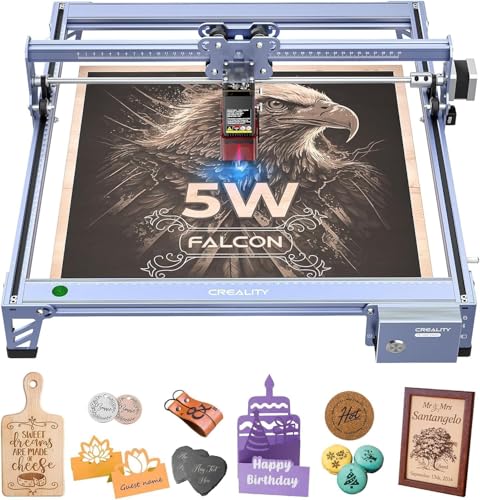
- Provides a 400 x 415mm working area for larger projects.
- Reaches engraving speeds up to 10,000mm/min.
- Rotary roller and risers are available separately.
Best For: Beginners working mainly on larger flat wood, leather, or acrylic pieces
Best Value 10W Option
Creality Falcon 10W Laser Engraver

- 10W output supports stronger cutting than the 5W Falcon.
- Works with LaserGRBL and LightBurn plus Wi-Fi, USB, and SD transfer.
- Quick assembly and a tool-free focusing plate simplify setup.
Best For: Beginners wanting versatile 10W engraving and cutting at a practical price
Large-Area Precision Pick – KENTOKTOOL LE400PRO 5.5W
For beginners who want room to work, the KENTOKTOOL LE400PRO combines a 400 x 400mm engraving area with a fine 0.08mm compressed spot. It supports popular software such as GRBL and LightBurn and can engrave or cut a range of common craft materials.
Best For: Beginners who need a large work area for wood, acrylic, leather, and mixed-material projects.
Pros:
- Large 400 x 400mm working area.
- Tool-free focus adjustment and an all-metal frame.
- Supports GRBL, LightBurn, Windows, and LightBurn on Mac.
- Can cut wood up to 8mm and black acrylic up to 5mm, according to the supplied specifications.
Cons:
- Installation still takes approximately 10–20 minutes.
- A roller is needed for round objects.
- The listed 50W machine designation may be confusing beside its 5.5W laser output.
The LE400PRO is a practical choice among laser engravers for beginners when workspace and material flexibility matter more than the smallest footprint. Its enclosure, emergency power switch, and straightforward focus adjustment add convenience for new users.
Small-Space Starter – SCULPFUN C1 Mini 3W
The SCULPFUN C1 Mini is a compact entry point for laser engravers for beginners, arriving pre-assembled and ready for small projects. Its 150 x 130mm area suits several small items, while compatibility with Sculpfun Space, LaserGRBL, and LightBurn gives users room to progress.
Best For: Beginners who prioritize portability, simple setup, and detailed engraving on small nonmetal projects.
Pros:
- Pre-assembled design minimizes setup.
- Lightweight 2.3-pound portable construction.
- Supports more than 100 listed engraving materials, including wood, leather, slate, and kraft paper.
- Includes X- and Y-axis limit switches plus a magnetic protective cover.
Cons:
- Cannot directly engrave bare metals with its limited power.
- Laser cutting is not recommended for this model.
- It does not currently support smartphones.
This is one of the easiest laser engravers for beginners to place on a desk and start using. Its modest power limits cutting and metal work, but the small footprint and ready-to-use design make it well suited to learning and detailed craft engraving.
Software-Friendly Craft Pick – ACMER S1 6W
The ACMER S1 is designed to reduce the software learning curve for laser engravers for beginners. Its free ACMER Studio software includes AI-assisted design tools, while LightBurn and LaserGRBL remain available for users who want more familiar workflows.
Best For: Beginners, students, and home makers creating personalized gifts, decorations, and small wood or acrylic projects.
Pros:
- Arrives 99% preassembled with one-minute laser-head installation.
- Offers AI-assisted design features through ACMER Studio.
- Supports engraving and cutting on materials including wood, bamboo, leather, plastic, and thin acrylic.
- Compact 2kg aluminum-alloy design.
Cons:
- The 130 x 130mm working area is smaller than many full-size machines.
- The protective enclosure needed for a Class 1 setup is compatible but not stated as included.
- Its compact format is better suited to small projects than large signs or panels.
Among laser engravers for beginners, the S1 stands out for its quick setup and approachable design workflow. It is a particularly useful fit for education, DIY gifts, and small-business prototypes where portability and ease of use are priorities.
Fast Wireless Maker Pick – Twotrees TTS-55 Pro
The Twotrees TTS-55 Pro gives beginners a larger 300 x 300mm workspace, wireless control, and support for both online and TF-card engraving. Its 5.5W laser and air-assist-ready nozzle are aimed at detailed engraving and light cutting across common maker materials.
Best For: Beginners and hobbyists who want a faster, connected machine for wood, leather, acrylic, and small-business projects.
Pros:
- 300 x 300mm working area with up to 30,000mm/min listed speed.
- Air-assist support can help with cleaner, deeper cuts.
- Built-in Wi-Fi enables mobile-app or computer web control.
- Supports LaserGRBL and LightBurn on multiple operating systems.
Cons:
- Requires assembly, despite supplied tutorials and tools.
- Windows users may need to download the appropriate CH340 or CH341 driver.
- Air-assist functionality may require integrating an air-assist system.
The TTS-55 Pro is a capable option for laser engravers for beginners who want more workspace and connectivity than a mini model provides. Its setup is less immediate than a preassembled machine, but the speed, wireless control, and cutting-oriented features offer useful room to grow.
Best All-in-One Starter Kit – BlazeX M3 10W
For beginners comparing laser engravers for beginners, the BlazeX M3 is a convenient starting point because it combines a 10W laser, protective enclosure, honeycomb bed, tools, and sample materials. Its 0.01mm stated accuracy and support for LightBurn, LaserGRBL, and CutLabX make it suitable for learning detailed engraving and basic cutting.
Best For: Beginners who want an enclosed, ready-to-start machine for desktop crafts, personalized items, and small projects.
Pros:
- Includes an enclosure, honeycomb bed, tools, and 13 engraving materials.
- Designed for engraving and cutting across wood, leather, glass, acrylic, and coated metal.
- Class 1 design includes lid-opening and tilt protection, plus smoke and odor ventilation.
- Works across Windows, macOS, iOS, and Android with several supported software options.
Cons:
- Rotary engraving, air assist, and purification require optional accessories.
- The listed 4.3 x 1.2 x 4.7-inch dimensions may not fully describe the assembled working setup.
The BlazeX M3 stands out when convenience and included safety equipment matter more than building a custom setup immediately. Its accessory ecosystem also gives beginners room to expand into cylindrical items and cleaner cutting later.
Best for Larger Beginner Projects – ACMER S2 7W
The ACMER S2 is a practical option for people exploring laser engravers for beginners who want generous workspace and approachable software. Its free Acmerstudio software includes AI design tools, while the 300 x 300mm work area and speeds up to 10,000mm/min support signs, gifts, and other larger projects.
Best For: New users who want a spacious work area, AI-assisted design tools, and a machine they can expand over time.
Pros:
- 300 x 300mm working area accommodates signs, decorations, and gifts.
- Acmerstudio offers AI tools for creating designs from text prompts or photos.
- Supports engraving over 100 materials and cutting selected wood and acrylic with multiple passes.
- Includes an anti-UV shield, safety goggles, and motion-detection auto-pause.
Cons:
- Rotary modules, risers, enclosure, and air assist are optional additions.
- Its 7W laser output may require multiple passes for thicker materials.
The ACMER S2 balances beginner-friendly software with a workspace that will not feel cramped as projects become more ambitious. It is especially appealing if you want to start with flat materials and add rotary or air-assist capability later.
Best for Fast, Guided Setup – Carverall K15 Pro
Among laser engravers for beginners, the Carverall K15 Pro focuses on reducing setup and design friction. It assembles with six screws, offers one-touch focusing, supports mobile app control and offline files, and includes tutorials, a one-year warranty, and lifetime technical support.
Best For: Beginners and small-business users who prioritize fast setup, simple controls, repeat jobs, and future expansion.
Pros:
- Assembles in about five minutes and includes safety glasses, tools, and test materials.
- CutLabX supports computers, tablets, and phones, with AI design tools and mobile control.
- One-touch focus, smart file memory, and speeds up to 15,000mm/min simplify repeat work.
- Optional IR head adds bare-metal marking, while other add-ons support rotary work and air handling.
Cons:
- The supplied details list a 6W power rating, so thicker cutting may require multiple passes.
- Important expansion features, including the IR head, honeycomb plate, and rotary roller, are optional.
- The supplied product dimensions are listed as 1 x 1 x 1 inch, which may be incomplete for workspace planning.
The K15 Pro is a strong fit for users who want a guided workflow rather than a complex initial build. Its offline operation, fast focusing, and optional IR head make it flexible for recurring craft or small-business jobs.
Best All-in-One Pick – BlazeX M3 10W Laser Engraver
For beginners comparing laser engravers for beginners, the BlazeX M3 stands out as a ready-to-use package with a 10W laser, enclosure, honeycomb bed, starter materials, and rotary accessories. Its compact design and support for LightBurn, LaserGRBL, and CutLabX make it suitable for learning engraving and cutting across wood, leather, glass, coated metal, and other materials.
Best For: Beginners who want cylindrical engraving and a broad starter kit in one purchase.
Pros:
- Includes a rotary roller and height risers for 360-degree tumbler and bottle engraving.
- Comes with an enclosure, honeycomb bed, toolkit, and 13 materials.
- Offers 10W output, stated 0.01mm precision, and compatibility with several popular software options.
- Class 1 safety design includes lid and tilt-stop sensors plus smoke ventilation.
Cons:
- The included rotary setup and enclosure add features that may require extra workspace.
- More advanced upgrades, such as air assist and purification, are optional accessories.
The BlazeX M3 is a practical choice for new users who want to explore both flat and cylindrical projects without assembling a separate accessory package. Its included safety features and materials help shorten the learning curve.
Best Large-Format Starter – Creality Falcon 5W Laser Engraver
The Creality Falcon 5W is a strong option for beginners choosing laser engravers for beginners who need more room for signs, panels, and other larger projects. Its 400 x 415mm working area, 10,000mm/min speed, offline capability, and fine compression spot combine practical workspace with efficient operation.
Best For: New users prioritizing a generous work area and fast engraving on flat materials.
Pros:
- Large 400 x 415mm working area accommodates bigger projects in one pass.
- Engraving speeds reach up to 10,000mm/min for higher-volume tasks.
- Supports more than 200 materials, including wood, leather, and acrylic.
- Eye-protective cover and active stop function add safeguards during operation.
Cons:
- The rotary roller and risers are optional purchases rather than included accessories.
- Its 5W output is lower than the 10W models in this roundup.
- The supplied notes identify it as a Class 4 laser, so users should follow appropriate operating precautions.
Choose the Falcon 5W when project size and speed matter more than included extras. It provides a spacious platform and flexible material support, while cylindrical work requires additional accessories.
Best Value 10W Option – Creality Falcon 10W Laser Engraver
The Creality Falcon 10W is worth considering for beginners seeking laser engravers for beginners with stronger cutting capability and straightforward setup. It combines 10W output, a 0.06 x 0.06mm spot, up to 10,000mm/min speed, and support for LightBurn and LaserGRBL, while Wi-Fi, USB, and SD-card transfers add flexibility.
Best For: Beginners who want a versatile 10W machine with multiple connection methods and a quick setup.
Pros:
- 10W output can cut 5mm basswood or 3mm black acrylic in one pass according to the supplied notes.
- Supports engraving on materials including wood, leather, paper, acrylic, glass, and metal.
- Compatible with LaserGRBL for new users and LightBurn for more experienced operators.
- Includes a focusing plate and is typically assembled in 10–20 minutes.
Cons:
- The supplied safety feature is an anti-UV acrylic filter rather than a fully enclosed Class 1 design.
- The notes do not mention an included rotary attachment or enclosure.
- Some software compatibility varies by operating system.
This Falcon model offers a useful balance of cutting power, software flexibility, and accessible setup. It is a sensible starting point for users who expect to move beyond basic engraving into small cutting projects.
How We Picked the Best Laser Engravers for Beginners
We focused on specifications that matter most to first-time buyers: laser output, working area, frame design, advertised precision, software or app control, portability, and compatibility with common materials. We also considered whether a machine offers useful room to grow without making initial setup unnecessarily complicated.
Because listings can describe optical power, electrical input, and cutting capability differently, treat wattage as only one comparison point. Always confirm the manufacturer’s current specifications, supported software, included accessories, and safety documentation before purchasing.
Quick Comparison
| Best For | Look For | Models to Consider |
|---|---|---|
| Small spaces and simple projects | Compact frame and lower output | SCULPFUN C1, Creality Falcon 5W |
| General beginner use | 6W–10W output and straightforward controls | ACMER S1, ACMER S2, Creality 10W |
| Larger designs | Expanded working area | LE400PRO, K15 Pro |
| Precision-focused projects | Fine spot-size claims and rigid construction | BlazeX M3, Twotrees TTS-55 Pro |
| Tumblers and cylindrical items | Rotary compatibility or included rotary set | BlazeX M3 with Rotary Set |
Key Buying Factors for Laser Engravers for Beginners
Laser Power and Project Materials
Lower-power machines are often suitable for marking wood, cardboard, leather, coated materials, and similar craft surfaces. Higher-output models generally provide more flexibility for cutting thin wood and acrylic, but results depend on material type, thickness, speed, passes, and air assistance. Never assume a machine can safely engrave bare metal or glass merely because those materials appear in a listing.
Working Area and Machine Footprint
Measure your available table space, including clearance around the frame and room for ventilation. A larger 400-by-400mm-style work area can accommodate bigger signs and panels, while a mini engraver may be easier to store and move. A larger bed is useful only if your workspace and projects justify it.
Safety and Ventilation
Laser engraving creates smoke and potentially hazardous fumes. Use appropriate eye protection, reliable ventilation or an enclosure, and a fire-safe workspace. Never leave an operating laser unattended. Check for emergency-stop features, limit switches, flame protection, protective covers, and clear operating instructions.
Software and Setup
Beginners should prioritize documented software support, common file compatibility, clear assembly instructions, and an active support community. App control can simplify basic jobs, but desktop software may offer better control over layers, speed, power, and repeated production work.
Rotary Accessories and Expansion
If you plan to personalize tumblers, bottles, or other cylindrical objects, verify whether a rotary attachment is included or sold separately. Also check the machine’s clearance, cable connections, and software support before relying on a rotary workflow.
Who Should Buy Which Laser Engravers for Beginners?
Choose a compact 3W or 5W model if you want an approachable machine for small crafts, occasional engraving, or limited workspace. A 6W to 7W engraver is a sensible middle ground for users who want more capability without immediately moving to the most powerful option.
Pick a 10W machine if cutting flexibility and faster work are priorities, provided you can handle ventilation and safety requirements. For larger signs or broader craft materials, favor a model with an expanded work area. If personalized drinkware is your main goal, select the rotary-ready BlazeX configuration rather than adding compatibility later.
Before ordering, confirm the actual optical output, bed dimensions, enclosure requirements, included accessories, warranty, and replacement-part availability. Those details usually matter more to a beginner’s long-term experience than headline power alone.