
Looking for laser cutting machines under 500 that can handle real hobby and small-shop projects? The right budget machine can still deliver clean cuts, reliable engraving, and enough work area for everyday creative tasks.
Below, we focus on models that offer strong value, practical build quality, and features that matter most when you want accurate results without overspending.
Best 10 Laser Cutting Machines Under 500 Picks for 2026
Premium Detail Cutter

- True 12W diode laser for engraving and cutting
- 0.01mm positioning accuracy for fine detail
- 300 × 300mm work area with software flexibility
Best For: Detailed crafts, signs, and moderate cutting projects
Large-Area Workhorse

- 10W optical power with strong wood and acrylic cutting
- Large 390 × 410mm engraving area
- Fast 10-15 minute assembly with modular metal build
Best For: Bigger hobby projects and users who want an easy-to-use cutter
Portable Creator Pick
WIZMAKER Wand 12W Laser Engraver
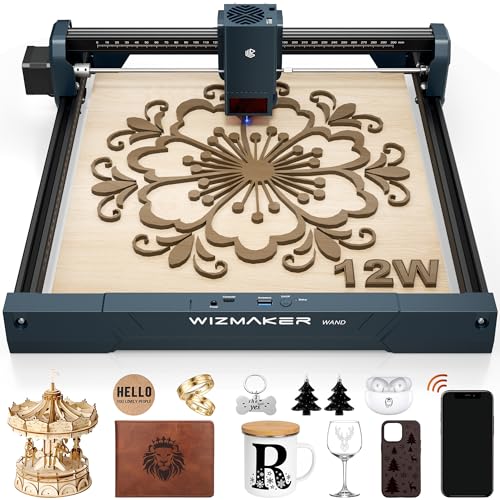
- 12W diode laser with a 300 × 300mm work area
- Wi-Fi, hotspot, USB, and multi-device support
- Up to 10,000 mm/min engraving speed
Best For: Small businesses and DIY users wanting a compact, connected machine
Creality 10W Precision Cutter

- 10W output cuts 5mm basswood or 3mm acrylic in one pass
- 0.06 x 0.06 mm spot supports fine engraving detail
- Works with LightBurn, LaserGRBL, Wi-Fi, USB, and SD card
Best For: Fast, precise desktop engraving with broad material support
Twotrees Air-Assist Engraver

- 5.5W laser with air-assist nozzle support
- Cuts 5mm plywood, 3mm acrylic, and 0.7mm leather
- 32-bit board supports 30,000mm/min and Wi-Fi control
Best For: Hobbyists wanting cleaner cuts and compact wireless control
Precision Pick
Creality Falcon 5W Laser Engraver Machine
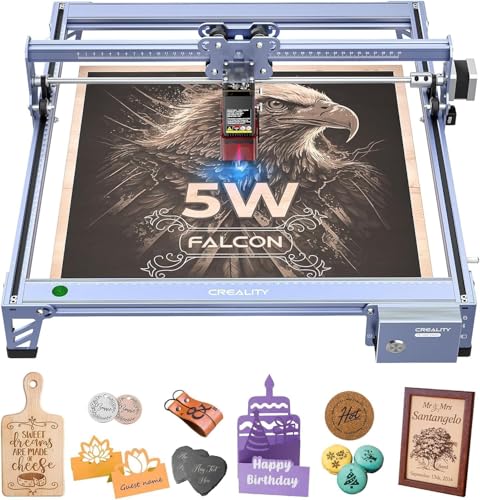
- 0.06 x 0.06mm spot for fine detail
- 10,000mm/min engraving speed
- 400 x 415mm work area for larger projects
Best For: Detailed DIY engraving and light cutting
Beginner-Friendly Choice

- Free software plus app and TF card control
- Verified 10.36–10.58W output
- Compact A4 workspace with starter kit included
Best For: Beginners and small business DIY projects
Premium Detail Cutter – ACMER S2 12W Laser Engraver
If you want one of the more capable laser cutting machines under 500 for detailed work, the ACMER S2 is built around a true 12W diode module and a 300 × 300mm workspace. It is aimed at users who want both engraving precision and enough cutting power for common hobby materials, with software support that keeps setup and project control in one place.
Best For: Makers who want a flexible desktop engraver/cutter for detailed art, signs, and moderate cutting tasks.
Pros:
- True 12W laser with support for engraving and cutting across 100+ materials
- Fine 0.08 × 0.08mm spot and up to 0.01mm positioning accuracy for detailed work
- Large 300 × 300mm working area for signs, layered art, and bigger DIY layouts
- Compatible with ACMER Studio, LightBurn, and LaserGRBL
Cons:
- Deeper cuts may require multiple passes
- Optional accessories are needed to expand into rotary or taller workpiece projects
The S2 stands out if precision matters more than raw brute force, especially for personalized gifts, decor, and small-business craft work. Its combination of workspace, software flexibility, and safety features makes it a strong all-around pick.
Large-Area Workhorse – ORTUR Laser Master 2 S2 10W
Among laser cutting machines under 500, the ORTUR Laser Master 2 S2 LU2-10A is a strong choice if you want a larger working area and solid cutting capability. Its 10W optical power, modular metal build, and wide software compatibility make it practical for hobbyists who want an easy-to-assemble machine that can handle bigger projects.
Best For: Users who want a larger engraving area and a dependable diode cutter for wood, acrylic, and general maker projects.
Pros:
- 10W optical power with support for cutting up to 30mm acrylic and 20mm wood
- Large 390 × 410mm engraving area for bigger layouts
- Easy 10-15 minute assembly with a modular full-metal structure
- Compatible with LaserGRBL and LightBurn on Windows and macOS
Cons:
- Class 4 laser requires careful safety practices
- Best cutting results depend on suitable settings and air assist support
This model is a practical fit if workspace size matters and you want a machine that is easy to build and update. Its safety features and broad software support make it appealing for buyers who want a straightforward entry into diode laser cutting.
Portable Creator Pick – WIZMAKER Wand 12W Laser Engraver
If you are comparing laser cutting machines under 500 and want a compact system that still offers useful power, the WIZMAKER Wand 12W is worth a close look. It combines a 300 × 300mm work area with app and desktop connectivity, making it a convenient option for makers who want straightforward engraving plus light cutting.
Best For: DIY creators and small businesses that want a compact, flexible engraver for personalization and light cutting.
Pros:
- 12W laser with 300 × 300mm work area for signs, décor, and personalized products
- 0.1mm repeatable positioning accuracy and up to 10,000 mm/min engraving speed
- Works with Windows, macOS, Android, and iOS via Wi-Fi, hotspot, or USB
- Supports LightBurn and LaserGRBL with beginner-friendly guidance
Cons:
- Wood cutting is listed up to 8mm under suitable settings, so it is better for light cutting than heavy-duty jobs
- Selective acrylic support is limited to dark opaque materials
The WAND 12W is appealing when convenience matters as much as capability. Its compact format and broad device compatibility make it easier to fit into a home workshop or small business workflow.
Safer Enclosed Choice – VEVOR 20W Enclosed Laser Engraver
For buyers looking at laser cutting machines under 500 and prioritizing safety, the VEVOR 20W enclosed engraver offers a different approach from open-frame desktop units. Its Class 1 enclosure, 11.8 × 11.8 inch work area, and 20W output make it a practical option for users who want an enclosed workspace with straightforward software support.
Best For: Users who want an enclosed diode engraver with added safety features for home or shared spaces.
Pros:
- Class 1 enclosure helps filter laser light, contain smoke, and reduce noise
- 20W output with up to 7,000 mm/min speed and 0.3 in basswood cutting in one pass
- Supports LaserGRBL, LightBurn, and CutLabX
- Includes safety features such as emergency stop, tilt stop, limit switches, and security lock
Cons:
- Cannot cut metals or transparent/reflective materials without specific black coating limitations
- LaserGRBL support is limited to Windows and low-speed devices only
This is a solid pick if your top concern is a safer, more enclosed setup rather than maximum open-frame flexibility. It is especially appealing for users who want a cleaner, more controlled engraving environment.
Creality 10W Precision Cutter – High-Speed Desktop Engraver
If you’re comparing laser cutting machines under 500 and want strong performance for the price, the Creality 10W is built for fast cutting and detailed engraving. It pairs a 10W output with a fine 0.06 x 0.06 mm spot, making it a practical pick for wood, acrylic, leather, paper, and even engraving on glass and metal.
Best For: Buyers who want a fast, precise desktop cutter with broad material support and simple setup.
Pros:
- 10W output can cut 5mm basswood or 3mm black acrylic in one pass.
- 0.06 x 0.06 mm spot and high repositioning accuracy support detailed work.
- Compatible with LightBurn and LaserGRBL, plus Wi-Fi, USB, and SD card transfer.
- Includes UV-filter acrylic on the module and a quick 10–20 minute assembly claim.
Cons:
- Best performance is focused on common hobby materials rather than heavy-duty production.
- Some setup and software familiarity may still be needed for first-time users.
Overall, this Creality model stands out as a capable all-around desktop option if you want speed, precision, and easy software compatibility. It looks especially appealing for makers who want a stronger cutting edge without moving into a much higher price tier.
Twotrees Air-Assist Engraver – Compact 5.5W Pro
For shoppers browsing laser cutting machines under 500, the Twotrees TTS-55 Pro is a compact 5.5W option with a strong focus on control and cleaner cutting. It adds air-assist support, a 32-bit control board, and a 300 x 300 mm work area, making it a useful fit for hobby builds and small projects.
Best For: Hobbyists and small-scale creators who want a compact engraver with air-assist support and fast wireless control.
Pros:
- 5.5W laser with air-assisted nozzle support for cleaner, deeper cuts.
- Can cut 5mm plywood, 3mm acrylic, and 0.7mm leather.
- 32-bit control board supports up to 30,000mm/min engraving speed.
- Built-in Wi-Fi plus online and TF card offline engraving options.
Cons:
- Lower power than 10W units, so cutting capacity is more limited.
- Work area is compact at 300 x 300 mm.
This Twotrees machine is a smart pick if you value cleaner results and flexible control in a smaller package. It offers a balanced feature set for makers who want solid performance without stepping up to a larger, pricier setup.
BlazeX Starter Safety Kit – Enclosed 10W Engraver
If you want one of the more beginner-friendly laser cutting machines under 500, the BlazeX M3 is packaged like a starter kit. It combines a 10W module, Class 1 safety rating, enclosure, honeycomb bed, and included materials, so you can begin projects with fewer add-ons to buy separately.
Best For: Beginners, home users, and small studios that want an enclosed, safety-focused starter bundle.
Pros:
- 10W laser with 0.01mm stated accuracy for detailed engraving.
- Class 1 safety design includes lid-open and tilt sensors, plus a fan.
- Bundle includes enclosure, honeycomb bed, tool kit, goggles, and 13 materials.
- Compatible with LightBurn, LaserGRBL, and CutLabX across multiple platforms.
Cons:
- The feature set is broad, which may be more than a casual user needs.
- Accessory ecosystem may tempt extra purchases beyond the starter bundle.
The BlazeX M3 is the easiest recommendation here if safety and convenience matter most. Its bundled accessories and enclosed design make it a practical way to get into laser engraving with fewer setup gaps.
Precision Pick – Creality Falcon 5W Laser Engraver Machine
If you want laser cutting machines under 500 that lean toward detail work, the Creality Falcon 5W is built for accurate engraving and clean small cuts. Its 0.06 x 0.06mm spot size, 10,000mm/min speed, and 400 x 415mm workspace make it a practical fit for wood, leather, acrylic, glass, and other hobby materials.
Best For: Makers who want a precise diode laser for detailed projects, larger panels, and everyday DIY cutting.
Pros:
- Ultra-fine 0.06 x 0.06mm spot helps preserve intricate details.
- Up to 10,000mm/min engraving speed supports faster batch work.
- Large 400 x 415mm working area handles bigger materials.
- Includes eye-protective cover and active stop safety features.
Cons:
- Rotary roller and raisers are optional extras, not included.
- Best suited to engraving and light cutting rather than heavy-duty shop use.
The Falcon 5W stands out if your priority is precision rather than maximum power. It offers a strong mix of safety, speed, and workspace for makers who want a capable entry-level machine without overcomplicating setup.
Beginner-Friendly Choice – K15 Pro 10W Laser Engraver
Among laser cutting machines under 500, the K15 Pro is a strong pick if you want simple setup and flexible control. It combines app-based operation, TF card offline use, and compatibility with LightBurn and LaserGRBL, while still offering a 10W diode output, A4-sized workspace, and support for a wide range of materials.
Best For: Beginners, hobby crafters, and small sellers who want an easy-to-use engraver with multiple control options.
Pros:
- Free CutLabX software plus app control and offline TF card operation.
- Quick 3-minute assembly with 6 screws and a starter kit included.
- Verified 10.36–10.58W output and support for 300+ materials.
- Compact A4 workbed fits everyday projects without taking over desk space.
Cons:
- Acrylic cutting is limited to 8mm, so it is not a heavy-duty cutter.
- IR engraving for stainless steel and aluminum requires an optional add-on head.
The K15 Pro is a practical all-around choice for first-time buyers who value guidance and convenience. Its combination of software support, offline flexibility, and upgrade options makes it especially appealing for home crafters and small-batch sellers.
Portable Pick – Artilume T1-P Foldable Laser Engraver
If portability matters in your search for laser cutting machines under 500, the Artilume T1-P is designed around easy storage and simple mobile control. Its foldable frame, 200 x 150mm work area, protective cover, and riser function make it a flexible option for small workspaces, while the 12W laser and 0.01mm precision help it handle detailed engraving jobs.
Best For: Makers who need a foldable, space-saving engraver for home studios, craft fairs, and small projects.
Pros:
- Foldable design makes it easier to store and move.
- Mobile app control lets you upload, customize, and run jobs wirelessly.
- 12W laser with 0.01mm precision supports clean detail work.
- Riser function adds height for thicker wood, boxes, tumblers, and bottles.
Cons:
- 200 x 150mm work area is compact compared with larger desktop units.
- Best suited to small projects rather than oversized materials.
The T1-P is a good fit if you need a machine that can tuck away easily but still deliver useful engraving performance. Its portability and app control make it especially convenient for hobbyists and on-the-go creators.
How We Picked These Laser Cutting Machines Under 500
We focused on models that make sense for buyers who want capable entry-level performance without moving into pro-grade pricing. That means prioritizing usable laser power, dependable motion control, reasonable work area, and safety-oriented designs where available. We also looked for machines suited to common materials like wood, leather, paper, MDF, coated metals, and select acrylic use cases.
Quick Comparison: What Matters Most
When comparing Laser Cutting Machines Under 500, the best choice is usually the one that matches your material type and project size first, then power second. A 5W unit may be fine for engraving and light cutting, while 10W to 20W machines offer more speed and thicker-material flexibility. Larger beds help with signs, batch work, and bigger layouts, while enclosed or foldable designs can make setup cleaner and safer.
Key Buying Factors for Laser Cutting Machines Under 500
Laser Power and Cutting Depth
Higher wattage generally improves cutting speed and expands the range of materials you can work with. For occasional crafts and engraving, lower-power machines can be enough. If you want faster cuts or more versatility, look at 10W and above.
Work Area and Project Size
Check the usable engraving area before buying. A compact footprint is great for desktop use, but a larger bed gives you more freedom for signs, panels, and repeat jobs.
Material Compatibility
Not every laser handles every material well. Many budget models work best on wood, leather, paper, and dark acrylic, while coated metals are typically engraved rather than cut. Always verify material limits before purchasing.
Precision, Software, and Ease of Use
Fine detail, stable motion, and straightforward software matter just as much as raw power. If you are a beginner, look for clear setup instructions, offline operation if needed, and a machine that is easy to align and maintain.
Safety and Enclosure Options
Laser safety should be part of the buying decision. Enclosures, proper ventilation, and emergency stop features can make a big difference, especially if you plan to use the machine often at home.
Who Should Buy Which Laser Cutting Machines Under 500?
If you are mainly engraving labels, gifts, or small craft items, a lower-power, easy-to-use model can be the smartest buy. Makers who want faster production or more cutting flexibility should lean toward 10W or higher options. Buyers with limited space may prefer a foldable or compact machine, while those planning more frequent use may benefit from an enclosed design and a larger work area.
In short, the best Laser Cutting Machines Under 500 are the ones that balance power, safety, and usability for your exact projects. Match the machine to your materials and workflow, and you will get far better long-term value than choosing by wattage alone.