
Finding the right laptop for school means balancing price, portability, battery life, performance, and software compatibility. The best choice depends on whether you need a simple device for web-based coursework or a faster computer for multitasking, creative work, or business programs.
We compare 10 student-friendly laptops across ChromeOS, Windows, and macOS to help you match your budget and coursework with the features that matter most.
Best 10 Laptops for Students Picks for 2026
Best All-Around Value

- 12GB RAM and 256GB SSD
- Full HD IPS display
- Office 365 included
Best For: Students wanting a larger Windows laptop for everyday schoolwork
Best Compact Chromebook Value

- Lightweight 2.9-pound design
- Up to 14 hours of listed battery life
- Chrome OS for browser-based work
Best For: Students needing a small Chromebook for basic online tasks
Best Premium Choice

- M5 chip with 16GB memory
- 512GB SSD and Liquid Retina display
- Up to 18 hours of listed battery life
Best For: Students wanting premium performance and portability
Best Mid-Size Chromebook

- Quad-core Celeron N4120 processor
- 14-inch anti-glare HD display
- HDMI, USB-A, and USB-C ports
Best For: Students wanting a practical 14-inch Chromebook
Best for Easy Setup

- A18 Pro chip with Apple Intelligence support
- Up to 16 hours of battery life
- Lightweight aluminum design and Liquid Retina display
Best For: Students wanting a premium, portable macOS laptop
Best Budget Windows Option

- 15.6-inch Full HD anti-glare display
- Silent fanless design for quiet study areas
- TF card expansion support up to 1TB
Best For: Students needing an affordable laptop for basic coursework
Best Student-Friendly Windows Pick

- 8GB LPDDR5 memory for everyday multitasking
- Privacy-shutter camera and extensive connectivity
- Lightweight design with MIL-STD-810H testing
Best For: Students wanting a balanced Windows laptop for school and home
Best Performance Pick
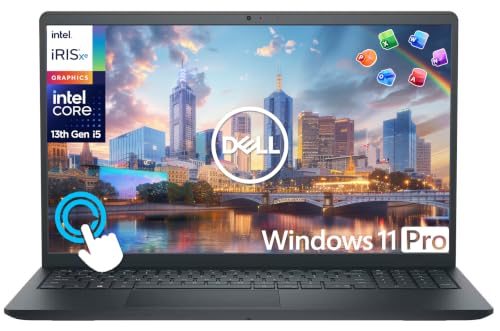
- 10-core Intel Core i5 and 16GB RAM
- 15.6-inch Full HD IPS touchscreen
- 512GB SSD plus 500GB portable drive
Best For: Business students and multitaskers needing extra performance
Best Lightweight Budget Pick

- 3.24-pound portable design
- Up to 11 hours of video playback
- Includes one-year Microsoft 365 Personal
Best For: Students focused on browsing, documents, and online classes
Best Accessory Bundle

- Windows 11 Pro with Microsoft Office
- Anti-glare 14-inch display and Wi-Fi 6
- Includes 500GB drive, earbuds, mouse, and cables
Best For: Students wanting a complete basic productivity setup
Best All-Around Value – 15.6-inch Student Laptop
For students who need a practical Windows computer for schoolwork, this 15.6-inch laptop combines a Full HD IPS display, 12GB of RAM, a 256GB SSD, and a bundled year of Office 365. It is suited to browsing, online classes, documents, presentations, and streaming rather than demanding creative workloads.
Best For: Students who want a larger screen, Windows 11, and included productivity software at a value-oriented price.
Pros:
- Includes one year of Office 365 with Word, Excel, and PowerPoint.
- 12GB RAM and a 256GB SSD support everyday multitasking and quick file access.
- 15.6-inch 1920×1080 IPS display offers crisp text and wide viewing angles.
- USB-C, USB 3.2, Mini HDMI, microSD, and headphone connectivity add flexibility.
Cons:
- Battery life is listed at up to 6 hours.
- Intel Celeron J4105 is aimed at everyday tasks, not demanding applications.
- At 3.7 pounds, it is less lightweight than smaller student laptops.
This is a sensible pick among laptops for students who prioritize screen space, ports, storage, and ready-to-use Office software. Its limitations are mainly portability and performance for intensive workloads.
Best Compact Chromebook Value – Dell Chromebook 11 3100
This renewed Dell Chromebook 11 3100 is a compact option for students whose schoolwork is primarily browser-based. Chrome OS, an 11.6-inch display, and a listed battery life of up to 14 hours make it convenient for web assignments, email, and lightweight classroom use.
Best For: Students seeking an inexpensive, highly portable Chromebook for basic online schoolwork.
Pros:
- Compact 11.6-inch design weighs 2.9 pounds.
- Chrome OS is well suited to browser-based assignments and web apps.
- Listed battery life is up to 14 hours.
- Bluetooth and USB connectivity support common accessories.
Cons:
- 4GB RAM and 16GB flash storage are limited.
- 1366×768 resolution provides less workspace than Full HD displays.
- As a renewed product, it includes a 90-day limited warranty.
Among laptops for students, this model makes the most sense when portability and battery endurance matter more than local storage or demanding software. Confirm that required school applications work with Chrome OS before buying.
Best Premium Choice – 2026 MacBook Air with M5
The 2026 MacBook Air pairs Apple’s M5 chip with 16GB of unified memory, a 512GB SSD, and a 13.6-inch Liquid Retina display. For students handling multitasking, creative workflows, video calls, and demanding everyday use, it offers a powerful and portable macOS platform.
Best For: College students who want premium performance, long battery life, and a lightweight laptop for varied coursework.
Pros:
- M5 chip and 16GB unified memory are designed for responsive multitasking and creative workflows.
- 512GB SSD provides substantially more storage than entry-level Chromebook configurations.
- Listed battery life reaches up to 18 hours.
- 2.71-pound design includes a 12MP Center Stage camera and Wi-Fi 7.
Cons:
- macOS may not support every Windows-specific school application natively.
- Connectivity centers on two Thunderbolt 4 ports, MagSafe, and a headphone jack.
- Premium hardware may be more than needed for basic browser-based coursework.
This is a strong high-end choice among laptops for students who want one computer for classes, content creation, communication, and life after graduation. Its main tradeoffs are platform compatibility and the need for adapters if you use many legacy peripherals.
Best Mid-Size Chromebook – HP 14-inch Student Chromebook
This HP Chromebook offers a middle ground between compact models and larger Windows laptops. Its 14-inch anti-glare HD screen, quad-core Intel Celeron N4120 processor, 64GB eMMC storage, webcam, HDMI, and USB-A and USB-C ports cover common student needs.
Best For: Students who want a straightforward 14-inch Chromebook for web-based classes, video calls, and everyday assignments.
Pros:
- Quad-core Intel Celeron N4120 is designed for everyday multitasking.
- 14-inch anti-glare display provides more working area than an 11.6-inch Chromebook.
- Includes HDMI, USB-A, USB-C, Wi-Fi, Bluetooth, and a privacy webcam.
- Listed battery life is up to 14 hours, and a one-year seller warranty is included.
Cons:
- 4GB RAM and 64GB eMMC storage limit heavier multitasking and local file storage.
- 1366×768 HD resolution is less sharp than Full HD.
- Chrome OS may not run software that requires Windows or macOS.
For shoppers comparing laptops for students, this HP is a practical choice when Chrome OS fits the coursework and a larger screen is preferred. It is best suited to browser apps, documents, video meetings, and other routine academic tasks.
Best for Easy Setup – Apple MacBook Neo 13-inch
For students who want a lightweight, polished laptop for schoolwork, the Apple MacBook Neo combines an A18 Pro chip, a vibrant 13-inch Liquid Retina display, and up to 16 hours of battery life. It is a strong premium option among laptops for students who value portability, video calls, and Apple-device integration.
Best For: Students seeking a portable macOS laptop for assignments, presentations, note summaries, streaming, and long study days.
Pros:
- Portable 2.71-pound aluminum design with up to 16 hours of battery life
- A18 Pro chip supports everyday assignments and Apple Intelligence features
- Sharp Liquid Retina display, 1080p camera, dual microphones, and speakers
- Works smoothly with iPhone features such as cross-device workflows and calling
Cons:
- 8GB unified memory and 256GB SSD provide less capacity than some larger laptops
- macOS may not suit students who require Windows-only software
The MacBook Neo is the most capable and refined choice in this group for students who prioritize battery life, portability, and the Apple ecosystem. Its compact screen and entry-level storage may be worth considering before purchase, especially for students managing large files.
Best Budget Windows Option – PADIX 15.6-inch Laptop
This PADIX laptop offers a large Full HD screen and Windows 11 at a budget-friendly specification level. For students shopping for practical laptops for students, its fanless design, simple connectivity, and support for document work and online classes make it suited to basic school use.
Best For: Students handling web browsing, email, document editing, online classes, spreadsheets, and video playback.
Pros:
- 15.6-inch 1920×1080 anti-glare display is useful for documents and study sessions
- Fanless design provides silent operation in classrooms or shared spaces
- Two full-featured USB-C ports, two USB-A ports, and a headphone jack
- TF card slot supports storage expansion up to 1TB, with card sold separately
Cons:
- 4GB RAM and 128GB eMMC storage limit multitasking and available space
- Intel Celeron N4020 is intended for everyday tasks rather than demanding workloads
- 1MP webcam is more basic than the cameras on the other listed options
The PADIX is a straightforward choice for students who need a larger screen and essential Windows functionality without demanding performance. Its memory and storage are modest, so it is best suited to lightweight coursework rather than intensive creative or multitasking workloads.
Best Student-Friendly Windows Pick – Lenovo IdeaPad Slim 3 15
The Lenovo IdeaPad Slim 3 balances student-focused features with a portable design. Its 8GB LPDDR5 memory, 15.6-inch display, privacy-shutter camera, and broad port selection make it one of the more practical laptops for students who need a Windows computer for school, home, and online meetings.
Best For: Students who need a dependable Windows laptop for research, documents, online classes, video calls, and everyday productivity.
Pros:
- 8GB LPDDR5 memory supports responsive everyday multitasking
- 15.6-inch anti-glare display includes a low-blue-light software solution
- Lightweight 3.42-pound design with MIL-STD-810H testing
- Includes Wi-Fi 6, USB-C, USB-A, HDMI, SD card reader, and a privacy shutter
Cons:
- 128GB UFS storage may fill quickly with large applications and media
- Memory is listed as 8GB maximum, limiting future upgrades
- Intel N150 is designed for essential computing rather than demanding workloads
The Lenovo is the most balanced Windows option here for typical student routines. It offers useful privacy, connectivity, and durability features, though students with substantial storage needs may want to plan on cloud storage or external media.
Best Performance Pick – Dell Inspiron 15 Touchscreen
For students who need more headroom for multitasking, the Dell Inspiron is one of the more capable laptops for students in this group. Its 10-core Intel processor, 16GB of RAM, Full HD touchscreen, and generous included storage suit coursework, office work, entertainment, and light creative tasks.
Best For: Business students and multitaskers who want a larger touchscreen, stronger everyday performance, and Windows 11 Pro.
Pros:
- 10-core Intel Core i5-1334U processor with boost speeds up to 4.6GHz
- 16GB RAM supports multiple apps, browser tabs, and light editing
- 15.6-inch Full HD IPS touchscreen with wide viewing angles
- Includes a 512GB SSD, 500GB portable drive, USB-C hub, mouse, and Office Suite
Cons:
- Larger and heavier than the 14-inch alternatives at 3.7 pounds
- Integrated graphics are better suited to light gaming and everyday use than demanding graphics work
The Dell stands out when performance, screen size, and included accessories matter more than maximum portability. Its 9-hour listed battery life is useful for a day of classes, though students should verify current configuration and bundled-software terms before buying.
Best Lightweight Budget Pick – HP 14-inch Everyday Laptop
The HP 14-inch Everyday Laptop is a practical choice among laptops for students who mainly browse, write papers, attend video calls, and stream media. Its lightweight design, Wi-Fi 6, integrated Copilot access, and included one-year Microsoft 365 Personal subscription cover common school and home tasks.
Best For: Students who prioritize portability, online learning, document work, and all-day battery life over demanding multitasking.
Pros:
- Lightweight 3.24-pound design with a slim 0.71-inch profile
- Intel N150 quad-core processor handles browsing, streaming, video calls, and productivity
- Up to 11 hours of listed video-playback battery life
- Includes Wi-Fi 6, an SD card reader, HDMI, and one year of Microsoft 365 Personal
Cons:
- 4GB RAM limits heavier multitasking
- 128GB UFS storage is modest for large local files
- 14-inch display uses a 1366-by-768 resolution rather than Full HD
This HP makes the most sense for students with cloud-based workflows and modest storage needs. The included Microsoft 365 subscription and up-to-11-hour video-playback rating add everyday value, while the 4GB memory and 128GB storage call for realistic expectations.
Best Accessory Bundle – HP 14-inch Student Laptop
This lavender HP 14-inch model is aimed at students seeking a ready-to-use package. Among laptops for students, it combines an Intel N150 processor, Windows 11 Pro, Office software, an anti-glare display, and several useful accessories for schoolwork, video calls, and basic productivity.
Best For: Students who want a compact Windows 11 Pro laptop with Office and a bundled mouse, earbuds, hub accessories, and portable storage.
Pros:
- Quad-core Intel N150 processor with speeds up to 3.6GHz
- 14-inch anti-glare display and 720p camera suit classes and video meetings
- Windows 11 Pro and Microsoft Office are included
- Bundle includes a 500GB portable drive, wireless earbuds, wireless mouse, HDMI cable, and other accessories
Cons:
- 4GB RAM is best suited to basic productivity and lighter multitasking
- Built-in 128GB storage is limited without the included external drive
- 1366-by-768 display resolution is lower than Full HD
The main appeal is convenience: students get core software and a broad accessory bundle without assembling a setup separately. Its 3.2-pound chassis and anti-glare display are well suited to carrying between classes, but users with demanding applications should look for more memory.
How We Picked the Best Laptops for Students
We focused on the practical needs of students: dependable everyday performance, usable battery life, comfortable displays, portability, storage, memory, and compatibility with common school software. The selection includes affordable Chromebooks, entry-level Windows laptops, and premium Apple models so different students can find a suitable fit.
We also considered productivity extras such as Microsoft Office availability, AI assistants, webcams, touchscreen displays, modern wireless connectivity, and ports for accessories. Specifications can vary by configuration, so confirm the exact memory, storage, operating system, and included software before ordering.
Quick Comparison
| Best For | Recommended Type | Why It Fits |
|---|---|---|
| Web-based schoolwork | Chromebook | Simple, affordable, and easy to manage |
| Microsoft Office and Windows apps | Windows laptop | Broad software compatibility |
| Long-term everyday use | MacBook Air | Strong efficiency, portability, and build quality |
| Large files and multitasking | Higher-memory Windows laptop | More RAM and storage for demanding workloads |
Key Buying Factors for Laptops for Students
Operating System and Software
ChromeOS works well for browser-based classes, Google Workspace, streaming, and basic documents, but it may not support specialized Windows or macOS applications. Windows is the safest choice for business, engineering, and many school-specific programs. macOS is a strong option for students already invested in Apple devices or who value a polished, portable system.
Memory and Storage
For basic browsing and documents, 4GB of RAM can work, although 8GB is a more comfortable starting point for multitasking. Choose 16GB if you regularly use demanding applications or keep many browser tabs open. At least 128GB of storage is preferable for Windows systems; 256GB or more gives additional room for downloads, projects, and applications.
Screen, Size, and Battery
A 14-inch laptop is a useful compromise between portability and workspace, while a 15.6-inch display is better for spreadsheets and split-screen work. Full HD resolution is preferable for sharper text. Students who commute should prioritize lower weight, sturdy construction, and a battery rated for a full day of classes.
Ports and Connectivity
Check for USB-A, USB-C, HDMI, headphone connectivity, and reliable Wi-Fi if you use external drives, projectors, monitors, or wired accessories. A webcam and microphone are also essential for remote classes and group meetings.
Who Should Buy Which Laptops for Students?
- Budget-conscious students: Choose an entry-level Chromebook or Windows laptop for documents, browsing, video calls, and online coursework.
- Students using Microsoft Office: Select a Windows model with Office included or verify that your school provides a Microsoft 365 license.
- Business and multitasking students: Look for at least 8GB of RAM, a modern processor, and ample storage; a 16GB model is better for heavier workloads.
- Apple users and creative students: A MacBook Air offers a portable premium experience, strong battery efficiency, and seamless integration with other Apple devices.
- Students who need a larger workspace: A 15.6-inch Full HD laptop is more comfortable for spreadsheets, research, and side-by-side applications.
Before buying, confirm the return policy, warranty, keyboard layout, included charger, and whether the listed operating system and software match your school’s requirements.