
The best laptops for programming need more than a fast processor. A comfortable keyboard, sharp display, ample memory, fast storage, and dependable battery life can make long coding sessions far more productive.
This roundup compares 10 options across different budgets and workloads, including business laptops, lightweight premium models, and graphics-capable systems for software development, AI tools, and game development.
Best 10 Laptops for Programming Picks for 2026
Best Performance
Acer Nitro V 16S AI Gaming Laptop

- Ryzen 7, 32GB DDR5, and 1TB Gen 4 SSD
- Dedicated RTX 5060 GPU with 8GB GDDR7
- 16-inch WUXGA 180Hz display with 100% sRGB
Best For: GPU-intensive programming, AI work, gaming, and content creation
Best Premium Productivity
Dell 16 Plus Touchscreen Laptop

- Core Ultra 9 288V with AI Boost NPU
- 32GB RAM and 1TB SSD for multitasking
- 16-inch 16:10 touchscreen with Thunderbolt 4
Best For: Professional coding, research, remote work, and business applications
Best Value Memory

- 40GB RAM supports extensive multitasking
- 1TB NVMe SSD for applications and projects
- Ryzen 7 processor with HDMI and RJ45 Ethernet
Best For: Students, web developers, and business programming
Best Developer-Focused Design
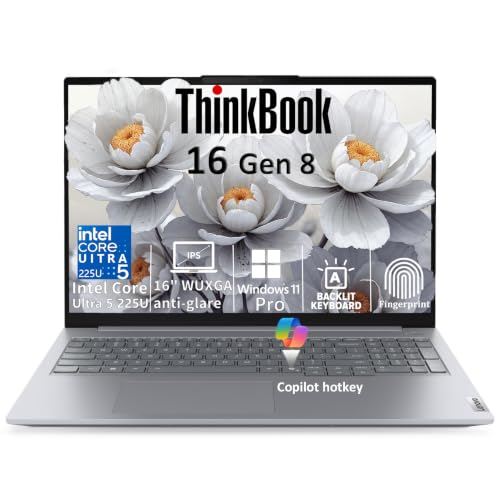
- Core 5 210H with 16GB DDR5 and 512GB SSD
- 16-inch WUXGA IPS display with 16:10 workspace
- Thunderbolt 4, Ethernet, HDMI, and SD reader
Best For: Everyday development, education, and durable office use
Best Value Big-Screen Pick

- 32GB DDR5 RAM and a 1TB SSD
- Large 17.3-inch 1080p display
- Fingerprint reader and U.S.-based support
Best For: Students and developers wanting ample memory and screen space
Best Premium Performance Pick
LG gram Pro 16-inch RTX Laptop

- Core Ultra 9, 32GB RAM, and 2TB SSD
- Dedicated NVIDIA RTX 5050 graphics
- Approximately 3 pounds with a 90Wh battery
Best For: Mobile developers and creators needing high performance
Roomy Coding Workspace

- 17.3-inch anti-glare FHD IPS display
- 32GB RAM and 1TB PCIe SSD
- Ryzen 5, Windows 11 Pro, and Wi-Fi 6
Best For: Desk-based programming and multitasking
Practical Everyday Pick

- Six-core Ryzen 5 5500U processor
- 16GB RAM and 512GB NVMe SSD
- HDMI, USB-C, RJ45, and Wi-Fi 6
Best For: Students and everyday coding
Best Performance – Acer Nitro V 16S AI Gaming Laptop
For demanding laptops for programming, the Acer Nitro V 16S offers substantial headroom for development tools, virtual machines, graphics work, and AI-assisted workflows. Its Ryzen 7 processor, 32GB of RAM, fast 1TB SSD, and dedicated RTX 5060 GPU make it especially versatile for programmers who also game or create content.
Best For: Developers who need strong multitasking and GPU performance for AI, graphics, gaming, or content creation.
Pros:
- 32GB DDR5 memory supports demanding multitasking.
- 1TB PCIe Gen 4 SSD provides fast storage and boot times.
- Dedicated RTX 5060 graphics with 8GB GDDR7 memory suits GPU-accelerated work.
- 16-inch WUXGA display offers 100% sRGB coverage and a 180Hz refresh rate.
Cons:
- At 4.6 pounds, it is less portable than a typical productivity laptop.
- Windows 11 Home may be less suitable for some professional environments.
- The display is non-touch.
This is the most capable option here for programming workloads that overlap with AI, game development, rendering, or other GPU-intensive tasks. Choose it when performance matters more than portability.
Best Premium Productivity – Dell 16 Plus Touchscreen Laptop
The Dell 16 Plus is a strong choice among laptops for programming when you want a large workspace, modern connectivity, and high-end CPU performance in a professional design. Its Core Ultra 9 processor, 32GB memory, 1TB SSD, and 16:10 touchscreen are well suited to coding, research, and heavy application multitasking.
Best For: Professional developers, students, and remote workers who value a spacious touchscreen and premium connectivity.
Pros:
- Intel Core Ultra 9 288V processor reaches up to 5.1GHz and includes an AI Boost NPU.
- 32GB RAM and 1TB SSD support substantial multitasking and project storage.
- 16-inch 1920×1200 touchscreen provides useful vertical workspace.
- Thunderbolt 4, HDMI 2.1, Wi-Fi 7, and USB ports support modern setups.
Cons:
- Integrated graphics are intended for productivity and light creation rather than demanding GPU work.
- The display has a 60Hz refresh rate.
- The supplied specifications list shared graphics memory.
With Windows 11 Pro, a fingerprint reader, backlit keyboard, and broad connectivity, this Dell is a polished programming and productivity machine. It is less appropriate for CUDA, 3D, or other heavily GPU-dependent development.
Best Value Memory – Lenovo V15 Business Laptop
The Lenovo V15 is a practical option for laptops for programming when plentiful memory and storage are priorities. Its Ryzen 7 5825U, unusually generous 40GB RAM configuration, and 1TB NVMe SSD can handle code editors, browsers, databases, and office tools together without focusing on gaming-oriented features.
Best For: Students and business-focused developers who need lots of memory, storage, and useful wired ports.
Pros:
- 40GB of RAM is useful for extensive multitasking and multiple browser tabs.
- 1TB PCIe NVMe SSD offers ample project and application storage.
- Eight-core, 16-thread Ryzen 7 5825U processor supports everyday development workloads.
- Includes HDMI, RJ45 Ethernet, USB-C, USB-A, and a numeric keypad.
Cons:
- Integrated Radeon graphics are not designed for demanding GPU workloads.
- The 15.6-inch display is limited to 1920×1080 at 60Hz.
- The supplied specifications contain inconsistent memory-type listings.
This Lenovo emphasizes capacity and practicality over premium display features. It makes sense for web development, coursework, scripting, and business programming, particularly if you frequently use wired networking or need a numeric keypad.
Best Developer-Focused Design – Lenovo ThinkBook 16 Gen 8
The Lenovo ThinkBook 16 Gen 8 balances programming essentials with a durable, office-ready design. Its 16-inch 16:10 IPS display, Core 5 210H processor, 16GB DDR5 RAM, 512GB SSD, and extensive port selection make it a well-rounded choice for coding, education, and everyday development.
Best For: Developers and students who want a durable workstation with strong connectivity and a comfortable large display.
Pros:
- Eight-core, 12-thread Intel Core 5 210H processor reaches up to 4.8GHz.
- 16-inch WUXGA IPS anti-glare display offers extra vertical coding space.
- Thunderbolt 4/USB4, USB-C, USB-A, HDMI, Ethernet, and SD card reader provide flexible expansion.
- Includes fingerprint security, camera privacy shutter, backlit keyboard, and MIL-STD-810H durability.
Cons:
- 512GB storage is less generous than the 1TB options in this roundup.
- Integrated Intel Arc graphics are shared rather than dedicated.
- The display is limited to 60Hz and 45% NTSC color coverage.
This ThinkBook is a sensible all-around programming laptop for IDEs, terminals, documentation, and external-monitor setups. Its business features and port selection make it particularly appealing for developers who value reliability and expandability.
Best Value Big-Screen Pick – NIMO 17.3-inch Ryzen 5 Laptop
For shoppers comparing laptops for programming, the NIMO N173 offers a practical mix of memory, storage, and screen space. Its six-core Ryzen 5 6600H processor, 32GB of DDR5 RAM, and 1TB SSD provide a capable foundation for coding tools, browser tabs, local development environments, and everyday work.
Best For: Students, home-office users, and developers who prefer a large display and generous memory at a value-oriented price.
Pros:
- 32GB DDR5 RAM supports substantial multitasking and development workloads.
- 1TB SSD provides room for projects, applications, and files.
- 17.3-inch 1080p display offers ample workspace, while the backlit keyboard includes a numeric keypad.
- Fingerprint reader, Windows 11 Home, and stated U.S.-based warranty support add convenience.
Cons:
- Integrated Radeon 660M graphics are less suited to demanding GPU-focused work than a dedicated graphics card.
- The larger 17.3-inch chassis is less travel-friendly than compact alternatives.
- The display is limited to 1920×1080 resolution.
The NIMO is a sensible choice when RAM, storage, and a roomy screen matter more than premium portability or dedicated graphics. Its configuration should handle general programming comfortably, especially for learners and everyday developers.
Best Premium Performance Pick – LG gram Pro 16-inch RTX Laptop
Among laptops for programming, the LG gram Pro stands out for combining high-end processing with a lightweight design. Its Intel Core Ultra 9 processor, 32GB RAM, 2TB SSD, and NVIDIA RTX 5050 provide substantial headroom for development, creative applications, AI-related workloads, and multitasking.
Best For: Mobile developers, creators, and power users who need strong performance without carrying a heavy 16-inch laptop.
Pros:
- Core Ultra 9 processor and 32GB DDR5 memory support demanding multitasking.
- NVIDIA RTX 5050 adds dedicated graphics capability for rendering, creative work, and gaming.
- 2TB SSD offers extensive space for development environments, media, and project files.
- At approximately 3 pounds and 0.6 inches thin, it emphasizes portability; the 90Wh battery is rated for up to 27 hours of video playback.
Cons:
- Its premium performance-focused configuration may be more than needed for basic coding and coursework.
- Battery-life figures are based on video playback, so programming runtimes may differ.
- The supplied notes do not specify upgradeability or port details.
The LG gram Pro is the strongest all-around performance option in this group for users who compile, create, analyze, or run graphics-intensive tools while traveling. Its combination of RTX graphics and low weight makes it particularly versatile.
Best Business Connectivity Pick – Lenovo ThinkBook 16 Gen 8
The Lenovo ThinkBook 16 Gen 8 is a well-rounded choice among laptops for programming, especially for users who connect to multiple displays and peripherals. Its Intel Core 5 210H processor, 32GB DDR5 RAM, 1TB NVMe SSD, and Windows 11 Pro are paired with Thunderbolt 4, HDMI 2.1, Ethernet, and an SD card reader.
Best For: Business developers, students, and professionals who value extensive connectivity, security features, and a spacious 16:10 display.
Pros:
- 32GB DDR5 memory and a 1TB PCIe NVMe SSD support multitasking and sizable projects.
- Thunderbolt 4, HDMI 2.1, Gigabit Ethernet, Wi-Fi 6E, and an SD card reader provide flexible connectivity.
- 16-inch 1920×1200 anti-glare IPS display offers extra vertical workspace over standard Full HD.
- Windows 11 Pro, TPM 2.0, BitLocker, and a fingerprint reader suit security-conscious users.
Cons:
- Integrated Intel Arc graphics are not a substitute for a dedicated GPU in highly graphics-intensive work.
- The display has a 60Hz refresh rate.
- The Intel Core 5 configuration is less powerful on paper than the LG gram Pro’s Core Ultra 9.
The ThinkBook is the practical productivity pick for programmers who work from a desk or office setup. Its port selection, security features, and 16:10 screen make it especially useful for development with external monitors and accessories.
Roomy Coding Workspace – HP 17.3-inch Ryzen 5 Laptop
If you want laptops for programming with plenty of screen space, this HP model offers a large 17.3-inch Full HD IPS display alongside a six-core Ryzen 5 processor, 32GB of RAM, and a 1TB PCIe SSD. It is a practical fit for coding, documentation, browsing, and general productivity.
Best For: Programmers who prefer a large display, generous memory, and a dedicated numeric keypad for desk-based work.
Pros:
- 17.3-inch anti-glare FHD IPS screen provides ample room for code, terminals, and browser windows.
- 32GB RAM and a 1TB PCIe SSD support multitasking and large project files.
- Six-core, 12-thread AMD Ryzen 5 processor is suited to coding and everyday workloads.
- Windows 11 Pro, USB-C, Wi-Fi 6, HDMI, and a numeric keypad add practical flexibility.
Cons:
- The large 17.3-inch format is less convenient for frequent travel.
- Integrated Radeon graphics are intended for general use rather than demanding graphics workloads.
This HP is a strong choice when workspace and memory matter more than compact portability. Its spacious display and substantial storage make it especially comfortable for programming at a desk.
Practical Everyday Pick – Lenovo V15 Ryzen 5 Laptop
For shoppers comparing laptops for programming on a practical budget, the Lenovo V15 combines a six-core Ryzen 5 5500U processor with 16GB of RAM and a 512GB PCIe NVMe SSD. Its 15.6-inch Full HD screen and useful port selection suit coding, coursework, and everyday office work.
Best For: Students and developers who need a straightforward programming laptop with business-friendly connectivity and a numeric keypad.
Pros:
- Ryzen 5 5500U provides six cores and 12 threads for coding and multitasking.
- 16GB RAM and a 512GB NVMe SSD support multiple applications and quick bootups.
- Full HD display, HDMI, USB-C, RJ45 Ethernet, and Wi-Fi 6 offer flexible connectivity.
- Windows 11 Pro and a numeric keypad add useful productivity features.
Cons:
- Its 512GB SSD offers less storage than the 1TB alternatives in this roundup.
- The integrated Radeon graphics are not positioned as a dedicated graphics solution.
The Lenovo V15 is a balanced option for programming fundamentals, web development, schoolwork, and business applications. It emphasizes dependable specifications and connectivity without adding unnecessary complexity.
Multitasking Powerhouse – Dell Inspiron 15 Ryzen 7 Laptop
Among laptops for programming, this Dell Inspiron stands out for its eight-core AMD Ryzen 7 processor, 32GB of RAM, and 1TB PCIe NVMe SSD. The 15.6-inch Full HD anti-glare display provides a comfortable workspace for code, browsers, documents, and demanding multitasking.
Best For: Developers, business users, and students who regularly run many applications or work with larger datasets.
Pros:
- Eight-core, 16-thread Ryzen 7 processor is built for demanding multitasking.
- 32GB RAM and a 1TB PCIe NVMe SSD provide substantial memory and storage capacity.
- 15.6-inch anti-glare FHD display offers sharp 1920×1080 visuals for work and media.
- USB-A, HDMI, SD card reader, numeric keypad, and Windows 11 Pro support productivity.
Cons:
- Integrated Radeon graphics may not suit graphics-intensive professional workloads.
- The listed connectivity includes Wi-Fi 5 rather than the newer Wi-Fi 6 standard.
This Dell is the performance-focused choice of the three, with the strongest processor and ample memory for heavy multitasking. It is a sensible fit for programming workflows that involve many tools, tabs, and files at once.
How We Picked the Best Laptops for Programming
We focused on the hardware that most directly affects development work: processor performance, memory capacity, SSD storage, display usability, keyboard practicality, connectivity, and portability. The selection includes systems with at least 16GB of RAM, since modern IDEs, browsers, containers, emulators, and local development tools can quickly consume memory.
We also considered workload variety. A lightweight laptop may be ideal for web development and travel, while a model with a dedicated NVIDIA GPU is better suited to game development, 3D work, GPU-accelerated tools, and local AI experimentation. Product configurations can vary by seller, so verify the exact processor, operating system, display, and included accessories before ordering.
Quick Comparison
| Best For | Recommended Type | What to Prioritize |
|---|---|---|
| Web and general software development | Modern business laptop | 16GB or more RAM, fast SSD, comfortable keyboard |
| Large projects and multitasking | Higher-memory productivity laptop | 32GB RAM, strong multi-core processor, 1TB SSD |
| Game development and GPU workloads | Gaming or creator laptop | Dedicated NVIDIA GPU, cooling, high-performance CPU |
| Travel and mobile coding | Premium lightweight laptop | Low weight, battery efficiency, bright display |
| Budget-conscious programming | Ryzen-based everyday laptop | At least 16GB RAM and an NVMe SSD |
Key Buying Factors for Laptops for Programming
Processor
Choose a recent Intel Core, Intel Core Ultra, or AMD Ryzen processor. Multi-core performance helps with compiling, running virtual machines, containers, and parallel development tasks. A modern midrange chip is usually sufficient for web, mobile, and business software development; higher-end processors are more useful for large codebases and intensive local workloads.
Memory and Storage
16GB is a practical baseline, while 32GB is preferable for Android Studio, Docker, virtual machines, data science, and heavy multitasking. A 512GB SSD can work, but a 1TB SSD provides more room for SDKs, repositories, datasets, and development environments without relying on external storage.
Display, Keyboard, and Ports
A 15- or 16-inch Full HD display offers a useful balance of workspace and portability. Higher-resolution or taller displays can reduce scrolling, but check scaling and text sharpness. Prioritize a firm keyboard, a responsive trackpad, USB-C, USB-A, HDMI when needed, and reliable Wi-Fi. A numeric keypad can be helpful for business work but may shift the keyboard off-center.
Graphics, Battery, and Operating System
Integrated graphics are adequate for most programming. A dedicated GPU matters for game engines, CUDA-enabled tools, 3D applications, and local AI workloads, but it typically adds weight, heat, and cost. For Linux development, confirm driver and distribution compatibility; Windows remains convenient for broad software and gaming support, while macOS is required for native Apple-platform development.
Who Should Buy Which Laptops for Programming?
Students and general-purpose developers should favor a balanced 16GB laptop with a recent processor and SSD. Professional developers running containers, emulators, or multiple IDEs will benefit from 32GB RAM and 1TB storage. Game developers, creators, and AI-focused users should choose a system with a dedicated GPU and stronger cooling. Frequent travelers should prioritize a lightweight premium model, while home-office buyers can gain more screen space and memory from a larger business laptop.