
The best laptops for home offices balance dependable performance, comfortable screens, useful ports, and enough storage for work files. This roundup compares 10 practical models for remote work, business tasks, study, and everyday productivity.
Before choosing, consider your workload, preferred screen size, memory, storage, operating system, and whether bundled software such as Microsoft Office adds value for your setup.
Best 10 Laptops for Home Offices Picks for 2026
Big-Screen Workhorse

- 17.3-inch anti-glare Full HD display
- 16GB RAM and 512GB SSD
- Full-size keyboard with numeric keypad
Best For: Home-office multitasking and spreadsheet work
Portable Value Pick
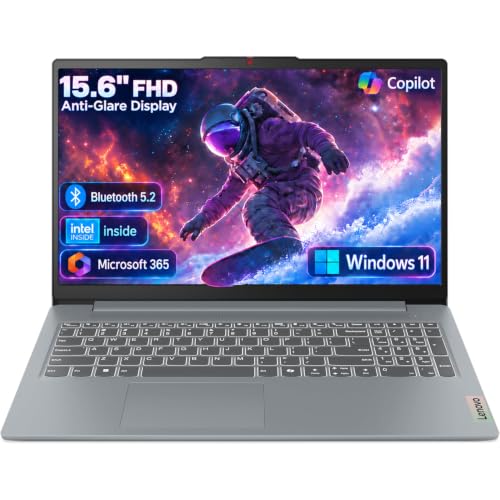
- Lightweight 3.42-pound design
- Full HD anti-glare display
- Wi-Fi 6 and versatile ports
Best For: Portable everyday office and school work
Compact Essentials

- Compact 14-inch anti-glare display
- 256GB SSD and Windows 11 S Mode
- Office 365 and Copilot key included
Best For: Light productivity, study, and browsing
Balanced Office Choice

- 15.6-inch Full HD matte display
- 512GB SSD and 8GB RAM
- Numeric keypad and Wi-Fi 6
Best For: Routine home-office and business tasks
Best Large-Screen Productivity Pick
HP 17.3-Inch Home Office Laptop

- 10-core Intel Core 5 120U processor
- Large 17.3-inch display for documents
- Full-size keyboard with numeric keypad
Best For: Desk-based work, spreadsheets, bookkeeping, and data entry
Best Office-Bundle Option
HP 14-Inch Windows 11 Pro Laptop

- Windows 11 Pro and Microsoft Office included
- 500GB portable drive and accessories bundled
- Compact 14-inch design with anti-glare display
Best For: Students, remote workers, and small offices wanting an all-in-one bundle
Best Equipped Bundle

- 16GB RAM for everyday multitasking
- Windows 11 Pro with anti-glare display
- Includes mouse, earbuds, cables, and 500GB drive
Best For: Home offices, small businesses, remote learning, and bundled setups
Big-Screen Workhorse – HP 17.3-inch Ryzen 5 Laptop
For shoppers comparing laptops for home offices, this HP emphasizes workspace, comfortable typing, and everyday productivity. Its large Full HD display, 16GB of RAM, 512GB SSD, numeric keypad, and Windows 11 make it well suited to documents, spreadsheets, video calls, and multitasking.
Best For: Home-office users who want a spacious screen and full-size keyboard for productivity.
Pros:
- 17.3-inch anti-glare Full HD display supports comfortable multitasking.
- 16GB RAM and a 512GB SSD provide a practical productivity setup.
- Full-size keyboard includes a 10-key numeric keypad.
- 720p camera, digital microphones, long battery life, and HP Fast Charge support remote work.
Cons:
- The large 17.3-inch chassis is less convenient for frequent travel.
- Graphics are integrated, so it is aimed at everyday work rather than demanding graphics workloads.
This HP is a strong fit when screen area and desktop-style comfort matter more than maximum portability. The included Office 365 for the Web and Windows 11 further suit routine home-office tasks.
Portable Value Pick – Lenovo 15.6-inch FHD Laptop
This Lenovo is a practical choice among laptops for home offices when portability, connectivity, and everyday efficiency are priorities. The Intel N150 processor, 8GB LPDDR5 memory, 15.6-inch Full HD anti-glare display, and broad port selection cover common browsing, document, streaming, and remote-work needs.
Best For: Remote workers, students, and home users seeking an affordable portable laptop.
Pros:
- Light 3.42-pound design and 0.70-inch profile are easy to carry.
- 15.6-inch Full HD anti-glare display provides a useful work area.
- Wi-Fi 6, USB-C with DisplayPort, HDMI, and an SD card reader offer flexible connectivity.
- Includes a one-year Microsoft 365 Personal subscription with 1TB OneDrive storage.
Cons:
- 128GB UFS storage is more limited than the storage in several larger-capacity alternatives.
- 8GB of memory is suited to everyday tasks but leaves less headroom for heavier multitasking.
With a lightweight build, privacy-shutter webcam, dual-display capability, and Microsoft 365 subscription, this Lenovo delivers a balanced setup for straightforward home-office work on a budget.
Compact Essentials – HP 14-inch Athlon Laptop
For basic laptops for home offices, this compact HP focuses on essential productivity features at a straightforward level. It combines an AMD Athlon processor, 256GB SSD, Windows 11 in S Mode, a privacy-shutter camera, and a one-year Microsoft Office 365 subscription for browsing, streaming, documents, and routine personal work.
Best For: Light office, study, browsing, and streaming tasks in a compact laptop.
Pros:
- Compact 14-inch anti-glare display and 0.7-inch profile suit smaller work areas.
- 256GB SSD supports fast startup and everyday file storage.
- Includes a Copilot key, camera privacy shutter, Wi-Fi 6, and HDMI.
- One-year Microsoft Office 365 subscription is included.
Cons:
- 4GB RAM limits its suitability for demanding multitasking.
- The 1366-by-768 display is less detailed than a Full HD panel.
- Windows 11 is provided in S Mode, which may be restrictive for some software needs.
This HP makes the most sense for users with modest workloads who value compact size, SSD responsiveness, and bundled Office access. It is better suited to essentials than intensive home-office multitasking.
Balanced Office Choice – Dell 15.6-inch Core 3 Laptop
This Dell offers a well-rounded option among laptops for home offices, pairing a 15.6-inch Full HD display with an Intel Core 3 processor, 8GB of RAM, and a 512GB SSD. Its numeric keypad, ComfortView software, ergonomic hinge, Wi-Fi 6, and onsite service are useful additions for regular work at home.
Best For: Home-office users who want a balanced screen, storage, keyboard, and support package.
Pros:
- 15.6-inch Full HD matte display has a 120Hz refresh rate.
- 512GB SSD provides useful space for work files and applications.
- Separate numeric keypad and calculator hotkey help with data entry.
- Wi-Fi 6, Bluetooth 5.3, HDMI, and a memory card slot support common accessories.
Cons:
- At 4.2 pounds, it is less portable than lightweight ultraportable models.
- Integrated Intel UHD Graphics are intended for everyday use rather than demanding graphics work.
- There is no fingerprint reader.
The Dell is a sensible middle-ground choice for routine office, student, and entertainment use. Its roomy keyboard and 512GB SSD are especially helpful for users who want a conventional home-office setup.
Best Value for Everyday Work – HP Everyday Slim 14-Inch Laptop
For shoppers comparing laptops for home offices, this slim HP model focuses on portability and everyday essentials. Its Intel N150 processor, 4GB of DDR5 RAM, Windows 11, and Microsoft Copilot key suit browsing, documents, video calls, streaming, and light productivity.
Best For: Home-office users, students, and anyone who prioritizes a lightweight laptop with useful ports and long stated battery life.
Pros:
- Lightweight 14-inch design weighs about 3.2 pounds.
- Includes Wi-Fi 6, Bluetooth 5.4, USB-C, USB-A, HDMI, and an SD card reader.
- Anti-glare display, 720p camera, dual-array microphones, and up to 11 hours of stated video playback.
Cons:
- 4GB of RAM may limit heavier multitasking.
- The 128GB storage capacity is modest for large files and media libraries.
- The listed display specifications vary between HD and higher-resolution details, so buyers should verify the exact configuration.
This is a practical choice when portability, connectivity, and basic office capability matter more than demanding performance or generous built-in storage.
Best Large-Screen Productivity Pick – HP 17.3-Inch Home Office Laptop
This HP 17.3-inch model is designed for laptops for home offices where screen space and comfortable data entry are priorities. The 10-core Intel Core 5 120U processor, 8GB of RAM, 256GB PCIe SSD, and Windows 11 provide a practical foundation for documents, spreadsheets, web apps, email, and meetings.
Best For: Home workers, small-business users, accountants, and anyone who benefits from a large display and dedicated numeric keypad.
Pros:
- Spacious 17.3-inch HD+ display provides more room for documents and spreadsheets.
- Dedicated numeric keypad is convenient for Excel, bookkeeping, and data entry.
- Intel Core 5 processor, 8GB RAM, and PCIe SSD support everyday multitasking.
Cons:
- The large chassis is less convenient for frequent travel.
- The 1600×900 display resolution is less detailed than many newer higher-resolution panels.
- Storage is listed inconsistently in the supplied details, so verify the actual capacity before purchasing.
Among these options, this is the most workspace-oriented pick. Its size and number pad make it especially appealing for desk-based productivity, though the tradeoff is reduced portability.
Best Office-Bundle Option – HP 14-Inch Windows 11 Pro Laptop
For buyers seeking laptops for home offices with software and accessories included, this 14-inch HP package offers Windows 11 Pro, Microsoft Office, an Intel N150 processor, and bundled peripherals. Its compact size and 3.2-pound weight make it easy to move between rooms or take to class and meetings.
Best For: Students, remote workers, and small-business users who want a ready-to-use setup with Office, a mouse, earbuds, and additional storage.
Pros:
- Windows 11 Pro and Microsoft Office are included.
- Bundle includes a 500GB portable drive, wireless mouse, earbuds, HDMI cable, and USB extension cord.
- Compact 14-inch anti-glare design includes a 720p camera and dual-array microphones.
Cons:
- 4GB of RAM is suited to lighter workloads rather than demanding multitasking.
- The built-in 128GB UFS storage is limited without relying on the included external drive.
- The 1366×768 display resolution is relatively basic.
This package stands out for convenience rather than raw performance. The included Office software and accessories can reduce setup costs, while Windows 11 Pro adds business-focused security features for compatible home-office use.
Best for Everyday Productivity – HP 15.6-inch N100 Laptop
For shoppers comparing laptops for home offices, this HP model focuses on practical everyday use. Its 15.6-inch HD display, Windows 11, integrated webcam, and expanded storage support documents, browsing, video calls, and general personal or student tasks.
Best For: Home-office users who want a larger screen, Windows 11, and generous bundled storage for everyday work and study.
Pros:
- 15.6-inch HD display provides a spacious workspace for documents and video calls.
- Windows 11 and Copilot AI are included for a current productivity setup.
- Storage configuration combines 128GB UFS with additional 512GB removable storage.
- Includes HDMI/DisplayPort support and compatibility with common peripherals.
Cons:
- The 1366 x 768 resolution is basic compared with higher-resolution office displays.
- The Intel N100 processor is aimed at everyday productivity rather than demanding workloads.
- Storage specifications are presented inconsistently in the supplied listing, so buyers should verify the exact configuration.
This is a sensible choice when screen size and included storage matter more than premium display resolution or intensive performance. It is well suited to routine office applications, browsing, streaming, and remote communication.
Best Compact Value – HP 14-inch N150 Ultrabook
This compact HP Ultrabook is a practical option among laptops for home offices, especially if desk space and portability are priorities. It pairs a 14-inch display with a quad-core Intel N150 processor, Windows 11 Home, Wi-Fi 6, and a one-year Microsoft 365 Personal subscription.
Best For: Home-office users who need a compact laptop for web-based work, documents, study, and everyday multitasking.
Pros:
- Quad-core Intel N150 processor reaches up to 3.6 GHz according to the supplied specifications.
- Compact 14-inch clamshell design measures 0.71 inches thick.
- Includes a one-year Microsoft 365 Personal subscription and Copilot.
- Wi-Fi 6 compatibility supports modern wireless networking.
Cons:
- 4GB of RAM may limit heavier multitasking with many applications or browser tabs.
- The 128GB storage capacity is modest for large files and media libraries.
- The 1366 x 768 display resolution is functional but not especially spacious for detailed work.
Choose this model when you want a small, straightforward Windows laptop with Office access included. Its memory and storage are best matched with cloud-based workflows and routine productivity rather than demanding creative applications.
Best Equipped Bundle – HP 14-inch N150 Pro Laptop
For buyers seeking laptops for home offices with a fuller accessory package, this HP Ultrabook combines Windows 11 Pro, 16GB of RAM, a 14-inch anti-glare display, and bundled peripherals. The setup is designed for remote work, online classes, documents, browsing, and video meetings.
Best For: Home-office and small-business users who value Windows 11 Pro, more memory, and included accessories.
Pros:
- 16GB DDR4 RAM is suited to multitasking across applications and browser tabs.
- Windows 11 Pro adds business-oriented security and management features described in the listing.
- 14-inch anti-glare display and 720p camera support video calls and presentations.
- Bundle includes a wireless mouse, earbuds, external 500GB drive, HDMI cable, and USB extension cord.
Cons:
- The internal 128GB UFS storage is limited before using the included external drive.
- The 1366 x 768 display resolution is basic for extended, detail-heavy office work.
- Bundled accessories may add convenience but are not a substitute for upgrading the laptop itself.
This model offers the strongest productivity-oriented configuration of the three, particularly for users who regularly multitask or need Windows 11 Pro. Its value depends on whether the included accessories and external storage fit your workspace.
How We Picked These Laptops for Home Offices
We focused on specifications that matter in a home-working environment: processor capability, RAM, storage, display size and resolution, portability, keyboard features, operating system, and included productivity software. The selection includes compact 14-inch models, larger 15.6- and 17.3-inch laptops, and configurations aimed at different budgets.
Because listed configurations can vary by retailer, confirm the exact processor, memory, storage type, display resolution, included accessories, and software license before purchasing.
Quick Comparison
| Best For | Recommended Configuration | What to Look For |
|---|---|---|
| Heavy multitasking | 16GB RAM, Ryzen 5 or Core 5-class CPU, SSD | Faster switching between apps and browser tabs |
| Everyday office work | 8GB RAM, modern entry-level processor, SSD | Good value for email, documents, and meetings |
| Large-screen productivity | 15.6- or 17.3-inch display | More workspace and often a numeric keypad |
| Portability | 14-inch display and compact design | Easier carrying between rooms or locations |
| Office-ready setup | Windows 11 with Microsoft Office included | Check whether the license is permanent or subscription-based |
Key Buying Factors for Laptops for Home Offices
Processor and Memory
For email, word processing, spreadsheets, web apps, and video calls, a current entry-level processor with 8GB of RAM is usually adequate. Choose 16GB if you regularly keep many browser tabs open, work with large spreadsheets, edit media, or run several applications at once.
Storage
An SSD makes Windows and applications feel more responsive than older mechanical storage. A 256GB SSD is a practical starting point for work files and applications, while 512GB provides more breathing room. A 128GB drive can work for cloud-first users, but it leaves less space after Windows and updates.
Display, Keyboard, and Ergonomics
A 15.6- or 17.3-inch screen can make spreadsheets and side-by-side windows easier to manage. A 14-inch laptop is generally more convenient for smaller desks and frequent travel. If you enter figures often, a numeric keypad may be worth prioritizing. For long sessions, plan to pair the laptop with an external monitor, keyboard, or mouse if the built-in setup feels cramped.
Connectivity and Calls
Check the available USB ports, HDMI or display output, Wi-Fi standard, webcam, and headphone connectivity. A reliable webcam and microphone matter for remote meetings, while extra display support can improve a permanent home-office setup.
Software and Upgrade Expectations
Windows 11 is standard across many current models, but bundled Microsoft Office may mean a subscription, web access, trial, or full license. Verify the terms. Also check whether RAM and storage are upgradeable; many thin laptops have components that cannot be replaced.
Who Should Buy Which Laptops for Home Offices?
Choose a 17-Inch Model If You Want Maximum Workspace
Larger HP configurations are suited to users who keep a laptop mostly at home and want a roomy display, numeric keypad, or easier spreadsheet navigation.
Choose a 15.6-Inch Model for Balanced Home Productivity
These laptops offer a useful middle ground for documents, browsing, video meetings, and light business software without taking up as much space as a 17-inch machine.
Choose a 14-Inch Model for Flexibility
Compact HP and Lenovo options make sense for students, hybrid workers, and anyone who moves between a desk, sofa, and meeting room. Favor 8GB or more of RAM when possible.
Choose the Highest-Memory Configuration for Demanding Multitaskers
A 16GB model with a capable Ryzen 5 or Core 5-class processor is the safer choice for heavier browser use, larger spreadsheets, frequent meetings, and longer useful life.
Finally, match the laptop to your peripherals and workspace. A good dock or USB hub, external monitor, and ergonomic input devices can improve a home-office setup as much as a modest processor upgrade.