
Hard drive duplicators can copy an entire drive without requiring a computer, making them useful for upgrades, migrations, backups, and repeat deployment tasks.
This roundup compares 10 options across USB docking stations, standalone SATA copiers, NVMe-compatible models, and multi-bay duplicators so you can match the hardware to your workflow.
Best 10 Hard Drive Duplicators Picks for 2026
Best Budget Dock
SABRENT USB 3.0 Dual-Bay Cloner

- Supports 2.5-inch and 3.5-inch SATA drives
- Offline cloning without drivers
- USB 3.0 and up to 10TB drive support
Best For: Affordable home and small-office drive cloning
Best for IT Sanitization

- Three duplication and four erase modes
- Copy & Compare clone verification
- Supports 2.5-inch and 3.5-inch SATA drives
Best For: IT deployment, recovery, and secure drive erasure
Best USB-C Option

- Offline 1-to-1 cloning without a computer
- Reads and writes two SATA drives over USB-C
- Tool-free support for 2.5-inch and 3.5-inch drives
Best For: USB-C laptops and flexible SATA drive access
Best High-Speed Professional Dock
StarTech Dual-Bay SATA Duplicator

- Standalone cloning up to 28GB/min
- Supports SATA drives of any capacity
- USB 3.2 Gen 2, 4Kn, and TRIM support
Best For: Professional high-speed SATA cloning and drive access
Best Triple-Bay Versatility
ICY BOX 3-Bay NVMe/SATA Cloner

- Three independent, tool-free drive bays
- Clones NVMe and 2.5/3.5-inch SATA drives
- USB 3.2 Gen 2 up to 10 Gbps
Best For: Mixed-drive workflows and frequent drive swapping
Best for Secure Drive Management
StarTech Dual-Bay M.2/SATA Duplicator

- Supports NVMe, M.2 SATA, and 2.5/3.5-inch SATA
- Multiple duplication and erase modes
- Secure Erase supports NIST SP 800-88 Rev. 1
Best For: IT workflows requiring drive cloning and sanitization
Best for Multi-Drive SATA Copies
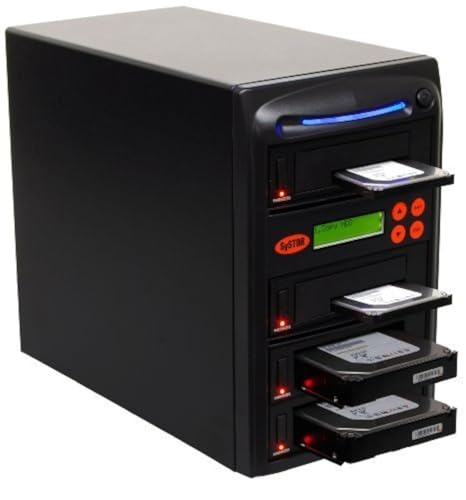
- Standalone SATA duplication without a computer
- Copies multiple drives at up to 90 MB per second
- Supports whole-drive copying and DoD 5220.22-M erasure
Best For: Batch SATA cloning and basic drive sanitization
Best Compact Clone Dock
ORICO Dual Bay Hard Drive Docking Station

- Offline cloning without a computer
- Supports 2.5/3.5-inch SATA drives up to 44TB
- USB 3.0, UASP, and tool-free drive access
Best For: Home backups, upgrades, and everyday drive transfers
Best Professional Duplicator
StarTech.com 4-Bay Hard Drive Duplicator

- Standalone 1:3 drive duplication
- Quick and NIST SP 800-88 Rev. 1 Secure Erase modes
- Supports SATA and IDE drives with adapters
Best For: IT teams, technicians, and drive sanitization workflows
Best Hub-Enabled Dock
MAIWO Dual Bay Hard Drive Cloner

- Offline cloning with progress LEDs
- Three USB 3.0 hub ports included
- Supports 2.5/3.5-inch SATA drives
Best For: Home offices needing cloning and extra USB connectivity
Best Budget Dock – SABRENT USB 3.0 Dual-Bay Cloner
For shoppers comparing hard drive duplicators, the SABRENT EC-HD2B is a straightforward dual-bay dock for copying or accessing bare 2.5-inch and 3.5-inch SATA drives. It supports offline cloning, USB 3.0 connectivity, and drives up to 10TB.
Best For: Home users and small offices that need an affordable SATA drive dock with basic offline cloning.
Pros:
- Supports both 2.5-inch and 3.5-inch SATA HDDs and SSDs.
- Offline cloning works without installed drivers or a connected computer.
- USB 3.0 supports transfer speeds up to 5Gbps.
- Supports drives up to 10TB, with a combined listed capacity of 20TB.
Cons:
- Offline cloning is limited to up to 60Mbps.
- Designed for SATA drives rather than IDE, M.2, or NVMe formats.
The EC-HD2B is a practical choice when you want one device for drive access and occasional cloning without paying for advanced sanitization features.
Best for IT Sanitization – StarTech 1:1 SATA Duplicator
Among hard drive duplicators, the StarTech SATDUP11 stands out for combining standalone SATA cloning with multiple drive-erasure modes. Its LCD menu supports sector-by-sector, system-and-file, and all-partitions duplication, along with quick, secure, and overwrite-based erasure.
Best For: IT professionals handling drive deployment, recovery, backup, and data sanitization workflows.
Pros:
- Supports 2.5-inch and 3.5-inch SATA HDDs and SSDs of any capacity.
- Offers three duplication modes and four erase modes.
- Includes Copy & Compare verification for completed clones.
- Works as a standalone, OS-independent device and includes a two-year warranty.
Cons:
- Adapters for eSATA, mSATA, IDE, and M.2 SATA are sold separately.
- Its specialized controls may be more than casual users need.
With its erasure options and verification feature, the SATDUP11 is better suited to repeatable professional workflows than simple occasional drive copying.
Best USB-C Option – SABRENT Dual-Bay USB-C Cloner
The SABRENT EC-CH2B is a convenient option for buyers seeking hard drive duplicators with USB-C connectivity. It can clone one bare SATA drive to another without a computer, while both bays can also function as separate drives when connected to a compatible computer.
Best For: USB-C laptop users who want tool-free access to two SATA drives and occasional offline cloning.
Pros:
- Supports offline 1-to-1 cloning without a computer.
- Accepts both 2.5-inch and 3.5-inch SATA HDDs and SSDs.
- Both bays can be read and written as separate drives over USB.
- Tool-free, hot-swappable design includes drive access LEDs.
Cons:
- Does not support IDE/PATA, M.2, NVMe, or 4-pin Molex drives.
- The included cable uses USB-C at the dock end; USB-C-to-USB-A may be needed for some computers.
- The target drive must be the same size as or larger than the source for offline cloning.
This dock is a strong fit for modern USB-C setups, provided your drives are bare SATA models and your computer has the appropriate host connection.
Best High-Speed Professional Dock – StarTech Dual-Bay SATA Duplicator
For buyers comparing hard drive duplicators for heavier-duty work, the StarTech SDOCK2U313R combines standalone sector-by-sector cloning with a dual-bay USB docking function. It supports 2.5-inch and 3.5-inch SATA drives, 4Kn, TRIM, and host connections up to USB 3.2 Gen 2 speeds.
Best For: IT technicians who need a fast, trayless SATA cloning dock with broad capacity compatibility.
Pros:
- Standalone cloning works without a computer and reaches up to 28GB/min.
- Supports 2.5-inch and 3.5-inch SATA HDDs and SSDs of any capacity.
- Includes 4Kn compatibility, TRIM support, and SATA III connectivity.
- Can also provide USB access to installed SATA drives and includes USB-C/A cables.
Cons:
- Sector-by-sector cloning copies the entire drive, including empty sectors.
- The target disk must be equal to or larger than the source.
- IDE drives require a separately sold adapter.
The SDOCK2U313R is a compelling professional option when speed, high-capacity compatibility, and a dual-purpose cloning-and-docking design matter more than portability.
Best Triple-Bay Versatility – ICY BOX 3-Bay NVMe/SATA Cloner
For shoppers comparing hard drive duplicators, the ICY BOX 3-Bay Cloner stands out for its flexible mix of M.2 NVMe, 2.5-inch SATA, and 3.5-inch SATA drive support. Its one-touch offline cloning and tool-free bays make routine drive migration straightforward without requiring a computer or cloning software.
Best For: Users who need to clone or access several NVMe and SATA drives in a mixed storage environment.
Pros:
- Supports cloning between M.2 PCIe NVMe, 2.5-inch SATA, and 3.5-inch SATA drives.
- Three independent bays allow multiple drives to be connected simultaneously.
- USB 3.2 Gen 2 provides transfer speeds up to 10 Gbps, with USB-C and USB-A connectivity.
- Works with Windows and macOS and includes a 24-month warranty.
Cons:
- It uses a plastic enclosure.
- Its broad compatibility may be more than needed for users working with only one drive type.
The ICY BOX is a practical choice when flexibility and easy drive swapping matter most. Its three-bay design and offline operation make it especially useful for technicians and users managing varied storage media.
Best for Secure Drive Management – StarTech Dual-Bay M.2/SATA Duplicator
Among hard drive duplicators, the StarTech dual-bay model is designed for users who need more than basic copying. It supports M.2 NVMe, M.2 SATA, and 2.5/3.5-inch SATA drives, while its configurable duplication and erase modes provide added control for migration and drive sanitization.
Best For: IT professionals and organizations that need standalone duplication, erasure, and on-screen drive management.
Pros:
- Clones M.2 NVMe, M.2 SATA, and 2.5/3.5-inch SATA drives without a PC or software.
- Offers System/File, All Partitions, Whole Drive, and percentage duplication modes.
- Includes five erase modes, including Secure Erase options aligned with NIST SP 800-88 Rev. 1.
- On-screen display, error reporting, LED indicators, and broad M.2 size support improve usability.
Cons:
- It has two bays rather than a multi-target duplication layout.
- Some legacy IDE and mSATA connections require optional adapters.
- Its professional feature set may be unnecessary for basic home cloning.
The StarTech is the most feature-focused option here for controlled duplication and sanitization. Its standalone interface and configurable erase settings make it well suited to repeatable IT workflows.
Best for Multi-Drive SATA Copies – Systor 1:3 HDD/SSD Duplicator
The Systor SYS103HS-DP is a straightforward choice among hard drive duplicators for copying multiple SATA drives at once. It operates independently of a computer, supports both 2.5-inch SSDs and 3.5-inch hard drives without an adapter, and can copy either selected data or an entire drive.
Best For: Users who need simultaneous 1-to-3 SATA duplication and basic DoD 5220.22-M-compliant drive erasure.
Pros:
- Standalone operation requires no computer or software.
- Copies multiple SATA HDDs or SSDs simultaneously at up to 90 MB per second.
- Supports data-only or whole-drive duplication.
- Provides DoD 5220.22-M-compliant sanitization and lifetime technical support.
Cons:
- It is limited to SATA drives and does not support M.2 NVMe media.
- Its listed speed is lower than the USB 10 Gbps interface offered by the ICY BOX.
- The supplied details describe two supported devices, despite the product’s 1:3 duplicator designation.
The Systor is best suited to straightforward SATA production or maintenance tasks where simultaneous copying is more important than modern M.2 compatibility. Its standalone design and sanitization function keep the workflow simple.
Best Compact Clone Dock – ORICO Dual Bay Hard Drive Docking Station
The ORICO dual-bay dock is a practical choice among hard drive duplicators for home users who need straightforward offline cloning and quick access to 2.5-inch or 3.5-inch SATA drives. Its tool-free design, USB 3.0 connectivity, and support for up to 44TB make it useful for backups, drive imaging, and file transfers.
Best For: Home offices, PC upgrades, and users who want a compact two-drive offline cloning station.
Pros:
- Offline cloning works without connecting to a computer.
- Supports 2.5-inch and 3.5-inch SATA HDDs and SSDs, up to 44TB total.
- USB 3.0 with UASP and transfer speeds up to 5Gbps.
- Works with Windows, Mac, Linux, iPad OS, Android, and several device types.
Cons:
- The target disk must be larger than the source disk for cloning.
- It will not power on without a hard drive inserted.
- Offline cloning is limited to the dual-bay layout.
Choose the ORICO if you value simple controls, broad device compatibility, and a small footprint. It is less suited to multi-drive production workflows, but it covers common cloning and data-transfer tasks without requiring specialized software.
Best Professional Duplicator – StarTech.com 4-Bay Hard Drive Duplicator
The StarTech.com SATDOCK4U3RE is one of the more capable hard drive duplicators for IT departments and technicians. It supports standalone 1:3 cloning, drive erasure, and docking, with a menu-driven LCD interface and compatibility with SATA and IDE drives through the included adapters.
Best For: IT professionals who need multi-drive duplication, secure erasure, and drive management in one unit.
Pros:
- Can clone one source drive to up to three targets independently.
- Supports Quick Erase and Secure Erase aligned with NIST SP 800-88 Rev. 1 Purge.
- Works with 2.5-inch and 3.5-inch SATA or IDE HDDs and SSDs.
- Provides USB 3.2 Gen 1 and eSATA host connections, plus an LCD menu.
Cons:
- Larger and heavier than a basic two-bay dock.
- Target drives must be equal to or larger than the source drive when duplicating.
- Its professional feature set may be excessive for occasional home cloning.
For technicians handling repeated migrations or retired-drive sanitization, the StarTech.com model offers substantially more workflow flexibility than a basic cloner. Its four-bay design and dedicated erase modes justify choosing it when throughput and drive-management features matter more than portability.
Best Hub-Enabled Dock – MAIWO Dual Bay Hard Drive Cloner
The MAIWO dual-bay station combines offline cloning with a three-port USB 3.0 hub, making it a versatile option among hard drive duplicators. It accepts 2.5-inch and 3.5-inch SATA drives, supports up to 48TB total according to the product listing, and provides LED indicators for tracking clone progress.
Best For: Users who want offline drive duplication plus extra USB ports for flash drives and peripherals.
Pros:
- Clones drives offline without drivers or a computer.
- Supports 2.5-inch and 3.5-inch SATA HDDs and SSDs.
- Offers three USB 3.0 Type-A hub ports, including one with 2.4A phone charging.
- Provides up to 5Gbps USB 3.0 bandwidth and LED clone-progress indicators.
Cons:
- It is limited to two drive bays for cloning.
- The listed capacity details vary between the product bullets and specifications.
- It supports SATA drives rather than the broader SATA-and-IDE compatibility of some professional duplicators.
The MAIWO is a strong fit when desk space and connectivity matter. Its built-in USB hub adds everyday utility beyond cloning, while the dual-bay layout keeps drive copying simple for backups, recovery work, and routine file transfers.
How We Picked These Hard Drive Duplicators
We selected models that cover the main use cases buyers encounter: straightforward two-bay drive cloning, faster USB-C connectivity, standalone 1:1 duplication, NVMe and SATA support, and multi-target copying for technicians or IT departments. We also considered drive-size compatibility, stated transfer speeds, erasing functions, host-computer connectivity, and whether a unit is best suited to occasional home use or repeated professional work.
Specifications such as maximum speed are theoretical or dependent on the source drive, target drive, interface, and file system. A slower SSD, older hard disk, or mixed-interface setup can reduce real-world performance.
Quick Comparison
| Best For | Look For | Models In This Roundup |
|---|---|---|
| Basic SATA cloning | Dual bays and one-button offline cloning | SABRENT, ORICO, MAIWO |
| Computer-connected workflows | USB 3.0 or USB-C and drive-dock functionality | SABRENT, ICY BOX, MAIWO |
| Faster standalone copying | Higher stated transfer rate and dedicated controls | StarTech SATDUP11, SDOCK2U313R |
| NVMe and SATA flexibility | Support for M.2 NVMe plus 2.5- or 3.5-inch SATA drives | ICY BOX, StarTech dual-interface model |
| Multiple target drives | 1:3 or larger duplication capacity | Systor, StarTech four-bay model |
Key Buying Factors for Hard Drive Duplicators
Drive Type and Physical Format
Confirm whether the duplicator supports 2.5-inch SATA drives, 3.5-inch SATA hard disks, M.2 SATA SSDs, M.2 NVMe SSDs, or a combination. M.2 drives are not interchangeable: an M.2 SATA device and an M.2 NVMe device use different protocols, so the product must explicitly support the type you own.
Offline Cloning Versus Computer-Assisted Copying
Standalone duplicators copy directly from source to target, which is convenient for drive upgrades and avoids operating-system software. Docking stations can also expose drives to a computer, making them more versatile for file transfers, diagnostics, and backups. Check the manual for cloning requirements, including target capacity and source-drive arrangement.
Speed, Capacity, and Connectivity
Higher advertised speeds matter most when the source and target drives can sustain them. USB-C, USB 3.0, and eSATA connectivity can improve computer-connected transfers, but ports and cables do not guarantee maximum throughput. Also verify supported drive capacities, power requirements, and whether the unit supports simultaneous multi-drive access.
Erasing and Deployment Features
If you handle retired drives or prepare multiple systems, secure erase options, status indicators, sector-copy behavior, and multi-target duplication can be more valuable than a basic dock. For business use, favor clear controls and documentation that reduce the chance of selecting the wrong source or target.
Who Should Buy Which Hard Drive Duplicators?
Choose a basic dual-bay SATA dock if you primarily clone or access 2.5- and 3.5-inch SATA drives at home. Select a USB-C model when newer computers and faster host connectivity are priorities. Buyers working with M.2 SSDs should choose a model that explicitly lists the required NVMe or SATA protocol rather than relying on the M.2 label alone.
For repair shops, IT departments, and system builders, a standalone StarTech or Systor duplicator can save time through dedicated controls and multi-target operation. A four-bay unit is the better fit for repeated batch work, while a compact dual-bay model is easier to store and typically more practical for occasional upgrades. Before cloning, back up important data, verify the source and target positions, and make sure the target drive is at least as large as the source.