
Protecting a growing photo library takes more than adding another external drive. The right duplicator can clone a working disk, migrate to higher-capacity storage, or create a dependable backup without relying on cloud uploads or complicated software.
We selected 10 hard drive duplicators for photo storage that cover different workflows, from simple two-bay SATA docks to high-volume standalone duplicators and flexible USB-C stations. The best choice depends on your drive types, backup frequency, capacity needs, and whether you prefer hardware cloning or computer-managed file transfers.
Best 10 Hard Drive Duplicators for Photo Storage Picks for 2026
Best Value
SABRENT Dual-Bay SATA Dock & Cloner

- Supports 2.5-inch and 3.5-inch SATA HDDs and SSDs
- Offline cloning requires no computer or drivers
- USB 3.0 transfers up to 5Gbps
Best For: Simple home photo-storage backups and SATA drive cloning
Standalone Pick

- Copies SATA drives without a computer or software
- Supports 2.5-inch and 3.5-inch HDDs and SSDs
- Includes DoD-compliant drive erasure
Best For: Studios and businesses needing duplication plus sanitization
High-Capacity Choice

- Supports up to 44TB across two SATA drives
- Clones offline with no computer required
- USB 3.0, UASP, and TRIM support
Best For: Large photo libraries and high-capacity SATA backups
Multi-Drive Specialist

- Duplicates USB media to up to 15 targets
- Standalone operation needs no computer
- Offers four copy and four erase modes
Best For: Batch USB photo-media duplication and sanitization
Flexible Offline Cloning Dock

- Offline cloning without a computer
- Supports 2.5- and 3.5-inch SATA drives
- Up to 32TB per bay and 5Gbps USB 3.0
Best For: Photographers managing and duplicating SATA backup drives
High-Volume Standalone Duplicator
Systor 1:11 HDD/SSD Duplicator
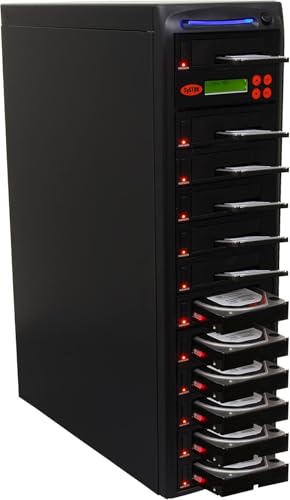
- Duplicates up to 11 drives simultaneously
- Runs without a computer or software
- Copies and sanitizes drives at up to 150MB/s
Best For: Professional batch duplication and SATA drive sanitization
Large-Capacity Cloning Station

- 40TB total capacity across two bays
- One-key offline cloning with progress LEDs
- Supports 2.5- and 3.5-inch SATA drives
Best For: Large photo archives and high-capacity SATA backups
Best with Extra Features

- Offline 1:4 duplication
- Up to five 20TB SATA drives
- USB-C and USB-A connectivity
Best For: Photographers managing large photo and video libraries
Practical Dual-Bay Choice

- Offline, driver-free cloning
- Two bays for 2.5- and 3.5-inch SATA drives
- Includes three USB 3.0 hub ports
Best For: Simple two-drive photo backups and file transfers
Most Versatile Interface

- Supports NVMe and SATA drives
- Three tool-free drive bays
- USB 3.2 Gen 2 up to 10Gbps
Best For: Mixed NVMe, SATA SSD, and HDD photo-storage workflows
Best Value – SABRENT Dual-Bay SATA Dock & Cloner
For photographers looking for hard drive duplicators for photo storage, the SABRENT EC-HD2B offers a straightforward dual-bay setup for reading, cloning, and transferring data between 2.5-inch or 3.5-inch SATA drives. It works without drivers and supports drives up to 10TB.
Best For: Home users who want a simple offline cloning dock for SATA hard drives or SSDs.
Pros:
- Supports both 2.5-inch and 3.5-inch SATA HDDs and SSDs.
- Offline cloning works without a computer or additional software.
- USB 3.0 transfer speeds reach up to 5Gbps.
- Supports up to 10TB drives and includes a power supply and USB cable.
Cons:
- Offline cloning is rated at up to 60Mbps, slower than its USB 3.0 interface speed.
- Designed for SATA drives rather than USB-only storage devices.
The SABRENT is a practical choice for photographers who need occasional drive duplication and convenient desktop access to bare SATA storage. Its dual-bay format keeps the process simple, while the included accessories make it ready for use out of the box.
Standalone Pick – Systor 1:1 HDD/SSD Duplicator
The Systor SYS101HS-DP is a standalone option among hard drive duplicators for photo storage, copying drives without a computer or software. It supports 2.5-inch and 3.5-inch SATA HDDs and SSDs, and it also provides drive-erasing functions for storage reuse or sanitization.
Best For: Photographers, studios, or small businesses that need independent duplication and secure drive erasure.
Pros:
- Operates as a complete standalone duplicator with no computer required.
- Supports both 2.5-inch and 3.5-inch SATA drives without an adapter.
- Copies at speeds up to 90MB per second.
- Offers whole-drive or data-only duplication plus DoD 5220.22-M erasure.
Cons:
- Its SATA compatibility is less flexible than a duplicator designed for USB media.
- The listed storage capacity is 3TB, so larger drives should be checked carefully before purchase.
With hot-swappable drive support and a metal enclosure, the Systor is suited to repeatable backup workflows and drive turnover. Its erasure modes make it especially useful when old photo drives need to be cleared before reuse or disposal.
High-Capacity Choice – ORICO Dual-Bay Offline Cloner
The ORICO DD28U3-C is a strong fit for photographers comparing hard drive duplicators for photo storage, especially when large-capacity SATA drives are part of the workflow. Its dual-bay dock supports up to 44TB total capacity, USB 3.0 connectivity, and offline cloning without a computer.
Best For: Users managing large photo libraries who want high-capacity SATA access and convenient drive cloning.
Pros:
- Supports two 2.5-inch or 3.5-inch SATA drives with up to 44TB total capacity.
- Offline cloning starts with a dedicated button and does not require a computer.
- USB 3.0 with UASP and TRIM supports transfers up to 5Gbps.
- Works with Windows, Mac, Linux, iPad OS, Android, TVs, routers, and other devices.
Cons:
- The target disk must be larger than the source disk for offline cloning.
- The dock will not power on without a hard drive inserted.
- It uses USB-A connectivity, which may require an adapter for some newer devices.
The ORICO combines broad device compatibility with unusually high stated capacity for a dual-bay dock. Its tool-free design and independent power supply make it convenient for transferring or duplicating large photo archives, provided the target-drive requirement fits your backup plan.
Multi-Drive Specialist – EZ DUPE USB Cyclone 1-to-15
The EZ DUPE USB Cyclone stands apart from typical hard drive duplicators for photo storage by handling up to 15 USB-connected targets at once. It is a standalone system with multiple copy modes, independent bandwidth design, and four erase modes for photographers or businesses processing removable storage in batches.
Best For: High-volume USB duplication, distribution, and erasure workflows that do not require a computer.
Pros:
- Duplicates USB flash drives and external USB HDDs or SSDs across up to 15 ports.
- Works independently without a computer or software.
- Supports full, partitioned, essential-file, and percentage copy modes.
- Provides Quick, Full, DoD 3-pass, and DoD 7-pass erase modes.
Cons:
- Its 45MB-per-second slot speed is lower than the USB 3.0 interface maximum offered by some drive docks.
- It is a large, 7-pound unit intended for batch work rather than a compact desktop dock.
- It is designed for USB media, not bare SATA drive insertion.
The USB Cyclone is best viewed as a production-oriented duplicator rather than a simple two-drive backup dock. Its independent channels and slow-drive alerts can help with batch operations, while the broad copy and erase modes add flexibility for media management.
Flexible Offline Cloning Dock – UGREEN Dual-Bay SATA Dock
For photographers building a reliable workflow around hard drive duplicators for photo storage, the UGREEN dual-bay dock offers a practical mix of offline cloning and everyday file transfers. It accepts both 2.5-inch and 3.5-inch SATA drives, supports up to 32TB per bay, and connects over USB 3.0 at speeds up to 5Gbps.
Best For: Photographers who want a straightforward dual-drive dock for cloning, transferring, and organizing SATA photo-storage drives.
Pros:
- Offline cloning works without connecting to a computer, provided the target drive is at least as large as the source.
- Supports two 2.5-inch or 3.5-inch SATA drives and capacities up to 32TB per bay.
- USB 3.0 connectivity includes a USB-C cable and supports transfer rates up to 5Gbps.
- Surround cooling, a dust cover, and anti-slip pads help support safer desktop use.
Cons:
- Cloning is limited by the requirement that the target drive be equal to or larger than the source.
- It is designed for SATA drives and does not indicate support for other drive interfaces.
The UGREEN is a versatile choice when you need both a photo-storage transfer dock and a simple standalone cloning tool. Its dual-bay design and broad SATA compatibility make it especially useful for rotating backup drives.
High-Volume Standalone Duplicator – Systor 1:11 HDD/SSD Duplicator
For high-volume workflows involving hard drive duplicators for photo storage, the Systor 1:11 is built to copy multiple drives simultaneously without a computer or software. It supports copying files, systems, or entire drives at up to 150MB per second, while also offering drive erasure with DoD 5220.22-M compliance.
Best For: Studios, IT teams, and photographers who need to duplicate or sanitize multiple SATA drives in standalone batches.
Pros:
- Standalone operation requires no computer or software.
- Can copy multiple hard disk drives or SSDs simultaneously at up to 150MB per second.
- Supports data-only, system, or whole-drive duplication.
- Includes drive erasure designed to comply with DoD 5220.22-M data-sanitization requirements.
Cons:
- The supplied specifications identify a Serial ATA interface and a 3.5-inch form factor, limiting the stated compatibility compared with dual-format docks.
- Its multi-drive design may be more equipment than needed for occasional home photo backups.
The Systor stands out when duplication volume matters more than compactness. Its 1:11 capacity, standalone operation, and sanitization mode make it suited to professional environments handling many working or archive drives.
Large-Capacity Cloning Station – SUITOK Dual-Bay SATA Dock
The SUITOK dual-bay dock is a strong option for photographers comparing hard drive duplicators for photo storage and wanting room for large archives. It supports offline one-key cloning, 5Gbps transfers, and two 2.5-inch or 3.5-inch SATA drives with a combined capacity of up to 40TB.
Best For: Photo professionals and home archivists who need high-capacity drive expansion, offline cloning, and broad device compatibility.
Pros:
- Offline cloning works without a PC or laptop, with LED progress indicators at 25%, 50%, 75%, and 100%.
- Each bay supports drives up to 20TB, for a stated total capacity of 40TB.
- Accepts both 2.5-inch and 3.5-inch SATA drives with tool-free vertical insertion.
- Supports UASP, TRIM, and S.M.A.R.T., plus Windows, macOS, Linux, Chrome OS, and Android OTG compatibility.
Cons:
- Transfer speeds are capped at the stated 5Gbps USB 3.2 Gen 1 rate.
- The open vertical design may be less suitable for environments where exposed drive bays are a concern.
With its 40TB expansion ceiling and clear cloning progress display, the SUITOK is well suited to large photo libraries and recurring backup tasks. Cooling vents, anti-slip pads, and support for drive-health protocols add useful safeguards for regular use.
Best with Extra Features – ORICO 5-Bay Hard Drive Dock
For photographers comparing hard drive duplicators for photo storage, the ORICO 5-bay dock stands out for its large capacity and offline duplication. It supports 2.5- and 3.5-inch SATA SSDs and HDDs, with up to five 20TB drives installed.
Best For: Photographers and professional users managing large libraries of high-resolution photos and videos.
Pros:
- Offline 1:4 duplication with one-button operation.
- Supports up to five 20TB SATA drives for a stated 100TB total capacity.
- Aluminum-alloy construction and vertical design assist heat dissipation.
- USB 3.2 Gen 1 connectivity includes both USB-C and USB-A compatibility.
Cons:
- Offline cloning overwrites the target disk, so backups are required first.
- Designed for SATA drives rather than M.2 NVMe storage.
- The 1:4 duplication feature may be more than casual users need.
The ORICO is a strong choice when capacity and multiple-copy workflows matter most. Its five bays and offline duplication are particularly useful for building several backups of a photo archive, while the USB connection also supports everyday computer access.
Practical Dual-Bay Choice – MAIWO SATA Drive Duplicator
The MAIWO dual-bay station is a practical option for shoppers seeking hard drive duplicators for photo storage without a large five-drive enclosure. It supports 2.5- and 3.5-inch SATA HDDs and SSDs, with offline cloning and a built-in USB hub.
Best For: Photographers who need straightforward two-drive backups, file transfers, and extra USB ports.
Pros:
- Offline cloning works without a computer or additional drivers.
- Supports drives up to 24TB per bay, according to the supplied specifications.
- Three USB 3.0 Type-A ports add connectivity for flash drives and other devices.
- LED indicators show clone progress at 25%, 50%, 75%, and 100%.
Cons:
- Only two drive bays are available.
- Uses USB 3.0 rather than the faster USB 3.2 Gen 2 interface.
- Supports SATA drives but not M.2 NVMe drives.
MAIWO keeps the workflow simple: insert the source and target drives, then start an offline clone. It is a sensible fit for photographers who routinely duplicate a working photo drive and value the added USB hub more than maximum bay count.
Most Versatile Interface – ICY BOX Triple-Bay Cloner
The ICY BOX triple-bay cloner is a versatile choice for hard drive duplicators for photo storage when your workflow includes both SATA and M.2 NVMe drives. Its tool-free design supports one-touch offline cloning and USB 3.2 Gen 2 transfers up to 10Gbps.
Best For: Professionals who work with mixed NVMe, SATA SSD, and HDD storage.
Pros:
- Clones between M.2 PCIe NVMe and 2.5- or 3.5-inch SATA drives.
- Three independent bays allow multiple drives to be connected at once.
- USB 3.2 Gen 2 provides up to 10Gbps data transfer speeds.
- Tool-free, one-touch offline cloning works with Windows and macOS.
Cons:
- Plastic construction may be less robust than an aluminum enclosure.
- Its mixed-drive flexibility may be unnecessary for SATA-only photo workflows.
- The supplied notes do not specify an overall drive capacity limit.
ICY BOX is the most adaptable option in this group because it handles both common SATA storage and M.2 NVMe media. That makes it especially useful for photographers upgrading to NVMe while continuing to access existing HDD and SATA SSD archives.
How We Picked These Hard Drive Duplicators for Photo Storage
We focused on hardware that can make photo backups more practical and repeatable. The selection includes standalone 1:1 and multi-drive duplicators, dual-bay docking stations, multi-bay storage readers, and models that support both traditional SATA hard drives and SSDs. We considered drive compatibility, advertised transfer speed, maximum capacity, connection type, ease of use, and whether a unit can clone drives without a computer.
Because specifications vary by drive, file type, and connection, advertised speeds should be treated as upper limits rather than guaranteed real-world performance. A duplicator is most useful when its ports, bays, and workflow match the storage devices you already own.
Quick Comparison
- Simple two-drive cloning: Dual-bay SATA docks from SABRENT, ORICO, UGREEN, MAIWO, and similar models suit occasional drive-to-drive copies.
- Standalone duplication: Systor and EZ DUPE units are designed for copying or erasing media without connecting to a computer.
- Higher drive count: The Systor 1:11 and ORICO five-bay options are better suited to repeatable workflows or several drives at once.
- Modern connectivity: USB-C and 10Gbps models can reduce transfer bottlenecks when the host computer and storage devices support those standards.
- Mixed storage formats: The ICY BOX triple-bay station is the most flexible option here for users working with M.2 NVMe, SATA SSD, and 2.5- or 3.5-inch drives.
Key Buying Factors for Hard Drive Duplicators for Photo Storage
Drive Format and Interface
Check whether you need 2.5-inch SATA drives, 3.5-inch desktop drives, M.2 NVMe SSDs, or a combination. SATA and NVMe are different interfaces, so a standard SATA dock cannot read an NVMe drive without the correct dedicated slot.
Cloning Versus File Backup
Hardware cloning creates a sector-by-sector copy and is useful for migrating a boot drive or making a direct duplicate. It may copy unused space and does not replace a cataloged, versioned photo backup. For Lightroom, Capture One, or other organized libraries, computer-managed file backups may be easier to verify and update.
Capacity and Source-Target Rules
A target drive generally needs to be at least as large as the source, even if the source contains relatively few files. Confirm the manufacturer’s capacity limits, supported disk types, and whether the unit can clone to a larger disk without special partition adjustments.
Speed, Cooling, and Reliability
USB 3.0 is adequate for many hard drives, while USB-C 5Gbps or 10Gbps has more headroom for SSDs. Frequent use also makes ventilation, a stable power adapter, clear status indicators, and a secure drive fit important.
Who Should Buy Which Hard Drive Duplicators for Photo Storage?
Choose a dual-bay dock for occasional photographer backups, drive access, and straightforward cloning. Pick a standalone Systor or EZ DUPE duplicator if you need computer-free operation, erasing, or repeated batch work. A multi-bay model makes more sense for studios, agencies, and working professionals managing several source drives. Choose the ICY BOX when your archive mixes NVMe and SATA media. For the best everyday balance, prioritize a dual-bay unit with the correct drive support, enough capacity overhead, and a connection that matches your computer.