
Moving large video libraries, disk images, backups, or workstation data requires more than a basic file-copy utility. The right hard drive duplicator can clone drives directly, reduce computer involvement, and make repeat migrations faster and more consistent.
This roundup compares 10 options across SATA, NVMe, standalone, and multi-bay designs. We focus on capacity, transfer speed, drive compatibility, duplication scale, erasure features, and practical usability for demanding storage jobs.
Best 10 Hard Drive Duplicators for Large Files Picks for 2026
Best Value Dual-Bay Dock

- Supports 2.5- and 3.5-inch SATA drives
- Up to 10TB per drive and 20TB stated capacity
- USB 3.0 dock with offline cloning
Best For: Budget-conscious users handling large drive backups and transfers
Fastest Sanitization Pick
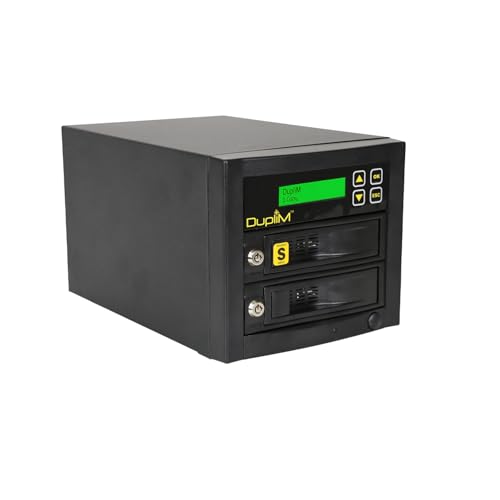
- Copy rates up to 300MB/s
- Includes 7-pass and Secure Erase options
- Standalone duplication and sanitization
Best For: IT and repair workflows requiring fast copies and secure wiping
Highest Capacity Dock

- Supports up to 24TB per bay
- Offline cloning for 2.5- and 3.5-inch SATA drives
- Adds three USB 3.0 hub ports
Best For: Large-capacity backups, transfers, and drive management
Best Multi-Drive Copier
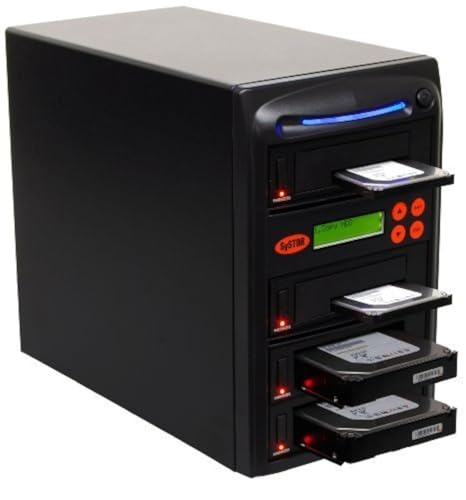
- Copies multiple SATA drives simultaneously
- Standalone operation needs no computer
- Includes DoD 5220.22-M sanitization
Best For: Technicians performing batch duplication and drive erasure
Best Hybrid NVMe Dock

- Supports two NVMe and one SATA drive
- Offline NVMe and SATA-to-NVMe cloning
- 10Gbps USB-C and foldable cooling fan
Best For: Mixed NVMe/SATA storage setups and large-file transfers
Best Standalone SATA Duplicator

- Requires no computer or software
- Copies at up to 150MB per second
- Includes DoD-compliant sanitization
Best For: Standalone SATA copying and secure drive erasing
Best Multi-Target SATA Cloner
StarTech.com 1:3 Drive Duplicator

- Clones one SATA drive to up to three targets
- Supports four bays and included IDE adapters
- Adds secure erase and docking functions
Best For: IT departments duplicating and sanitizing multiple SATA drives
High-Capacity Production Pick

- Up to 23 SATA drives at 300 MB/s per slot
- Four copy modes for full, partition, or targeted duplication
- Standalone operation with seven erase modes
Best For: High-volume SATA HDD and SSD duplication
Field-Ready Professional Pick

- Up to 600 MB/s per channel
- Supports SATA and IDE/PATA drives
- Includes case, adapters, logs, and source write blocker
Best For: Mobile technicians and mixed-drive duplication
Fast Compact SATA Pick

- Up to 600 MB/s per slot
- Four copy modes, including percentage copying
- Standalone design with independent bandwidth
Best For: Fast 2.5-inch SATA drive duplication
Best Value Dual-Bay Dock – Sabrent EC-HD2B
For shoppers comparing hard drive duplicators for large files, the Sabrent EC-HD2B combines a dual-bay SATA dock with offline cloning and USB 3.0 connectivity. It supports 2.5- and 3.5-inch SATA HDDs and SSDs up to 10TB per drive, with no drivers required.
Best For: Home users and technicians who need an affordable dual-bay dock for drive access, backups, and occasional offline cloning.
Pros:
- Supports 2.5- and 3.5-inch SATA HDDs and SSDs
- Handles drives up to 10TB, with 20TB total stated storage capacity
- Offline cloning works without a computer or drivers
- USB 3.0 transfer speeds reach up to 5Gbps
Cons:
- Offline cloning is rated up to 60Mbps
- Designed for two drives rather than multi-drive duplication
This is a straightforward choice when broad drive compatibility and simple offline cloning matter more than advanced sanitization or high-volume duplication.
Fastest Sanitization Pick – DupliM 1:1 SSD HDD Duplicator
The DupliM 1:1 is a standalone option for hard drive duplicators for large files, offering copy rates up to 300MB/s alongside drive sanitization. It duplicates one source drive or sanitizes two drives, with support for 3.5-inch SATA drives and optional adapter support for 2.5-inch models.
Best For: IT departments and repair workflows that need both drive duplication and certified data-erasure functions.
Pros:
- Copy speeds reach up to 300MB/s
- Supports 7-pass wipe, Secure Erase, and 1-pass or 3-pass options with verification
- LED indicators confirm drive-operation completion
- Lockable quick-load doors help protect SATA connectors
Cons:
- Duplicates only one drive at a time
- 2.5-inch drive support requires optional DupliM adapters, sold separately
With its higher stated speed and multiple sanitization modes, this model is better suited to controlled technical environments than casual file copying.
Highest Capacity Dock – MAIWO K3082H
The MAIWO K3082H is a practical contender among hard drive duplicators for large files, with dual-bay offline cloning and support for drives up to 24TB per bay. Its USB 3.0 interface also turns the unit into a drive reader and adds three USB Type-A hub ports.
Best For: Users managing very large SATA drives who also want a USB hub for file transfers and peripheral access.
Pros:
- Supports 2.5- and 3.5-inch SATA HDDs and SSDs
- Each bay supports up to 24TB, for 48TB total stated capacity
- Offline cloning requires no computer or drivers
- Includes three USB 3.0 Type-A hub ports
Cons:
- Cloning is limited to the two installed drives
- Uses a USB 3.0 connection rated up to 5Gbps rather than a faster interface
This model stands out for capacity and versatility, especially if the dock will double as a USB hub and large-drive reader.
Best Multi-Drive Copier – Systor SYS103HS-DP
The Systor SYS103HS-DP is built for repeated duplication jobs, making it a useful choice among hard drive duplicators for large files when one source must be copied to multiple drives. It operates without a computer, supports 2.5- and 3.5-inch drives without adapters, and includes DoD 5220.22-M data sanitization.
Best For: Technicians and organizations copying or erasing multiple SATA HDDs and SSDs in a standalone workflow.
Pros:
- Copies multiple HDDs or SSDs simultaneously
- Stated copy speed reaches up to 90MB/s
- Supports 2.5- and 3.5-inch drives without an adapter
- Can copy data or whole drives and perform DoD-compliant sanitization
Cons:
- Slower stated transfer rate than the 300MB/s DupliM model
- Listed storage capacity is 3TB
This is the strongest fit for batch work: its multi-drive design and standalone operation prioritize repeatable duplication and erasure over maximum transfer speed.
Best Hybrid NVMe Dock – FIDECO 3-Bay NVMe/SATA Cloner
For shoppers comparing hard drive duplicators for large files, the FIDECO MS02 stands out as a flexible dock for NVMe and SATA storage. It supports two M.2 NVMe drives plus one 2.5- or 3.5-inch SATA drive, while USB 3.2 Gen 2 connectivity provides up to 10Gbps for computer-based file transfers.
Best For: Users who need one tool for NVMe and SATA drives, occasional offline cloning, and fast large-file access.
Pros:
- Supports M-Key and M+B Key PCIe NVMe SSDs along with 2.5- and 3.5-inch SATA drives.
- Offers offline NVMe-to-NVMe or SATA-to-NVMe cloning without software.
- Includes a foldable cooling fan and USB-C cable with USB-A adapter.
- Works with Windows, macOS, and Linux without requiring drivers.
Cons:
- Offline cloning requires the target drive to be equal to or larger than the source.
- Its offline clone modes are limited to the listed NVMe-to-NVMe and SATA-to-NVMe conversions.
- New drives must be initialized before a computer can recognize them.
The FIDECO is a strong choice when versatility matters more than dedicated multi-target production copying. Its cooling fan and 10Gbps interface are useful for large files, but buyers should verify drive types and clone direction before purchasing.
Best Standalone SATA Duplicator – Systor 1:1 HDD/SSD Copier
The Systor SYS201HS-DP is a dedicated standalone option for hard drive duplicators for large files when you want to work without a computer or cloning software. It handles 2.5- and 3.5-inch SATA drives and copies at up to 150MB per second, or about 9GB per minute.
Best For: IT workspaces that need straightforward SATA drive copying and secure erasing without relying on a host computer.
Pros:
- Operates as a complete standalone duplicator with no computer or software required.
- Supports both 2.5-inch and 3.5-inch drives without an adapter.
- Copies systems and files or entire hard drives at up to 150MB per second.
- Includes DoD 5220.22-M-compliant drive sanitization.
Cons:
- Designed for SATA drives rather than M.2 NVMe storage.
- The supplied details do not specify the number of simultaneous target bays.
- Actual copy speed may vary by the drives being used.
Choose the Systor when independent operation and drive sanitization are priorities. Its 1:1 format is uncomplicated and well suited to SATA-focused workflows, though NVMe users will need a different duplicator.
Best Multi-Target SATA Cloner – StarTech.com 1:3 Drive Duplicator
For buyers seeking hard drive duplicators for large files in an IT or repair setting, the StarTech.com SATDOCK4U3RE provides four drive bays and standalone 1:3 cloning. It supports 2.5- and 3.5-inch SATA drives, offers USB 3.0 or eSATA host connectivity, and includes quick and secure erase modes.
Best For: IT professionals who need to clone one SATA drive to multiple targets and also perform drive wiping or docking tasks.
Pros:
- Supports standalone 1:3 sector-by-sector cloning across four bays.
- Works with 2.5- and 3.5-inch SATA drives of any capacity, plus included IDE adapters.
- Provides quick erase and NIST SP 800-88 Rev. 1 Purge secure erase options.
- Functions as a USB or eSATA drive dock with an LCD menu and drive-status LEDs.
Cons:
- Its listed standalone cloning speed is up to 4.2GB per minute, slower than some newer interfaces.
- Target drives must be equal to or larger than the source drive.
- It uses USB 3.0 or eSATA rather than USB-C.
The StarTech.com model is a practical choice for repeated SATA duplication, especially when erasing and docking are part of the same workflow. Its multi-target design saves time, but the listed transfer rate makes it less compelling for users focused solely on maximum speed.
High-Capacity Production Pick – 23-Bay SATA Duplicator
For buyers comparing hard drive duplicators for large files, the EZ DUPE H23PROHEB pairs 300 MB/s transfer speeds with up to 23 SATA drive bays. Its standalone design, full-drive and partition-based copy modes, and broad erase options make it suited to repeat duplication and secure media handling without a computer.
Best For: Businesses and production environments that need to duplicate many 2.5-inch or 3.5-inch SATA HDDs or SSDs in one batch.
Pros:
- Duplicates up to 23 SATA HDDs or SSDs at up to 300 MB/s per slot.
- Offers system/files, whole-drive, partition, and percentage copy modes.
- Works standalone and includes secure, enhanced SSD, DoD, and HPA-removal erase modes.
- Supports 2.5-inch and 3.5-inch SATA drives without an adapter.
Cons:
- Supports SATA drives rather than IDE/PATA media.
- At 80 pounds, it is intended for a dedicated workspace rather than frequent transport.
Choose this model when throughput volume matters more than portability. Its 23-slot capacity is the standout feature, while the standalone workflow helps keep duplication separate from a host computer.
Field-Ready Professional Pick – HD Pal Pro 1-to-3
The EZ Dupe HD Pal Pro is a practical choice among hard drive duplicators for large files when compatibility and documentation are important. It duplicates up to three drives at up to 600 MB/s per channel, supports SATA and IDE/PATA media, and comes as a travel-ready kit with adapters and a rugged protective case.
Best For: Technicians, analysis labs, and mobile teams working with mixed SATA and IDE/PATA HDDs or SSDs.
Pros:
- Copies 2.5-inch and 3.5-inch HDDs or SSDs at up to 600 MB/s per channel.
- Includes SATA cables and IDE/PATA adapters for broader drive compatibility.
- Provides four copy modes, eight erase modes, HPA/DCO support, and a source write blocker.
- Includes downloadable log files, label printing, and a foam-padded protective case.
Cons:
- Handles up to three target drives, fewer than larger tower duplicators.
- The label-printing feature does not use the downloadable log file directly.
This is the most versatile option for mixed-media work and field use. Its independent bandwidth design helps maintain speed across multiple targets, while the case and recordkeeping features add practical value for repeat projects.
Fast Compact SATA Pick – HD Cyclone 600
For hard drive duplicators for large files that prioritize speed in a compact SATA workflow, the EZ Dupe HD Cyclone 600 offers up to 600 MB/s per slot and independent bandwidth design. Its flatbed layout supports targeted, partition-based, or full-drive copying without requiring software or a host computer.
Best For: Users duplicating multiple 2.5-inch SATA HDDs or SSDs who want high speed and a straightforward standalone setup.
Pros:
- Copies SATA drives at up to 600 MB/s per slot.
- Supports quick, full-drive, partition-area, and percentage copy modes.
- Independent bandwidth design helps avoid speed loss when copying to multiple drives.
- Includes seven erase modes, including DoD, secure, enhanced SSD, and HPA removal options.
Cons:
- Designed for 2.5-inch SATA drives and does not support IDE/PATA media.
- Does not connect to a computer or other host device.
The HD Cyclone 600 is a strong middle ground for fast SATA duplication without software dependencies. Select it for repeat copying of compatible 2.5-inch drives, especially when independent throughput and multiple erase choices are useful.
How We Picked the Best Hard Drive Duplicators for Large Files
We evaluated these duplicators by looking at the factors that matter most when copying substantial amounts of data: supported drive formats, maximum drive capacity, stated duplication speed, number of target drives, standalone operation, connectivity, and compatibility with common 2.5-inch and 3.5-inch SATA disks. We also considered whether a unit supports M.2 NVMe drives, USB or eSATA access, drive erasing, and repeated professional workflows.
Speed ratings are typically maximum or theoretical figures and can vary with the source drive, target drive, interface, file structure, and whether the device performs a full sector-by-sector clone. Treat advertised throughput as a useful comparison point rather than a guaranteed real-world result.
Quick Comparison
- Compact dual-bay docks: Sabrent and Maiwo models suit occasional cloning, drive access, and desktop backups.
- One-to-one standalone units: The 1:1 Systor and similar duplicators are practical for controlled drive migrations without relying on a computer.
- Multi-target duplicators: Systor 1:3, StarTech.com, and EZ Dupe systems are better for IT departments, repair benches, and repeated deployments.
- High-throughput equipment: EZ Dupe tower and professional flatbed models prioritize faster duplication and larger batches.
- NVMe-focused workflows: FIDECO is the specialist choice when M.2 NVMe cloning is as important as SATA support.
Key Buying Factors
Drive Compatibility and Capacity
Confirm whether the duplicator supports SATA HDDs, SATA SSDs, IDE/PATA drives, M.2 NVMe modules, or a combination. Check the maximum capacity as well, especially when cloning modern multi-terabyte disks. A device that accepts the physical drive but lacks the required protocol or capacity support will not solve the problem.
Speed and Duplication Method
For large files, sustained throughput matters more than short burst speed. Standalone sector cloning can copy a complete drive, including partitions and unused space, while computer-connected docks may be more flexible for selective file transfers. Compare stated GB-per-minute ratings, but also check the source and target drive types and interface limitations.
Number of Targets and Workflow
A 1:1 duplicator is usually simpler and less expensive, while 1:3, 1:4, or 1:23 systems save substantial time when preparing multiple identical drives. If you regularly clone drives for deployment or repair, target count can matter more than extra connectivity.
Erasure, Verification, and Connectivity
Look for secure erase or DoD erase functions when repurposing drives. Verification or analysis features can help identify failed copies. USB 3.0 is convenient for computer access, while eSATA and standalone operation may better suit fixed workstations and repeat production tasks.
Who Should Buy Which Hard Drive Duplicators for Large Files?
Choose a compact dual-bay dock for home users, photographers, and technicians who need occasional drive cloning or easy disk access. Choose a 1:1 standalone model for straightforward migrations without a host computer. Businesses and repair shops handling several identical drives should consider a multi-target Systor, StarTech.com, or EZ Dupe unit. For mixed SATA and M.2 NVMe inventories, a compatible multi-bay NVMe/SATA dock is the better long-term investment. Before ordering, confirm the source and target drive capacities, interfaces, and whether the intended clone requires sector-by-sector copying.