
The best gaming mouse for MOBA play gives you fast access to abilities, items, and commands without forcing your hand into an awkward grip. Button count matters, but comfort, sensor consistency, software, and control placement matter just as much.
This roundup compares 10 wired and wireless options, including versatile FPS/MOBA designs and MMO-style mice with extensive side-button layouts. Use the guide below to narrow the list by hand size, preferred grip, connectivity, and how many commands you actually want at your thumb.
Best 10 Gaming Mouse for Moba Picks for 2026
Adjustable Control
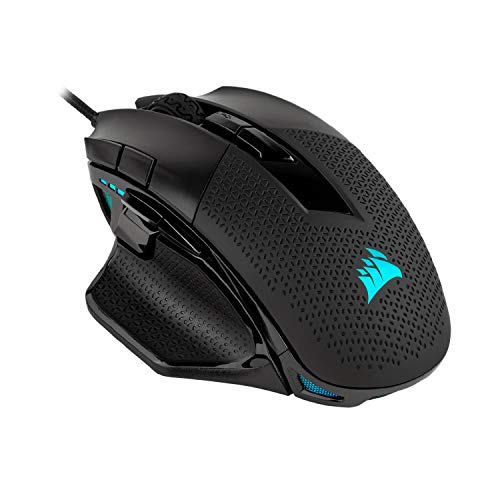
- 10 programmable buttons for macros and remaps
- 119g–141g adjustable weight system
- 18,000 DPI optical sensor
Best For: Right-handed players who want a tunable wired MOBA mouse
Fast-Action Versatility

- Nine programmable buttons
- Five quick-action side buttons
- 85g body with TrueMove Air tracking
Best For: Players wanting a lightweight wired mouse for fast-paced games
Wireless MOBA Command Center

- 12 programmable buttons with six side buttons
- 2.4GHz wireless and USB-C wired modes
- Up to 67 hours of battery life with charging dock
Best For: Players who want extensive controls and wireless flexibility
Maximum Button Access

- 19 programmable buttons for complex bindings
- Up to 250 hours on 2.4GHz wireless
- 30,000 DPI Focus Pro optical sensor
Best For: MOBA and MMO players who need extensive commands and long wireless battery life
Large-Hand MOBA Pick

- Palm-grip shape for larger hands
- Seven programmable buttons
- 18,000 DPI adjustable sensor
Best For: Larger-handed MOBA players who prefer a palm grip
Wireless Button-Heavy Pick
Corsair Scimitar Elite Wireless SE
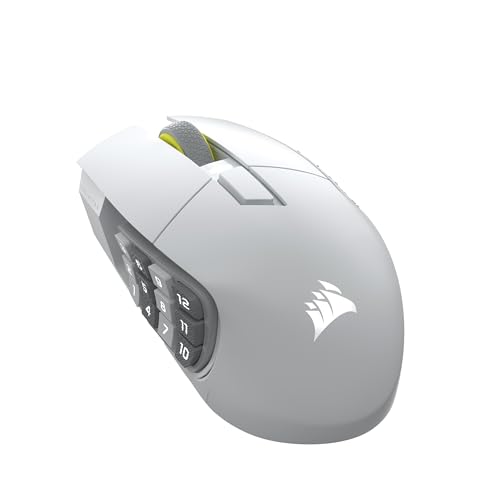
- Sixteen programmable buttons
- 33,000 DPI optical sensor
- Low-latency wireless with 1,000Hz polling
Best For: MOBA and MMO players who need extensive programmable controls
Customizable Value Pick

- Eighteen programmable buttons
- Five memory profiles and adjustable DPI
- Includes eight-piece weight set
Best For: Players wanting extensive controls and customization on a wired mouse
Button-Heavy Pick
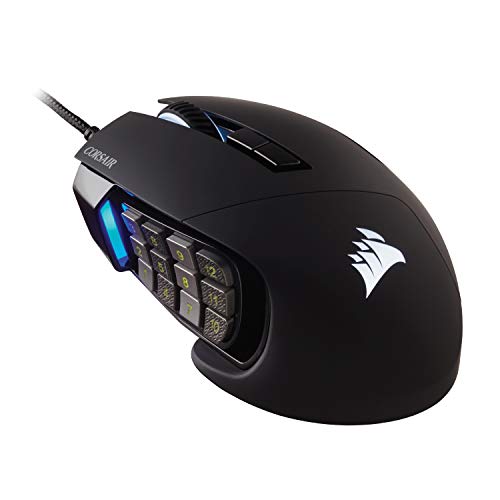
- 17 programmable buttons for macros and shortcuts
- Repositionable 12-button side panel
- 18,000 DPI sensor with 1 DPI adjustment
Best For: MOBA and MMO players who need extensive button access
Accessible Macro Pick

- 15 programmable buttons for custom keybinds
- Five selectable DPI levels
- Software controls buttons, DPI, and RGB
Best For: Right-handed players wanting configurable MOBA controls
Customizable Control Pick

- 19 programmable buttons with 12 side buttons
- Five memory profiles for saved configurations
- Removable weights tune balance and feel
Best For: Players who want extensive macros and setup customization
Adjustable Control – CORSAIR NIGHTSWORD RGB
The CORSAIR NIGHTSWORD RGB is a practical gaming mouse for MOBA players who want extensive button customization and a tuneable feel. Its 10 programmable buttons, high-resolution sensor, and adjustable weight system let you configure both controls and balance around your grip.
Best For: Right-handed MOBA players who prefer a wired mouse with customizable weight and macros.
Pros:
- Ten programmable buttons support macros and key remaps.
- Adjustable 119g–141g weight range with 120 balance configurations.
- 18,000 DPI Pixart optical sensor offers fine sensitivity adjustment.
- Contoured shape and rubber grips are designed for extended comfort.
Cons:
- Wired connectivity limits desk mobility.
- Its adjustable-weight design is less suited to players seeking an especially light mouse.
- Right-hand orientation excludes left-handed users.
The NIGHTSWORD RGB stands out when grip comfort, balance tuning, and programmable controls matter more than minimizing weight. It is a flexible choice for a customized wired MOBA setup.
Fast-Action Versatility – SteelSeries Rival 5
The SteelSeries Rival 5 is a gaming mouse for MOBA players who want quick access to commands without moving to a larger MMO-style design. Its nine-button layout includes five side buttons, while the 85g body keeps the mouse relatively light for fast-paced play.
Best For: Right-handed players who want a lightweight, versatile wired mouse for MOBAs and other fast-paced games.
Pros:
- Nine programmable buttons provide flexible command placement.
- Five quick-action side buttons are useful for frequently used MOBA inputs.
- TrueMove Air sensor provides true 1-to-1 optical tracking.
- 85g construction balances feature access with a competitive lightweight design.
Cons:
- Wired USB connectivity does not provide wireless freedom.
- Right-hand design is not intended for left-handed users.
- It has fewer buttons than dedicated MMO/MOBA mice with larger side panels.
The Rival 5 is a balanced option for players who want useful side controls without the bulk or button count of a full MMO mouse. Its lightweight build suits quick transitions and general gaming.
Wireless MOBA Command Center – ASUS ROG Spatha X
The ASUS ROG Spatha X is a gaming mouse for MOBA players who need a broad set of accessible commands. It combines 12 programmable buttons, six side buttons, dual-mode wireless or wired operation, and a charging dock for a feature-rich desktop setup.
Best For: Right-handed MMO and MOBA players who prioritize button access, wireless flexibility, and a larger ergonomic shape.
Pros:
- Twelve programmable buttons include six strategically positioned side buttons.
- Supports low-latency 2.4GHz wireless and USB-C wired modes.
- 19,000 DPI sensor and 1,000Hz polling rate support precise tracking.
- Up to 67 hours of battery life and a magnetic charging dock add convenience.
Cons:
- At 168g, it is substantially heavier than lightweight gaming mice.
- The large shape and right-handed design may not suit every grip or user.
- Its extensive feature set may be more than players need for simpler control layouts.
The Spatha X is aimed at players who want a substantial mouse with many commands close at hand. Hot-swappable switches, dual-mode connectivity, and the dock further support a premium, customizable setup.
Maximum Button Access – Razer Naga V2 HyperSpeed
The Razer Naga V2 HyperSpeed is a gaming mouse for MOBA players who want an unusually large command library at their fingertips. With 19 programmable buttons, wireless connectivity, and a high-resolution sensor, it is built for complex bindings and macro-heavy setups.
Best For: Right-handed MOBA and MMO players who need maximum button access and long battery life.
Pros:
- Nineteen programmable buttons support extensive commands and macros.
- HyperSpeed 2.4GHz wireless and Bluetooth provide flexible connectivity.
- Battery life reaches up to 250 hours on HyperSpeed or 400 hours on Bluetooth.
- Focus Pro 30K optical sensor supports tracking across a wide range of surfaces, including glass.
Cons:
- Its large number of buttons can require an adjustment period.
- It uses a replaceable AA battery rather than an integrated rechargeable battery.
- Right-hand orientation limits suitability for left-handed players.
The Naga V2 HyperSpeed is the clearest fit for players who want to move many abilities and commands onto the mouse. Its long battery life makes it particularly convenient for wireless gaming between battery changes.
Large-Hand MOBA Pick – Corsair IRONCLAW RGB
The Corsair IRONCLAW RGB is a practical gaming mouse for MOBA players who prefer a right-handed, palm-grip design and a larger shell. Its seven programmable buttons, adjustable 18,000 DPI optical sensor, and durable Omron switches provide a balanced mix of control and customization.
Best For: Larger-handed players who use a palm grip and want programmable controls without moving to a high-button MMO layout.
Pros:
- Contoured shape is designed for larger hands and palm grips.
- Seven programmable buttons support macros and key remapping.
- 18,000 DPI sensor can be adjusted in 1 DPI increments.
- Omron switches are rated for more than 50 million clicks.
Cons:
- Wired USB connectivity does not provide wireless flexibility.
- Its seven-button layout offers fewer dedicated controls than MMO-style mice.
Choose the IRONCLAW RGB if comfort for larger hands and precise sensitivity adjustment matter more than having a large bank of side buttons. Two-zone RGB lighting adds setup customization, while the wired connection keeps the configuration straightforward.
Wireless Button-Heavy Pick – Corsair Scimitar Elite Wireless SE
The Corsair Scimitar Elite Wireless SE is a gaming mouse for MOBA players who want extensive access to abilities, items, and other commands. It combines 16 programmable buttons with a 33,000 DPI optical sensor and low-latency Slipstream wireless connectivity.
Best For: MOBA and MMO players who want many programmable controls, wireless freedom, and integration with Elgato Stream Deck features.
Pros:
- Sixteen programmable buttons provide extensive command access.
- 33,000 DPI MARKSMAN S sensor supports precise tracking.
- Slipstream wireless offers low-latency connectivity with 1,000Hz polling.
- Up to 150 hours of battery life is listed, with Bluetooth and USB options available.
Cons:
- The right-handed, 16-button layout may feel excessive for players wanting a simpler mouse.
- Listed minimum requirements include Windows 11 or macOS 14 Sonoma.
The Scimitar Elite Wireless SE is the most feature-heavy choice here for players who want to map nearly every important MOBA action. Its wireless modes and Stream Deck support add flexibility, though the dense control layout is best suited to users comfortable with many side buttons.
Customizable Value Pick – Redragon M908 Impact
The Redragon M908 Impact is a gaming mouse for MOBA players who want a large number of remappable controls at a wired price. It offers 18 programmable buttons, adjustable DPI, five memory profiles, and a weight-tuning set for a more personalized setup.
Best For: Budget-conscious players who want MMO-style side buttons, multiple profiles, and adjustable mouse weight.
Pros:
- Eighteen programmable buttons include 12 MMO-style side buttons.
- Five memory profiles help organize different games or control schemes.
- DPI can be adjusted from 200 to 12,400 through software.
- Eight removable weights allow customization of the mouse feel.
Cons:
- At 175g before weight adjustments, it is considerably heavier than many lightweight mice.
- It uses a wired USB connection rather than wireless operation.
- Mac support is listed for normal use, while programmable functions are specified for Windows.
The M908 Impact makes sense for players who value button quantity and customization over a lightweight design. Its 18-button layout and profile memory suit complex control schemes, while the adjustable weights let you fine-tune the feel for different games.
Button-Heavy Pick – Corsair Scimitar RGB Elite
If you want a gaming mouse for MOBA play with extensive shortcut coverage, the Corsair Scimitar RGB Elite combines 17 programmable buttons with a repositionable 12-button side panel. Its 18,000 DPI optical sensor also offers fine-grained tracking adjustment.
Best For: MOBA and MMO players who rely on numerous macros and want to position the side buttons around their grip.
Pros:
- 17 programmable buttons support frequent actions and complex macros.
- Key Slider system repositions the 12 side buttons for a more tailored reach.
- 18,000 DPI PixArt PMW3391 sensor adjusts in 1 DPI steps.
- Contoured right-handed shape includes a supporting finger rest.
Cons:
- Its extensive button layout may take time to configure and learn.
- Wired connectivity limits cable-free desk setups.
The Scimitar RGB Elite is a strong fit when programmable access matters more than a minimalist design. Durable switches, a braided cable, and onboard RGB lighting round out its MOBA-focused feature set.
Accessible Macro Pick – Redragon M811
The Redragon M811 is a practical gaming mouse for MOBA players who want many remappable controls without moving to a more elaborate weight-tuning design. It provides 15 programmable buttons, adjustable DPI levels, and customizable RGB lighting through its software.
Best For: Right-handed players seeking a wired MMO/MOBA mouse with configurable keybinds and straightforward DPI switching.
Pros:
- 15 programmable buttons support customizable tactical keybinds.
- Five DPI levels make it easy to switch sensitivity for different tasks.
- Dedicated software controls button functions, DPI settings, and lighting.
- Ergonomic shape is designed for extended use.
Cons:
- Its listed default DPI levels top out at 6,200, though software allows higher settings.
- Wired USB connectivity is the only listed connection option.
The M811 offers broad customization in a relatively direct package. It is a sensible choice if you value plentiful side controls and software remapping for MOBA commands.
Customizable Control Pick – Redragon M901K
For a gaming mouse for MOBA players who want maximum configuration, the Redragon M901K offers 19 programmable buttons, 12 side buttons, five memory profiles, and adjustable weight tuning. Its DPI and polling-rate controls also cover both gaming and everyday use.
Best For: Players who want extensive macros, saved profiles, and the ability to tune mouse balance for different games.
Pros:
- 19 remappable buttons provide substantial macro and shortcut coverage.
- Five memory profiles help save settings for different scenarios.
- Eight removable 2.4-gram weights allow balance customization.
- Adjustable DPI from 100 to 12,400 and polling rates from 125Hz to 1,000Hz.
Cons:
- The large number of controls may feel overwhelming for simpler setups.
- It is a right-handed, corded mouse rather than a wireless option.
The M901K stands out for players who enjoy refining every part of their setup. Its profile storage and weight system make it particularly useful when switching between games or preferred control schemes.
How We Picked the Best Gaming Mouse for Moba Play
We focused on the features that affect real MOBA sessions: programmable button placement, reliable tracking, comfort during long matches, dependable connectivity, and practical software support. The selection includes both streamlined mice with a handful of extra controls and MMO-style models with dense side-button grids.
We also considered hand size and mouse shape. Larger designs can provide useful palm support, while lighter or less crowded models may feel easier to reposition during fast camera movement. Wireless models were included for players who value a clean desk, while wired options remain strong choices for consistent power and straightforward setup.
Quick Comparison
- Best for many keybinds: Choose an MMO/MOBA mouse with a numbered side grid and extensive remapping.
- Best for a balanced layout: Look for five to seven programmable controls without excessive thumb-button density.
- Best for large hands: Prioritize a broad shell, longer body, and comfortable palm support.
- Best for wireless freedom: Select a dual-mode or 2.4GHz wireless mouse with strong battery performance.
- Best for value: A wired model can deliver abundant controls without adding battery management or wireless cost.
Key Buying Factors for a Gaming Mouse for Moba
Button Layout and Programming
Count the commands you expect to bind before choosing a mouse. A smaller cluster can be faster to learn and less likely to cause accidental presses, while 12 or more side buttons suit players who want abilities, items, emotes, and macros close at hand. Check whether the software supports profiles, per-game assignments, macros, and onboard memory.
Shape, Grip, and Weight
MOBA matches can last for hours, so a comfortable shape is more important than an extreme DPI number. Match the mouse to your grip and hand size, and consider whether a heavy chassis feels stable or tiring. Adjustable weights are useful only if the adjustment range suits your preferences.
Sensor and Connection
A modern sensor with consistent tracking is sufficient for MOBA games; very high DPI ratings are not automatically better. Wired models avoid charging, while 2.4GHz wireless can provide responsive performance without a cable. Bluetooth is convenient for general use but may not be the first choice for competitive play.
Software and Compatibility
Confirm that the configuration software supports your operating system and that lighting, profiles, and remapping work as advertised. If you switch between games or computers, onboard profile storage can be especially useful.
Who Should Buy Which Gaming Mouse for Moba?
Choose a compact, balanced mouse if you want a familiar FPS-style shape with a few extra MOBA bindings. Choose a high-button MMO/MOBA model if you use many ability and item shortcuts and can comfortably distinguish a dense thumb grid. Choose a large-hand design if smaller mice cause cramped fingers or palm fatigue. Choose wireless for a cleaner setup and freedom of movement, or choose wired for simple reliability and typically lower cost.