
Looking for an external SSD with hardware encryption that balances speed, security, and portability? The right drive can protect sensitive files without slowing down your workflow.
Below, we focus on secure portable SSDs that make sense for business users, creators, and anyone storing private data on the go.
Best 10 External SSD with Hardware Encryption Picks for 2026
Speed-Safe Portable Vault
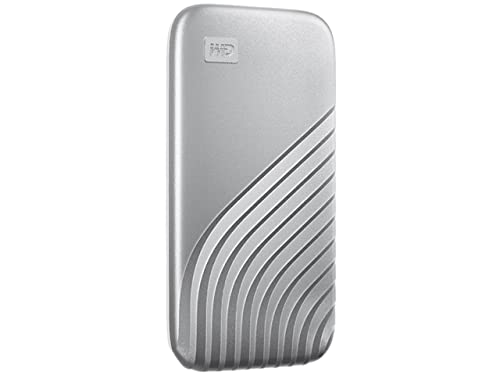
- NVMe speeds up to 1050MB/s read
- Password-enabled 256-bit AES hardware encryption
- USB-C and USB-A compatible
Best For: Portable encrypted storage with strong speed
Phone-Unlock Security Drive

- Phone-based unlock with no password needed
- 256-bit AES-XTS hardware encryption
- IP67 ruggedness with up to 1000MB/s speeds
Best For: High-security portable storage with rugged protection
PIN-Locked Secure Portable SSD

- 7-15 digit PIN access, no software required
- AES-XTS 256-bit hardware encryption
- Wide compatibility with IP56 protection
Best For: PIN-secured portable SSD for broad device support
Keypad-Controlled Encrypted Backup

- Hardware encryption with keypad unlock
- USB-C and USB-A cables included
- Splash-proof pouch and shock-resistant design
Best For: Compliance-minded backup storage with keypad access
Rugged High-Speed Pick
SanDisk 2TB Extreme Portable SSD

- 1050MB/s read, 1000MB/s write
- 256-bit AES hardware encryption
- IP65 rating and 3-meter drop protection
Best For: Fast, rugged storage with built-in hardware encryption
Security-First Enterprise Pick

- FIPS 140-2 Level 2 certified
- AES 256-bit hardware encryption
- Includes Bitdefender antivirus and tamper-evident design
Best For: Sensitive data and compliance-focused portable storage
Compact Everyday Option

- 1050MB/s read, 1000MB/s write
- Lexar DataShield 256-bit AES encryption software
- 44g slim design with Type-C cable
Best For: Portable everyday storage with lightweight design
Government-Grade Security
DataLocker DL4 FE 1TB Password Protected Encrypted SSD

- FIPS 140-3 validated and TAA compliant
- AES 256-bit XTS hardware encryption
- Touchscreen password setup and SafeConsole support
Best For: Government, regulated teams, and security-first portable storage
Fast Everyday Backup

- Up to 1,050MB/s transfer speeds
- AES 256-bit hardware encryption
- Compact aluminum build with drop protection
Best For: Creators and everyday users who want fast encrypted storage
Top-Speed Creator Drive

- Up to 2,000MB/s sustained speeds
- AES 256-bit hardware encryption
- Thermal control plus Magician Software
Best For: Creators and power users moving large encrypted files
Speed-Safe Portable Vault – WD My Passport SSD 1TB
If you want an external ssd with hardware encryption that also feels fast for everyday transfers, the WD My Passport SSD is built for a simple, portable workflow. It combines NVMe performance with password-enabled 256-bit AES hardware encryption, plus USB-C and USB-A compatibility for broader use.
Best For: Users who want a compact encrypted SSD with strong speed and broad device compatibility.
Pros:
- Up to 1050MB/s read and 1000MB/s write speeds with NVMe technology.
- Password-enabled 256-bit AES hardware encryption for protected storage.
- Shock- and vibration-resistant design with drop resistance up to 6.5ft.
- USB 3.2 Gen-2 and USB-C support, with USB-A compatibility for older systems.
Cons:
- Performance can vary by host device and usage conditions.
- Security depends on using the password protection feature correctly.
Overall, this is a practical pick if you want a fast, pocketable drive with hardware-based protection and easy cross-platform connectivity. It is especially appealing for users who move large files often and want encryption without extra software complexity.
Phone-Unlock Security Drive – G-Technology ArmorLock 2TB
This external ssd with hardware encryption stands out for a security-first design that skips passwords and uses your phone to unlock the drive. The G-Technology ArmorLock pairs 256-bit AES-XTS hardware encryption with pro-grade NVMe speeds, making it a strong fit when both access control and performance matter.
Best For: Security-focused users who want phone-based unlocking and rugged encrypted storage.
Pros:
- Simple unlock with your phone, with no password needed.
- 256-bit AES-XTS hardware encryption for protected data.
- Up to 1000MB/s read and 1000MB/s write performance.
- Ultra-rugged build with IP67 dust/water resistance and high drop/crush protection.
Cons:
- Phone-based unlocking may not suit every workflow.
- Performance depends on host device and usage conditions.
If your priority is secure access without juggling passwords, ArmorLock offers a distinctive approach backed by rugged construction. It is a strong choice for users who want encrypted NVMe storage that is built for demanding environments.
PIN-Locked Secure Portable SSD – iStorage diskAshur2 1TB
For buyers specifically looking for an external ssd with hardware encryption, the iStorage diskAshur2 is built around direct PIN-based access and always-on protection. You enter a 7-15 digit PIN to use it like a normal portable SSD, while AES-XTS 256-bit hardware encryption protects data in real time without requiring software.
Best For: Users who want PIN entry, broad compatibility, and hardware-encrypted portable storage.
Pros:
- 7-15 digit PIN authentication with no software required.
- AES-XTS 256-bit hardware encryption protects data when disconnected.
- Works with Windows, macOS, Linux, Chrome, Android, and more.
- Rugged IP56 dust and splash resistance for portable use.
Cons:
- Transfer speeds are lower than faster NVMe-based encrypted drives.
- PIN-based access adds an extra step before use.
This drive is a solid match if you value straightforward hardware security and wide device support over top-tier speed. It is especially useful for users who want encrypted storage that works across many platforms without installing drivers.
Keypad-Controlled Encrypted Backup – SecureData SecureDrive KP 4TB
The SecureData SecureDrive KP is a hardware-encrypted external drive aimed at users who want keypad access and compliance-friendly features. It includes USB-C and USB-A cables, requires no drivers or software to unlock, and adds password-style access for keeping data protected on the go.
Best For: Business and compliance-minded users who want keypad unlocking and bundled accessories.
Pros:
- Hardware encryption with keypad-based access and no software required.
- Includes both USB-C and USB-A cables for flexible connectivity.
- Formatted NTFS for Windows, with reformatting options for Mac or Linux.
- Includes a splash-proof pouch and shock-resistant protection for transport.
Cons:
- Listed transfer speed is only 5MB/s.
- Some features, including antivirus, require online activation.
This model is more about security, compatibility, and workflow convenience than raw speed. If you need encrypted backup storage with keypad access and a business-friendly feature set, it is positioned well for that role.
Rugged High-Speed Pick – SanDisk 2TB Extreme Portable SSD
If you want an external ssd with hardware encryption that also prioritizes speed and durability, the SanDisk Extreme Portable SSD is built for everyday carrying. It offers up to 1050MB/s read speeds, 1000MB/s write speeds, 3-meter drop protection, and IP65 water and dust resistance, making it a practical choice for travel and field use.
Best For: Users who want a fast, rugged external SSD with built-in password protection and hardware encryption.
Pros:
- Up to 1050MB/s read and 1000MB/s write speeds
- 256-bit AES hardware encryption with password protection
- IP65 water and dust resistance
- 3-meter drop protection and a carabiner loop for easy carrying
Cons:
- Old model compared with newer revisions
- Speed can vary by host device and other factors
Overall, this is a strong all-around portable drive if your priority is fast transfers plus physical protection. It balances security and ruggedness well for work files, backups, and personal data on the go.
Security-First Enterprise Pick – Kanguru Defender SSD350 1TB
For shoppers focused on an external ssd with hardware encryption, the Kanguru Defender SSD350 is the most security-driven option here. It combines FIPS 140-2 Level 2 certification, hardware-based AES 256-bit encryption in XTS mode, and tamper-evident design, making it well suited to sensitive data and compliance-oriented use.
Best For: Secure file storage, compliance-focused workflows, and users who need certified encryption.
Pros:
- FIPS 140-2 Level 2 certification
- Hardware-based AES 256-bit encryption in XTS mode
- Built-in Bitdefender Antivirus with a 30-day free trial
- Tamper-evident design and optional remote management
Cons:
- Transfer speeds are much lower than the faster consumer SSDs listed here
- 1TB capacity may be limiting for larger media libraries
- Security-focused feature set may be more than casual users need
This drive makes sense when protection matters more than raw speed. If you need encrypted portable storage with certification, antivirus, and management options, it stands out as the most specialized pick.
Compact Everyday Option – Lexar ES3 1TB Portable SSD
The Lexar ES3 is a compact external ssd with hardware encryption software that fits well into an everyday carry setup. It delivers up to 1050MB/s read and 1000MB/s write speeds, weighs just 44g, and includes a Type-C cable, so it is easy to use with phones, laptops, and game consoles.
Best For: Users who want a slim, lightweight portable SSD with fast transfer speeds and encryption software.
Pros:
- Up to 1050MB/s read and 1000MB/s write speeds
- Lexar DataShield 256-bit AES encryption software
- Very slim and lightweight at 44g
- Broad device support, including phones, laptops, and consoles
Cons:
- Encryption is software-based, not hardware-based
- Not all iPhone models are supported
- Magsafe is not available in this version
As a portable daily driver, the ES3 focuses on speed, size, and compatibility. It is a good fit if you want a small SSD for on-the-go storage and are comfortable with software encryption instead of hardware encryption.
Government-Grade Security – DataLocker DL4 FE 1TB Password Protected Encrypted SSD
If you need an external ssd with hardware encryption for highly sensitive data, the DataLocker DL4 FE focuses on security first. It combines AES 256-bit XTS encryption with FIPS 140-3 validation, TAA compliance, and an OS-independent design, making it a practical fit where policy and auditability matter as much as storage.
Best For: Government, regulated teams, and users who need strong compliance-focused portable storage.
Pros:
- FIPS 140-3 validated and TAA compliant for regulated environments
- AES 256-bit XTS encryption for strong hardware-based protection
- Touchscreen setup supports complex alphanumeric passwords
- SafeConsole support adds remote management and audit capabilities
Cons:
- SafeConsole license is sold separately
- Security-first design is less about speed-focused use cases
Overall, this is the most security-centric option in the group and is built for buyers who care more about controlled access and compliance than casual portability. The IP64 dust and water resistance is a useful extra for field use, but the real value is its validated encryption and administrative controls.
Fast Everyday Backup – Samsung T7 Portable SSD 1TB
The Samsung T7 is a strong pick if you want an external ssd with hardware encryption in a fast, compact drive for everyday use. It delivers up to 1,050MB/s speeds, supports a wide range of devices, and adds AES 256-bit hardware encryption for users who want both performance and basic drive protection.
Best For: Creators, students, and general users who want fast, compact storage with built-in encryption.
Pros:
- Up to 1,050MB/s read and 1,000MB/s write speeds
- AES 256-bit hardware encryption adds drive-level protection
- Compact aluminum design with shock resistance and 6-foot fall protection
- Broad compatibility with PC, mobile devices, and other supported hardware
Cons:
- Not as fast as the newer T9 for heavier workloads
- Security features are simpler than compliance-focused encrypted drives
The T7 is a balanced choice when you want speed, portability, and encryption without moving into enterprise-style security tools. It is especially appealing for backup, media transfer, and day-to-day file storage where a reliable external SSD matters.
Top-Speed Creator Drive – Samsung T9 Portable SSD 1TB
If speed is your priority, the Samsung T9 is a high-performance external ssd with hardware encryption for demanding workflows. It offers up to 2,000MB/s sustained read and write speeds, AES 256-bit hardware encryption, and thermal controls that help it stay cool during long transfers or editing sessions.
Best For: Creators, power users, and anyone who needs fast encrypted storage for large files.
Pros:
- Up to 2,000MB/s sustained read and write speeds
- AES 256-bit hardware encryption for built-in protection
- Dynamic Thermal Guard helps manage heat during heavy use
- Magician Software adds firmware updates, encryption, and health monitoring
Cons:
- Higher-end performance is more than many casual users need
- Full speed depends on compatible hardware and connection support
For users moving large project files, video, or other heavy data, the T9 stands out as the most performance-oriented option here. It combines speed, encryption, and thermal management in a drive designed to handle long sessions without feeling like a compromise.
How We Picked the Best External SSD with Hardware Encryption
We prioritized drives with real hardware-based protection, strong portability, and practical performance for everyday use. For this roundup, that means looking beyond raw speed to include encryption methods, access controls, durability, and connector compatibility.
We also considered whether each External SSD with Hardware Encryption is suitable for travel, workplace security policies, and sensitive data handling. Models with compliance-oriented features, password protection, keypad unlocks, or certified encryption earned extra weight.
Quick Comparison
If speed is your top priority, newer USB 3.2 Gen 2×2 options stand out. If security is the main goal, drives with keypad entry, FIPS validation, or managed encryption features are better suited to regulated environments. Portable drives with simpler password-based protection are often the best balance for most buyers.
Key Buying Factors for External SSD with Hardware Encryption
Encryption Type
Look for AES-based hardware encryption or a clearly documented encrypted controller. Hardware encryption is preferable because it keeps the protection process inside the drive, which can reduce performance overhead and simplify use.
Unlock Method
Password-only drives are convenient, but keypad, screen-guided, or managed-unlock models can offer stronger control for shared or compliance-heavy environments. Consider who will use the drive and whether quick access or stricter security matters more.
Performance and Port
USB-C is now the most practical standard for most buyers. USB 3.2 Gen 2 drives are fast enough for large file transfers, while Gen 2×2 models can deliver even higher throughput if your computer supports it.
Durability and Compliance
If you travel often or store sensitive work files, favor rugged housings, water/dust resistance, and compliance markers such as FIPS, TAA, or industry-specific readiness. These features can matter as much as speed when choosing a secure SSD.
Who Should Buy Which External SSD with Hardware Encryption?
For everyday privacy: Choose a simpler password-protected portable SSD if you want easy setup and solid speed for personal files.
For business and regulated data: Pick a keypad-unlock or compliance-focused model designed for controlled access and policy requirements.
For creators and frequent travelers: Look for a fast, compact drive with hardware encryption and a durable shell so you can move large files securely without worrying about knocks, dust, or brief exposure to the elements.
For maximum speed: A newer high-bandwidth SSD makes sense, but only if your laptop or desktop supports the connection standard needed to unlock its full performance.