
Enclosed CNC routers make desktop machining more approachable by containing chips, reducing noise, and adding a cleaner barrier between the operator and moving components. The right model can support anything from beginner engraving and sign work to PCB milling, small production runs, and light metal cutting.
We compared these 10 machines by enclosure design, working capacity, rigidity, spindle or router power, software workflow, expandability, and overall fit for different skill levels. Use the guide below to narrow the list by material, workspace, budget, and the accessories you actually need.
Best 10 Enclosed Cnc Routers Picks for 2026
Best Enclosed CNC Router for Desktop Precision
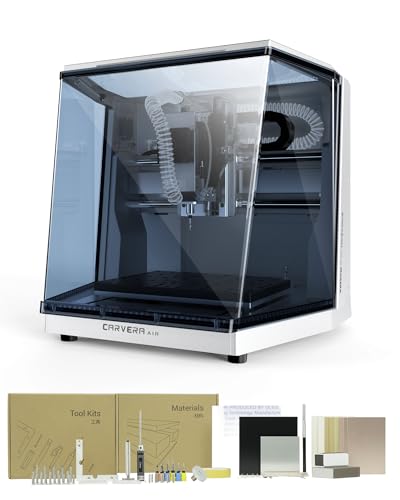
- Fully enclosed compact design helps contain chips and dust
- Automatic probing and leveling support precision work
- Quick tool changer and broad material compatibility
Best For: Makers, hobbyists, and small workshops needing detailed desktop machining
Best Open-Frame Power Upgrade

- 710W router supports powerful engraving and cutting
- Reinforced spoilboard adds support and T-track clamping
- 100mm pass height handles taller materials
Best For: Users seeking a larger work area and higher cutting power
Best Beginner Enclosed CNC Router

- Beginner-focused Makera CAM and tutorial ecosystem
- Built-in camera helps monitor cuts
- Handles wood, acrylic, plastics, PCB materials, and soft metals
Best For: New CNC users and makers learning desktop machining
Best Upgradeable Metal-Capable Router

- Dual steel linear guides support rigid cutting
- 800W router handles metals and common sheet materials
- Upgrade paths include spindle, ball screws, motors, and table
Best For: Makers wanting light-duty metal cutting and future upgrades
PCB-Ready Precision Pick

- Includes 4th axis and PCB fabrication pack
- Auto-probing, leveling, and quick tool changes
- Cross-platform control and CAD/CAM compatibility
Best For: Makers building detailed parts and PCBs on a compact desktop mill
All-Metal Workshop Choice

- 800W spindle handles diverse materials
- Ball screws and linear guides target precision
- Mostly assembled for a simpler setup
Best For: Desktop fabrication across wood, plastics, PCB, aluminum, and brass
Rotary-Capable Maker Pick

- Includes true 4th-axis rotary machining
- Auto-probing and leveling simplify calibration
- Quick tool changes support complex projects
Best For: Hobbyists creating small cylindrical and 3D parts
Stability-Focused Pick

- All-aluminum frame with linear-rail Z-axis
- 15.75 x 15.75-inch working area
- Supports spindle and Y-axis upgrades
Best For: DIY users wanting a sturdy, expandable hobby CNC router
Best Enclosed Beginner Setup

- Pre-assembled for quicker setup
- Enclosure contains debris and reduces noise
- Auto Z-probing and surface mapping
Best For: Beginners using a desktop CNC in a home workshop or maker space
Software-Flexible Enclosed Pick

- Pre-assembled reinforced one-piece frame
- Works with several popular CNC programs
- Enclosure pauses operation when opened
Best For: Makers doing enclosed desktop engraving, prototyping, and PCB work
Best Enclosed CNC Router for Desktop Precision – Carvera Air
The Carvera Air is a practical choice among enclosed cnc routers for makers who want a compact, cleaner desktop setup without giving up precision. Its fully enclosed footprint helps contain chips and dust, while automatic probing, surface leveling, and Makera CAM simplify detailed milling, engraving, and prototyping.
Best For: Hobbyists, small workshops, PCB projects, jewelry, custom parts, and detailed desktop machining.
Pros:
- Fully enclosed 19.7-by-17.7-by-17.7-inch design helps reduce noise and contain dust.
- Automatic probing and leveling support accurate work on uneven materials.
- Quick tool changer switches bits in about 10 seconds.
- Supports wood, acrylic, carbon fiber, aluminum, brass, and more.
Cons:
- Its 11.8-by-7.9-by-5.1-inch workspace is smaller than open-frame routers.
- At 90.3 pounds, it is compact but not especially lightweight.
Choose the Carvera Air when enclosure, software assistance, and fine-detail capability matter more than a large cutting area. It is especially well suited to home and studio environments where cleanliness and repeatable setup are priorities.
Best Open-Frame Power Upgrade – Genmitsu 4040-PRO MAX
The Genmitsu 4040-PRO MAX is a powerful router platform for buyers comparing enclosed cnc routers with larger, open-frame alternatives. Its 710W trimmer, reinforced spoilboard, linear guideways, and increased pass height are aimed at stable cutting and engraving across a broader work area.
Best For: Users who prioritize cutting power, a 410-by-405-millimeter work area, and the flexibility to clamp taller materials.
Pros:
- 710W digital-display compact router provides strong cutting and engraving performance.
- Linear guideway structures improve motion stability and precision.
- Reinforced spoilboard includes an integrated aluminum support bar and T-track.
- 100mm pass height accommodates taller workpieces.
Cons:
- It is not an enclosed machine, so chips and dust require separate management.
- Its open-frame design may be less convenient for desktop or shared home spaces.
The 4040-PRO MAX makes more sense than a small enclosure when workpiece capacity and router power are the deciding factors. Plan on adding appropriate dust collection and workspace protection if you need the cleaner operation associated with enclosed cnc routers.
Best Beginner Enclosed CNC Router – Makera Z1 Standard
The Makera Z1 Standard is designed for beginners who want an easier introduction to enclosed cnc routers. Its Makera CAM and app ecosystem, tutorials, built-in camera, and desktop-friendly dust management help reduce setup friction while keeping the cutting process easier to monitor.
Best For: New CNC users, 3D-printing enthusiasts, makers, and creators working on models, robotics parts, crafts, and prototypes.
Pros:
- Beginner-focused workflow is supported by Makera CAM, tutorials, and project resources.
- Built-in camera helps users monitor cuts in real time.
- Desktop-friendly dust management supports cleaner machining.
- Works with wood, acrylic, PCB materials, plastics, and soft metals such as aluminum.
Cons:
- The supplied details do not specify the Z1 Standard’s work-area dimensions.
- Its stated material range is better suited to soft metals than demanding heavy-duty metal work.
For first-time CNC buyers, the Z1 Standard emphasizes learning support and visibility rather than a long list of advanced specifications. It is a sensible enclosed option when an approachable ecosystem is more important than maximum production capacity.
Best Upgradeable Metal-Capable Router – 3030-Evo Max
The 3030-Evo Max is a rigid, open-frame CNC router for buyers who need more metal-cutting capability than many compact enclosed cnc routers provide. Dual steel linear guides, an 800W trim router, higher-torque stepper motors, and upgrade paths give it a practical foundation for aluminum, brass, stainless steel, wood, acrylic, MDF, and plastics.
Best For: Home users and makers who want light-duty metal cutting, upgradeable mechanics, and flexible GRBL-based control.
Pros:
- MGN-15 dual linear guides on each axis provide rigidity for heavier cutting tasks.
- 800W router offers six speed settings and up to 24,000 RPM.
- Upgradeable spindle, ball screws, closed-loop motors, and 3060 table extend its capability.
- Wi-Fi control and GRBL_ESP32 support features such as laser engraving and a fourth rotary axis.
Cons:
- It is open-frame rather than enclosed, so dust and chips are not contained.
- The machine is described as intended for light-duty home work.
- Router speed adjustment requires manual dial control.
The 3030-Evo Max is a strong fit when rigidity and future upgrades outweigh the convenience of an enclosure. Its metal-oriented construction and broad software compatibility make it appealing for hands-on users comfortable managing an open machine.
PCB-Ready Precision Pick – Carvera Air 4th Axis PCB Kit
For shoppers comparing enclosed cnc routers, the Carvera Air stands out as a compact desktop mill with an included PCB Fabrication Pack. Its auto-probing, leveling, quick tool changer, and optional-style rotary capability make it suited to detailed, multi-step projects across wood, plastics, and metals.
Best For: Makers who want an enclosed desktop CNC with 4th-axis machining and PCB-focused accessories.
Pros:
- Includes a 4th axis and PCB Fabrication Pack.
- Quick tool changer switches tools in about 10 seconds.
- Auto-probing and leveling help calibrate uneven materials.
- Works with Mac, Windows, iOS, Android, and Linux controller environments.
Cons:
- Its 3.6-inch-diameter by 7.9-inch-long rotary work area limits cylindrical projects.
- At nearly 100 pounds, it is not especially portable.
This is a feature-rich choice for users prioritizing automation, small-format precision, and electronics fabrication in an enclosed desktop setup.
All-Metal Workshop Choice – LUNYEE 3020 Nova CNC Router
Among enclosed cnc routers and compact CNC machines, the LUNYEE 3020 Nova emphasizes a rigid all-metal build and industrial-style motion hardware. Its 800W spindle, 1204 ball screws, and HG-15 linear guides support work in wood, acrylic, plastics, PCB materials, aluminum, and brass.
Best For: Desktop users seeking a fully assembled, metal-framed CNC for varied materials and GRBL-based software.
Pros:
- All-metal frame with ball screws and linear guides on every axis.
- 800W spindle offers 6,000–30,000 RPM operation and six speed settings.
- Supports materials including aluminum, brass, wood, acrylic, MDF, plastics, and PCB.
- Arrives largely assembled with wiring pre-connected.
Cons:
- The supplied notes do not identify a fully enclosed enclosure design.
- Users must install the Z-axis module before operation.
The 3020 Nova is a practical pick when motion rigidity, material range, and a straightforward setup matter more than integrated enclosure features.
Rotary-Capable Maker Pick – Carvera Air 4th Axis Kit
This Carvera Air is a strong option for shoppers seeking enclosed cnc routers with rotary machining in a compact format. The included 4th Axis Rotary Kit supports cylindrical, double-sided, and 3D work, while auto-leveling, a quick tool changer, and cross-platform control streamline everyday use.
Best For: Hobbyists making cylindrical parts, detailed 3D models, and multi-step projects in wood, plastics, or metals.
Pros:
- True 4th-axis simultaneous machining supports cylindrical and 3D projects.
- Rotary work area measures 3.6 inches in diameter by 7.9 inches long.
- Tool changes take about 10 seconds.
- Supports Wi-Fi or USB operation and several CAD/CAM platforms.
Cons:
- The rotary work area is intended for relatively small projects.
- The supplied package does not include the PCB Fabrication Pack listed with the other Carvera Air bundle.
- Its approximately 99-pound weight makes relocation difficult.
Choose this bundle if rotary capability is central to your workflow and you want automated calibration in a compact Carvera Air platform.
Stability-Focused Pick – FoxAlien Masuter Pro
The FoxAlien Masuter Pro is a practical option for shoppers comparing enclosed cnc routers who want a sturdy, expandable machine for woodworking and hobby projects. Its all-aluminum structure, linear-rail Z-axis, and 15.75 x 15.75 x 2.36-inch working area support detailed engraving and cutting in materials such as wood, acrylic, MDF, and nylon.
Best For: DIY users who prioritize an all-metal frame, a relatively large work area, and future spindle or Y-axis upgrades.
Pros:
- All-aluminum construction and linear-rail Z-axis promote stability and durability.
- Pre-wired components and a step-by-step manual support quick assembly.
- Includes 52mm and 65mm spindle clamps, with additional upgrade compatibility.
- Dust-resistant controller includes accessible emergency-stop and home buttons.
Cons:
- This model is not supplied with an integrated enclosure.
- Some spindle options and the 69mm clamp require separate purchases.
- Its 60W included spindle is oriented toward hobby-scale work.
Choose the Masuter Pro if frame rigidity and expandability matter more than having an enclosure built in. It offers a useful balance of working space, straightforward setup, and upgrade potential for hands-on makers.
Best Enclosed Beginner Setup – Genmitsu Cubiko Desktop CNC
The Genmitsu Cubiko is a strong fit for shoppers seeking enclosed cnc routers for a home workshop or maker space. It arrives pre-assembled, uses an integrated enclosure to help contain chips and reduce noise, and pauses automatically when the cover is opened.
Best For: Beginners who want a faster start, guided Z-height setup, and flexible app, WiFi, PC, or offline control.
Pros:
- Pre-assembled design reduces setup time for first-time CNC users.
- Enclosure helps contain debris and reduce operating noise.
- Auto Z-probing simplifies tool-height setup.
- Surface mapping supports more consistent PCB engraving on uneven work surfaces.
Cons:
- The compact desktop format provides less working space than larger CNC machines.
- It is intended for suitable soft metals and light-duty applications rather than heavy machining.
- Its listed 230-volt power specification may require checking outlet compatibility.
Cubiko stands out when convenience and containment are priorities. Its pre-assembled format and automated setup features make it particularly approachable for beginners working with wood, acrylic, plastics, and PCB projects.
Software-Flexible Enclosed Pick – Genmitsu Cubiko CNC Router
This Genmitsu Cubiko variant is worth considering among enclosed cnc routers if you want a pre-assembled desktop machine with broad software compatibility. Its reinforced one-piece frame, enclosure, auto Z-probing support, and height mapping features are aimed at learning, prototyping, and light-duty engraving.
Best For: Makers who want an enclosed, compact CNC compatible with the Genmitsu App, Fusion 360, Candle, Easel, and Carveco.
Pros:
- Factory-assembled construction helps reduce initial setup time.
- Reinforced integrated frame supports stable desktop engraving.
- Enclosure helps reduce dust and noise and pauses operation when opened.
- Supports auto Z-probing and surface mapping for PCB and uneven-material workflows.
Cons:
- Its compact desktop dimensions limit project scale.
- Soft-metal work is light-duty and depends on suitable tooling and settings.
- Proper calibration and a conductive probe connection are required for optimal probing.
This Cubiko version makes the most sense for users building a flexible desktop workflow around familiar design software. It combines enclosure-based convenience with stability and setup aids, while remaining focused on hobby, prototyping, and light carving tasks.
How We Picked the Best Enclosed Cnc Routers
We focused on machines that either include an enclosure or are designed as enclosed desktop systems, then compared the features that most affect real-world usability. Key considerations included frame construction, linear motion components, work area, cutting-tool compatibility, dust and chip containment, noise management, setup requirements, and available upgrades.
We also considered whether each router is better suited to beginners, hobbyists, makers, educators, or users who need more capability from a compact machine. A powerful router is not automatically the best choice if its software, workholding, ventilation, or maintenance demands are difficult to manage.
Quick Comparison
| Best For | Look For | Products in This Roundup |
|---|---|---|
| Beginners and small projects | Simple setup, enclosure, approachable controls | Genmitsu Cubiko, FoxAlien Masuter Pro |
| Compact all-in-one machining | Integrated enclosure, CAM workflow, upgrade paths | Makera Carvera Air, Makera Z1/Z1 Pro |
| Wood, acrylic, and plastics | Rigid frame, useful work area, trim-router compatibility | Genmitsu 4040-PRO MAX, LUNYEE 3020 Nova |
| Small metal and PCB work | Rigid guides, controlled feeds, appropriate tooling | Carvera systems, 3030-Evo Max |
| Rotary or fourth-axis projects | Compatible rotary accessories and sufficient clearance | Carvera Air fourth-axis configurations |
Key Buying Factors for Enclosed Cnc Routers
Work Area and Machine Footprint
Check the usable X, Y, and Z travel rather than relying on the outside dimensions. Measure your available bench space and leave room for cables, ventilation, stock loading, and maintenance. A smaller router may be more practical if most projects involve plaques, panels, PCBs, or small parts.
Rigidity, Motion System, and Materials
All-metal frames, ball screws, dual linear guides, and stronger gantries generally improve repeatability and reduce vibration. These details matter especially when cutting aluminum or brass. Router power alone does not determine metal-cutting ability; rigidity, tooling, feeds, cooling, and workholding are equally important.
Spindle, Router, and Tooling
Compare the included spindle or trim router, collet sizes, speed control, bit availability, and compatibility with your preferred cutters. Higher power can help remove material faster, but it may also increase noise, dust, heat, and electrical requirements.
Enclosure, Dust Control, and Safety
An enclosure can contain chips and reduce noise, but it is not a substitute for supervision, ventilation, eye protection, or proper dust extraction. Confirm whether the enclosure has viewing panels, interlocks, filtration, ports, or enough clearance for your stock and tooling.
Software and Expandability
Review the supported CAM software, file formats, controller workflow, and learning curve before buying. Features such as probing, automatic tool changes, fourth-axis support, PCB accessories, and offline operation can add value if they match your projects—not merely because they appear on a specification sheet.
Who Should Buy Which Enclosed Cnc Routers?
Choose a Carvera Air or Makera Z1/Z1 Pro if you want a polished enclosed mini mill with a broad range of desktop machining possibilities and value integrated workflows or expansion options.
Choose the Genmitsu 4040-PRO MAX, LUNYEE 3020 Nova, or 3030-Evo Max if you prioritize a conventional router layout, a rigid metal frame, and the flexibility to work with wood, plastics, acrylic, and selected light-metal projects.
Choose the FoxAlien Masuter Pro or Genmitsu Cubiko if you are beginning with engraving, signs, prototypes, and hobby projects and want a more accessible entry point. Finally, select a fourth-axis or PCB-equipped Carvera configuration only when rotary work or circuit-board milling is part of your actual plan; otherwise, the standard setup may offer better value.