
A sharp, color-rich display can make a major difference when you are sketching fine details, painting textures, or editing finished artwork. The best drawing tablets with 4K displays combine high pixel density with accurate color, low-latency pen tracking, and a workspace that suits your desk.
This roundup compares 10 pen displays from Wacom, HUION, DIGIDRAW, and GAOMON, ranging from compact 15.6-inch models to expansive 27-inch options. Use the guide below to narrow the choices by screen size, pen performance, connectivity, and professional workflow needs.
Best 10 Drawing Tablets with 4K Display Picks for 2026
Best Overall Detail
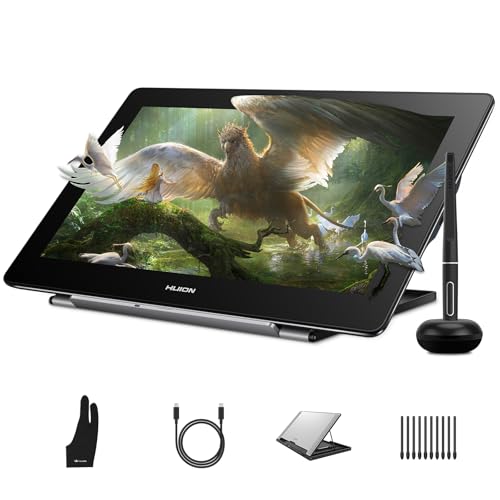
- Sharp 4K display with 120% sRGB color gamut
- Laminated anti-glare screen for comfortable drawing
- Battery-free stylus and broad device compatibility
Best For: Artists and designers seeking a versatile, detailed pen display
Best for Pro Studios

- 4K touchscreen with a 120Hz refresh rate
- Customizable Pro Pen 3 with 8,192 pressure levels
- Eight ExpressKeys and 10-point multi-touch
Best For: Professional animation, VFX, game art, and 3D studios
Best Large-Format Value

- Large 18.4-inch 4K drawing area
- Factory-calibrated ΔE below 1.3 and 99.8% sRGB
- 16,384-pressure stylus, touch, and wireless shortcut remote
Best For: Creators wanting a spacious, color-focused workstation
Best for Expansive Canvases

- Large 21.5-inch 4K touchscreen
- 120Hz refresh rate for responsive creative work
- Pro Pen 3 and extensive touch and connection options
Best For: Professionals who need maximum working space for complex projects
Best Color Range
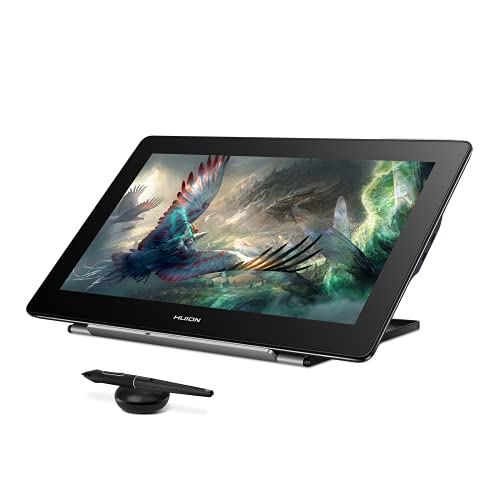
- 15.6-inch 4K UHD display with 145% sRGB coverage.
- Battery-free pen with 8,192 pressure levels and tilt support.
- Full-laminated, anti-glare screen with broad OS compatibility.
Best For: Color-focused artists needing a compact pen display
Best for Professional Studios

- 27-inch 4K touchscreen with 120 Hz refresh rate.
- 10-bit color, 99% Adobe RGB, and 98% DCI-P3 coverage.
- Customizable Pro Pen 3 and eight ExpressKeys.
Best For: Animation, VFX, game art, and 3D studio workflows
Best Large-Canvas Color Accuracy

- 27-inch 4K display with sRGB, Adobe RGB, and DCI-P3 modes.
- Hardware calibration rated at ΔE<1.5.
- PenTech 4.0, multi-touch, and anti-glare laminated glass.
Best For: Color-critical creative work on a spacious studio display
Best Value 4K Pick

- 18.4-inch 4K laminated anti-glare display
- 99% sRGB and 98% DCI-P3 coverage
- 16,384-pressure battery-free pen
Best For: Creators seeking a spacious, color-focused 4K pen display
Best Large-Screen Option

- 23.8-inch 4K UHD multitasking workspace
- 140% sRGB gamut with Quantum Dot and HDR
- Keydial Mini and multiple video inputs
Best For: Desktop creators who need maximum screen space and color range
Best Compact Choice
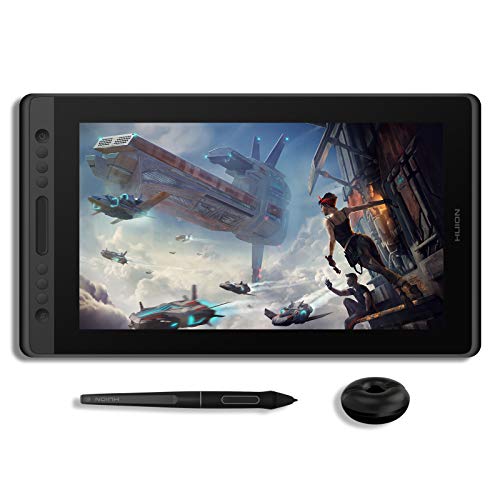
- 15.6-inch laminated anti-glare Full HD display
- 8,192-pressure battery-free tilt pen
- Six express keys plus touch bar
Best For: Students and mobile creators prioritizing compact size and controls
Best Overall Detail – HUION Kamvas Pro 16 4K
The HUION Kamvas Pro 16 4K is a strong all-around choice among drawing tablets with 4k display for artists who want sharp detail in a compact pen display. Its fully laminated, anti-glare screen, wide color gamut, and battery-free stylus suit illustration, photo editing, 3D work, and note-taking.
Best For: Artists, designers, students, and hobbyists who need detailed 4K work across multiple operating systems.
Pros:
- 3840×2160 display with 120% sRGB coverage and 16.7 million colors.
- Fully laminated anti-glare screen helps reduce cursor gap, reflections, and eye strain.
- PW517 stylus provides 8,192 pressure levels and ±0.3mm accuracy without batteries.
- Supports Windows, Mac, Linux, and compatible Android devices.
Cons:
- It is a pen display rather than a standalone tablet and requires a compatible computer or Android device.
- Android compatibility requires USB 3.1 Gen and DisplayPort 1.2 support.
With its detailed display, included adjustable stand, and broad software compatibility, the Kamvas Pro 16 offers a practical balance of precision, comfort, and flexibility.
Best for Pro Studios – Wacom Cintiq Pro 17
The Wacom Cintiq Pro 17 combines a 4K display with a 120Hz refresh rate and touch controls, making it a high-end option among drawing tablets with 4k display. It is designed for professional animation, VFX, game art, 3D modeling, and other demanding creative workflows.
Best For: Creative professionals and studio users who value responsive pen input, touch gestures, and customizable controls.
Pros:
- 4K display and 120Hz refresh rate support near-zero-latency visual feedback.
- Pro Pen 3 includes 8,192 pressure levels, three side switches, and adjustable grip and balance options.
- 10-point multi-touch, eight ExpressKeys, and on-screen menus support efficient workflows.
- Included Easy Stand allows a comfortable fixed working angle.
Cons:
- Its professional feature set may be more than casual artists need.
- It is designed for use with a Windows or macOS desktop or laptop rather than standalone operation.
The Cintiq Pro 17 is a focused professional tool, especially appealing if fast screen response, touch interaction, and configurable pen ergonomics matter as much as 4K resolution.
Best Large-Format Value – DIGIDRAW Turing Pro 19
The DIGIDRAW Turing Pro 19 provides a large 18.4-inch 4K workspace for creators comparing drawing tablets with 4k display. Its factory-calibrated color, 10-point touch, high-pressure stylus, and included wireless remote are useful for illustration, design, photo editing, and video work.
Best For: Illustrators and designers who want a spacious canvas, accurate color, touch controls, and shortcut access.
Pros:
- Large 18.4-inch 3840×2160 display reduces the need for frequent canvas zooming.
- Factory calibration targets ΔE below 1.3, with 99.8% sRGB coverage listed.
- 16384 pressure levels and 10-point touch support detailed pen and gesture control.
- Includes a K30 wireless remote with 11 shortcut keys and a two-year monitor warranty.
Cons:
- Listed operating-system support is limited to Windows, Chromebook, and Android 14+.
- Mac touch and handwriting features may require a system update from customer service.
This model stands out for workspace and control: the large 4K panel, touch layer, remote, and color-focused specifications make it well suited to creators who want an immersive desk setup.
Best for Expansive Canvases – Wacom Cintiq Pro 22
The Wacom Cintiq Pro 22 is built for creators who want a large working surface without giving up 4K clarity. Among drawing tablets with 4k display, it pairs a 21.5-inch screen with a 120Hz touchscreen, Pro Pen 3 controls, and connectivity for Windows and macOS systems.
Best For: Professional illustrators, animators, 3D artists, and designers who prefer a generous physical canvas.
Pros:
- 3840×2160 display with a 120Hz refresh rate supports smooth, responsive work.
- 21.5-inch screen provides an expansive active area for animation, VFX, and 3D projects.
- Pro Pen 3 offers 8,192 pressure levels, three side switches, and adjustable ergonomics.
- 10-point multi-touch, eight ExpressKeys, and multiple video connections support flexible workflows.
Cons:
- At 11 pounds, it is considerably less portable than smaller pen displays.
- It is intended for connection to a Windows or macOS computer rather than standalone use.
The Cintiq Pro 22 is a substantial professional display for creators who benefit from more on-screen room, particularly when working on complex illustrations, animation, or 3D scenes.
Best Color Range – HUION Kamvas Pro 16 Plus 4K
The HUION Kamvas Pro 16 Plus 4K is a strong choice among drawing tablets with 4k display for artists who need a compact, color-focused pen display. Its 15.6-inch 4K UHD screen combines 145% sRGB coverage, Quantum Dot technology, full lamination, and anti-glare glass for detailed, vibrant work. Remember that it must connect to a compatible computer, laptop, or Android device.
Best For: Digital artists, animators, designers, and editors who want high-resolution color in a smaller workspace.
Pros:
- 4K UHD resolution with 145% sRGB color gamut and a 1200:1 contrast ratio.
- Battery-free stylus offers 8,192 pressure levels and ±60° tilt recognition.
- Full lamination and etched anti-glare glass provide a pen-on-paper feel.
- Works with Windows, macOS, Linux, and compatible Android devices.
Cons:
- It is a pen display, not a standalone tablet, so a compatible host device is required.
- Android compatibility depends on USB 3.1 and DisplayPort 1.2 support.
Choose this model when desk space and color range matter more than having a very large canvas. Its included cables and broad operating-system support make it flexible, while the 4K panel and responsive pen suit detailed illustration and editing.
Best for Professional Studios – Wacom Cintiq Pro 27
The Wacom Cintiq Pro 27 is a premium option among drawing tablets with 4k display, built around a spacious 27-inch touchscreen for animation, VFX, game art, and 3D work. Its 4K UHD panel adds 10-bit color, 99% Adobe RGB coverage, and a 120 Hz refresh rate, while the Pro Pen 3 and customizable controls support demanding creative workflows.
Best For: Professional artists and studios working on animation, visual effects, game art, and 3D projects.
Pros:
- Large 27-inch 4K UHD display with 10-bit color and 99% Adobe RGB coverage.
- 120 Hz refresh rate supports a smooth, immersive drawing experience.
- Pro Pen 3 includes 8,192 pressure levels and customizable grips, weight, and balance.
- Eight ExpressKeys, multi-touch gestures, and multiple mounting options support customization.
Cons:
- Its 15.9-pound size and 27-inch footprint require substantial desk space.
- It supports Windows 10 or later and macOS 10.15 or later, limiting older systems.
This Cintiq is best suited to buyers who will use its large canvas, fast refresh rate, touch controls, and advanced pen customization. It is a studio-oriented choice rather than a compact or highly portable display.
Best Large-Canvas Color Accuracy – HUION Kamvas Pro 27
The HUION Kamvas Pro 27 targets professionals comparing drawing tablets with 4k display who want a large working area and color-management options. Its 27-inch 4K display supports sRGB, Adobe RGB, and DCI-P3 modes, with hardware calibration rated at ΔE<1.5, full lamination, anti-glare glass, and multi-touch controls.
Best For: Digital painters, photographers, motion designers, and 3D artists who need a large, color-accurate workspace.
Pros:
- Expansive 27-inch 4K display with three selectable color spaces.
- Hardware calibration delivers a stated ΔE<1.5 accuracy rating and 2.2 gamma.
- PenTech 4.0 pens use 2g activation force and support precise stroke placement.
- Full lamination, anti-glare treatment, multi-touch, and DC dimming support extended sessions.
Cons:
- It is not standalone and requires a compatible computer or supported Android device.
- Its large 27-inch format may be excessive for smaller desks or portable setups.
- Mac users with certain macOS 14.5 systems may need the ActiveTrackPad tool for multi-touch.
The Kamvas Pro 27 stands out when accurate color switching and a broad canvas are central to your workflow. It makes the most sense for a dedicated studio setup where its size, calibration features, and touch controls can be fully used.
Best Value 4K Pick – GAOMON Pro 19
If you want drawing tablets with 4k display resolution without moving to an oversized professional workstation, the GAOMON Pro 19 offers a practical middle ground. Its 18.4-inch 4K screen, laminated anti-glare surface, and color-focused panel suit detailed illustration, animation, and design work.
Best For: Creators who want a spacious, color-accurate 4K drawing display with an ergonomic stand and broad device compatibility.
Pros:
- 4K UHD resolution on an 18.4-inch fully laminated, anti-glare display.
- 99% sRGB coverage, 98% DCI-P3, and factory-rated ΔE<1.5 color accuracy.
- Battery-free pen with 16,384 pressure levels, tilt support, and 2g activation force.
- Pre-attached adjustable stand, included cables, and support for Windows, macOS, Ubuntu, and compatible Android devices.
Cons:
- It is a pen display rather than a standalone computer, so it requires a compatible connected device.
- A single-cable USB-C setup requires a compatible USB-C-to-C cable, sold separately.
The GAOMON Pro 19 stands out for combining a large 4K canvas, strong color specifications, and a high-resolution battery-free pen in a relatively compact format. It is a compelling option for creators who want professional-oriented features without stepping up to a much larger display.
Best Large-Screen Option – HUION Kamvas Pro 24 4K
For artists and editors who prioritize workspace above all else, the HUION Kamvas Pro 24 4K is one of the most expansive drawing tablets with 4k display resolution. Its 23.8-inch screen supports split-workspace multitasking, while full lamination and anti-glare glass help keep pen placement precise.
Best For: Professional artists, video editors, and designers who need a large 4K canvas, wide color gamut, and customizable workflow controls.
Pros:
- Large 23.8-inch 4K UHD display provides ample room for artwork, timelines, and reference windows.
- Quantum Dot panel offers 140% sRGB color gamut volume, HDR support, and 1.07 billion colors.
- Full lamination and anti-glare glass reduce parallax and distracting reflections.
- Includes a customizable Keydial Mini, integrated 20° stand, USB-A ports, and HDMI, DisplayPort, and USB-C connectivity.
Cons:
- Its large footprint may be difficult to accommodate on smaller desks.
- It is not a standalone product and must connect to a compatible computer or Android device.
The Kamvas Pro 24 4K is built around a desktop-class creative workspace rather than portability. If you have room for its 23.8-inch panel and want a high-gamut display with useful shortcut hardware, it is the strongest fit of these options for multitasking-heavy workflows.
Best Compact Choice – HUION Kamvas Pro 16
The HUION Kamvas Pro 16 is a more compact alternative for creators who value portability and built-in controls over 4K resolution. Although its native display is Full HD rather than 4K, its laminated anti-glare screen, 120% sRGB color gamut, and battery-free tilt pen make it useful for drawing, teaching, and remote work.
Best For: Students, beginners, and mobile-minded creators who want a lightweight pen display with shortcut keys and broad software compatibility.
Pros:
- 15.6-inch full-laminated anti-glare display reduces parallax and reflections.
- 120% sRGB color gamut and 16.7 million colors support vivid artwork.
- Battery-free pen provides 8,192 pressure levels, 60° tilt, and a 266PPS report rate.
- Six customizable express keys and a touch bar provide convenient workflow controls.
Cons:
- Its 1920×1080 native resolution does not meet a strict 4K-display requirement.
- It is not standalone and requires connection to a Windows, Mac, or Linux computer.
- The smaller screen offers less workspace than the 18.4-inch and 23.8-inch alternatives.
The Kamvas Pro 16 is best considered a practical, lower-resolution companion to true 4K drawing displays. Its lighter 1.2 kg design, integrated controls, and pen performance make it a sensible choice when desk space, portability, or budget matters more than maximum pixel density.
How We Picked the Best Drawing Tablets with 4K Display
We focused on Drawing Tablets with 4K Display resolution that are designed for direct-on-screen drawing rather than traditional non-display pen tablets. The selected models were compared by screen size, stated color coverage, pressure sensitivity, pen technology, display finish, touch support, refresh rate, and overall suitability for illustration, animation, photo editing, and design work.
Because specifications vary between models and configurations, check the manufacturer’s current compatibility, port, stand, and accessory details before purchasing. A 4K panel is important, but it is only one part of the drawing experience.
Quick Comparison
For a compact workstation, 15.6-inch models such as the HUION Kamvas Pro 16 series offer a smaller footprint while retaining a detailed UHD canvas. Mid-size 18.4- to 19-inch displays from DIGIDRAW and GAOMON provide more room for timelines, palettes, and broad brushwork without reaching the largest desk requirements.
The Wacom Cintiq Pro 17, 22, and 27 stand out for creators who prioritize a premium professional workflow, 4K resolution, 120 Hz refresh, and touch interaction. Larger HUION Kamvas Pro models are worth considering when you want a spacious canvas and strong stated color coverage, particularly for illustration or color-sensitive production.
Key Buying Factors for Drawing Tablets with 4K Display
Screen Size and Desk Space
A 15.6-inch display is easier to position and transport, while 22- to 27-inch models feel more like a dedicated drafting surface. Measure your desk and consider the required stand, cable clearance, and viewing distance before choosing a large pen display.
Color and Surface Finish
Look beyond 4K resolution for color-gamut claims such as sRGB or Adobe RGB coverage. A laminated display can reduce the gap between the pen tip and cursor, while anti-glare or etched surfaces may reduce reflections and provide a more paper-like feel. Matte finishes can slightly affect perceived sharpness, so balance texture against image clarity.
Pen Performance
Pressure sensitivity, tilt recognition, initial activation force, and tracking accuracy all affect brush control. Battery-free pens reduce charging interruptions. Higher pressure counts can be useful, but calibration and software response usually matter more than the headline number alone.
Refresh Rate, Touch, and Connectivity
A higher refresh rate can make strokes and cursor movement feel smoother, especially during fast sketching. Touch support may speed up zooming, panning, and canvas rotation, but it is not essential for every workflow. Confirm that your computer has the required USB, HDMI, DisplayPort, or USB-C connections and enough bandwidth for 4K output.
Who Should Buy Which Drawing Tablets with 4K Display?
Choose a compact 15.6-inch HUION if you need detailed drawing in a smaller studio, shared workspace, or portable setup. Choose an 18.4- or 19-inch model if you want a practical middle ground with more room for menus and reference material.
Choose a Wacom Cintiq Pro if professional pen feel, touch controls, and a high-refresh workflow are priorities and your budget supports a premium display. Choose a 24- or 27-inch HUION when a large canvas and broad color coverage matter more than portability. Before checkout, compare included stands, warranties, driver support, and the total cost of any required cables or accessories.