
Receipts are easy to lose and surprisingly time-consuming to organize. The right document scanner can turn paper receipts into searchable digital records while reducing manual data entry and clutter.
We selected 10 receipt-friendly scanners for different needs, from compact mobile models to fast desktop machines with wireless connectivity, duplex scanning, and receipt-management features.
Best 10 Document Scanner for Receipts Picks for 2026
Best Overall

- 45 ppm single-pass duplex scanning
- 100-sheet automatic document feeder
- AI-ready receipt and financial data extraction
Best For: High-volume receipt and document workflows
Best Portable Value
Hczrc Portable Receipt Scanner

- Lightweight battery-powered design
- Scans directly to included 16GB microSD card
- 300/600/900 dpi and JPEG/PDF options
Best For: Travel and occasional receipt capture
Best Compact Epson
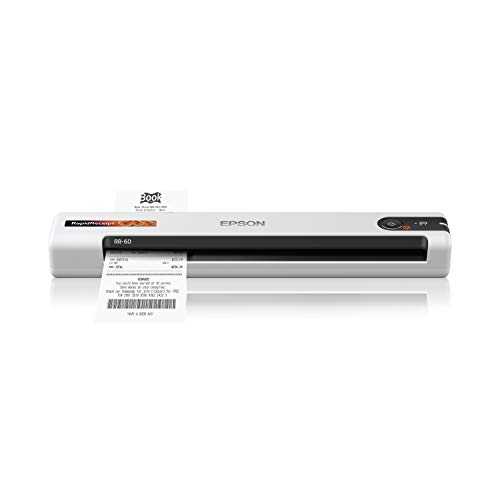
- Under-10-ounce portable design
- USB powered for laptop use
- ScanSmart AI supports receipt and invoice data conversion
Best For: Mobile professionals and compact workspaces
Best Flexible Connectivity
ScanSnap iX1300 Wireless Duplex Scanner

- Wi-Fi or USB connectivity
- 30 ppm automatic duplex scanning
- Handles receipts, photos, cards, and documents
Best For: Connected home offices scanning mixed media
Best High-Volume Choice

- 45 ppm double-sided scanning
- 100-sheet document feeder
- Wi-Fi 6 and USB-C connectivity
Best For: Busy offices and batch scanning
Best QuickBooks Option

- 45 ppm duplex color scanning
- 60-sheet automatic feeder
- QuickBooks Online plugin included
Best For: QuickBooks users and wired office setups
Best Office Receipt Scanner

- 50-sheet ADF for batch scanning
- Duplex scanning with OCR support
- Cloud sharing and double-feed detection
Best For: High-volume home-office and business receipt scanning
Best Portable Receipt Scanner
Brother DS-640 Compact Scanner

- Lightweight, compact design
- Up to 16 ppm in color or black and white
- USB-powered with receipt and card support
Best For: Mobile users scanning individual receipts and cards
Best Lightweight Receipt Scanner

- Ultra-lightweight single-sheet design
- Scans receipts and ID cards
- USB-powered with OCR and cloud support
Best For: Occasional receipt scanning at home or while traveling
Best Overall – Epson RapidReceipt RR-620W
For high-volume home offices and small businesses, the Epson RapidReceipt RR-620W is a powerful document scanner for receipts. It combines wireless and USB connectivity, fast duplex scanning, and receipt-focused data extraction for users who want to organize financial paperwork efficiently.
Best For: Frequent receipt, invoice, and document scanning with QuickBooks, TurboTax, Excel, or cloud workflows.
Pros:
- Scans both sides in one pass at up to 45 pages per minute.
- 100-sheet auto document feeder supports larger scanning batches.
- AI-ready extraction can convert receipts and documents into structured data.
- Color touchscreen enables computer-free scanning to email, cloud storage, or USB drives.
Cons:
- At 8.2 pounds, it is less convenient to move than compact scanners.
- Its larger feature set may be more than occasional users need.
The RR-620W is the strongest choice here for organized, high-volume receipt management. Its speed, capacity, wireless access, and financial software integration make it especially suitable for tax preparation and ongoing business recordkeeping.
Best Portable Value – Hczrc Portable Receipt Scanner
The Hczrc portable model is a simple document scanner for receipts when portability matters more than automated feeding. It scans directly to an included 16GB microSD card, runs on two AA batteries, and saves files as JPEG or PDF without requiring software installation.
Best For: Travelers, students, and occasional users who need to capture receipts or documents away from a desk.
Pros:
- Compact 9.6-ounce design is easy to carry.
- Battery-powered operation supports scanning without a nearby outlet.
- Offers 300, 600, and 900 dpi resolution settings.
- Includes a 16GB memory card and supports up to 32GB microSD storage.
Cons:
- Manual handheld scanning is less convenient for large batches.
- Requires two AA batteries, which are not included.
- USB is the listed connection type; wireless scanning is not specified.
This scanner is best viewed as a grab-and-go capture tool rather than a desktop receipt-processing system. Its direct-to-memory workflow is useful for private, on-location scanning, provided you are comfortable manually guiding each scan.
Best Compact Epson – Epson RapidReceipt RR-60
The Epson RapidReceipt RR-60 is a compact document scanner for receipts designed for mobile professionals and small workspaces. It is USB powered, weighs under a pound, and uses ScanSmart AI technology to help turn receipts, invoices, and business cards into usable digital data.
Best For: Laptop users who need a lightweight scanner for receipts, invoices, cards, and occasional long documents.
Pros:
- Lightweight design is easy to transport between home and office.
- USB-powered operation avoids the need for a separate power adapter.
- Scans up to 10 pages per minute in automatic feeding mode.
- Handles receipts, invoices, business cards, ID cards, and pages up to 8.5 by 72 inches.
Cons:
- Its 10-page-per-minute speed is slower than the larger RR-620W.
- USB connectivity may be less flexible than a wireless model.
- It is intended for lighter-duty scanning than a high-capacity desktop unit.
The RR-60 offers a practical balance for users who want Epson’s receipt-oriented software features in a smaller format. Choose it when portability and USB convenience outweigh the need for high batch capacity or wireless operation.
Best Flexible Connectivity – ScanSnap iX1300 Wireless Duplex Scanner
The ScanSnap iX1300 is a versatile document scanner for receipts that adds wireless connectivity and a space-saving design. It supports duplex scanning at up to 30 pages per minute, handles documents and cards, and can send scans to computers, mobile devices, cloud services, or a USB connection.
Best For: Home offices that need flexible device connectivity and scanning for mixed document types.
Pros:
- Wireless or USB connectivity supports Mac, PC, mobile, Chromebook, and cloud workflows.
- Scans up to 30 pages per minute with automatic duplex capture.
- Automatic de-skew, color optimization, and blank-page removal simplify cleanup.
- Compact design fits small workspaces and handles thick items and plastic cards.
Cons:
- Its 20-sheet standard capacity is smaller than the RR-620W’s 100-sheet feeder.
- It does not list the same dedicated AI financial integration features as Epson’s RapidReceipt models.
- At 4.4 pounds, it is portable around a workspace but not pocket-sized.
The iX1300 is a strong all-purpose choice when receipts are only one part of your scanning needs. Its software automation, wireless access, and ability to handle photos, cards, and documents make it especially adaptable for a connected home office.
Best Portable Pick – Epson RapidReceipt RR-70W
If you need a document scanner for receipts that can travel with you, the Epson RapidReceipt RR-70W combines a compact design with wireless connectivity and receipt-focused software. It scans at up to 15 pages per minute, runs by USB or battery, and supports documents up to 8.5 x 72 inches.
Best For: Travelers, mobile professionals, and small businesses that want a lightweight scanner for receipts, invoices, and business documents.
Pros:
- Lightweight 10.56-ounce design with USB or battery power.
- Wireless scanning to OneDrive, Dropbox, and Google Drive.
- ScanSmart AI PRO supports smart digital data and automatic file naming.
- Scans receipts, invoices, business cards, and long documents.
Cons:
- Its 15-page-per-minute speed is lower than the desktop models in this roundup.
- The standard sheet capacity is limited to 15 sheets.
The RR-70W is the most convenient choice when portability matters more than high-volume throughput. Its receipt-aware software and cloud support make it practical for organizing expense records on the go.
Best High-Volume Choice – ScanSnap iX2500
For shoppers seeking a document scanner for receipts that can also handle substantial office workloads, the ScanSnap iX2500 offers fast double-sided scanning, a 100-sheet feeder, and both Wi-Fi 6 and USB-C connectivity. Its touchscreen and customizable profiles simplify repeat scanning tasks.
Best For: Offices, teams, and users who regularly scan large batches of receipts, documents, photos, and business cards.
Pros:
- Scans double-sided documents at up to 45 pages per minute.
- Large 100-sheet automatic document feeder.
- Wi-Fi 6 and USB-C support connections to computers, mobile devices, and cloud services.
- Skew detection, multi-feed sensing, and a brake roller system help protect documents.
Cons:
- At 7.7 pounds, it is substantially less portable than the Epson.
- Its larger office-focused design may be excessive for occasional receipt scanning.
The iX2500 is the strongest throughput option here. Choose it when scanning speed, feeder capacity, wireless flexibility, and shared workflows matter more than a compact footprint.
Best QuickBooks Option – Canon imageFORMULA R40II
The Canon imageFORMULA R40II is a practical document scanner for receipts and office paperwork, with simultaneous two-sided color scanning at up to 45 pages per minute. It includes a 60-sheet feeder and a CaptureOnTouch plugin designed for scanning to QuickBooks Online.
Best For: QuickBooks users and offices that want a wired scanner for receipts, invoices, reports, contracts, and business cards.
Pros:
- 45-page-per-minute double-sided color scanning.
- 60-sheet automatic feeder for routine batch jobs.
- Includes a CaptureOnTouch Scan to QuickBooks Online plugin.
- Supports Windows 11 and macOS with simple USB-C setup.
Cons:
- USB is the only listed connection type; wireless scanning is not available.
- It is designed exclusively for the included CaptureOnTouch software and does not support TWAIN or ISIS drivers.
The R40II makes the most sense for a dedicated desktop setup, especially when QuickBooks Online is part of the workflow. Its fast duplex scanning balances receipt processing with broader document handling.
Best Office Receipt Scanner – Epson WorkForce ES-400 II
For offices processing stacks of receipts and paperwork, the Epson WorkForce ES-400 II is a high-speed document scanner for receipts with a 50-sheet automatic document feeder. Duplex scanning, OCR, and cloud-sharing options make it suited to recurring business workflows.
Best For: Home offices and businesses scanning large batches of receipts and documents.
Pros:
- 50-sheet ADF supports faster batch scanning.
- Duplex scanning captures both sides in one pass.
- OCR creates searchable PDFs and editable Word or Excel files.
- Double-feed detection and skew correction help reduce scanning errors.
Cons:
- USB connectivity may be less convenient than a wireless scanner.
- Larger and heavier than the mobile models in this roundup.
The ES-400 II is the strongest choice here for volume work. Its feeder, duplex capability, image adjustments, and software integrations can simplify receipt digitization when speed and organized file handling matter most.
Best Portable Receipt Scanner – Brother DS-640 Compact Scanner
The Brother DS-640 is a compact document scanner for receipts that fits easily in a bag and runs from a computer through its included micro USB 3.0 cable. It accepts receipts, cards, and plain paper, making it practical for mobile work and occasional document capture.
Best For: Travelers, mobile professionals, and users who need a lightweight scanner for individual receipts.
Pros:
- Compact design weighs about 1 pound and is less than 1 foot long.
- Scans color and black-and-white pages at up to 16 pages per minute.
- USB-powered operation works without a wall outlet.
- Software supports cloud, email, OCR, and image-enhancement destinations.
Cons:
- Single-sheet capacity is slower for large receipt batches.
- Requires a computer and USB connection for operation.
The DS-640 balances portability and useful software features. Its single-sheet design is not intended for bulk scanning, but its receipt and card compatibility makes it a flexible choice when space and mobility are priorities.
Best Lightweight Receipt Scanner – Epson WorkForce ES-50
The Epson WorkForce ES-50 is a lightweight document scanner for receipts designed for single-sheet scanning on the go. It connects by USB, handles receipts and ID cards, and includes OCR software for creating searchable or editable files.
Best For: Users who want a simple, lightweight scanner for receipts, IDs, and occasional documents.
Pros:
- Weighs about 9.44 ounces and has a slim 1.3-inch height.
- Scans a single page in as little as 5.5 seconds.
- Handles documents up to 8.5 by 72 inches, plus receipts and ID cards.
- USB-powered setup requires no batteries or external power supply.
Cons:
- Single-sheet capacity is less suitable for large stacks.
- USB connection limits use to compatible computers.
The ES-50 is a convenient choice for organized, low-volume receipt scanning. Its small footprint, USB power, automatic multi-page file mode, and OCR support provide useful features without the bulk of a desktop scanner.
How We Picked the Best Document Scanner for Receipts
We focused on scanners that can handle narrow, irregular, or frequently handled documents without making receipt capture unnecessarily slow. Our comparison considered scanning speed, automatic document feeding, duplex capability, connection options, portability, software support, and suitability for home offices or heavier business workloads.
Receipt scanning is not only about maximum pages per minute. Reliable feeding, clear text capture, simple file organization, and compatibility with your computer or mobile workflow can matter just as much. Models with specialized receipt software or cloud-ready features may also save time during expense reporting.
Quick Comparison
| Best For | Look For | Recommended Type |
|---|---|---|
| Frequent business scanning | Fast speed, large feeder, duplex scanning | Desktop document scanner |
| Travel and mobile work | Compact size, USB power, lightweight design | Mobile scanner |
| Shared home or office use | Wireless access and simple software | Wireless desktop scanner |
| Mixed documents and photos | Color scanning and flexible media handling | General-purpose color scanner |
Key Buying Factors for a Document Scanner for Receipts
Feeding and Document Handling
Receipts vary widely in length, thickness, and condition. A dependable feeder and a straight paper path help reduce jams, while a manual feed option is useful for delicate or unusually shaped slips. If you scan receipts in batches, an automatic document feeder is a major convenience.
Duplex Scanning and Speed
Duplex scanning captures both sides in one pass, which is helpful for receipts with terms, item details, or notes on the back. Higher page-per-minute ratings are valuable for offices, but real-world productivity also depends on setup time, feeding reliability, and how quickly files can be saved or sent to cloud services.
Connectivity and Software
USB works well for a dedicated desk setup, while Wi-Fi makes it easier to scan from multiple computers or supported mobile devices. Check operating-system compatibility and whether the included software supports searchable PDFs, automatic file naming, optical character recognition, or direct cloud storage.
Size and Power
A compact mobile scanner is easier to carry between meetings or work locations and may draw power directly from USB. Desktop models take up more space but generally offer faster throughput, larger feeders, and a smoother batch-scanning experience.
Who Should Buy Which Document Scanner for Receipts?
Choose a desktop scanner if you process receipts regularly, scan invoices or forms alongside them, or need efficient batch operation. These models are typically the best fit for small businesses, accounting desks, and busy home offices.
Choose a wireless model if several users need access or you want to scan without keeping the scanner permanently connected to one computer. Wireless connectivity is especially useful in shared workspaces.
Choose a portable scanner if you travel, work at client sites, or only scan a modest number of receipts at a time. Compact models trade some speed and feeder capacity for convenience and easier storage.
Choose a receipt-focused package if expense organization is your main goal. Dedicated software and receipt-oriented workflows can reduce the time spent naming files, searching records, and preparing reimbursement reports.