
Desktop laser cutting machines have become a practical way to turn ideas into finished parts, gifts, signs, and prototypes from a home workshop or small business setup.
In this roundup, we focus on models that balance cutting performance, workspace size, ease of use, and safety features so you can choose with confidence.
Best 10 Desktop Laser Cutting Machines Picks for 2026
Precision Maker Pick
ACMER S2 12W Desktop Laser Cutter

- True 12W module for engraving and cutting
- 0.01mm positioning accuracy for fine detail
- 300 × 300mm workspace with upgrade options
Best For: Makers who want a larger work area and strong all-around engraving and cutting performance.
Smart Enclosed Pick
Creality Falcon A1C 10W Mini Engraver

- HD smart camera for visual positioning
- Auto Focus simplifies setup across materials
- Enclosed Class 1 design with safety features
Best For: Beginners and small workspaces that benefit from a safe enclosed machine with smart alignment tools.
Compact Value Pick
ACMER K1 7W Enclosed Desktop Laser

- Class 1 enclosed body with built-in fan
- Free software with AI design tools
- Compact 2.4kg frame and 150 × 150mm area
Best For: Users who want a small, portable enclosed engraver for light cutting and detailed personalization.
Starter Bundle Pick
BlazeX M3 10W Class 1 Laser Engraver

- 10W module with 0.01mm ultra-fine accuracy
- Includes enclosure, honeycomb bed, and tools
- Class 1 safety with fan exhaust and sensors
Best For: Beginners who want an all-in-one setup with safety gear and useful starter accessories included.
Feature-Rich Value Pick
Creality Falcon 10W Laser Engraver

- 10W output with air assist for cleaner cutting edges
- 4-in-1 rotary kit expands use to tumblers, rings, and spheres
- Works with LightBurn, LaserGRBL, Windows, macOS, and TF-card offline use
Best For: Hobbyists who want air assist and rotary engraving in one system
Budget-Friendly Maker Pick
Twotrees TTS-55 Pro 5.5W Laser Engraver

- 5.5W laser with a fine spot for detailed work
- Cuts plywood, acrylic, leather, and more in a 300×300 mm area
- Supports Wi‑Fi, TF card offline use, LaserGRBL, and LightBurn
Best For: Hobbyists who want a fast, compact engraver with broad compatibility
Speed-First Desktop Cutter
Longer RAY5 10W Desktop Laser Cutter Bundle
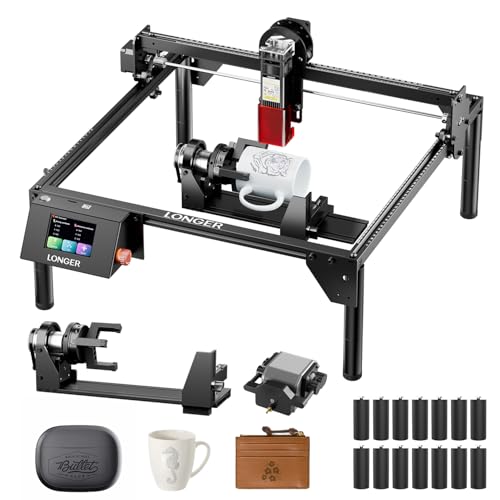
- 10W dual-beam laser with up to 10,000 mm/min engraving speed
- Large 400×400mm work area for bigger desktop projects
- Air assist and 3-in-1 rotary roller included
Best For: Users who want fast cuts, a large bed, and rotary capability
Compact Precision Pick
Twotrees TTS-10 Pro 10W Laser Engraver

- 10W optical power for fast engraving on common craft materials
- 300×300mm work area suits coasters, jewelry, and small signs
- Supports TF card offline use plus LightBurn and LaserGRBL
Best For: Crafters needing a compact, stable machine for smaller projects
Beginner-Friendly Desktop Cutter

- Free CutLabX software with AI design tools and app control
- Assembles in about 3 minutes and includes starter accessories
- Verified 10.36–10.58W output for 300+ materials
Best For: Beginners who want simple setup and flexible software
Precision Maker Pick – ACMER S2 12W Desktop Laser Cutter
If you want a capable option in desktop laser cutting machines, the ACMER S2 balances cutting power, fine detail, and room to grow. Its true 12W module, 300 × 300mm workspace, and support for ACMER Studio, LightBurn, and LaserGRBL make it a practical fit for makers who want one machine for engraving and light cutting across many materials.
Best For: Makers who want a larger work area and strong all-around engraving and cutting performance.
Pros:
- True 12W laser module handles engraving and cutting on 100+ materials.
- 0.01mm positioning accuracy and a refined 0.08 × 0.08mm laser spot for fine detail.
- 300 × 300mm workspace supports signs, layered art, and larger DIY layouts.
- Compatible with ACMER Studio, LightBurn, and LaserGRBL for flexible workflows.
Cons:
- Multiple accessories like rotary modules, risers, and air assist are optional extras.
- Best cutting results on thicker materials may require multiple passes.
The S2 stands out as a flexible desktop machine for users who want detail, workspace, and upgrade potential in one package. It is a strong choice if you plan to move from simple engraving into more varied cutting projects over time.
Smart Enclosed Pick – Creality Falcon A1C 10W Mini Engraver
The Creality Falcon A1C is a streamlined choice among desktop laser cutting machines for users who want speed, safety, and easier setup. Its enclosed Class 1 design, smart camera, auto focus, and quick-swap laser module system make it especially appealing if you want a compact engraver that is simple to use and adaptable over time.
Best For: Beginners and small workspaces that benefit from a safe enclosed machine with smart alignment tools.
Pros:
- Built-in HD smart camera helps with visual positioning and real-time preview.
- Auto Focus adjusts laser height automatically for different materials.
- Quick-swap modular design supports compatible 5W diode, 10W diode, and 1.2W IR heads.
- Enclosed Class 1 design adds flame detection, tilt protection, and USB safety lock.
Cons:
- Additional laser modules are sold separately.
- The compact format favors desktop use over larger production jobs.
The A1C is built for convenience, with software, camera positioning, and safety features that reduce friction for everyday projects. If you want a user-friendly desktop engraver that still leaves room to expand, this is a compelling option.
Compact Value Pick – ACMER K1 7W Enclosed Desktop Laser
For shoppers comparing desktop laser cutting machines, the ACMER K1 offers a compact enclosed design with beginner-friendly software and solid everyday capability. Its 150 × 150mm working area, built-in exhaust fan, and support for Acmerstudio, LightBurn, and LaserGRBL make it a practical fit for home workshops, craft spaces, and small business counters.
Best For: Users who want a small, portable enclosed engraver for light cutting and detailed personalization.
Pros:
- Class 1 enclosed body keeps engraving activity contained.
- Built-in exhaust fan helps reduce smoke and odors.
- Free Acmerstudio software includes AI design tools and supports LightBurn and LaserGRBL.
- Compact 2.4kg frame and 150 × 150mm workspace fit small desks and portable setups.
Cons:
- Smaller work area limits larger signs and bigger layouts.
- Top cutting depth depends on the selected power option and multiple passes for tougher materials.
The K1 is a sensible pick if you want a smaller machine that is easy to place, easy to move, and approachable for first-time users. It is best suited to modest projects where size, convenience, and controlled operation matter most.
Starter Bundle Pick – BlazeX M3 10W Class 1 Laser Engraver
The BlazeX M3 is a bundle-oriented option in desktop laser cutting machines, combining a 10W engraver with an enclosure, honeycomb bed, tools, and sample materials. With 0.01mm ultra-precision, Class 1 safety features, and broad software compatibility, it is designed to help beginners get started quickly while still supporting detailed DIY work.
Best For: Beginners who want an all-in-one setup with safety gear and useful starter accessories included.
Pros:
- 0.01mm ultra-fine accuracy supports detailed engraving on wood, leather, glass, and coated metal.
- Includes a protective enclosure, honeycomb laser bed, tool kit, and 13 engraving materials.
- Class 1 rating, fan exhaust, and tilt/lid sensors support safer operation.
- Works with LightBurn, LaserGRBL, and CutLabX on multiple platforms.
Cons:
- Accessory bundle may be more than needed for buyers who already own setup gear.
- Some advanced add-ons like a rotary roller, risers, air assist, and purifier are separate upgrades.
The M3 makes sense if you value a ready-to-use package over buying parts one by one. It gives first-time users a clearer starting point and enough flexibility to grow into more advanced projects later.
Compact Power Pick – WIZMAKER WAND 12W Desktop Laser Cutter
If you want desktop laser cutting machines that can do more than basic hobby work, this 12W WIZMAKER model is built for deeper cuts and cleaner detail on common maker materials. It’s a practical step up from entry-level 5W–6W diode machines, with a 300×300 mm work area, LightBurn support, and flexible connectivity for home shops, classrooms, or small business setups.
Best For: Makers upgrading from beginner engravers who want stronger cutting performance and a compact desktop footprint.
Pros:
- 12W output is positioned for deeper engraving and faster cutting than typical 5W–6W machines.
- Works with wood, bamboo, leather, MDF, cork, paper, cardboard, fabric, and selected dark acrylic.
- Supports LightBurn and LaserGRBL, with WiFi, hotspot, and USB connection options.
- Includes a reinforced frame, stable motion control, and 0.01 mm positioning accuracy.
Cons:
- Best material range is still concentrated on common hobby and craft substrates.
- Optional rotary and infrared add-ons are sold separately for expanded use cases.
For buyers comparing desktop laser cutting machines on power and usability, this model stands out for its stronger diode output without giving up a compact layout. It’s a sensible choice if you want more cutting capability for detailed personal projects or a small shop workflow.
Feature-Rich Value Pick – Creality Falcon 10W Laser Engraver
Among desktop laser cutting machines, the Creality Falcon 10W stands out for users who want a capable cutter with added convenience features. It pairs a 10W output with air assist, a rotary roller kit, fast setup, and compatibility with major software, making it a versatile option for wood, acrylic, and cylindrical projects.
Best For: Hobbyists and small makers who want extra cutting aids like air assist and rotary engraving in one package.
Pros:
- 10W output can cut 12 mm wood board or 3 mm black acrylic in one pass.
- Air assist helps reduce smoke and dust for cleaner, smoother edges.
- Includes a 4-in-1 rotary roller for cylindrical, spherical, and ring-shaped items.
- Compatible with LaserGRBL and LightBurn, plus offline TF card use.
Cons:
- Higher feature count may be more than a basic beginner needs.
- Rotary kit installation requires careful checking of included cables and manuals.
If you want a desktop machine that leans into productivity and finishing quality, this Creality unit is easy to recommend. The combination of air assist, rotary support, and broad software compatibility makes it especially useful for users who plan to move beyond simple flat engraving.
Budget-Friendly Maker Pick – Twotrees TTS-55 Pro 5.5W Laser Engraver
If you’re shopping desktop laser cutting machines for hobby work, the Twotrees TTS-55 Pro focuses on precision, speed, and a manageable 5.5W power level. It’s designed for clean engraving on a wide mix of materials, with a 300×300 mm work area, Wi‑Fi control, and air-assist-friendly hardware for users who want a capable but straightforward setup.
Best For: Hobbyists and small business users who want a compact, fast engraver with broad software support.
Pros:
- 5.5W Class II laser with a fine spot for detailed engraving and cutting.
- Can cut 5 mm plywood, 3 mm acrylic, and 0.7 mm leather according to the notes.
- Runs up to 30,000 mm/min with a fast dual-core 32-bit control board.
- Supports Wi‑Fi, online control, TF card offline engraving, LaserGRBL, and LightBurn.
Cons:
- Lower power than 10W and 12W options, so it’s less suited to heavier cutting jobs.
- Air assist is supported, but the notes emphasize the nozzle rather than a full included air system.
This is a strong fit if you value speed, precision, and software flexibility over maximum cutting power. For many desktop laser cutting machine buyers, that balance makes it a practical everyday engraver for crafts and small production tasks.
Speed-First Desktop Cutter – Longer RAY5 10W Desktop Laser Cutter Bundle
If you’re shopping for desktop laser cutting machines that can handle bigger projects without sacrificing speed, the Longer RAY5 stands out with its 10W dual-beam setup and 400×400mm work area. It is built for users who want fast engraving, cleaner cuts, and flexible control across wood, leather, acrylic, and many other materials.
Best For: Makers, hobbyists, and small workshops that want a larger desktop laser cutter with air assist and rotary options.
Pros:
- 10W dual-beam laser with engraving speeds up to 10,000 mm/min.
- Large 400×400mm working area for bigger projects.
- Air assist helps reduce smoke and dust for cleaner cuts.
- Includes a 3-in-1 rotary roller for cylindrical objects.
Cons:
- More advanced feature set may be more than casual users need.
- Air assist and accessories add setup complexity compared with basic units.
- Best suited to materials listed in the product notes, not every possible surface.
The RAY5 is a strong pick if you want a desktop laser cutting machine that combines speed, workspace, and practical add-ons in one bundle. Its safety protections and offline connectivity make it especially appealing for frequent use in a workshop or home studio.
Compact Precision Pick – Twotrees TTS-10 Pro 10W Laser Engraver
The Twotrees TTS-10 Pro is aimed at buyers comparing desktop laser cutting machines for smaller, precise jobs. With a 300×300mm work area and 10W optical power, it is positioned for clean engraving on wood, bamboo, acrylic, leather, coated glass, and coated or anodized metal.
Best For: Crafters and small-space users who want a compact desktop laser engraver for detailed jobs and offline control.
Pros:
- 10W optical power supports deep, fast engraving on common craft materials.
- 300×300mm area is a good fit for coasters, jewelry, keychains, and small signs.
- TF card offline operation adds convenient standalone use.
- Metal frame and dual Y-axis motor setup are designed for stable motion.
Cons:
- Work area is smaller than larger desktop laser cutting machines.
- Not recommended for bare stainless steel or uncoated metal without preparation.
- Best for smaller projects rather than oversized workpieces.
For buyers who value a smaller footprint and straightforward operation, the TTS-10 Pro is a practical option. It offers the core features needed for hobby engraving and light cutting without demanding a large dedicated workspace.
Beginner-Friendly Desktop Cutter – K15 Pro 10W AI Laser Engraver
The K15 Pro is designed for shoppers who want desktop laser cutting machines that are easy to start using right away. It combines a compact A4 work area, free CutLabX software, AI-assisted design tools, and offline TF card control, making it a practical choice for home crafting and small business projects.
Best For: Beginners and small-business users who want an easy setup, app control, and room to grow.
Pros:
- Assembles in about 3 minutes with 6 screws and includes a starter kit.
- Free CutLabX software works on computers, tablets, and phones.
- Verified 10.36–10.58W output with support for 300+ materials.
- Compact A4 workspace still handles everyday engraving and small cutting jobs.
Cons:
- A4 bed size is compact, so large projects are out of scope.
- Optional add-ons are needed if you later want broader capability.
- Feature-rich app and AI tools may be more than some buyers need.
If you want a desktop laser cutter that reduces setup friction, the K15 Pro is one of the more approachable choices. Its mix of beginner-friendly software, offline support, and upgrade options makes it a flexible starter machine.
How We Picked These Desktop Laser Cutting Machines
We prioritized models that offer a useful mix of output power, engraving precision, work area, safety features, and real-world versatility. We also looked for options that make sense for beginners, hobbyists, and side-hustle sellers, not just spec-heavy machines.
Because Desktop Laser Cutting Machines vary widely, the best choice depends on what you plan to cut, how often you’ll use it, and how much setup you want to manage.
Quick Comparison: What Matters Most
Higher power generally helps with faster cutting and thicker materials, while a larger work area improves flexibility for signs, panels, and batch work. Precision matters more for detailed engraving, fine text, and repeatable results. Safety features such as enclosures, camera systems, air assist, and offline control can also make daily use easier and more predictable.
Key Buying Factors for Desktop Laser Cutting Machines
Power and Cutting Ability
If you mainly engrave wood, leather, or coated materials, a mid-power machine may be enough. If you want more cutting capability, look for stronger output and support for air assist, which can improve edge quality and reduce scorch marks.
Work Area and Project Size
Choose a machine with enough room for your typical projects. Compact beds suit small gifts and labels, while larger work areas are better for signs, templates, and small-batch production.
Precision and Workflow
For detailed artwork or product branding, prioritize stable motion, fine resolution, and helpful workflow tools such as autofocus, smart camera alignment, or offline engraving support.
Safety and Ease of Use
Desktop Laser Cutting Machines are more approachable when they include enclosure-style protection, clear status feedback, and simple software compatibility. Beginners should also value setup simplicity and predictable operation over raw power alone.
Who Should Buy Which Desktop Laser Cutting Machines?
If you are a beginner, choose a machine that emphasizes safety, guided setup, and smart alignment features. If you are a hobby maker, a balanced mid-range model is usually the best value for engraving and occasional cutting. If you run a small business, prioritize larger work area, stronger cutting performance, and features that improve repeatability and throughput.
In short, the best machine is the one that matches your materials, project size, and workflow. That is the fastest way to get consistent results without overspending on features you will not use.