
Choosing the right desktop computer for architects comes down to more than raw specs. You need a system that can handle large models, complex drawings, rendering workloads, and multiple design apps without slowing down.
In this roundup, we focus on balanced performance, workstation-ready features, and practical value so you can match the right desktop to your workflow and budget.
Best 10 Desktop Computer for Architects Picks for 2026
AI-Ready Workstation
Lenovo ThinkStation P2 Tower for CAD & Design

- Core Ultra 9 CPU with NPU for AI tasks
- 32GB DDR5 RAM and 1TB SSD for speed
- Supports RTX 5000 Ada-class graphics
Best For: Architects who need a solid CAD and design workstation
Pro Graphics Tower
Dell Pro Max T2 for Architecture Workflows
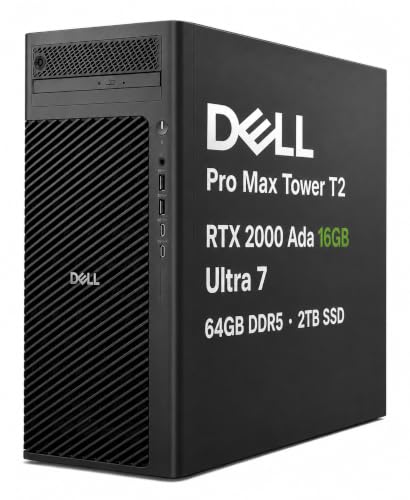
- RTX 2000 Ada 16GB for graphics-heavy work
- 64GB DDR5 RAM and 2TB SSD
- Thunderbolt 4 and multi-display support
Best For: Architects and creators needing a serious workstation
Value Creator Desktop
HP OmniDesk for Everyday Design Work

- Ryzen 7 8700G with AMD Ryzen AI
- 32GB DDR5 and 1TB NVMe SSD
- Includes keyboard and mouse
Best For: Architects and students needing a balanced everyday desktop
Workstation Classic
Dell Precision 3660 for CAD and 3D

- Core i7-13700 with 16 cores
- 64GB RAM and 2TB NVMe SSD
- Quadro T1000 with broad display outputs
Best For: Architects needing a proven CAD and modeling workstation
Workhorse Office Pick
Dell Pro Business Desktop with i5-14500

- 14-core Intel i5-14500
- Up to 64GB DDR5 and 4TB SSD support
- USB-C, HDMI 2.1, and DisplayPort connectivity
Best For: Architects needing a quiet, business-ready tower for daily CAD and office work
Rendering-Ready Pro
Dell Precision 3660 with RTX A4000

- Core i9-13900 and RTX A4000 16GB
- 64GB DDR5 RAM with 2TB NVMe SSD
- Up to 8K output over DisplayPort and HDMI
Best For: Architects doing rendering, visualization, and heavy 3D work
Budget Office Tower
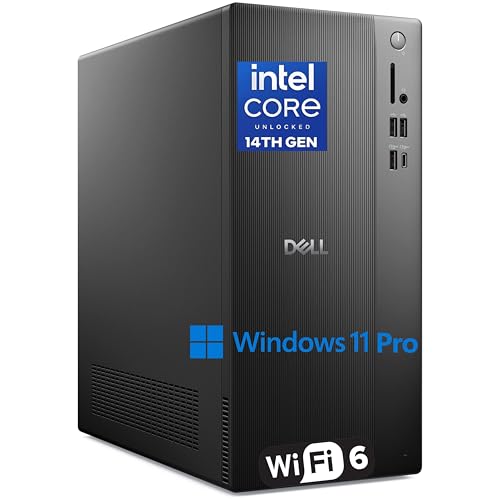
- Core i3-14100 with 4.7GHz turbo
- 16GB DDR5 RAM and 1TB PCIe SSD
- Wi-Fi 6, HDMI 2.1, and DisplayPort 1.4
Best For: Architects who want an affordable desktop for office tasks and lighter CAD
High-Performance Creator Pick
Dell Tower ECT1250 with Ultra 7 and RTX 4060

- Ultra 7 CPU with built-in AI support
- RTX 4060 8GB for creative workloads
- 64GB RAM and 2TB NVMe SSD
Best For: Architects needing a powerful, high-storage tower for heavy multitasking
Business Workhorse Choice
Dell Tower with i7-12700K and Dual 4K Support

- Core i7-12700K with up to 5.0GHz boost
- Dual 4K monitor support for larger workspaces
- 32GB DDR5 RAM and 1TB PCIe SSD
Best For: Architects who want a dependable dual-monitor workstation
Balanced Creative Pick
Dell Tower ECT1250 with Ultra 7 and RTX 4060
- Ultra 7-265F with built-in AI features
- RTX 4060 8GB for creative tasks
- 32GB DDR5 RAM and 1TB NVMe SSD
Best For: Architects wanting strong performance at a more moderate spec level
AI-Ready Workstation – Lenovo ThinkStation P2 Tower for CAD & Design
If you want a desktop computer for architects that can keep up with CAD, modeling, and design automation, the Lenovo ThinkStation P2 Tower is built for exactly that kind of work. Its Intel Core Ultra 9 processor includes an NPU for faster AI tasks, while the 32GB DDR5 memory and 1TB SSD help large projects open and run smoothly.
Best For: Architects and designers who want a professional tower for CAD, simulation, and multi-monitor productivity.
Pros:
- Intel Core Ultra 9 with integrated NPU for AI-assisted workflows
- 32GB DDR5 RAM and 1TB SSD for responsive project handling
- Ready for NVIDIA RTX 5000 Ada-class graphics support
- Multiple DisplayPort and HDMI outputs for productive display setups
Cons:
- Ships with integrated graphics rather than a dedicated GPU
- 32GB RAM is listed as the maximum, which may limit future memory growth
- Best performance for heavy 3D work depends on adding the right graphics card
Overall, this ThinkStation is a practical choice if you need a stable foundation for architecture software and want room to build out the graphics side later. It focuses on fast CPU performance, AI support, and professional connectivity rather than flashy extras.
Pro Graphics Tower – Dell Pro Max T2 for Architecture Workflows
The Dell Pro Max Tower T2 is a strong desktop computer for architects who need workstation-class graphics and fast multitasking. It pairs an Intel Core Ultra 7 processor with 64GB of DDR5 memory, a 2TB SSD, and NVIDIA RTX 2000 Ada graphics to support design, rendering, and other demanding professional tasks.
Best For: Architects and technical creators who want a powerful Windows 11 Pro tower for CAD, rendering, and multi-display work.
Pros:
- NVIDIA RTX 2000 Ada 16GB for design and visual computing workloads
- 64GB DDR5 RAM and 2TB SSD for heavy multitasking and storage
- Thunderbolt 4, USB-C, and multiple DisplayPort outputs for broad connectivity
- ISV certifications and Windows 11 Pro for professional workflows
Cons:
- Configured for premium professional use, so it may be more than casual users need
- Its size and weight may make it less convenient for compact desks
- The included DVD±RW drive is useful, but not essential for everyone
For architects who value GPU acceleration and a large memory footprint, this Dell tower is a very capable fit. It is especially appealing if your workflow includes CAD, 3D modeling, rendering, and multiple connected displays.
Value Creator Desktop – HP OmniDesk for Everyday Design Work
If you want a desktop computer for architects that handles everyday design tasks without moving into full workstation pricing, the HP OmniDesk is a sensible middle-ground option. It uses an AMD Ryzen 7 8700G processor, 32GB of DDR5 memory, and a 1TB NVMe SSD, plus Radeon 780M graphics for general visual work.
Best For: Architects, students, and home-office users who need a capable everyday desktop for light-to-moderate design work.
Pros:
- Ryzen 7 8700G with AMD Ryzen AI support
- 32GB DDR5 memory and 1TB NVMe SSD for smooth daily use
- Includes keyboard and mouse for a ready-to-use setup
- Wi-Fi 6 and Bluetooth 5.4 for modern wireless connectivity
Cons:
- Radeon 780M integrated graphics are less suited to demanding rendering
- Windows 11 Home is less business-focused than Pro editions
- Not positioned as a dedicated workstation for intensive CAD loads
This HP is best viewed as a practical, well-rounded desktop rather than a specialty architecture rig. It should fit users who want strong general performance, quick storage, and a simple included peripheral bundle.
Workstation Classic – Dell Precision 3660 for CAD and 3D
The Dell Precision 3660 is a traditional workstation-style desktop computer for architects who need dependable performance for CAD, modeling, and heavy multitasking. It combines an Intel Core i7-13700 processor, 64GB of DDR5 memory, a 2TB NVMe SSD, and Nvidia Quadro graphics in a tower built for professional use.
Best For: Architects and power users who want a proven tower workstation for CAD, 3D workflows, and high-resolution display support.
Pros:
- Intel Core i7-13700 with 16 cores for demanding productivity work
- 64GB DDR5 RAM and 2TB NVMe SSD for large project files
- Nvidia Quadro T1000 graphics for professional application compatibility
- Plenty of display options, including Mini-DisplayPort, DisplayPort, USB-C, and HDMI
Cons:
- Uses an older processor generation than some newer AI-focused towers
- Quadro T1000 is capable, but not as powerful as higher-end workstation GPUs
- More of a classic workstation than a compact all-purpose desktop
For architects who prioritize stability, memory capacity, and workstation graphics over the latest platform features, this Precision is a smart option. It is especially appealing if you want a familiar Dell tower built around professional software support.
Workhorse Office Pick – Dell Pro Business Desktop with i5-14500
If you’re shopping for a desktop computer for architects, this Dell Pro Business Desktop is a practical office-focused option for drafting, coordination, and everyday project work. The 14th Gen Intel Core i5-14500, DDR5 memory, and PCIe SSD help keep files, apps, and multitasking responsive without overcomplicating the setup.
Best For: Architects who want a quiet, business-ready desktop for CAD work, documentation, and dual-display office use.
Pros:
- Intel Core i5-14500 with 14 cores and 20 threads for strong productivity performance
- Up to 64GB DDR5 RAM support and up to 4TB PCIe M.2 SSD expansion
- Wide port selection including USB-C, HDMI-out 2.1, DisplayPort, Ethernet, and USB 3.2
- Windows 11 Pro plus keyboard and mouse included for a ready-to-run setup
Cons:
- Uses integrated Intel UHD Graphics 770 rather than a dedicated workstation GPU
- Ships with 16GB RAM and 512GB SSD in the listed configuration
Overall, this is the most straightforward pick in the group for architecture teams that need dependable general performance and flexible connectivity. It makes the most sense if your workload leans toward modeling, documentation, and office productivity rather than heavy rendering.
Rendering-Ready Pro – Dell Precision 3660 with RTX A4000
For architects who need a desktop computer for architects that can handle demanding visualization, this Dell Precision 3660 Tower is built around a high-end Intel Core i9 and a professional Nvidia RTX A4000 GPU. The 64GB of DDR5 RAM and 2TB NVMe SSD add the memory and storage headroom useful for larger project files, rendering tasks, and smoother multitasking.
Best For: Architects working with rendering, high-resolution displays, and heavier 3D visualization workflows.
Pros:
- Intel Core i9-13900 paired with a dedicated Nvidia RTX A4000 16GB workstation GPU
- 64GB DDR5 RAM and 2TB NVMe SSD for large project files and fast storage
- Supports DisplayPort and HDMI output with maximum resolution up to 7680 x 4320
- Windows 11 Pro and multiple connectivity options including Wi-Fi, Bluetooth, and USB
Cons:
- More expensive and specialized than a basic business desktop
- May be more machine than needed for light drafting or general office tasks
This is the strongest performance pick here for architecture users who care about rendering and visualization. If your workflow depends on a dedicated pro GPU and lots of memory, it offers far more headroom than a standard office tower.
Budget Office Tower – Dell ECT1250 with 1TB SSD
If you want a desktop computer for architects on a tighter budget, this Dell Tower ECT1250 keeps the essentials in place for office software, file management, and light design work. Its Core i3-14100, 16GB of DDR5 RAM, and 1TB PCIe SSD are a sensible mix for everyday productivity and quick boot times.
Best For: Architects needing an affordable tower for general productivity, documentation, and lighter CAD use.
Pros:
- Intel Core i3-14100 with turbo speeds up to 4.7GHz for responsive everyday use
- 16GB DDR5 RAM and 1TB PCIe SSD offer a solid baseline for work files and apps
- Includes Wi-Fi 6, Bluetooth, Gigabit Ethernet, HDMI 2.1, DisplayPort 1.4, and USB-C
- Windows 11 Pro adds business features like BitLocker and remote desktop support
Cons:
- Core i3 processor is less capable than the Core i5 and Core i9 options in this roundup
- No dedicated graphics card listed for demanding rendering or advanced 3D workloads
This model is best viewed as a cost-conscious office desktop rather than a rendering machine. For architects whose work is mostly documentation, coordination, and moderate design tasks, it covers the basics well.
High-Performance Creator Pick – Dell Tower ECT1250 with Ultra 7 and RTX 4060
If you need a desktop computer for architects that can handle design work, multitasking, and large project files, this Dell Tower ECT1250 is built around strong modern hardware. The Intel Core Ultra 7 processor, RTX 4060 graphics, 64GB of DDR5 RAM, and 2TB NVMe SSD make it a capable tower for demanding day-to-day workflows.
Best For: Architects and designers who want a high-memory, high-storage tower for heavy multitasking and creative work.
Pros:
- Intel Core Ultra 7-265F with built-in AI support for productivity and creativity tasks
- NVIDIA GeForce RTX 4060 8GB for smooth content creation and ray tracing support
- 64GB DDR5 RAM and 2TB NVMe SSD provide fast performance and generous storage
- Three PCIe expansion slots for adding sound or network cards
Cons:
- Uses Windows 11 Pro, which may be more than some users need
- No monitor is included in the listed package
This model stands out when your architectural work involves frequent app switching, large project libraries, and hardware-accelerated tasks. Its combination of memory, storage, and dedicated graphics makes it the strongest option here for a demanding desktop setup.
Business Workhorse Choice – Dell Tower with i7-12700K and Dual 4K Support
This desktop computer for architects is a practical pick if you want a responsive tower for design software, file handling, and a multi-monitor desk setup. The Intel Core i7-12700K, 32GB of DDR5 RAM, 1TB PCIe SSD, and dual 4K monitor support give it a balanced spec sheet for productive office and studio use.
Best For: Architects who want a reliable tower for multitasking and dual-monitor workflows.
Pros:
- Intel Core i7-12700K with 12 cores and up to 5.0GHz boost for fast responsiveness
- Dual 4K monitor support via HDMI and DisplayPort for expanded workspace
- 32GB DDR5 RAM and 1TB PCIe SSD for smooth multitasking and quick boot times
- Wi-Fi, Bluetooth, USB-C, and multiple USB ports for broad connectivity
Cons:
- No dedicated graphics card is listed in the supplied details
- Storage is smaller than the highest-capacity option in this roundup
For architects who prioritize a clean dual-display setup and strong general performance, this Dell tower makes sense. It emphasizes practical productivity features, secure business-ready hardware, and enough speed for everyday design workflows.
Balanced Creative Pick – Dell Tower ECT1250 with Ultra 7 and RTX 4060
For buyers looking for a desktop computer for architects with strong core specs but less upfront capacity than the top-end model, this Dell Tower ECT1250 is a sensible middle-ground choice. It pairs the Intel Core Ultra 7 processor and RTX 4060 graphics with 32GB of DDR5 RAM and a 1TB NVMe SSD for fast, modern performance.
Best For: Architects who want a capable all-around tower for design work, multitasking, and everyday productivity.
Pros:
- Intel Core Ultra 7-265F offers 20 cores and built-in AI features
- NVIDIA GeForce RTX 4060 8GB supports content creation and ray tracing
- 32GB DDR5 RAM and 1TB NVMe SSD deliver quick, responsive operation
- Eight USB ports and Wi-Fi 6 provide flexible connectivity
Cons:
- Windows 11 Home is included rather than Windows 11 Pro
- Storage is solid, but less spacious than the 2TB version
This version keeps the same strong processor and GPU platform as the higher-spec Dell tower while dialing back memory and storage. It is a good fit if you want solid performance for architectural software without paying for maximum capacity.
How We Picked the Best Desktop Computer for Architects
We prioritized desktop systems with the right mix of processing power, graphics capability, memory headroom, and fast storage for architecture workflows. That means strong multicore CPUs for modeling and multitasking, capable GPUs for viewport performance and GPU-accelerated tasks, and enough RAM to keep Revit, AutoCAD, SketchUp, Rhino, or similar software responsive during heavy sessions.
We also favored configurations with upgrade potential, modern connectivity, and workstation-oriented reliability, since a Desktop Computer for Architects should be built for long project cycles rather than short-term use.
Quick Comparison
For pure CAD and office-style drafting, a well-balanced midrange tower can be enough. For larger BIM files, real-time visualization, or rendering, step up to systems with 32GB to 64GB of RAM and a dedicated workstation or gaming-class GPU. If your workload includes frequent rendering or heavy 3D visualization, prioritize GPU VRAM and cooling alongside CPU speed.
Key Buying Factors for a Desktop Computer for Architects
CPU Performance
Look for modern multi-core processors with strong single-core speed. Architecture software often depends on both: single-core performance helps with responsiveness, while more cores improve rendering, exports, and multitasking.
Memory
16GB is a starting point, but 32GB is a smarter baseline for most professionals. If you work with large BIM projects, complex scenes, or multiple applications at once, 64GB offers much better breathing room.
Graphics
A dedicated GPU is important for 3D navigation, real-time shading, and visualization tools. Workstation GPUs can be ideal for stability and certified workflows, while strong consumer GPUs can deliver excellent performance for the price.
Storage
Fast NVMe SSD storage improves boot times, file loading, and project responsiveness. A 1TB drive is practical for many users, but 2TB is preferable if you keep large project libraries locally.
Expandability and Ports
Choose a tower with room for future RAM, storage, and GPU upgrades. Multiple display outputs, USB ports, and reliable networking also matter in a professional studio environment.
Who Should Buy Which Desktop Computer for Architects?
If you mainly draft, manage documents, and run lighter CAD workloads, a more affordable tower with 16GB to 32GB of RAM is usually enough. If your work includes BIM, 3D modeling, or frequent multitasking, aim for 32GB or more and a stronger GPU. For rendering-heavy professionals, visualization specialists, and architecture firms handling large projects, the best Desktop Computer for Architects is typically a higher-end tower with 64GB RAM, fast NVMe storage, and a capable dedicated graphics card.
In short, match the machine to the size of your projects, the number of programs you run at once, and how much rendering or visualization you do. That approach will help you avoid overspending while still getting a desktop that stays fast as your workload grows.