
Choosing among today’s CNC routers means balancing work area, spindle power, rigidity, software compatibility, and your available workspace. The right machine should match the materials and project sizes you plan to handle—not simply offer the highest advertised power.
We compared 10 machines across compact hobby models, larger benchtop systems, and more rigid all-metal designs to help you find a capable router for woodworking, engraving, prototyping, and light metal work.
Best 10 Cnc Routers Picks for 2026
Best Expandable CNC Router

- 460 x 460 x 80 mm work area
- Touchscreen and expansion ports
- GRBL compatibility across major operating systems
Best For: Makers and small workshops planning future upgrades
Best Large-Format CNC Router

- 26.76 x 26.76 x 4.44-inch work envelope
- Closed-loop motion system
- 710W spindle with dual ER11 collets
Best For: Large woodworking, signage, and cabinetry projects
Best Heavy-Duty CNC Router

- 33 x 33-inch working area
- Rigid frame with ball screws and linear rails
- Closed-loop motors with 2.6 N.m torque
Best For: Large-format projects and customizable spindle setups
Best Compact 710W CNC Router
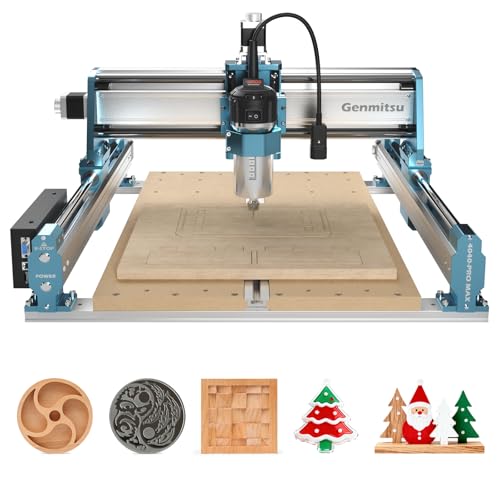
- 410 x 405 x 77 mm work area
- 710W digital-display router
- Reinforced spoilboard with T-track
Best For: Desktop workshops needing power and upgrade options
Large-Format Precision Pick
Twotrees TTC450 Ultra CNC Router

- 465 x 465 mm work area
- 500W spindle supports varied materials
- Touchscreen control and expansion options
Best For: Makers needing a larger, upgradeable desktop CNC router
Metal-Cutting Upgrade Pick

- 800W router with 24,000 RPM maximum
- Dual MGN-15 guides on every axis
- Upgradeable spindle, screws, motors, and table
Best For: Home workshops wanting rigid construction and upgrade potential
Beginner-Friendly Budget Pick

- Compact 300 x 180 x 45 mm work area
- GRBL control with offline controller
- Handles wood, acrylic, PCB, PVC, and soft aluminum
Best For: Beginners learning CNC on small desktop projects
Best All-Material Precision Pick

- All-metal frame with ball screws and HG-15 linear guides
- 800W spindle supports a wide range of materials
- Mostly assembled and compatible with popular GRBL software
Best For: Mixed-material desktop projects and makers who prioritize rigidity
Best Beginner-Friendly Work Area

- 400 × 400 × 60mm engraving area
- All-aluminum frame with linear-rail Z-axis
- Pre-wired setup takes a stated 10–15 minutes
Best For: Hobbyists learning CNC work on wood and sheet materials
Best High-Precision Metal-Capable Pick

- 710W digital spindle with real-time display
- Dual linear guides and ball screws on every axis
- Stated ±0.03mm precision for detailed work
Best For: Precise aluminum and acrylic engraving with a rigid desktop machine
Best Expandable CNC Router – Twotrees TTC450 Pro
The Twotrees TTC450 Pro is a capable choice among cnc routers for makers who want a sturdy desktop machine with a relatively large work area and room to expand. Its 460 x 460 x 80 mm workspace, GRBL control, touchscreen, and upgrade ports support woodworking, signage, prototyping, and detailed relief work.
Best For: Home craftsmen, makerspaces, educational settings, and small workshops that value expansion options.
Pros:
- 18.1-inch square work area with an 80 mm Z-axis range.
- 3.5-inch capacitive touchscreen and ports for a 4th axis, laser, and spindle control.
- Aluminum-and-stainless-steel construction with XYZ limit switches.
- Includes cutting tools, clamps, test materials, and a 775 spindle motor.
Cons:
- The included 775 brushed spindle is less powerful than the 710W spindles in some larger models.
- Windows 11 users need to install the CH341 driver before connecting.
- Assembly and computer setup are required.
Choose this model if you want a flexible entry-level professional router rather than a sealed, fixed-purpose machine. Its open-source compatibility and expansion ports give it useful growth potential, though demanding users may eventually want a more powerful spindle or upgraded configuration.
Best Large-Format CNC Router – Genmitsu PROVerXL 2X2
The Genmitsu PROVerXL 2X2 stands out among cnc routers for its 2-by-2-foot work envelope and closed-loop motion system. It is designed for larger woodworking, signage, cabinetry, and detailed carving projects that exceed the capacity of compact hobby machines.
Best For: Larger furniture panels, full-size signs, batch work, and users upgrading from hobby-grade equipment.
Pros:
- 679 x 679 x 113 mm working area handles full-size projects.
- Closed-loop steppers, ball screws, and linear rails are specified for precision and repeatability.
- Open-front and open-back design supports oversized material handling.
- 710W, 30,000 RPM spindle includes 1/4-inch and 1/8-inch ER11 collets.
Cons:
- Its large footprint requires substantial workspace.
- Additional accessories such as rotary modules and dust baffles are optional expansions.
- The supplied notes identify the main body as the included component, so accessory contents should be confirmed.
This is the strongest fit for buyers who prioritize capacity and production flexibility. The large bed and closed-loop drive system make it more suitable for demanding projects, while Wi-Fi control and the Genmitsu accessory ecosystem add convenience as your workflow grows.
Best Heavy-Duty CNC Router – FoxAlien XE-Ultra 8080
The FoxAlien XE-Ultra 8080 is one of the more substantial cnc routers in this lineup, offering a 33-by-33-inch workspace and a rigid aluminum frame. Its ball screws, linear rails, and closed-loop stepper motors are aimed at users working with large materials and demanding cuts in wood, acrylic, aluminum, and carbon fiber.
Best For: Ambitious DIY projects, large-format woodworking, and users who want to choose their own spindle setup.
Pros:
- 33 x 33 x 4.72-inch working area with 5.3-inch pass height.
- Heavy-duty 46 x 80 mm aluminum frame with HG-15 linear rails and ball screws.
- Closed-loop motors provide 2.6 N.m torque and step-loss protection.
- Supports a 65 mm router, 1.5kW VFD spindle, or compatible engraving modules.
Cons:
- The spindle is not included, so the total setup requires an additional purchase.
- Its 40 kg weight and large footprint reduce portability.
- More advanced hardware may require more setup and tuning than a smaller desktop router.
The XE-Ultra 8080 makes sense when workspace and rigidity matter more than plug-and-play simplicity. Its spindle-neutral design is useful for customization, but buyers should budget for the cutting head and ensure they have adequate room and electrical provisions.
Best Compact 710W CNC Router – Genmitsu 4040-PRO MAX
The Genmitsu 4040-PRO MAX is a practical pick among cnc routers for users who need a compact machine with a 710W spindle and a reinforced work surface. Its 410 x 405 x 77 mm work area is suited to woodworking, acrylic, and metal engraving while keeping the overall machine smaller than large-format alternatives.
Best For: Desktop workshops and makers who want strong cutting performance with upgrade potential.
Pros:
- 710W digital-display router supports higher-power engraving and cutting.
- SBR16 linear rails and a lead screw are designed to improve motion stability.
- Reinforced MDF spoilboard includes an aluminum support bar and integrated T-track.
- Supports optional Wi-Fi, Y-axis extension, 4th-axis, and dust-shoe upgrades.
Cons:
- The standard work area is smaller than the 2-by-2-foot and 33-by-33-inch models.
- Wi-Fi control requires an optional module.
- It is a corded 110-volt machine and requires assembly and setup.
This model balances footprint, spindle power, and expandability. It is a sensible starting point for desktop users who may add accessories later, although buyers handling full-size panels should choose a larger router instead.
Large-Format Precision Pick – Twotrees TTC450 Ultra CNC Router
The Twotrees TTC450 Ultra is one of the more versatile CNC routers for users who need a larger 465 x 465 mm work area and the ability to work with materials ranging from hardwood and acrylic to aluminum and stainless steel. Its 500W spindle, rigid all-metal frame, touchscreen controls, and broad upgrade path make it suitable for more demanding desktop projects.
Best For: Hobbyists, machinists, educators, and makers who want a spacious work area, metal-capable cutting, and room to expand.
Pros:
- Large 465 x 465 mm work area for signs, models, and larger workpieces.
- 500W spindle supports 8,000–30,000 RPM and accepts 0.5–7 mm tools through the ER11 chuck.
- All-metal construction, dual linear rails, and T8 lead screws support stable, precise operation.
- Includes a touchscreen, offline TF-card/USB operation, safety switches, and fourth-axis expansion support.
Cons:
- Its 19 kg structure and 90% pre-assembled design still require a suitable, stable workspace.
- The included 500W spindle is upgradeable, but heavier-duty users may eventually want the optional 3000W upgrade.
The TTC450 Ultra stands out among CNC routers for combining a generous work area with strong material compatibility and useful controls out of the box. It is a particularly flexible choice for buyers who expect their projects to grow beyond basic wood engraving.
Metal-Cutting Upgrade Pick – 3030-Evo Max CNC Router
The 3030-Evo Max is a rigid, compact option among CNC routers, pairing an 800W trim router with dual steel linear guides and higher-torque stepper motors. It is designed for light-duty home work but offers a strong upgrade path for users who want to cut aluminum, brass, stainless steel, wood, acrylic, and plastics with greater capability over time.
Best For: Home workshops and experienced makers who prioritize rigidity, metal-cutting potential, and future hardware upgrades.
Pros:
- 800W router with 8,000–24,000 RPM range and ER11-1/8-inch collet supports varied cutting tasks.
- MGN-15 dual linear guides on all axes provide rigidity and load support for metal work.
- Upgradeable to a 1.5kW spindle, 1204 ball screws, closed-loop motors, and a 3060 extension table.
- 32-bit GRBL 1.3a control supports Wi-Fi access, laser work, a rotary fourth axis, coolant controls, and touch probing.
Cons:
- Router speed adjustment uses a manual dial even though software can control run and stop functions.
- The machine is intended for light-duty home use, so its compact format may not suit production-scale work.
For buyers comparing CNC routers with metal capability, the 3030-Evo Max offers an unusually comprehensive upgrade platform in a small footprint. Its rigid guides and advanced controller are appealing, provided you are comfortable with manual speed adjustment and future upgrades.
Beginner-Friendly Budget Pick – Genmitsu CNC 3018-PRO
The Genmitsu 3018-PRO is a compact entry point into CNC routers for beginners, makers, classrooms, and home workshops. Its 300 x 180 x 45 mm working area is suited to small carvings, engravings, PCB prototypes, and soft-material projects, while GRBL control and an included offline controller make it easier to learn the basics.
Best For: Beginners and DIY users working on small projects in wood, acrylic, PVC, plastic, PCB, and soft aluminum.
Pros:
- Compact footprint and practical 300 x 180 x 45 mm XYZ work area for desktop use.
- 120W spindle supports beginner projects in wood, acrylic, PVC, plastic, PCB, and soft aluminum.
- Open-source GRBL control and Candle software provide a widely supported learning workflow.
- Offline controller can run compatible G-code files without a computer remaining connected.
Cons:
- The smaller work area limits it to compact parts, signs, engravings, and prototypes.
- Its 120W power is intended for light-duty materials rather than demanding metal machining.
The 3018-PRO remains a sensible starting point among CNC routers because it keeps the workspace manageable and the control system approachable. Choose it when learning, compact projects, and affordability matter more than high-power cutting or a large production area.
Best All-Material Precision Pick – LUNYEE 3020 Nova
For shoppers comparing cnc routers for mixed-material projects, the LUNYEE 3020 Nova stands out with an all-metal frame, ball screws, linear guides, and an 800W spindle. Its fully assembled design also makes it a practical choice when you want to begin with minimal setup.
Best For: Makers who need a versatile desktop CNC router for wood, acrylic, plastics, PCB work, and occasional aluminum or brass projects.
Pros:
- 1204 ball screws and HG-15 linear guides on all axes are designed to reduce backlash, with stated accuracy of ±0.05mm.
- 800W spindle offers 6,000–30,000 RPM, six speed settings, and constant torque control.
- Supports GRBL software including UGS, Fusion 360, Easel, and Candle.
- Arrives largely assembled with pre-connected wiring; installation mainly involves the Z-axis module.
Cons:
- The 19.2 kg metal machine is less portable than a lighter hobby-oriented router.
- The supplied notes do not specify a full working-area measurement.
The 3020 Nova is a strong fit for users who value rigidity, material flexibility, and a fast path from unboxing to machining. Its broad material support and 800W spindle make it especially appealing for varied desktop fabrication.
Best Beginner-Friendly Work Area – FoxAlien Masuter Pro
Among cnc routers aimed at hobbyists, the FoxAlien Masuter Pro combines an all-aluminum structure with a relatively large 15.75-by-15.75-inch engraving area. Pre-wired components and quick assembly make it approachable for DIY users getting started with routing and carving.
Best For: Beginners and hobbyists working primarily with wood, acrylic, MDF, and nylon who want an expandable desktop machine.
Pros:
- All-metal construction and a linear-rail Z-axis support stability and durability.
- Provides a 400 × 400 × 60mm working area for larger hobby projects.
- Includes 52mm and 65mm spindle clamps, with compatibility for several spindle upgrade options.
- Pre-wired components and a step-by-step manual support a stated 10–15 minute setup.
Cons:
- The included 60W spindle is less powerful than the 710W and 800W spindle options in the other listed machines.
- The 69mm spindle clamp must be purchased separately.
- The supplied notes focus on nonmetal materials rather than metal cutting.
The Masuter Pro makes sense when accessible setup, a generous work area, and future customization matter more than maximum spindle power. Its optional Y-axis extension also gives hobbyists room to expand later.
Best High-Precision Metal-Capable Pick – Genmitsu 3030-PROVer Ultra
For cnc routers focused on precision and heavier-duty work, the Genmitsu 3030-PROVer Ultra pairs a 710W digital spindle with dual linear guides and ball screws on every axis. Its rigid all-metal construction and stated ±0.03mm precision make it suited to detailed aluminum and acrylic engraving.
Best For: DIYers and experienced makers seeking a rigid CNC router for precise aluminum, acrylic, and custom-part engraving.
Pros:
- 710W digital spindle provides real-time display information to help monitor operation.
- HG15 dual linear rails and 1204 ball screws on every axis support accurate, smooth movement.
- All-metal chassis and high-torque stepper motors are designed to reduce wobble and vibration.
- Works with the Genmitsu app, Candle, UGS, and Easel, and ships as two pre-assembled modules.
Cons:
- At 23 kg, it is the heaviest machine in this comparison.
- The supplied details do not list a specific working-area measurement.
- The 230V voltage specification may require checking compatibility with your workspace.
The 3030-PROVer Ultra is the most precision-oriented option here, with a strong spindle, rigid drive components, and useful control features. It is a compelling choice when accuracy and aluminum capability take priority over portability.
How We Picked These Cnc Routers
We focused on the specifications that most affect real-world usability: cutting area, frame construction, drive system, spindle or router power, motion accuracy, upgrade potential, and setup requirements. We also considered whether each machine suits beginners, experienced makers, or small-shop users.
Product claims such as precision, material compatibility, and maximum cutting depth can vary with tooling, feeds and speeds, workholding, and machine setup. Treat them as starting points rather than guarantees. A rigid frame, properly trammed spindle, sharp bit, and conservative settings often matter as much as the headline specifications.
Quick Comparison
| Type | Best For | What to Prioritize |
|---|---|---|
| Compact 3018-style router | Learning and small engravings | Low cost, simple setup, modest footprint |
| 4040 or 3030 benchtop router | General hobby projects | Useful work area, rigidity, upgrade options |
| Large 2×2 or 8080 router | Signs, panels, and larger stock | Floor space, frame stiffness, dust control |
| All-metal precision model | Frequent use and light metal work | Linear guides, ball screws, closed-loop motion, and spindle control |
Key Buying Factors for Cnc Routers
Work Area and Machine Footprint
Measure the usable cutting area—not just the outside dimensions. Leave room for clamps, cable movement, dust collection, and access to the emergency stop. A smaller router is easier to place, while a 2×2-foot machine handles larger signs and panels without repeated repositioning.
Frame Rigidity and Motion Hardware
All-metal frames, dual linear guides, supported rails, and ball screws generally provide better resistance to vibration than lightweight open-frame designs. Rigidity is especially important when cutting aluminum or using larger tooling. Closed-loop steppers can also help reduce the risk of lost position during demanding jobs.
Spindle, Router, and Tooling Compatibility
Higher power does not automatically mean faster or cleaner cuts. Check collet size, speed control, replacement availability, and compatibility with the bits you already own. For wood and plastics, a capable trim-router-style motor may be sufficient; metal work benefits from rigidity, controlled speeds, lubrication, and conservative passes.
Software, Safety, and Support
Confirm that the controller works with your preferred sender and CAM workflow. Look for limit switches, an emergency stop, protective enclosures or shields, and accessible documentation. Budget separately for a spoilboard, clamps, cutters, dust collection, and eye and hearing protection.
Who Should Buy Which Cnc Routers?
Beginners and occasional users: Choose a compact, well-supported machine with straightforward assembly and a large user community. A smaller router lowers the initial cost and makes it easier to learn CAM, workholding, and feeds and speeds.
Makers cutting signs, furniture parts, or larger panels: A 2×2 or 8080-class machine offers more practical capacity, provided you have a stable table and enough room around it.
Users working with aluminum or other light metals: Favor a rigid all-metal frame, supported linear motion, ball screws where available, and a controllable spindle. Expect shallower passes and more setup discipline than with wood.
Frequent users and small shops: Prioritize repeatability, serviceable components, limit switches, dust management, and upgrade paths over the lowest purchase price. The best choice is the router that fits your typical material, project size, and workflow while leaving room for safer, more precise operation.