
A reliable capture card is the bridge between your gaming PC and streaming or recording system. The right model can preserve high-refresh gameplay, pass clean video to your second PC, and keep setup friction to a minimum.
This roundup compares 10 options across HDMI 2.1 performance, 4K passthrough, USB connectivity, dual-input flexibility, and budget-friendly 1080p recording. Use the guide below to match your display, workflow, and performance requirements.
Best 10 Capture Card for Dual PC Recording Picks for 2026
Best Overall

- 4K144 capture and HDMI 2.1 passthrough
- VRR, HDR10, and ultra-low latency
- Works with Windows, Mac, and iPadOS
Best For: High-refresh-rate external dual-PC recording
Best Internal Card

- 4K60 HDR10 capture
- 8K60 HDMI 2.1 passthrough
- Designed for Windows dual-PC setups
Best For: Stationary Windows recording rigs with PCIe slots
Best Audio Features
AVerMedia Live Gamer Ultra 2.1

- 4K144 Windows capture
- Party chat and 5.1 audio support
- 4K144 HDR/VRR passthrough
Best For: Dual-PC setups with headset and party-chat audio
Best Budget-Friendly Option

- 1080p60 USB-C capture
- 4K60 and 1080p240 passthrough
- Windows, Mac, and Linux support
Best For: Simple 1080p dual-PC recording on a budget
Dual-Source Control
j5create JVA06 Dual HDMI Capture Card

- Dual HDMI capture at 1080p/60 Hz
- PIP and PBP layout options
- Flexible audio mixing and connections
Best For: Dual-source Full HD recording and streaming
High-Frame-Rate Flexibility

- 4K60 capture and passthrough
- 1080p recording up to 120 fps
- USB-A/USB-C and wide OS support
Best For: High-frame-rate gaming and 4K monitoring
Dual 4K Source Hub

- Two 4K60 HDMI inputs
- PIP/PBP layouts and source switching
- 1080p/60 USB output with low latency
Best For: Multi-source gaming, camera, and live-production setups
Best Budget Pick
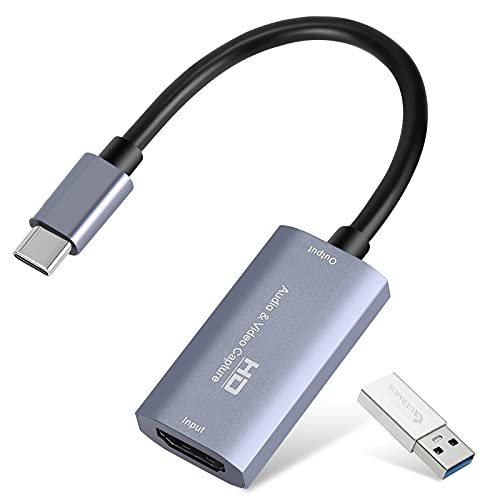
- 1080p60 output with 4K30 input
- USB-A and USB-C connectivity
- Plug-and-play with OBS and major platforms
Best For: Budget dual PC recording at 1080p 60FPS
Best Versatile Option
UGREEN 2K60-Compatible Capture Card
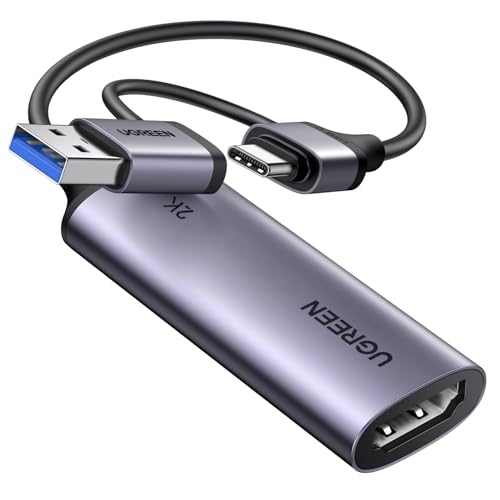
- 4K30 input with 2K30 and 1080p60 output
- 5Gbps USB 3.0 transfer speed
- USB-A and USB-C support
Best For: Flexible PC, console, camera, and tablet streaming
Best for Pass-Through Gaming

- 4K60 HDMI loop-out for direct gameplay viewing
- 1080p60 capture over USB 3.0
- 3.5mm microphone input for commentary
Best For: Gaming setups needing 4K60 pass-through and 1080p recording
Best Overall – Elgato 4K X
The Elgato 4K X is a strong choice for a capture card for dual PC recording when you want external connectivity, high refresh-rate passthrough, and broad software support. Its HDMI 2.1 connections support up to 4K144 capture and passthrough, while USB 3.2 Gen 2 helps keep gameplay and broadcasts synchronized.
Best For: Dual-PC streamers who want a compact external card with HDMI 2.1, VRR passthrough, and high-frame-rate support.
Pros:
- Captures up to 4K at 144 fps and supports up to 1080p240 capture.
- HDMI 2.1 input and output provide high-bandwidth connectivity.
- Supports VRR passthrough, HDR10, OBS, Streamlabs, Twitch Studio, and other popular apps.
- Works with Windows, macOS, and iPadOS, subject to system requirements.
Cons:
- Requires a USB 3.2 Gen 2 port for its highest stated performance.
- USB 3.2 Gen 1 operation reduces capture resolution.
- Listed video capture resolution details may vary by mode and setup.
Choose the 4K X if you want a flexible external capture solution for a modern gaming PC or console. Its high refresh-rate support and low-latency design make it particularly suitable for performance-focused dual-PC recording.
Best Internal Card – Elgato 4K Pro
The Elgato 4K Pro is an internal capture card designed specifically for Windows systems with an available PCIe slot. For a capture card for dual PC recording, it offers 4K60 HDR10 capture, 8K60 passthrough, HDMI 2.1 connectivity, and compatibility with dual-PC setups.
Best For: Windows users building a dedicated internal dual-PC recording system with PCIe expansion.
Pros:
- Supports 4K60 HDR10 capture and 8K60 passthrough.
- HDMI 2.1 input and output support up to 1080p240 recording.
- Includes VRR support and ultra-low-latency performance.
- Explicitly identified as compatible with dual-PC setups.
Cons:
- Requires a Windows 10 computer with an available PCIe slot.
- Not positioned as a macOS or Linux solution.
- Internal installation is less portable than an external USB capture card.
The 4K Pro is the most purpose-built option here for a stationary Windows dual-PC arrangement. It is a good fit when you have the required PCIe slot and want high-quality HDR capture without using an external enclosure.
Best Audio Features – AVerMedia Live Gamer Ultra 2.1
The AVerMedia Live Gamer Ultra 2.1 combines high-refresh-rate HDMI 2.1 passthrough with USB-C capture for Windows, Mac, or iPad. As a capture card for dual PC recording, it stands out for its party-chat connections, 5.1-channel audio support on compatible Windows workflows, and 4K144 capture through AVerMedia Streaming Center on supported Windows PCs.
Best For: Dual-PC creators who prioritize party chat, headset connectivity, and flexible high-refresh-rate passthrough.
Pros:
- Supports up to 4K144 MJPEG capture on supported Windows systems.
- Offers 4K144 HDR/VRR passthrough, plus 1440p240 and 1080p360 modes on compatible displays.
- Includes dual 3.5mm ports for party chat and supports 5.1-channel audio in compatible Windows workflows.
- Works with OBS Studio through the AVerMedia plugin and supports Windows, Mac, and iPad capture.
Cons:
- Windows is required for the listed 4K144 capture capability; macOS capture supports up to 4K60.
- Displays using DSC may limit 4K passthrough to 4K120.
- Some audio features depend on compatible Windows workflows.
This model is especially appealing when audio routing matters as much as video quality. Its USB-C 10Gbps connection and HDMI 2.1 passthrough make it versatile, while the dedicated audio ports simplify console and party-chat setups.
Best Budget-Friendly Option – NearStream CCD10
The NearStream CCD10 is a practical entry-level choice for a capture card for dual PC recording, with USB-C 3.0 connectivity, 1080p60 capture, and high-refresh-rate passthrough. It also supports Windows, macOS, and Linux, making it useful for straightforward recording and streaming setups.
Best For: Budget-conscious creators who need 1080p60 capture, simple software compatibility, and broad computer support.
Pros:
- Captures up to 1080p60 through USB-C 3.0.
- Passes through 4K60, 1440p120, or 1080p240 for smooth local gameplay.
- Supports Windows, Mac, and Linux with compatible capture software such as OBS.
- Includes dual 3.5mm audio ports for microphone, headset, and headphone connections.
Cons:
- Capture is limited to 1080p60 rather than 4K.
- Higher-resolution modes are passthrough capabilities, not stated capture modes.
- System requirements vary by capture format and may require specific hardware for some modes.
The CCD10 makes the most sense when the recording PC only needs dependable 1080p60 output while the gaming display benefits from higher-resolution or higher-refresh-rate passthrough. Its broad operating-system support and included cables also help simplify setup.
Dual-Source Control – j5create JVA06 Dual HDMI Capture Card
The j5create JVA06 is a practical capture card for dual PC recording when you need to bring two HDMI sources into one workflow. It supports uncompressed 1080p at 60 Hz, USB-C 3.1 Gen1 connectivity, and flexible audio routing for streaming, recording, or monitoring.
Best For: Dual-source 1080p recording, game streaming, and setups that need picture-in-picture or picture-by-picture layouts.
Pros:
- Captures two HDMI channels at up to 1080p/60 Hz.
- Offers six screen configurations, including PIP and PBP.
- Includes HDMI audio support plus 3.5 mm mic-in and speaker-out connections.
- Three individual audio mixer switches and channel volume indicators add control.
Cons:
- Capture resolution is limited to 1080p rather than 4K.
- Requires a USB-C 3.1 Gen1-compatible system and HDMI 1.3a-compatible source.
Choose this model if two-channel Full HD capture and integrated audio mixing matter more than 4K recording. Its dual-input design and layout options make it especially useful for multi-source streaming setups.
High-Frame-Rate Flexibility – USB 3.0 4K60 Capture Card
This USB 3.0 model is a versatile capture card for dual PC recording when you want 4K60 passthrough alongside high-frame-rate capture. It records up to 4K60 or 1080p at 120 fps and includes both USB-A and USB-C connection options.
Best For: Gamers and creators who want 4K passthrough, 1080p/120 capture, and broad operating-system and software compatibility.
Pros:
- Supports up to 4K60 capture and 4K HDMI passthrough.
- Handles 1080p at up to 120 fps for high-frame-rate recording.
- Works with Windows, macOS, Linux, Android, and iPadOS 17+.
- Includes 3.5 mm audio input and microphone output ports.
Cons:
- The supplied notes do not specify dual HDMI inputs.
- Performance depends on a USB 3.0 connection and compatible source hardware.
This is a strong fit for a recording setup that prioritizes high frame rates and 4K monitoring. Its plug-and-play design and wide software support also make it adaptable beyond gaming capture.
Dual 4K Source Hub – Osee GoStream M2 Capture Card
The Osee GoStream M2 is designed for a capture card for dual PC recording workflow that uses two HDMI sources. It accepts two 4K60 inputs, provides 1080p/60 output, and adds PIP/PBP layouts for switching or displaying multiple sources during streams and recordings.
Best For: Dual-camera or dual-console streaming setups that need source switching, multi-view layouts, and 1080p/60 output.
Pros:
- Provides two 4K60 HDMI inputs for separate cameras or gaming devices.
- Supports four PBP layouts and four zoomable PIP layouts.
- USB 3.0 connectivity is designed for smooth, low-latency video and audio transmission.
- Includes 3.5 mm microphone and audio input/output ports.
Cons:
- Records through the USB workflow at up to 1080p/60 rather than 4K recording.
- Its feature set may be more involved than needed for a single-source setup.
The GoStream M2 stands out when dual-source control is the priority. Although its USB recording output is Full HD, its two 4K inputs, switching button, and PIP/PBP tools provide useful flexibility for live production.
Best Budget Pick – 1080p 60FPS USB Capture Card
If you need a straightforward capture card for dual PC recording, this compact HDMI-to-USB model supports up to 1080p at 60FPS output while accepting up to 4K at 30Hz. Its plug-and-play design, USB-A/USB-C connectivity, and compatibility with OBS make it a practical option for basic streaming and recording setups.
Best For: Budget-conscious users recording HDMI gameplay or camera video to a computer at 1080p 60FPS.
Pros:
- Supports 1080p at 60FPS output and up to 4K at 30Hz input.
- Includes USB-A and USB-C connection options, plus an adapter.
- Plug-and-play design requires no drivers or external power.
- Works with OBS Studio, Windows, macOS, Linux, and common consoles.
Cons:
- It is a one-way HDMI-to-USB device and does not directly cast to a monitor or TV.
- USB 2.0 connections may limit bandwidth and resolution.
- Audio setup in OBS may require restarting the software.
This is a sensible entry-level choice for dual PC recording when 1080p60 capture is enough. Use a USB 3.0 port whenever possible, and expect a small amount of decoding latency rather than completely lag-free capture.
Best Versatile Option – UGREEN 2K60-Compatible Capture Card
For a capture card for dual PC recording with broader device compatibility, the UGREEN model combines 4K input, 2K at 30Hz output, and 1080p at 60FPS support. Its USB 3.0 interface and included USB-A/USB-C options suit desktop, laptop, tablet, and mobile streaming workflows.
Best For: Users who want flexible HDMI capture for PC streams, consoles, cameras, and compatible tablets.
Pros:
- Accepts 4K at 30Hz and outputs up to 2K at 30Hz or 1080p at 60FPS.
- USB 3.0 provides up to 5Gbps data transfer for low-delay streaming.
- USB-A and USB-C interfaces support a wide range of computers and mobile devices.
- Supports OBS Studio, XSplit, QuickTime, PotPlayer, VLC, Windows, macOS, and Linux.
Cons:
- It supports HDMI input to USB output only, not reverse signal conversion.
- iPadOS devices require iPadOS 17 or later.
- Console sources may require HDCP to be disabled.
The UGREEN capture card is a strong all-around pick when your dual PC setup may also involve consoles, cameras, or mobile devices. It offers useful resolution flexibility, although 2K output is limited to 30Hz and source-device compatibility still matters.
Best for Pass-Through Gaming – 4K60 HDMI Capture Card
This capture card for dual PC recording stands out with 4K60 HDMI pass-through, allowing a gaming display to remain connected while video is captured over USB 3.0. It can capture up to 1080p at 60FPS or 2K at 30Hz, and its microphone input adds flexibility for commentary during recordings.
Best For: Gamers who want 4K60 pass-through and 1080p60 capture in a dual PC or console recording setup.
Pros:
- Supports 4K at 60Hz HDMI input and loop-out for lag-free gameplay viewing.
- Captures up to 1080p at 60FPS or outputs up to 2K at 30Hz over USB 3.0.
- Includes a 3.5mm microphone input for external commentary.
- Works with OBS Studio, Streamlabs, XSplit, consoles, cameras, Windows, macOS, and Linux.
Cons:
- It does not support 4K at 120Hz or 144Hz.
- The microphone input accepts a 3.5mm microphone headset and does not record party chat.
- Audio setup may require restarting OBS Studio.
For gaming-focused dual PC recording, the loop-out connection is the key advantage because it helps preserve a direct gameplay display while the computer records. Choose it if 4K60 pass-through matters more than capturing a 4K video file.
How We Picked the Best Capture Card for Dual PC Recording
We focused on the features that matter in a two-computer setup: supported input and passthrough resolutions, refresh rates, connection type, capture quality, latency, audio handling, and compatibility with common software such as OBS Studio. We also included a range of internal PCIe, USB, HDMI 2.1, and entry-level USB 3.0 designs so different gaming and production setups are represented.
Specifications can vary by resolution, color format, HDR mode, and software configuration. Confirm the manufacturer’s requirements before buying, especially for high-refresh 4K recording.
Quick Comparison
| Type | Best For | Typical Strength |
|---|---|---|
| HDMI 2.1 USB | Modern 4K gaming PCs and consoles | High-refresh passthrough with flexible installation |
| Internal PCIe | Permanent desktop setups | Direct connectivity and a clean cable layout |
| Dual-input capture | Multi-source streaming | Switching between two HDMI devices |
| USB 3.0 budget models | 1080p recording and basic streaming | Low cost and simple setup |
Key Buying Factors for a Capture Card for Dual-PC Recording
Passthrough and Capture Resolution
Passthrough determines what you can play on your gaming display without compromising refresh rate. If you use a 4K 120Hz or higher monitor, look for HDMI 2.1 support and verify the exact 4K refresh specification. Capture resolution is separate: some devices pass through 4K but record at 1080p or 1440p.
Connection and System Compatibility
USB models are portable and easy to move between computers, but they require a suitable USB 3.x port and cable. An internal card can reduce desktop clutter and provide a dependable permanent connection, though it requires an available PCIe slot and a compatible desktop chassis.
Latency, HDR, and Audio
Low-latency passthrough is important for competitive games. Check whether HDR, variable refresh rate, surround audio, and HDCP handling match your source devices. Your recording PC also needs enough CPU or GPU capacity to encode the selected resolution and frame rate.
Who Should Buy Which Capture Card for Dual PC Recording?
- Choose an HDMI 2.1 model if you play at 4K high refresh rates or want more headroom for current consoles and GPUs.
- Choose an internal PCIe card for a fixed desktop studio where cable simplicity and consistent performance matter most.
- Choose a dual-HDMI model if your stream regularly switches between two cameras, consoles, or computers.
- Choose a basic USB 3.0 card if 1080p at 60 frames per second meets your needs and keeping costs low is the priority.
Before ordering, confirm the source output, gaming-monitor resolution, recording target, available ports, and operating-system support. Those checks usually matter more than headline passthrough numbers alone.