
Camera external recorders with touchscreens can give mirrorless, DSLR, and cinema cameras a larger, more accurate monitoring surface while adding higher-quality recording options. The right model can simplify focus checks, exposure control, camera operation, and media management without turning a compact rig into an unwieldy setup.
This roundup compares 10 options across HDMI and SDI workflows, 4K and Full HD recording, ProRes and ProRes RAW support, HDR brightness, camera-to-cloud features, and included accessories. Use the guide below to match the recorder to your camera, production style, and budget.
Best 10 Camera External Recorders with Touchscreens Picks for 2026
Best ProRes Workflow

- 1000-nit 5-inch HDR monitoring
- Records ProRes, ProRes RAW, DNxHR/HD, and HEVC
- Compact design for tripod, handheld, or gimbal use
Best For: Filmmakers needing flexible professional-format recording
Best SDI Touch Recorder

- 6-inch 1080p touchscreen
- Records up to 1080p30 to FAT32 USB drives
- 3G-SDI and HDMI connectivity with monitoring scopes
Best For: Small crews combining SDI and HDMI workflows
Best Scopes and Viewfinder Tools

- 5-inch Full HD touchscreen monitor
- Includes professional scopes and focus assist
- Supports 3D LUTs and HDR enhancement
Best For: Operators focused on exposure and focus monitoring
Best Modern HDMI Recorder
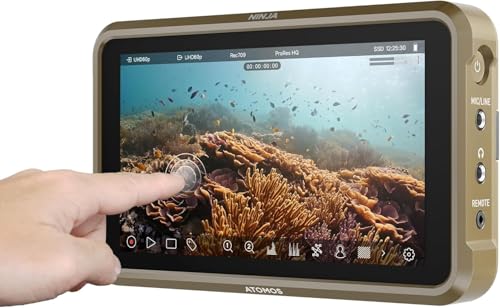
- 1000-nit 5.2-inch monitoring display
- 4Kp60 recording and up to 6Kp30 ProRes RAW
- AtomOS 11 with RecordAssist and RemoteView
Best For: HDMI-camera users wanting advanced recording workflows
Best Budget Touch Recorder

- 6-inch 1080p touchscreen
- Records HDMI video to USB
- LUT and pro monitoring tools
Best For: Budget-conscious DSLR and mirrorless filmmakers
Best for ProRes RAW

- 1500-nit HDR touchscreen
- Records ProRes and ProRes RAW
- Camera control and monitoring tools
Best For: Professional HDMI camera productions
Best for Camera-to-Cloud Workflows

- 1500-nit touchscreen monitor
- 4K60 HDMI and 12G-SDI I/O
- Wi-Fi 6 and cloud uploading
Best For: Connected professional production teams
Best All-Around HDMI Recorder

- Records 4Kp60 and up to 6Kp30 ProRes RAW
- Includes a 240GB SSD
- Supports ProRes, DNxHD, and H.265
Best For: HDMI camera users wanting included storage and flexible codecs
Best for Professional Monitoring

- 1500-nit 5.2-inch Full HD touchscreen
- Includes professional scopes and focus tools
- Offers 12G-SDI and 4K HDMI connectivity
Best For: Bright-location monitoring and scope-based exposure control
Best for RAW and Wireless Workflows
Ninja TX GO 5" Monitor-Recorder
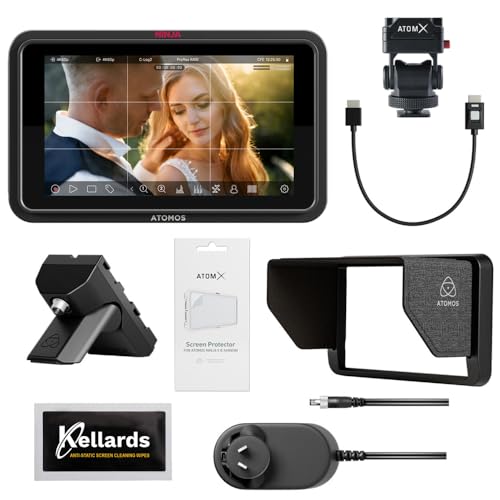
- Captures up to 6K RAW
- Records to CFexpress Type B or USB-C storage
- Supports Wi-Fi 6E and NDI streaming
Best For: RAW capture and connected production workflows
Best ProRes Workflow – Atomos Ninja V
For filmmakers seeking camera external recorders with touchscreens, the Atomos Ninja V combines a bright 5-inch HDR monitor with recording and playback tools. Its HDMI input supports compatible cinema, DSLR, and mirrorless cameras, while recording options include ProRes, ProRes RAW, DNxHR/HD, and HEVC.
Best For: Filmmakers and content creators who want HDR monitoring and broad professional-format recording in a compact setup.
Pros:
- 1000-nit 5-inch HDR display for on-location monitoring.
- Records 4K HDMI footage and supports several professional codecs.
- Compact, lightweight design can be tripod-, handheld-, or gimbal-mounted.
- Includes playback, take review, tagging, and playlist creation tools.
Cons:
- SDI connectivity requires an optional accessory.
- The listed package includes a battery eliminator rather than a battery.
- Its 5-inch screen may feel compact for multi-person viewing.
The Ninja V is a strong choice when recording flexibility and bright HDR monitoring matter more than built-in SDI connectivity or a larger display.
Best SDI Touch Recorder – FEELWORLD CUT6S
The FEELWORLD CUT6S is a practical option among camera external recorders with touchscreens, especially for crews working with both HDMI and SDI. Its 6-inch 1080p touchscreen records compatible video to a FAT32 USB flash drive and includes monitoring scopes and LUT-related output features.
Best For: Shooters and small crews needing SDI/HDMI monitoring, basic USB recording, and multi-person display output.
Pros:
- 6-inch 1920×1080 touchscreen provides a clear monitoring surface.
- Records compatible video up to 1080p30 in MP4 format to a USB flash drive.
- Includes 3G-SDI input and output plus HDMI input.
- Offers waveform, RGB parade, vectorscope, histograms, LUT output, and HDMI loop-out.
Cons:
- The package does not include an NP-F battery.
- Recording is limited to 1080p30 according to the supplied notes.
- The display is rated at 450 nits, so it may be less daylight-friendly than brighter alternatives.
Choose the CUT6S when SDI routing and production monitoring are priorities, but plan for separate battery and USB storage purchases.
Best Scopes and Viewfinder Tools – Blackmagic Video Assist 5
Blackmagic Design Video Assist 5'' 3G Portable Monitor, Recorder, Scope, and Viewfinder
Check Price On AmazonThe Blackmagic Design Video Assist 5 is a touchscreen monitor, recorder, scope, and viewfinder for compatible consumer and broadcast cameras. Its 5-inch Full HD LCD emphasizes professional scopes, focus assistance, 3D LUTs, and HDR support for more controlled on-camera monitoring.
Best For: Camera operators who value exposure, focus, and viewing-assistance tools in a compact professional monitor.
Pros:
- Combines monitoring, recording, scopes, and viewfinder functions.
- Provides professional scopes and focus-assist features.
- Supports 3D LUTs and HDR-related picture enhancement.
- Includes HDMI connectivity and a 2-year warranty.
Cons:
- The supplied notes do not specify recording codecs or maximum recording resolution.
- Its 5-inch 1080p display is smaller than the FEELWORLD CUT6S display.
- At 771 g, it is heavier than the listed Atomos Ninja models.
This Video Assist suits users who prioritize monitoring accuracy and production scopes, though buyers seeking clearly specified high-resolution codec recording may prefer a model with more detailed recording specifications.
Best Modern HDMI Recorder – Atomos Ninja
The Atomos Ninja is a lightweight camera external recorder with a touchscreen-style monitoring workflow, a 5.2-inch 1000-nit display, and HDMI compatibility for a wide range of cameras. It records up to 4Kp60 in ProRes, DNxHD, and H.265, while ProRes RAW recording can reach 6Kp30 with compatible equipment.
Best For: HDMI-camera users who want current recording tools, a bright monitor, and network-based sharing features.
Pros:
- 1000-nit 5.2-inch display for bright monitoring conditions.
- Records up to 4Kp60 and supports up to 6Kp30 ProRes RAW with compatible cameras.
- AtomOS 11 improves memory management and responsiveness.
- Supports RecordAssist, PlayBackAssist, and wireless Atomos RemoteView sharing.
Cons:
- Its core camera connection is HDMI; the supplied notes do not list SDI input.
- Some advanced recording modes depend on camera compatibility.
- RemoteView sharing requires compatible Atomos devices and network conditions.
The current Ninja is compelling for HDMI-based creators who want high-resolution recording and newer workflow features without moving to a larger field recorder.
Best Budget Touch Recorder – FEELWORLD CUT6
The FEELWORLD CUT6 is a practical entry point for creators comparing camera external recorders with touchscreens. Its 6-inch Full HD display combines HDMI recording, LUT support, and a broad set of exposure and focus tools in a field-monitor design.
Best For: DSLR and mirrorless users who want an affordable touchscreen monitor with basic 1080p recording and on-set monitoring tools.
Pros:
- Records compatible HDMI video up to 1080p30 to a FAT32 USB flash drive.
- 6-inch, 1920×1080 touchscreen provides a large viewing area.
- Supports LUT recording and HDMI loop-out with custom LUT output.
- Includes waveform, vectorscope, histogram, focus peaking, zebra, and false-color tools.
Cons:
- Recording is limited to compatible 1080p30 HDMI video.
- USB recording requires a separately supplied FAT32 flash drive.
- HDMI output supports up to 1080p60 rather than 4K output.
The CUT6 makes the most sense when touchscreen monitoring and straightforward USB recording matter more than advanced codecs or high-end media workflows.
Best for ProRes RAW – Atomos Ninja RAW
The Atomos Ninja RAW is a professional option among camera external recorders with touchscreens, pairing a bright 5.2-inch HDR display with ProRes and ProRes RAW recording. It is designed for compatible HDMI cameras and supports camera control plus professional monitoring.
Best For: Filmmakers who need ProRes RAW or ProRes recording, camera control, and a bright monitor for production work.
Pros:
- 1500-nit HDR touchscreen remains highly visible in bright conditions.
- Records ProRes, ProRes RAW, ProRes RAW HQ, ProRes LT, and ProRes 422 variants.
- Supports camera control for start/stop, ISO, shutter, aperture, and white balance.
- Includes waveform, EL Zone false color, focus peaking, and Onion Skin tools.
Cons:
- Its advanced recording formats require compatible cameras and supported media.
- CFexpress Type B media or external USB-C storage is needed for recording.
- At 5.2 inches, the display is smaller than the FEELWORLD CUT6.
Choose the Ninja RAW when post-production flexibility and sensor-level recording are priorities; it is more specialized than a basic HDMI-to-USB recorder.
Best for Camera-to-Cloud Workflows – Atomos Ninja TX
The Atomos Ninja TX combines a 5.2-inch touchscreen monitor with recording, wireless connectivity, and camera-to-cloud features. For shoppers comparing camera external recorders with touchscreens, its 4K60 I/O, CFexpress recording, Wi-Fi 6, and multiple codec options make it suited to connected production workflows.
Best For: Production teams that want touchscreen monitoring, flexible recording, wireless uploading, and camera-to-cloud capabilities.
Pros:
- Bright 1500-nit 1920×1080 IPS touchscreen.
- Provides 4K60 HDMI 2.0 and 12G-SDI input/output connectivity.
- Records Apple ProRes, Avid DNx, H.265/H.264, and up to 8K30 ProRes RAW.
- Includes Wi-Fi 6, timecode synchronization, uploading, and cross conversion.
Cons:
- Its connected-production features may be more than needed for simple local recording.
- Recording to the CFexpress Type B slot requires compatible media.
- The supplied details do not specify a software-update support date.
The Ninja TX is the strongest fit for teams building a networked workflow, especially when wireless transfer and broad input/output support are as important as touchscreen monitoring.
Best All-Around HDMI Recorder – Ninja 5.2" 4K Monitor
For creators comparing camera external recorders with touchscreens, the Atomos Ninja combines a compact 5.2-inch monitor with HDMI recording and a bundled 240GB SSD. It records up to 4K at 60 fps in ProRes, DNxHD, or H.265, while ProRes RAW supports up to 6K at 30 fps with compatible cameras.
Best For: DSLR, mirrorless, and cinema-camera users who want a portable HDMI recorder with included storage and broad codec support.
Pros:
- Records up to 4Kp60 and supports up to 6Kp30 ProRes RAW.
- Includes a 240GB SSD for getting started quickly.
- AtomOS 11 improves responsiveness and adds RecordAssist and PlayBackAssist.
- Supports wireless Atomos RemoteView sharing with compatible devices.
Cons:
- Uses HDMI connectivity, so compatibility depends on the camera’s HDMI output.
- The supplied notes do not specify the monitor’s brightness or touch-control features.
This is a flexible choice for HDMI-based production setups, especially if you value a bundled SSD and multiple recording codecs in a lightweight monitor-recorder.
Best for Professional Monitoring – Ninja TX FHD Touch Recorder
If you need camera external recorders with touchscreens for bright outdoor work, the Atomos Ninja TX pairs a 5.2-inch Full HD touchscreen with a 1500-nit display and professional exposure tools. Its 12G-SDI and 4K HDMI connectivity also make it suitable for a range of professional video sources.
Best For: Shooters who prioritize clear daylight monitoring, detailed scopes, touch-to-focus control, and flexible power options.
Pros:
- 1500-nit 1920×1080 touchscreen is designed for visibility in varied lighting.
- Includes waveform, RGB parade, vectorscope, focus peaking, and false color tools.
- Records ProRes RAW, ProRes, Avid DNx, and H.265 codecs.
- Supports 12G-SDI, 4K HDMI, Wi-Fi 6E, and USB-C 3.0 connectivity.
Cons:
- The supplied details do not list included recording media or storage capacity.
- At 4.9 pounds as listed, it may be less appealing for minimal handheld rigs.
The Ninja TX is strongest when monitoring precision matters as much as recording, with its bright display, extensive scopes, and professional input/output options.
Best for RAW and Wireless Workflows – Ninja TX GO 5" Monitor-Recorder
For camera external recorders with touchscreens that also support modern file and network workflows, the Atomos Ninja TX GO offers a bright 1500-nit 5-inch display, touch-to-focus control, and recording to CFexpress Type B or USB-C storage. It can capture up to 6K RAW and supports HDMI, Wi-Fi 6E, and NDI streaming.
Best For: Filmmakers and content teams needing ProRes RAW capture, external storage choices, camera control, and wireless delivery options.
Pros:
- Records up to 6K RAW to CFexpress Type B or compatible USB-C storage.
- Supports ProRes, ProRes RAW, Avid DNx, H.265, and H.264.
- Provides a 1500-nit touchscreen with touch-to-focus and professional monitoring tools.
- Includes Wi-Fi 6E, NDI streaming support, and two USB-C ports.
Cons:
- Recording media is not included in the supplied product details.
- Some network and calibration accessories are sold separately.
This model is a capable choice for RAW-focused productions and connected workflows, particularly when you want to move beyond basic HDMI recording.
How We Picked the Best Camera External Recorders with Touchscreens
We evaluated these Camera External Recorders with Touchscreens based on the features that most affect real-world shooting: supported input and output standards, recording resolutions and codecs, screen size and brightness, touchscreen usability, camera-control compatibility, storage requirements, power options, and workflow extras. We also considered whether each unit is better suited to handheld filmmaking, studio production, documentary work, live video, or fast-turnaround delivery.
Compatibility should come first. A recorder may support 4K or RAW capture, but your camera must output the appropriate signal and the recorder must accept the required HDMI or SDI format. Check both devices’ specifications before buying.
Quick Comparison
- Best all-around 4K option: Atomos Ninja V or the standard Atomos Ninja 5.2-inch 4K model.
- Best for SDI-equipped cameras: FEELWORLD CUT6S or Blackmagic Video Assist 3G.
- Best for RAW workflows: Atomos Ninja RAW, provided your camera is supported.
- Best for camera-to-cloud production: Atomos Ninja TX models.
- Best value-focused touchscreen options: FEELWORLD CUT6 and CUT6S.
- Best bundled setup: An Atomos Ninja package that includes an SSD or power accessories.
Key Buying Factors for Camera External Recorders with Touchscreens
Inputs, Outputs, and Camera Compatibility
HDMI is common on mirrorless and DSLR cameras, while SDI is more typical on professional cinema and broadcast equipment. Confirm connector type, signal resolution, frame-rate limits, and whether the recorder supports the camera’s clean output. Loop-through outputs are useful when sending the feed to another monitor, switcher, or transmitter.
Recording Format and Media
ProRes is widely supported in post-production and can reduce the need to work with heavily compressed internal files. ProRes RAW can preserve more flexibility, but it requires a compatible camera, recorder, editing application, and suitable storage. Check supported SSD, CFexpress, or other media, along with sustained write-speed requirements and expected capacity for your recording duration.
Screen Quality and Touchscreen Controls
A bright display is important outdoors, while accurate color, viewing tools, waveform monitoring, false color, zebras, focus peaking, and magnification matter in every location. Touch controls should be responsive and easy to use with the camera mounted in a practical shooting position. A 5-inch screen is compact; a 6-inch display can be easier to assess but adds size and weight.
Power, Mounting, and Workflow Features
Compare battery compatibility, runtime, charging options, and whether a power kit is included. Also consider mounting points, fan noise, weight, timecode support, camera control, HDR capability, proxy recording, wireless connectivity, and cloud-delivery tools. These details can matter more than headline resolution on long shoots.
Who Should Buy Which Camera External Recorders with Touchscreens?
Choose a Ninja V or standard Ninja 4K model if you want a compact, versatile HDMI recorder for mirrorless, DSLR, or small cinema cameras. Select the RAW model when your camera and editing workflow specifically benefit from RAW capture. Choose Blackmagic Video Assist or FEELWORLD CUT6S when SDI connectivity is central to the setup; the FEELWORLD options are also appealing for buyers prioritizing a straightforward touchscreen monitor-recorder.
Ninja TX models are better suited to creators and production teams that need camera-to-cloud or connected delivery features. A bundled Ninja package makes sense when you need storage or power immediately and want to avoid assembling compatible accessories separately. Before ordering, verify camera compatibility, required cables, media, batteries, and the exact bundle contents.