
External recorders can make a focus puller’s job easier by combining a larger, clearer monitoring image with recording, exposure tools, camera control, and dependable on-set connectivity.
This roundup compares 10 monitor-recorders and related field recording tools for different camera rigs, workflows, and budgets. Before choosing, confirm your camera’s output, supported codecs, media requirements, and power setup.
Best 10 Camera External Recorders for Focus Pulling Picks for 2026
RAW Monitoring Power

- 1500-nit HDR touchscreen with focus peaking
- Records ProRes and ProRes RAW
- Camera control and multiple power options
Best For: Professional focus pulling, monitoring, and RAW recording
Audio and Sync Support

- 32-bit float recording with dual ADCs
- Dual XLR/TRS inputs plus 3.5 mm input
- Built-in timecode generation and sync
Best For: Videographers needing compact audio and timecode support
Bright Scope Monitoring

- 2500-nit 5-inch LCD touchscreen
- Professional scopes and focus assist
- 3D LUT and HDR support
Best For: Bright, scope-based focus and exposure monitoring
Flexible 4K Recording
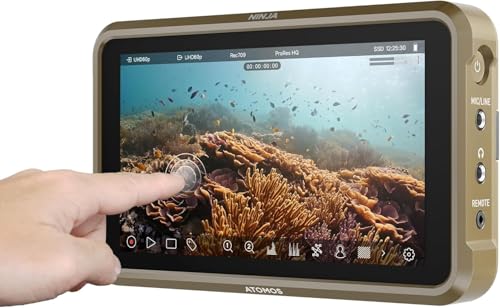
- 4Kp60 recording in multiple formats
- Up to 6Kp30 ProRes RAW support
- Lightweight monitor with false color tools
Best For: Compact HDMI-camera monitoring and recording
Best Audio-Focused Pick
Zoom M3 MicTrak Shotgun Recorder

- 32-bit float audio recording
- Mono and stereo pickup modes
- Mid-Side RAW backup and camera safety output
Best For: On-camera production sound for filmmaking and content creation
Best Budget Focus Monitor
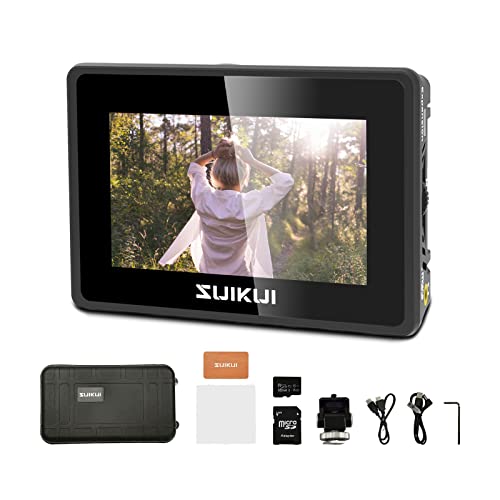
- Peaking and focus-assist tools
- 1080p30 H.264 recording
- Compact 3.5-inch, 600-nit display
Best For: Budget-conscious 1080p camera monitoring and recording
Best Professional Workflow
Atomos Ninja TX Monitor Recorder

- Bright 1920x1080 touchscreen
- 4K60 I/O and multiple recording codecs
- CFexpress, Wi-Fi 6, and camera-to-cloud features
Best For: Professional productions needing advanced monitoring and recording
Best All-Around Monitor-Recorder

- 1500-nit touchscreen with touch-to-focus control
- Records up to 6K RAW to CFexpress or USB-C
- Supports ProRes RAW, DNx, H.265/H.264, and NDI
Best For: Versatile on-set monitoring, focus pulling, and external recording
Best Bundled Setup

- 1500-nit HDR touchscreen with focus peaking
- Records ProRes RAW, DNx, and H.265
- Includes batteries, charger, case, cables, and mounts
Best For: Mirrorless-camera rigs needing monitoring, power, and mounting accessories
Best Accessory Bundle
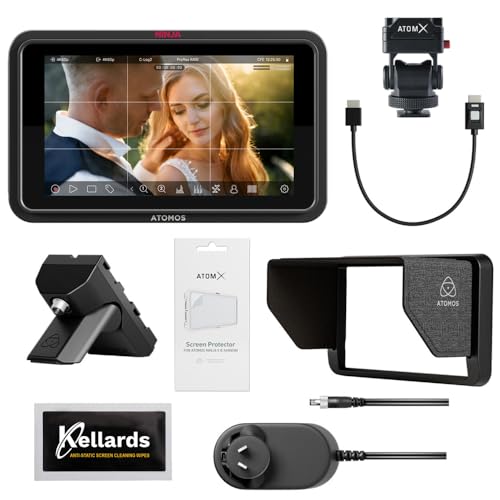
- 1500-nit touchscreen with touch-to-focus
- Captures up to 6K RAW in several codecs
- Includes five anti-static screen-cleaning wipes
Best For: TX GO users who want a display-care accessory included
RAW Monitoring Power – Ninja RAW
For camera external recorders for focus pulling, the Atomos Ninja RAW combines a bright 5.2-inch HDR touchscreen with focus peaking, EL Zone false color, waveform tools, and direct recording from compatible cameras. Its 1500-nit display and flexible power options make it well suited to demanding production environments.
Best For: Focus pullers and cinematographers who need advanced monitoring, camera control, and ProRes or ProRes RAW recording.
Pros:
- Bright 1500-nit HDR touchscreen with focus peaking and EL Zone false color.
- Records ProRes, ProRes RAW, and related formats to CFexpress Type B or external USB-C storage.
- Provides camera control for start/stop, ISO, shutter, aperture, and white balance.
- Runs from NP-F batteries, USB-C power banks, or a DC adapter.
Cons:
- Some storage and networking accessories are sold separately.
- Its professional feature set may be more than needed for basic monitoring.
With precise exposure and focus tools, strong brightness, and broad recording support, the Ninja RAW is a particularly capable choice when focus-pulling assistance and camera control matter as much as recording.
Audio and Sync Support – TASCAM FR-AV2
The TASCAM FR-AV2 is an audio-focused companion rather than a picture monitor, but it can complement camera external recorders for focus pulling by simplifying sound capture and camera synchronization. Its compact design, dual XLR/TRS inputs, and 32-bit float recording target fast-moving video workflows.
Best For: Videographers who need dependable dual-channel audio and built-in timecode alongside a separate focus-monitoring recorder.
Pros:
- 32-bit float recording with dual ADCs helps support worry-free capture.
- Two XLR/TRS combo inputs plus a 3.5 mm input accommodate common video audio setups.
- Built-in timecode generation and timecode input/output support synchronization.
- Compact body and 9.5-ounce weight suit mobile production.
Cons:
- It does not provide a video display or focus-assist tools.
- Wireless monitoring requires the optional AK-BT2 adapter.
- Runs on three AA batteries.
Choose the FR-AV2 as an audio and timecode partner, not as a replacement for a focus-pulling monitor. Its value is in reducing audio clipping concerns and simplifying sync on set.
Bright Scope Monitoring – Video Assist 5'' 3G
Blackmagic Design Video Assist 5'' 3G Portable Monitor, Recorder, Scope, and Viewfinder
Check Price On AmazonThe Blackmagic Design Video Assist 5” 3G provides a 5-inch touchscreen monitor, recorder, scope, and viewfinder in one unit. For camera external recorders for focus pulling, its focus-assist functions, 3D LUT support, professional scopes, and very bright 2500-nit display can make framing and image evaluation easier.
Best For: Camera operators and focus pullers who prioritize a bright monitor with scopes, viewfinder functionality, and focus assist.
Pros:
- Extremely bright 2500-nit LCD is suited to challenging viewing conditions.
- Includes professional scopes and focus-assist features.
- Supports 3D LUTs and HDR-related picture enhancement.
- Combines monitor, recorder, scope, and viewfinder functions.
Cons:
- At 771 g, it is substantially heavier than the compact Atomos options listed here.
- The supplied notes do not specify recording formats or media details.
- Its listed connectivity is comparatively limited.
The Video Assist 5” 3G is a practical pick when daylight visibility and monitoring tools are more important than minimizing rig weight. Its scopes and focus assist give crews useful image feedback in a single device.
Flexible 4K Recording – Atomos Ninja
The Atomos Ninja is a lightweight 5.2-inch HDMI recording monitor for camera external recorders for focus pulling. Its 1000-nit display, ARRI false color, SegmentPro tools, and 4K recording support provide a balanced setup for crews that want monitoring and recording without a heavier professional rig.
Best For: HDMI-camera users who need a compact monitor-recorder with focus and exposure aids plus flexible recording formats.
Pros:
- Records up to 4Kp60 in ProRes, Avid DNxHD, and H.265.
- Supports up to 6Kp30 Apple ProRes RAW with compatible cameras.
- Includes ARRI false color and SegmentPro monitoring tools.
- Lightweight 210 g body with camera mounting support.
Cons:
- Its 1000-nit brightness is lower than the Ninja RAW and Video Assist models listed here.
- The supplied notes identify HDMI hardware connectivity but do not detail included recording media.
- Advanced wireless sharing features depend on compatible Atomos devices and setup.
For many mirrorless and HDMI-camera rigs, the Ninja offers a strong middle ground: useful focus and exposure monitoring, broad recording support, and a notably light form factor.
Best Audio-Focused Pick – Zoom M3 MicTrak Shotgun Recorder
The Zoom M3 MicTrak is an audio recorder rather than a video monitor, making it a useful companion for camera external recorders for focus pulling when your priority is capturing clean production sound alongside the image. Its 32-bit float recording helps reduce concerns about setting gain, while the built-in shock mount keeps a moving camera rig relatively streamlined.
Best For: Filmmakers and content creators who need flexible on-camera shotgun audio with a backup recording option.
Pros:
- 32-bit float recording helps avoid clipped audio without manual gain setting.
- Offers mono, 90-degree stereo, and 120-degree stereo pickup modes.
- Saves a Mid-Side RAW backup and can send a safety track to the camera through its 3.5mm output.
- Runs for up to 12 hours on two AA batteries and supports SDXC cards up to 1TB.
Cons:
- It records audio, not video or focus-assist overlays.
- Its single-channel design is aimed at shotgun microphone capture rather than multi-source recording.
The M3 MicTrak is best viewed as an audio-first addition to a focus-pulling setup. Choose it when dependable, adaptable sound matters more than an HDMI monitor or video recording workflow.
Best Budget Focus Monitor – RH35 HDMI Monitor Recorder
The RH35 combines a compact 3.5-inch display with HDMI recording, making it a practical entry-level option among camera external recorders for focus pulling. Its focus-assist tools, including peaking and waveform, can help with on-set checking, while H.264 recording captures 1080p video at 30fps.
Best For: Shooters who want a small HDMI monitor with basic recording and focus- and exposure-assist features.
Pros:
- Includes peaking, zebra, waveform, focus assist, exposure assist, and false color.
- Supports HDMI input and output with 1080p60 signal handling.
- Records unlimited H.264 1080p30 video to a microSD card or USB flash drive.
- Compact 3.5-inch display weighs about 120g and reaches 600 nits brightness.
Cons:
- The 800×480 display is less detailed than a Full HD monitoring panel.
- Recording is limited to H.264 1080p30 rather than higher-resolution formats.
- The supplied specifications identify one HDMI port and one USB port, limiting expansion.
The RH35 offers the core monitoring aids needed for manual focus checks without the larger footprint of a professional recorder. It is a sensible budget choice for 1080p workflows, provided its lower-resolution screen meets your monitoring needs.
Best Professional Workflow – Atomos Ninja TX Monitor Recorder
The Atomos Ninja TX is the most capable video option here for camera external recorders for focus pulling, combining a bright touchscreen monitor with professional recording, connectivity, and camera-to-cloud features. Its 1920×1080 IPS display and 1500 cd/m² brightness support on-set viewing, while focus and exposure decisions can be made alongside a broad codec and input/output workflow.
Best For: Production teams needing a bright monitor-recorder with 4K connectivity, professional codecs, and networked workflow features.
Pros:
- Provides a 1920×1080 IPS touchscreen with 1500 cd/m² brightness.
- Supports 4K60 input/output and records Apple ProRes, Avid DNx, and H.265/H.264.
- Records to a CFexpress Type B slot and includes USB-C data, power delivery, and Wi-Fi 6 connectivity.
- Supports camera-to-cloud functions, timecode synchronization, NDI, and 8K30 ProRes RAW recording as specified.
Cons:
- At approximately 0.67kg, it is heavier than a small basic monitor.
- Its advanced workflow and codec features may be more than a simple focus-monitoring setup requires.
- The supplied details do not specify bundled recording media.
The Ninja TX is a strong fit when focus monitoring is only one part of a larger production workflow. Its bright screen, professional recording formats, and connectivity make it better suited to demanding rigs than minimalist camera setups.
Best All-Around Monitor-Recorder – Ninja TX GO 5-Inch
Atomos Ninja TX GO 5-inch Camera Monitor-Recorder, HDMI CFexpress Wi-Fi HDR Touchscreen ProRes RAW
Check Price On AmazonFor camera external recorders for focus pulling, the Atomos Ninja TX GO combines a bright 1500-nit touchscreen with touch-to-focus camera control and professional monitoring tools. It records ProRes, ProRes RAW, Avid DNx, H.265, and H.264, including up to 6K RAW capture to CFexpress Type B or compatible USB-C storage.
Best For: Filmmakers who want a versatile HDMI monitor-recorder with touch focus, broad codec support, and flexible storage.
Pros:
- 1500-nit 5-inch touchscreen supports outdoor and on-set viewing.
- Touch-to-focus and camera-control features assist focus pulling and operation.
- Captures up to 6K RAW and supports multiple professional codecs.
- Offers HDMI, Wi-Fi 6E, NDI, USB-C storage, and direct ATOMOSphere uploads.
Cons:
- Compatible external drives, calibration probes, and some cloud services may be sold separately.
- Its many connectivity and recording features may be more than basic monitor users need.
The Ninja TX GO is a strong general-purpose choice when focus assistance, bright monitoring, and high-quality external recording need to fit into one compact unit.
Best Bundled Setup – Ninja RAW HDMI Mirrorless Kit
Among camera external recorders for focus pulling, the Atomos Ninja RAW pairs a 1500-nit 5-inch HDR touchscreen with waveform, vectorscope, EL Zone false color, and focus peaking. It is designed for HDMI mirrorless and cinema cameras, with ProRes RAW recording, USB-C camera control, batteries, mounting hardware, and charging accessories included.
Best For: Mirrorless-camera filmmakers who want a ready-to-use monitoring, recording, power, and mounting bundle.
Pros:
- Bright HDR display includes focus peaking and other professional monitoring tools.
- Records ProRes RAW, DNx, and H.265 to CFexpress Type B or external USB-C storage.
- USB-C camera control can manage start/stop, ISO, shutter, aperture, and white balance.
- Includes two batteries, charger, carry case, D-Tap cable, and hot-shoe mounts.
Cons:
- The bundled package is substantially larger and heavier than a monitor-recorder alone.
- Its feature set and included accessories may be excessive for simple recording setups.
This kit stands out for creators building a complete mobile rig, especially when focus-peaking tools, camera control, and included power accessories matter as much as recording.
Best Accessory Bundle – Ninja TX GO Creator Kit
This Ninja TX GO bundle is a practical option for camera external recorders for focus pulling, combining a 1500-nit touchscreen with touch-to-focus control, professional monitoring tools, and external recording. It supports ProRes RAW and other common codecs, while the included Creator Accessory Kit adds cleaning wipes for maintaining the 5-inch display.
Best For: Shooters who want the Ninja TX GO’s recording and focus-monitoring features with a basic screen-care accessory included.
Pros:
- Touchscreen offers touch-to-focus control and professional monitoring features.
- Captures up to 6K RAW to CFexpress Type B or compatible USB-C storage.
- Supports ProRes, ProRes RAW, Avid DNx, H.265, and H.264.
- Includes an Atomos Creator Accessory Kit with five anti-static cleaning wipes.
Cons:
- Storage media and some optional accessories are not included.
- The accessory bundle adds cleaning supplies rather than additional recording hardware.
Choose this version when the TX GO’s focus and recording capabilities are the priority and you value having display-cleaning supplies ready for regular production use.
How We Picked These Camera External Recorders for Focus Pulling
We focused on features that matter during real production: screen visibility, focus-assist tools, recording reliability, input and output compatibility, timecode support, audio options, camera control, media flexibility, and portability. The selection includes compact HDMI monitor-recorders, professional RAW-capable units, camera-to-cloud options, and dedicated audio recorders that can complement a focus-pulling setup.
Because cameras differ widely, a recorder that is ideal for a mirrorless body may not suit a cinema camera or a multi-camera production. Treat compatibility and workflow fit as equally important as resolution.
Quick Comparison
- Best for RAW workflows: Atomos Ninja RAW models and compatible Ninja TX GO configurations.
- Best for integrated monitoring: Blackmagic Video Assist and Atomos Ninja monitor-recorders.
- Best for camera-to-cloud workflows: Atomos Ninja TX.
- Best for audio capture: TASCAM FR-AV2 or Zoom M3 MicTrak.
- Best for straightforward HDMI capture: RH35 Unlimited Recording Camera Monitor.
Key Buying Factors for Camera External Recorders for Focus Pulling
Screen and Focus Tools
A bright five-inch-class display is often easier to position on a compact rig, while a larger screen can improve judging fine detail. Look for focus peaking, punch-in magnification, false color, waveform, zebras, and high-quality image scaling. These tools help you evaluate focus without relying solely on the camera’s built-in display.
Camera, Codec, and Media Compatibility
Check whether your camera outputs clean HDMI, the required resolution and frame rate, and the color or RAW signal supported by the recorder. Also verify whether recording uses SD cards, SSDs, CFexpress media, or another format. Media speed, capacity, and sustained write performance can affect recording reliability.
Timecode, Audio, and Control
Timecode support is valuable for multicamera shoots and separate audio. If the recorder is expected to handle production sound, confirm the number and type of inputs, phantom power, gain controls, and monitoring outputs. Camera-control features can reduce trips to the camera, but they depend on the camera model and connection type.
Power, Mounting, and Field Durability
Assess battery type, runtime, hot-swapping options, mounting points, cable clearance, and weather or impact protection. A recorder with excellent specifications is less useful if it adds awkward weight or cannot run through a full shooting day.
Who Should Buy Which Camera External Recorders for Focus Pulling?
Choose a RAW-capable Atomos model if you need maximum post-production flexibility and your camera supports a compatible RAW output. Choose Blackmagic Video Assist if you want monitoring, scopes, and recording in one production-oriented device. Choose an Atomos Ninja TX model for connected workflows, HDR monitoring, or camera-to-cloud features, provided your network and production pipeline support them.
Choose the TASCAM or Zoom recorder when clean, dependable audio is the priority or when your camera rig needs a dedicated sound solution. Choose the RH35 for basic HDMI viewing and capture when advanced RAW, cloud, or professional timecode features are not required. For any option, match the recorder to your camera’s signal, your preferred media, and the way your focus team actually works on set.