
Wireless video can simplify camera monitoring, live production, presentations, and home entertainment—but the right system depends on more than a 4K label. Range, latency, inputs, receiver capacity, and wireless-band performance all affect real-world results.
We selected 10 4K wireless video receivers and transmitter kits spanning compact HDMI setups, professional SDI systems, multi-device workflows, and long-range monitoring. Use the guide below to match features with your equipment and production needs.
Best 10 4K Wireless Video Receivers Picks for 2026
Professional 4K Pick

- 4K HDMI with 3G-SDI support
- Up to 450ft LOS range and 66ms latency
- iOS/Android app monitoring
Best For: Production crews needing HDMI and SDI connectivity
Simple Presentation Choice

- Plug-and-play screen mirroring
- Supports up to 1080p at 60Hz
- Includes mini and USB-C adapters
Best For: Meetings, classrooms, and casual home streaming
Long-Range Production Pick

- 4K30 transmission over HDMI
- Up to 1,300ft LOS range and 60ms latency
- Supports up to four receivers and UVC streaming
Best For: Multi-monitor film production and live streaming
Multi-Computer Switching Pick
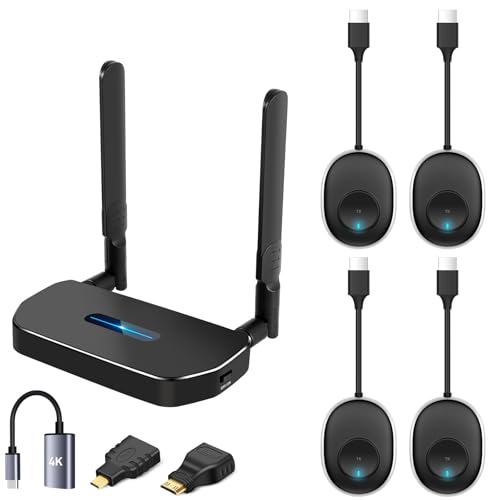
- Includes four transmitters and one receiver
- Supports up to 4K at 30Hz
- One-key switching for multiple sources
Best For: Shared displays in offices, classrooms, and homes
Professional Production Pick

- 4K30 HDMI and 1080p HDMI/SDI support
- Up to 1,312 feet of stated range
- Monitoring for up to five destinations
Best For: Professional film crews and multi-device monitoring
Easy Home and Office Choice

- Plug-and-play HDMI connection
- 4K30 receiver output with 165-foot stated range
- Supports up to eight transmitters per receiver
Best For: Home theater, presentations, classrooms, and gaming
Long-Range Pro Option

- 4K60 HDMI and 1080p HDMI/SDI support
- Up to 8,202 feet of stated range
- Tri-band transmission with sub-35ms 4K latency
Best For: Large-scale film, event, sports, and concert production
Long-Range 4K Pick
Vrriis WL095P Wireless HDMI Kit

- 4K at 30Hz with synchronized audio
- Up to 1,150 feet in open-field conditions
- Supports up to four receivers
Best For: Home theaters and multiroom 4K setups
Pro 6GHz Choice
Teradek Ace 750 Wireless 4K System

- 4Kp30 10-bit HDR over HDMI
- 6GHz transmission with auto channel selection
- Under 0.01 seconds of stated latency
Best For: Professional camera and A/V monitoring
Flexible HD Alternative
Vrriis WL082 Wireless HDMI Extender

- 1080p at 60Hz with 0.05-second delay
- Up to 1,300 feet in open-field conditions
- Loop-out, dual HDMI output, and IR support
Best For: Full HD monitoring with flexible power options
Professional 4K Pick – Hollyland Mars 4K
For creators needing flexible 4k wireless video receivers, the Hollyland Mars 4K combines 4K HDMI transmission with SDI connectivity, making it suitable for cameras, monitors, and production equipment. It supports up to 450 feet of line-of-sight range and 66ms latency in ideal conditions.
Best For: Camera crews and small production setups that need both HDMI and SDI monitoring.
Pros:
- Supports up to 4K at 24/25/30fps through HDMI.
- Includes HDMI and 3G-SDI input/output options with decimal-frame-rate support.
- Offers app monitoring for iOS and Android devices.
- Provides multiple power options, including NP-F batteries, DC power, and USB-C.
Cons:
- The stated 450-foot range and 66ms latency apply to interference-free laboratory conditions.
- QC/PD charging and 5V/2A charging are not supported.
The Mars 4K is a practical choice when professional SDI compatibility matters as much as 4K HDMI transmission. Its app support and flexible power options add convenience for on-set monitoring.
Simple Presentation Choice – Wireless HDMI 4K Kit
This wireless HDMI kit is a straightforward option among 4k wireless video receivers for presentations, home entertainment, and classroom use. It is designed for plug-and-play mirroring from compatible laptops, phones, cameras, and other HDMI sources to a TV, projector, or monitor.
Best For: Meetings, lessons, and casual screen sharing where simple setup is more important than professional production features.
Pros:
- Supports video up to 1080p at 60Hz and 3D content.
- Requires no driver or app for basic operation.
- Includes mini and USB-C HDMI adapters for broader device compatibility.
- A receiver can pair with up to eight transmitters.
Cons:
- Although marketed as 4K, the supplied specifications list transmission support up to 1080p at 60Hz.
- The advertised 165-foot range can drop substantially through cement walls or between floors.
- A 5V/2A charger is not included.
This kit favors convenience and device flexibility over confirmed 4K transmission. It is best suited to everyday wireless mirroring in open or lightly obstructed spaces.
Long-Range Production Pick – Hollyland Pyro H
The Hollyland Pyro H stands out among 4k wireless video receivers for its long stated range, dual-band operation, and multi-receiver support. It transmits 4K video at up to 30fps, offers HDMI loopout, and adds UVC support for plug-and-play computer live streaming.
Best For: Film crews, live-streaming operators, and productions requiring several monitoring points.
Pros:
- Supports 4K at 24/25/30fps and 1080p at 60fps.
- Offers up to 1,300 feet of line-of-sight range with stated 60ms latency.
- Can transmit to up to four receivers and supports HollyView app monitoring.
- Includes HDMI loopout and UVC live-streaming support.
Cons:
- The 1,300-foot range is a line-of-sight specification and may vary in real environments.
- The kit’s professional features may be excessive for basic home screen sharing.
With dual-band connectivity, smart channel scanning, and expansion to four receivers, the Pyro H is a strong fit for collaborative production workflows. Its UVC feature also makes it more versatile for streaming than a basic HDMI extender.
Multi-Computer Switching Pick – 4K Wireless HDMI Kit
This four-transmitter kit is a useful choice among 4k wireless video receivers for switching several computers or HDMI sources to one display. The transmitters are factory-paired, support one-key switching, and are designed for presentations, home theater, and shared workspaces.
Best For: Offices, classrooms, and home setups that need to alternate between multiple computers on a single TV, projector, or monitor.
Pros:
- Includes four transmitters and one receiver.
- Supports resolutions up to 4K at 30Hz according to the supplied notes.
- A receiver can pair with up to eight transmitters.
- Offers mirror and extend display modes with no app, Bluetooth, or Wi-Fi setup required.
Cons:
- It is designed to share multiple sources to one display, not multiple displays from one source.
- The 165-foot range is specified without barriers and can be affected by obstructions.
- Chargers are not included, and stable operation requires suitable 5V/1A-or-higher power.
This kit’s main advantage is source switching rather than advanced production monitoring. It makes sense when several computers need convenient access to one display and a simple, pre-paired setup.
Professional Production Pick – Accsoon CineView SE 4K
For filmmakers who need 4k wireless video receivers with professional camera connectivity, the Accsoon CineView SE 4K combines HDMI and 3G-SDI support with 4K30 transmission, long-range monitoring, and low-latency performance. It is designed for production teams rather than casual home entertainment setups.
Best For: Filmmakers, directors, cinematographers, and larger video-production crews needing multi-device monitoring.
Pros:
- Supports 4K video input and output up to 30p through HDMI, plus 1080p through HDMI or 3G-SDI.
- Offers a stated range of up to 1,312 feet and latency as low as 0.05 seconds at 1080p.
- Supports up to four wireless connections plus one wired USB-C monitoring connection.
- Includes camera-control support for select Sony and Canon cameras.
Cons:
- 4K latency is listed at approximately 0.1 seconds, higher than its 1080p figure.
- USB-C output is for mobile monitoring and does not support UVC capture or computer webcam input.
- Camera control has connection-specific limitations and is not available when the receiver is connected by USB.
The CineView SE 4K is a strong choice when production features, range, and flexible monitoring matter more than simple plug-and-play home use. Confirm device and camera compatibility before buying.
Easy Home and Office Choice – AIMIBO 4K Wireless HDMI Kit
If you want 4k wireless video receivers for a TV, projector, monitor, or meeting space, this AIMIBO kit emphasizes simple setup. Its plug-and-play HDMI design supports 4K at 30Hz on the receiver, with dual-band wireless transmission and included mini- and micro-HDMI adapters.
Best For: Home theater, presentations, classrooms, gaming, meetings, and straightforward screen mirroring.
Pros:
- Plug-and-play setup requires no Bluetooth, Wi-Fi network, or app.
- Supports 4K at 30Hz on the receiver and advertises up to 165 feet of range in unobstructed conditions.
- Allows up to eight transmitters to connect to one receiver for shared presentation use.
- Includes mini-HDMI and micro-HDMI adapters for broader device compatibility.
Cons:
- Range can drop to about 32 feet when the signal passes through walls or floors.
- 4K support is specified at 30Hz, while transmitter and receiver operation is also listed at 1080p60.
- Performance depends on a clear, low-interference environment.
This AIMIBO system is more approachable than professional camera links and suits everyday HDMI distribution. It is a practical option for users who value fast setup and broad consumer-device compatibility.
Long-Range Pro Option – Accsoon CineView Master 4K
For demanding productions comparing 4k wireless video receivers, the Accsoon CineView Master 4K stands out with 4K60 support, HDMI and SDI connectivity, tri-band transmission, and a stated range of up to 8,202 feet. Its low-latency design is aimed at professional monitoring, events, and live production.
Best For: Film crews, sports and concert production, event videographers, and long-distance wireless monitoring.
Pros:
- Supports HDMI video up to 4K60 and 1080p through HDMI or 3G-SDI.
- Uses 2.4GHz, 5GHz, and 6GHz bands for tri-band wireless transmission.
- Lists latency below 25ms at 1080p60 and below 35ms at 4K60, excluding camera latency.
- Supports four wireless monitoring destinations and one wired iOS connection.
Cons:
- The 8,202-foot range is measured in an unobstructed, interference-free environment.
- Wireless monitoring is limited to four destinations, while the wired monitoring feature is specifically described for iOS devices.
- Its professional feature set may be more than casual home users need.
The CineView Master 4K is the strongest fit here for high-resolution, long-distance production work. Its tri-band design and low stated latency make it particularly compelling for teams covering large venues or coordinating multiple monitors.
Long-Range 4K Pick – Vrriis WL095P Wireless HDMI Kit
For buyers comparing 4k wireless video receivers, the Vrriis WL095P emphasizes long-range UHD transmission, simple setup, and flexible multi-display support. It is pre-paired and supports video up to 4K at 30Hz.
Best For: Home theaters, presentations, and multiroom video setups that need extended range and 4K output.
Pros:
- Supports UHD 4K at 30Hz with synchronized audio.
- Advertised transmission range reaches up to 1,150 feet in an open field.
- Pre-paired plug-and-play setup with no apps or drivers required.
- Supports one transmitter with up to four receivers and dual HDMI output on the receiver.
Cons:
- Walls, metal, brick, and glass can significantly reduce coverage.
- 4K support is limited to 30Hz.
- Transmission distance can decrease as additional receivers are added.
The WL095P is a practical choice when range and multiroom expansion matter more than high-refresh-rate 4K. Its audio output and dual HDMI receiver ports add flexibility for larger display arrangements.
Pro 6GHz Choice – Teradek Ace 750 Wireless 4K System
Among 4k wireless video receivers, the Teradek Ace 750 stands out for professional workflows requiring low delay, HDR support, and 6GHz transmission. It delivers up to 4Kp30 10-bit HDR over HDMI.
Best For: Camera operators, production crews, and A/V users who need a compact professional wireless monitor link.
Pros:
- Supports 4Kp30 10-bit HDR image quality.
- Uses 6GHz transmission with 12 frequency options and automatic channel selection.
- Advertised latency is under 0.01 seconds.
- Includes AC and D-Tap power options for studio or on-camera use.
Cons:
- Its range is rated at up to 750 feet, shorter than some listed alternatives.
- A second AC adapter for additional studio or A/V setups is sold separately.
- Control features rely on the Bolt Manager mobile app and compatible devices.
The Ace 750 is the most production-oriented option in this group. Its 6GHz operation, HDR capability, and exceptionally low stated latency make it suited to demanding camera and monitoring applications.
Flexible HD Alternative – Vrriis WL082 Wireless HDMI Extender
Although it is not a 4K model, the Vrriis WL082 is worth considering beside 4k wireless video receivers when Full HD is sufficient. It combines long-range 1080p transmission with loop-out, IR control, and multiple power options.
Best For: Full HD monitoring, classrooms, presentations, and camera setups needing local and remote displays.
Pros:
- Supports 1080p at 60Hz with a stated 0.05-second delay.
- Advertised range reaches up to 1,300 feet in an open field.
- Transmitter loop-out supports a local monitor while the receiver provides dual HDMI outputs.
- Accepts USB-C, adapters, portable power banks, and NP-F series batteries.
Cons:
- Maximum resolution is Full HD 1080p rather than 4K.
- Walls and other obstructions can sharply reduce range.
- Batteries are not included.
The WL082 makes sense for buyers who prioritize deployment flexibility and display monitoring over 4K resolution. Its IR extension and loop-out are useful additions for remote source control and local viewing.
How We Picked These 4K Wireless Video Receivers
We compared the selected systems by resolution support, advertised transmission range, latency, connection options, wireless-band design, and practical flexibility. HDMI-only kits can be convenient for presentations and consumer devices, while SDI-and-HDMI systems are better suited to cameras, switchers, monitors, and professional video workflows.
We also considered features that affect everyday operation, including loop-through outputs, multi-receiver support, app connectivity, transmitter switching, HDR capability, camera control, and compatibility with common frame rates. Advertised range and latency are useful comparison points, but walls, interference, line of sight, and connected equipment can change actual performance.
Quick Comparison
- Best for professional camera workflows: Look for SDI and HDMI inputs, dependable frame-rate support, and robust monitoring features.
- Best for portable presentations: Choose a plug-and-play HDMI kit with simple pairing and broad display compatibility.
- Best for multi-screen or multi-camera use: Prioritize systems supporting several transmitters or receivers.
- Best for demanding live monitoring: Favor low-latency systems with stable band selection and strong interference management.
- Best for future flexibility: Consider 4K60 support, HDR, app connectivity, and both wired and wireless outputs.
Key Buying Factors for 4K Wireless Video Receivers
Resolution, Frame Rate, and HDR
Confirm that the transmitter, receiver, source, and display all support the format you plan to use. Many systems handle 4K at 30 frames per second but drop to 1080p at 60 fps. If smooth motion, 10-bit color, or HDR matters, verify those specifications rather than assuming a product labeled 4K includes them.
Latency and Reliability
Low latency is important for camera operators, presenters, gamers, and live production. A few milliseconds may be acceptable for monitoring, while noticeable delay can make framing, performance, or interaction difficult. Dual-band or tri-band systems may offer more flexibility in crowded environments, but placement and line of sight remain critical.
Inputs, Outputs, and Compatibility
HDMI is the common choice for cameras, laptops, media players, and televisions. SDI adds locking connections and longer-cable compatibility for professional equipment. Check connector type, HDCP behavior, audio support, loop-out availability, and whether the receiver can feed your monitor, switcher, or capture device.
Range and Expansion
Manufacturers typically quote maximum range under ideal conditions. For reliable use, allow margin for walls and interference. If you need multiple viewing positions, verify the maximum number of receivers and whether one receiver can pair with several transmitters or switch between sources.
Who Should Buy Which 4K Wireless Video Receivers?
Choose a compact HDMI kit for straightforward laptop-to-display presentations, home entertainment, or occasional streaming. Choose an SDI/HDMI professional system for production cameras, field monitors, switchers, and more demanding crew workflows. Choose a multi-transmitter system when several sources must share one display or when switching between cameras is part of the setup. Choose a long-range, low-latency model for larger venues or camera monitoring where responsiveness matters most.
Before purchasing, confirm every device’s ports, supported resolution, frame rate, audio format, and power requirements. A system that matches your entire signal chain will usually deliver a better experience than one selected solely for its highest advertised range or resolution.