
Choosing among 4K streaming encoders can be challenging when specifications vary across HDMI, SDI, NDI, network protocols, frame rates, and recording features. The right model depends on your source equipment, streaming platform, production workflow, and required reliability.
This roundup compares ten options for home creators, businesses, event teams, and professional broadcasters. Use the guide below to narrow your choices by connectivity, output quality, compatibility, and ease of deployment.
Best 10 4K Streaming Encoders Picks for 2026
Flexible Multi-Protocol Pick
URayCoder 4K HDMI Network Encoder

- 4K30 H.264/H.265 encoding
- Up to four protocol outputs
- Overlays and video adjustments
Best For: Multi-platform livestreaming and IPTV workflows
4K60 Broadcast Choice
Blackmagic Design Streaming Encoder 4K

- DCI 4K streaming up to 60 fps
- H.264/H.265 over SRT or RTMP
- SDI, HDMI, and USB-C connectivity
Best For: Broadcast-style 4K60 streaming
Most Complete Production Hub
Magewell Ultra Encode HDMI Plus

- 4K HDMI with loop-through
- NDI|HX and multi-destination streaming
- Streams and records simultaneously
Best For: Professional live production and IP workflows
Compact DisplayPort Option
UNISHEEN 4K30 DisplayPort Encoder

- 4K30 H.264/H.265 encoding
- Four simultaneous stream outputs
- Built-in overlays and image processing
Best For: DisplayPort computers and compact multi-server setups
Professional SDI Pick
Magewell Ultra Encode SDI Plus

- 4K SDI encoding up to 4096×2160p30
- Multi-protocol, multi-destination streaming
- Simultaneous recording with 128GB storage
Best For: Professional SDI production and contribution workflows
Most Versatile HDMI Option

- HDMI encoding to SRT, RTMP(S), and RTSP
- Decodes network streams to HDMI
- Includes HDMI/UVC conversion and PoE
Best For: Flexible HDMI streaming, conferencing, and remote production
Best for 4K60 and Failover
Blackmagic Streaming Encoder 4K
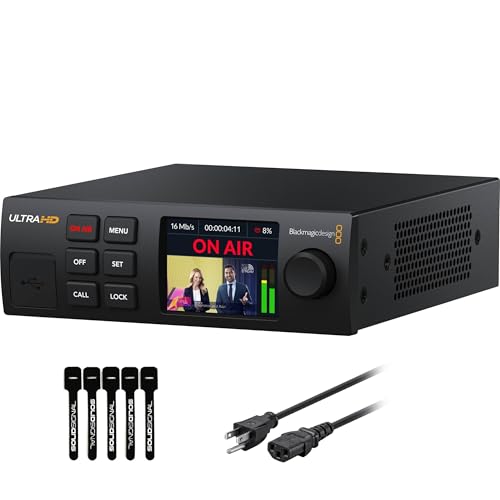
- 4K60 streaming with H.264 and H.265
- 12G-SDI input with standards conversion
- Ethernet and mobile auto-failover
Best For: Professional 4K60 live production with resilient connectivity
Best Compact HDMI Encoder

- 4K capture with zero-lag HDMI passthrough
- NDI|HX3, SRT, RTMP(S), and RTSP support
- Compact design with PoE and USB-C power
Best For: Gaming, portable production, and HDMI-to-NDI streaming
Best SDI Workflow Encoder

- Converts SDI to NDI and NDI to SDI
- Supports SRT, RTMP(S), and RTSP streaming
- Two units can extend SDI over a LAN
Best For: SDI production, broadcast workflows, and LAN signal extension
Best 4K60 Pro Encoder

- 4K60 HDMI input, output, and zero-latency loop-out
- Dual-stream encoding with a 720p sub-stream
- Touchscreen control and AI PTZ tracking features
Best For: Professional 4K production, gaming, and PTZ workflows
Flexible Multi-Protocol Pick – URayCoder 4K HDMI Network Encoder
For shoppers comparing 4k streaming encoders, this URayCoder model is a versatile HDMI-to-IP option with H.264 and H.265 support, 4K input and output, and broad protocol compatibility. It can output up to four streams using different protocols, making it useful for multi-platform distribution.
Best For: Multi-platform livestreaming, IPTV, OBS setups, and HDMI-based enterprise video workflows.
Pros:
- Supports 4K UHD at up to 30 fps and up to 120 fps at 2K or lower resolutions.
- Works with RTMP(S), SRT, HLS, RTSP, WebRTC, UDP, ONVIF, and other protocols.
- Offers overlays, cropping, rotation, mirroring, adjustable bitrate, and four simultaneous outputs.
- Includes lifetime free warranty and technical support according to the supplied notes.
Cons:
- 4K operation is limited to 30 fps.
- Its extensive settings may be more than casual users need.
This is a strong choice when protocol flexibility and simultaneous streaming matter more than a simple plug-and-play workflow. HDMI input also makes it broadly compatible with cameras, computers, and other HDMI sources.
4K60 Broadcast Choice – Blackmagic Design Streaming Encoder 4K
Among 4k streaming encoders, the Blackmagic Design Streaming Encoder 4K stands out for DCI 4K streaming up to 60 fps. It supports H.264 and H.265 delivery over SRT or RTMP, with SDI and HDMI monitoring plus front-panel controls.
Best For: Broadcast-oriented users who need 4K60 streaming and SRT or RTMP output.
Pros:
- Supports DCI 4K streaming at up to 60 fps.
- Provides H.264 and H.265 streaming to SRT or RTMP.
- Includes SDI and HDMI monitor outputs.
- USB-C supports phone tethering and webcam output.
Cons:
- The supplied notes list fewer streaming protocols than some competing models.
- SDI and HDMI monitor outputs may be unnecessary for basic home streaming.
Choose this encoder if smooth 4K60 delivery and familiar broadcast connectivity are priorities. Its physical front-panel buttons and spin knob also make local operation straightforward.
Most Complete Production Hub – Magewell Ultra Encode HDMI Plus
This Magewell model is one of the more feature-rich 4k streaming encoders for live production. It combines 4K HDMI encoding, loop-through monitoring, multi-protocol streaming, NDI|HX, PoE, Wi-Fi, and simultaneous recording to internal, USB, or network storage.
Best For: Professional live production, remote workflows, events, education, and corporate AV.
Pros:
- Encodes HDMI video up to 4096×2160p30 with loop-through output.
- Supports RTMP, RTMPS, SRT, NDI|HX, HLS, and TS over UDP/RTP.
- Records while streaming to 128GB internal storage, USB, or network locations.
- Offers PoE, Wi-Fi, USB modem support, overlays, scheduling, and web/API control.
Cons:
- 4K encoding is specified up to 30 fps.
- Its professional feature set may be excessive for simple single-platform streaming.
- 4G/5G USB modems are not supplied.
For users building a dependable production system rather than a basic streaming rig, the Ultra Encode HDMI Plus offers exceptional workflow flexibility. Loop-through, recording, NDI|HX, and network options make it especially adaptable.
Compact DisplayPort Option – UNISHEEN 4K30 DisplayPort Encoder
This compact UNISHEEN unit gives DisplayPort-based systems a place among 4k streaming encoders. It supports 4K30 input and output, H.264/H.265 encoding, four simultaneous streams, and protocols including SRT, RTSP, RTMPS, UDP, and NVR.
Best For: Compact DisplayPort streaming setups, computer-based broadcasts, and multi-server distribution.
Pros:
- Supports 3840×2160 video at up to 30 fps.
- Can output four streams simultaneously using different protocols.
- Includes de-interlacing, image enhancement, noise reduction, cropping, and rotation.
- Supports text, scrolling captions, time, and PNG image overlays.
Cons:
- It is designed around DisplayPort rather than HDMI input.
- 4K output is limited to 30 fps.
- The listed warranty is one year, shorter than the lifetime support claim in the notes.
Its small footprint and DisplayPort connectivity make this a practical fit for computer and workstation sources. It is particularly appealing when multiple destinations and on-screen branding are required.
Professional SDI Pick – Magewell Ultra Encode SDI Plus
The Magewell Ultra Encode SDI Plus is a strong choice among 4k streaming encoders for professional SDI-based workflows. It supports up to 4096×2160p30 encoding, multiple streaming protocols, simultaneous recording, and flexible network connectivity in a compact standalone design.
Best For: Broadcast, corporate AV, education, houses of worship, and remote production teams using SDI sources.
Pros:
- Supports 4K SDI input with H.264 and H.265 encoding.
- Streams to multiple destinations using RTMP, RTMPS, SRT, NDI|HX, HLS, and other protocols.
- Records while streaming to 128GB internal storage, USB media, or network locations.
- Offers PoE, Wi-Fi, optional USB modem support, overlays, and web/API control.
Cons:
- 4K encoding is specified up to 30 frames per second.
- Designed for SDI equipment rather than HDMI-only setups.
- 4G/5G USB modems are not included.
Choose this Magewell model if your setup centers on SDI and you need recording, protocol flexibility, and NDI|HX support alongside live streaming. Its compact enclosure and multiple control options also suit installations where a dedicated computer is undesirable.
Most Versatile HDMI Option – Zowietek ZowieBox 4K
The Zowietek ZowieBox is a flexible pick among 4k streaming encoders for HDMI sources. It can encode HDMI to SRT, RTMP(S), or RTSP, decode network streams back to HDMI, and provide HDMI-to-UVC conversion for computer-based calls and broadcasts.
Best For: HDMI cameras, gaming consoles, classrooms, conferences, remote production, and compact multi-camera systems.
Pros:
- Supports HDMI encoding and network-stream decoding in one device.
- Handles SRT, RTMP(S), and RTSP workflows with H.264/H.265 hardware encoding.
- Provides HDMI-to-UVC and UVC-to-HDMI conversion for computers, displays, and production equipment.
- Compact aluminum housing includes PoE, tripod mounting, tally, and multiple power options.
Cons:
- Uses HDMI rather than SDI as its primary video interface.
- The supplied details do not specify a maximum 4K frame rate.
- Some advanced workflows may require additional HDMI or network equipment.
This ZowieBox stands out when your system needs more than straightforward streaming. Its bidirectional encoder/decoder functions and UVC conversion make it useful for connecting cameras, computers, displays, and remote sources without adding a separate device for every signal conversion.
Best for 4K60 and Failover – Blackmagic Streaming Encoder 4K
The Blackmagic Design Streaming Encoder 4K is built for demanding 4k streaming encoders applications, supporting Ultra HD up to 2160p60 through 12G-SDI. It combines H.264/H.265 streaming, automatic standards conversion, dual monitoring outputs, and Ethernet-to-mobile failover for production environments where continuity matters.
Best For: Live production teams, SDI camera systems, broadcasters, events, and users needing 4K60 with resilient connectivity.
Pros:
- Supports H.264 and H.265 streaming up to 2160p60.
- 12G-SDI input and loop output accept sources up to DCI 4K60.
- Automatic failover can switch between Gigabit Ethernet and USB-C-tethered mobile data.
- Includes HDMI and SDI monitoring, captions, timecode, REST API control, and webcam outputs.
Cons:
- Built around SDI sources and may be more than casual streamers need.
- Mobile failover requires a compatible smartphone and data connection.
- Its professional feature set may involve a steeper setup process.
For productions that prioritize 4K60, standards conversion, and backup connectivity, this Blackmagic encoder is the most feature-rich option in the group. It is especially well suited to coordinated SDI environments that benefit from camera control, tally, talkback, and broadcast-oriented monitoring.
Best Compact HDMI Encoder – ZowieBox HDMI NDI
The ZowieBox HDMI NDI is a compact choice for buyers comparing 4k streaming encoders for gaming, live events, and portable production. It supports up to 4K capture with zero-lag HDMI passthrough and can operate as a standalone RTMP hardware encoder without a PC.
Best For: Console gameplay, HDMI-to-NDI workflows, portable live streaming, and installations needing PoE or USB-C power.
Pros:
- Supports up to 4K video with zero-lag HDMI passthrough.
- Works with NDI|HX3, NDI|HX2, and NDI workflows, plus SRT, RTMP(S), and RTSP.
- Compact aluminum design includes an LCD screen, tally light, tripod mount, and flexible power options.
Cons:
- Encoder and decoder modes cannot run simultaneously.
- Does not support full NDI signals.
- USB capture card functionality is not currently supported.
Choose this model when portability and broad IP protocol support matter more than simultaneous encode/decode operation. Its HDMI passthrough and PC-free streaming make it particularly practical for gaming and compact production setups.
Best SDI Workflow Encoder – ZowieBox SDI NDI
The ZowieBox SDI NDI is aimed at production teams comparing 4k streaming encoders for SDI-based systems. It converts SDI to NDI, can decode network streams to SDI, and supports PC-free SRT, RTMP(S), and RTSP streaming.
Best For: SDI cameras, broadcast-style LAN extension, NDI production systems, and UVC-to-SDI conversion.
Pros:
- Encodes SDI to NDI and decodes NDI or AVoIP streams to SDI.
- Supports NDI|HX3, NDI|HX2, SRT, RTMP(S), and RTSP.
- Two units can create an SDI point-to-point extender over a LAN.
- Compact aluminum housing includes PoE, USB-C charger, DC output, tripod mounting, and a tally light.
Cons:
- Encoder and decoder modes cannot operate at the same time.
- It does not support full NDI.
- USB capture card functionality is not supported.
This is the more specialized pick for SDI-centered environments. It offers useful network conversion and extension options, but buyers should verify compatibility with their specific SDI equipment before deployment.
Best 4K60 Pro Encoder – ZowieBox Pro HDMI NDI
The ZowieBox Pro is the most feature-rich option here for buyers evaluating 4k streaming encoders. It combines 4K60 HDMI input and output, zero-latency loop-out, dual-stream encoding, touchscreen control, NDI integration, and standalone RTMP, SRT, and RTSP streaming.
Best For: Professional live production, gaming, remote monitoring, PTZ camera control, and applications requiring 4K60 HDMI.
Pros:
- Supports 4K60 HDMI input and output with zero-latency loop-out.
- Provides NDI|HX3/HX2 encoding and decoding with 2–3 frame latency.
- Dual-stream encoding can combine a 4K60 main stream with a 720p sub-stream.
- Includes a 3.42-inch touchscreen, tally light, PTZ control, and built-in AI tracking for supported cameras.
Cons:
- It cannot encode and decode simultaneously.
- Full NDI and NDI|HB are not supported.
- Some advanced PTZ and AI features depend on supported ZowiePTZ or compatible cameras.
For demanding HDMI production, the Pro model offers the strongest feature set and the clearest upgrade path to 4K60 workflows. Its touchscreen, loop-out, dual-stream capability, and edge processing make it better suited to professional setups than basic encoder applications.
How We Picked These 4K Streaming Encoders
We focused on encoders that support 4K video workflows and offer practical features for live production, contribution, or distribution. The selection includes HDMI and SDI models, standalone hardware, NDI-capable devices, and units supporting common protocols such as RTMP, RTMPS, SRT, RTSP, UDP, HLS, or WebRTC.
We also considered frame-rate support, codec options, loop-through connectivity, recording, network flexibility, power requirements, and suitability for different types of users. Because product configurations can vary, confirm the manufacturer’s current specifications before purchasing.
Quick Comparison
HDMI encoders are generally the simplest choice for cameras, computers, and consumer video sources. SDI models are better suited to professional cameras, long cable runs, and installed broadcast systems. Devices with NDI support can integrate into IP-based production environments, while SRT support is valuable when a resilient contribution stream is needed over unpredictable networks.
Some models target 4K30 workflows, while others are designed for 4K60 output. Check the complete signal path—including the camera, switcher, display, network, and streaming service—because the lowest supported component determines the usable format.
Key Buying Factors for 4K Streaming Encoders
Input and Pass-Through Connections
Match the encoder to your source. HDMI is common for mirrorless cameras, laptops, and consumer equipment; SDI is preferred for professional cameras and production hardware. HDMI loop-through can let you monitor the source without adding a splitter.
Resolution, Frame Rate, and Codec
Look for the maximum supported resolution and frame rate rather than relying only on “4K” in the product name. H.264 offers broad compatibility, while H.265 can reduce bandwidth at comparable quality when the platform and receiving equipment support it.
Streaming Protocols and Network Options
RTMP or RTMPS is widely compatible with streaming platforms. SRT can improve reliability over difficult connections, while NDI is useful for local network production. Ethernet is usually the most dependable option; models with wireless or mobile connectivity can add deployment flexibility.
Recording, Power, and Management
Built-in recording is useful for backups and post-production. For permanent installations, consider PoE, remote management, compact mounting, and the availability of status monitoring. Also verify whether the required power supply and cables are included.
Who Should Buy Which 4K Streaming Encoders?
Choose an HDMI model for straightforward camera, presentation, classroom, or online-video setups. Pick an SDI encoder for broadcast cameras, venues, and professional production systems that need robust cabling. An NDI-capable unit makes the most sense for studios already using IP video tools and network-based routing.
For remote events or contribution feeds across the internet, prioritize SRT support and stable Ethernet connectivity. If you need the highest motion quality, select a model that explicitly supports 4K60; otherwise, a 4K30 encoder may provide a more affordable fit for interviews, presentations, and general live content.