
Shopping for a 3D scanner for beginners can feel overwhelming, especially when specs like accuracy, frame rate, and tracking modes all start to blur together.
This roundup focuses on models that are easier to learn, simpler to set up, and practical for first-time users who want solid scans without a steep learning curve.
Best 10 3d Scanner for Beginners Picks for 2026
Entry-Level Medium-Format Choice

- 0.07mm accuracy, 0.10mm resolution
- Markerless AI visual tracking
- JMStudio scanning and editing workflow
Best For: Beginners who want easy handheld scanning for printing and modeling
Portable Dual-Mode Pick
Creality Pika wireless scanner

- Dual blue laser and NIR structured light
- Up to 0.03mm accuracy
- Wi-Fi 6, touchscreen, and dual batteries
Best For: New users who want a portable, feature-packed scanner for varied projects
Quiet Beginner-Friendly Handheld

- 0.05mm accuracy with 0.10mm resolution
- AI visual tracking and JMStudio software
- Lightweight, quiet handheld design
Best For: Beginners who want a portable scanner for medium-sized objects and detailed prints
Simple Desktop Starter
Creality CR-Ferret SE for beginners
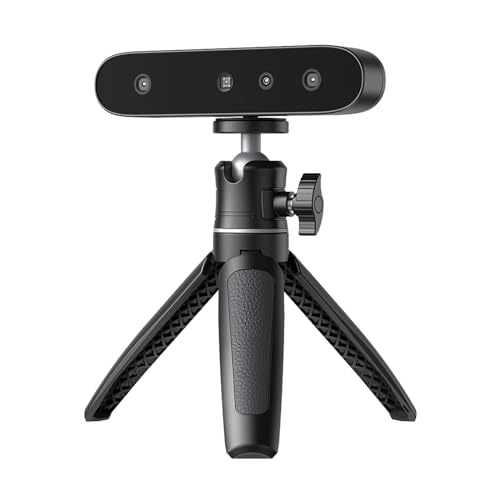
- Anti-shake tracking for steadier scans
- 24-bit full-color capture with 2MP camera
- Lightweight 105g PC-only design
Best For: Beginners who want an easy desktop scanner with color capture
Premium AI-Laser Scanner
Revopoint POP 4 for Precise 3D Work

- 0.03 mm single-frame accuracy
- Five scan modes for many object types
- WiFi 6 and battery grip for mobile use
Best For: Beginners who want advanced features and room to grow
Entry-Level NIR Scanner
3DMakerpro Fox for Small to Medium Objects

- 0.07 mm accuracy with NIR scanning
- Markerless tracking and anti-shake support
- JMStudio handles scanning, editing, and export
Best For: Budget-minded beginners willing to learn the workflow
Wireless Beginner Handheld

- 0.1 mm accuracy with 30 FPS scanning
- Anti-shake tracking helps beginners stay on target
- WiFi 6 bridge supports wireless workflow
Best For: Beginners who want portable handheld scanning with easier tracking
Best for tiny objects
Seal Lite small-format scanner

- Up to 0.02mm accuracy for fine detail
- Blue LED light source for small objects
- JMStudio includes alignment and correction tools
Best For: Beginners scanning small indoor objects with high detail needs
Fast handheld pick
CR-Scan Ferret handheld scanner

- Up to 30 FPS scanning with ASIC processing
- Dual-mode scans for wide or detailed capture
- Built-in RGB camera adds full-color textures
Best For: Beginners scanning medium-to-large objects who want speed and portability
Beginner-friendly wireless choice
Ferret Pro easy wireless scanner

- Designed for entry-level users and quick starts
- WiFi6 wireless scanning with anti-shake tracking
- Works with Windows, macOS, Android, and iOS
Best For: Beginners who want the simplest wireless workflow for larger objects
Entry-Level Medium-Format Choice – 3DMakerpro Fox for beginners
If you’re looking for a 3d scanner for beginners, the 3DMakerpro Fox is built to make handheld scanning feel approachable without giving up useful detail. It combines medium-format capture with AI visual tracking, so you can recover quickly if you lose your place and keep moving on hobby, printing, or inspection projects.
Best For: Beginners who want a straightforward scanner for 3D printing, modeling, and basic measurement work.
Pros:
- 0.07mm accuracy and 0.10mm resolution for detailed scans
- Markerless AI visual tracking helps relock onto the object after movement
- JMStudio handles scanning, editing, and optimization in one workflow
- Designed as an entry-level option for hobbyists and first-time users
Cons:
- Medium-format focus may not suit every tiny-object workflow
- Handheld scanning still benefits from a steady technique
- Advanced users may want more specialized features
The Fox is a practical starting point if you want guided software and beginner-friendly tracking in one package. It aims to reduce the learning curve while still producing scans detailed enough for real 3D printing and modeling work.
Portable Dual-Mode Pick – Creality Pika wireless scanner
The Creality Pika is a strong 3d scanner for beginners if you want a portable device that can grow with you. It combines blue laser and NIR structured light scanning, AI-assisted features, and a touchscreen interface, giving new users a flexible setup for small parts, collectibles, and even full-body scans.
Best For: Beginners who want a compact, wireless scanner with extra scanning modes and automatic cleanup tools.
Pros:
- Dual-mode scanning with 7-line blue laser and NIR structured light
- Up to 0.03mm accuracy for detailed small-object capture
- AI body completion, AI retexturing, and AI hole filling
- Wireless-friendly design with touchscreen, Wi-Fi 6, and dual batteries
Cons:
- Feature-rich setup may feel more complex than a basic starter scanner
- Best experience depends on compatibility with the CrealityScan workflow
- Small size means it may be easier to overlook in a crowded workspace
For beginners who want flexibility from day one, the Pika offers a lot in a compact package. Its mix of portability, AI tools, and dual scanning modes makes it appealing if you expect to scan different object types over time.
Quiet Beginner-Friendly Handheld – 3DMakerpro Moose Lite kit
If you want a 3d scanner for beginners that emphasizes ease of handling, the 3DMakerpro Moose Lite is a compelling handheld option. It pairs AI visual tracking with 0.05mm accuracy and JMStudio software, making it a sensible choice for users who want detailed results without a complicated setup.
Best For: Beginners who want a lightweight handheld scanner for medium objects and print-ready detail.
Pros:
- 0.05mm accuracy and 0.10mm resolution for refined detail
- AI visual tracking helps simplify handheld scanning
- JMStudio integrates scanning, editing, and optimizing
- Lightweight and quiet design makes it easy to use anywhere
Cons:
- 10FPS scanning speed is not the fastest in this group
- Best suited to medium objects rather than very large projects
- Plastic build may feel less premium than metal-bodied alternatives
The Moose Lite balances beginner-friendly software support with solid scan precision. It is especially attractive if you want a quiet, portable scanner that focuses on reliable results for printing and display work.
Simple Desktop Starter – Creality CR-Ferret SE for beginners
The Creality CR-Ferret SE is a practical 3d scanner for beginners who want an easy desktop-friendly way to start scanning. Its anti-shake tracking and simple click-to-start workflow are designed to reduce frustration, while the 24-bit color camera adds full-color capture for more lifelike results.
Best For: Beginners who want a lightweight, PC-based scanner with full-color capture and steady tracking.
Pros:
- Anti-shake tracking helps compensate for unsteady hands
- 24-bit full-color scanning with a built-in 2MP color camera
- Can scan black and metal objects without spray
- Easy-to-start workflow with a compact 105g design
Cons:
- PC scanning only, so it is less flexible than wireless options
- No battery handle included in the SE version
- More limited than models that support mobile or wireless scanning
The CR-Ferret SE is a sensible entry point if you want straightforward operation and useful color capture. It is best for beginners who plan to stay at a PC and want a compact scanner that helps make early scans feel more manageable.
Premium AI-Laser Scanner – Revopoint POP 4 for Precise 3D Work
If you want a 3d scanner for beginners that still leaves room to grow into advanced projects, the Revopoint POP 4 stands out for its wide feature set. It is built for detailed 3D printing, reverse engineering, and outdoor capture, but it also adds beginner-friendly conveniences like AI segmentation, wireless scanning, and multiple scan modes.
Best For: Users who want an advanced beginner-friendly scanner with strong detail, wireless convenience, and outdoor flexibility.
Pros:
- Up to 0.03 mm single-frame accuracy for fine surface detail and complex geometry.
- AI object segmentation helps isolate the target and filter background noise on Windows.
- Five scanning modes cover small parts, large objects, dark surfaces, and reflective metal.
- WiFi 6 support and a battery grip make outdoor and mobile scanning more practical.
Cons:
- Its many modes and software features may feel overwhelming for a true first-time user.
- Some AI features are Windows-only.
- Best results will likely take time to learn and tune.
Overall, the POP 4 is a strong pick if you want beginner access without giving up professional-grade tools. It is especially appealing if you expect to scan a wide range of object sizes and materials.
Entry-Level NIR Scanner – 3DMakerpro Fox for Small to Medium Objects
The 3DMakerpro Fox is positioned as a 3d scanner for beginners who want a more approachable way into scanning small and medium objects. Its markerless tracking, anti-shake support, and NIR-based scanning simplify setup, but the notes also make it clear that patience and some CAD or modeling knowledge help a lot.
Best For: Entry-level users who want a budget-friendly scanner for small to medium objects and are willing to learn the workflow.
Pros:
- Markerless tracking removes the need to place target dots on objects.
- 0.07 mm accuracy is solid for an entry-level model.
- Works on items from 40 mm to 1200 mm, with an ideal distance of 150 to 400 mm.
- JMStudio includes scanning, editing, fusion, and export tools for common file formats.
Cons:
- Results can require a learning curve, patience, and basic CAD/3D modeling experience.
- A capable PC with a dedicated GPU is strongly recommended.
- Not the most effortless option if you want instant plug-and-play scanning.
For beginners who are ready to learn the process, the Fox offers a practical balance of affordability, scanning flexibility, and usable output formats. It is a better fit for hands-on users than absolute novices expecting effortless results.
Wireless Beginner Handheld – Creality CR-Scan Ferret Pro
If you are looking for a 3d scanner for beginners with a simpler handheld experience, the Creality CR-Scan Ferret Pro is a compelling choice. Its anti-shake tracking, one-shot 3D imaging, and wireless WiFi 6 bridge are designed to make scanning smoother, especially for users who want portability without a complicated setup.
Best For: Beginners who want a wireless handheld scanner that is easier to track and use on the move.
Pros:
- Up to 0.1 mm accuracy and 30 FPS scanning for detailed capture.
- Anti-shake tracking and one-shot imaging help improve scanning success rates.
- WiFi 6 bridge offers faster, more stable wireless transfer.
- Supports OBJ, STL, and PLY exports for 3D printing and reverse engineering.
Cons:
- Performance is limited on highly reflective, transparent, or extremely dark surfaces.
- Best results still depend on compatible devices and software requirements.
- Wireless setup adds convenience, but also adds another component to manage.
As a beginner-friendly handheld scanner, the Ferret Pro focuses on making scanning more forgiving rather than overwhelming you with complexity. It is a good fit if portability and easier tracking matter more than maximum surface versatility.
Best for tiny objects – Seal Lite small-format scanner
If you want a 3d scanner for beginners that focuses on small objects, the 3DMakerpro Seal Lite is built for careful, close-range work. It targets items from 10 to 300mm and uses a blue LED light source to help capture fine edges, dents, and textures with up to 0.02mm accuracy. It does have a learning curve, but its bundled software and scan aids make it a practical entry point for patient users.
Best For: Beginners scanning small models, parts, and indoor objects who want high detail and can spend time learning the workflow.
Pros:
- Up to 0.02mm accuracy for fine-detail scanning
- Blue LED structured light helps capture tiny textures and edges
- Scan-back and anti-shake features support steadier results
- JMStudio includes visual tracking, error correction, and auto-alignment
Cons:
- Mono texture only, so it does not capture full color
- Designed for indoor use and small-format objects only
- Requires a relatively powerful PC and some practice to use well
Overall, the Seal Lite is a strong fit if detail matters more than simplicity. It is not the most plug-and-play option, but for beginners willing to learn, it offers a capable path into small-object 3D scanning and 3D printing prep.
Fast handheld pick – CR-Scan Ferret handheld scanner
The Creality CR-Scan Ferret is a practical 3d scanner for beginners who want faster handheld scanning without stepping into a fully professional setup. It offers dual-mode scanning for both larger subjects and finer detail, up to 0.1mm accuracy, and a built-in RGB camera for full-color textures. With wireless options and support for Android, Windows, and compatible Macs, it is flexible enough for mixed-use home scanning.
Best For: Beginners who want a fast handheld scanner for medium-to-large objects and value portability plus color capture.
Pros:
- Up to 30 FPS scanning speed and 60 FPS image processing
- Dual-mode scanning covers both wide-range and high-accuracy work
- Built-in RGB camera captures full-color textures
- Low-power design supports power-bank or Android device use
Cons:
- Not designed for very small objects or highly detailed items like jewelry
- Requires fairly specific system requirements for each platform
- Some workflows depend on compatible mobile or PC software versions
For beginners who want speed, color, and handheld flexibility, the Ferret is easy to understand as a first serious scanner. It is best when your projects are moderate in size and you want a quicker learning curve than a more detail-focused small-object scanner.
Beginner-friendly wireless choice – Ferret Pro easy wireless scanner
If you’re looking for a 3d scanner for beginners that keeps setup simple, the Creality CR-Scan Ferret Pro is the most approachable option in this group. Creality specifically calls it easy to use for entry-level users, and its WiFi6 wireless scanning, anti-shake tracking, and cross-platform support make it convenient for home, studio, or travel use. It supports full-color scanning and works best on objects from 50mm to 2000mm.
Best For: Entry-level users who want an easy wireless scanner for larger everyday objects and flexible cross-platform use.
Pros:
- Marketed as easy to use for beginners and DIY creators
- WiFi6 wireless scanning with anti-shake tracking
- Works with Windows, macOS, Android, and iOS
- Includes a full kit with tripod, power bank, phone holder, and case
Cons:
- Not suitable for very small or highly detailed items like jewelry
- Performs best when surfaces are not reflective, transparent, or very dark
- Needs compatible software and device requirements for each platform
The Ferret Pro stands out as the easiest recommendation for beginners who want wireless convenience and broad device compatibility. It is a better fit than a precision small-object scanner if your goal is general-purpose 3D capture rather than fine miniature detail.
How We Picked the Best 3d Scanner for Beginners
For a 3d Scanner for Beginners, ease of use matters as much as raw performance. We prioritized scanners with straightforward software, stable tracking, flexible capture modes, and enough accuracy for common first projects like small parts, figurines, product mockups, and 3D printing reference scans.
We also looked for models that reduce frustration for new users: clearer onboarding, forgiving scan behavior, useful color capture where available, and hardware that works across typical home or desktop workflows.
Quick Comparison
As you compare the options, think in terms of object size and workflow. Small-format scanners tend to be better for detailed parts and tabletop items, while medium-format and handheld scanners are often more versatile for larger objects, body scans, or mixed-size projects. Wireless or anti-shake features can make a big difference if you are still learning how to keep a scan stable.
Key Buying Factors for a 3d Scanner for Beginners
Accuracy and Detail
Higher accuracy helps capture sharp edges and finer surface detail, but beginners should balance that against usability. A scanner that is slightly less precise but easier to operate may deliver better real-world results than a spec-heavy model that is hard to control.
Tracking and Stability
Good tracking reduces dropped frames and messy rescans. Look for anti-shake support, dual-light or laser options, and scanning modes that help maintain alignment when moving around the object.
Object Size and Scanning Range
Match the scanner to what you actually plan to scan. Small objects, medium props, full products, and larger items all benefit from different capture ranges. Choosing the right range from the start can save time and improve scan quality.
Software and File Workflow
Beginner-friendly software should make it easy to preview, clean, and export scans for 3D printing or editing. Simple file handling and compatible export formats matter just as much as hardware features.
Lighting and Surface Support
Shiny, dark, or textured surfaces can challenge any scanner. If you plan to scan difficult materials, look for stronger light projection, color scanning, or features that improve surface recognition.
Who Should Buy Which 3d Scanner for Beginners?
If you want the easiest start, choose a model built around simple handheld scanning and strong software support. If your goal is 3D printing of smaller items with fine detail, a more precise small-format scanner may be the better fit. If you need more flexibility for larger objects, body capture, or mixed-use scanning, a portable wireless scanner with better tracking is usually worth the upgrade.
In short, the best 3d Scanner for Beginners is the one that matches your projects, your workspace, and how much setup you are willing to manage. Start with your primary use case, then choose the most forgiving scanner that meets it.