
Finding a capable 3D printer on a $300 budget is easier than ever, but the best choice depends on more than headline speed. Build volume, automatic calibration, material support, and setup time all affect the ownership experience.
We selected 10 standout options for different needs, from compact beginner machines to fast CoreXY printers. Use the guide below to compare practical features and choose the right fit for your projects.
Best 10 3d Printers Under 300 Picks for 2026
Best Beginner Pick

- Automatic calibration and simple setup
- Includes a creative LED Lamp Kit
- Quiet, compact connected printing
Best For: Beginners making décor, gifts, and everyday models
Best Bundle Value

- Includes four PLA filament colors
- 250mm/s maximum print speed
- Auto leveling and direct-drive extrusion
Best For: Beginners who want supplies included
Best High-Speed Choice

- Up to 600mm/s advertised speed
- CoreXY frame with auto leveling
- Quick-change nozzles and PEI plate
Best For: Rapid prototypes, batches, and functional parts
Best Straightforward Workhorse

- 250mm/s printing with auto leveling
- Direct drive supports PLA, PETG, and TPU
- Flexible plate and silent mainboard
Best For: Everyday projects and functional parts
Best Compact Pick

- Compact 100mm build volume
- PLA and TPU compatibility
- Includes filament and setup guides
Best For: Beginners and small workspaces
Best for Everyday Use
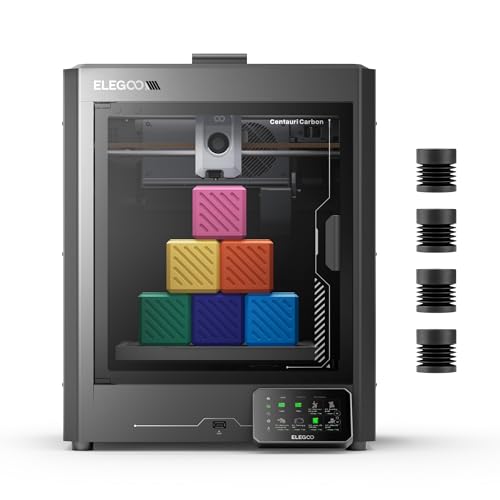
- Up to 500mm/s CoreXY printing
- 256mm cubed build volume
- Auto calibration and built-in camera
Best For: Fast, larger-format maker projects
Best Smart Desktop Pick

- Auto leveling and WiFi connectivity
- AI camera supports remote monitoring
- 260mm build volume with quick-swap hotend
Best For: Connected everyday desktop printing
Best Overall Speed and Ease

- One-click automatic leveling
- CoreXY design with up to 600 mm/s speed
- Three-second tool-free nozzle swaps
Best For: Beginners and experienced makers seeking fast, low-maintenance printing
Best Quick-Start Printer

- Ten-minute setup with automatic leveling
- Up to 600 mm/s CoreXY printing
- Power-loss recovery and filament run-out sensing
Best For: New and intermediate users wanting fast, straightforward printing
Best Beginner Pick – A1 mini LED Lamp Kit
If you are comparing 3d printers under 300, the Bambu Lab A1 mini stands out as a compact, ready-to-use option for beginners. Automatic calibration, simple setup, quiet operation, and access to MakerWorld models make it approachable for everyday creative projects.
Best For: Beginners who want an easy way to print toys, décor, tools, gifts, and compatible LED lamp designs.
Pros:
- Includes an LED Lamp Kit for functional decorative projects.
- Automatic calibration and simple setup reduce troubleshooting.
- Quiet, compact design suits homes, studios, and workspaces.
- Works with the Bambu Lab MakerWorld and Bambu Handy ecosystem.
Cons:
- The compact format may be less suitable for larger prints.
- The LED lamp projects depend on compatible models and materials.
The A1 mini is a particularly convenient choice when ease of use matters more than maximum build capacity. Its bundled lamp kit also gives new makers an engaging project right away.
Best Bundle Value – Ender 3 V3 SE Filament Bundle
Creality Ender 3 V3 SE 3D Printer Bundle with PLA Filament 4 Packs(Black+White+Red+Blue)
Check Price On AmazonAmong 3d printers under 300, this Ender 3 V3 SE bundle is practical for shoppers who want a fast printer and several commonly used PLA colors to start printing immediately. Its direct-drive extruder, auto leveling, and automatic Z-offset support a smoother setup.
Best For: New or budget-conscious makers who want a capable printer with four packs of PLA filament included.
Pros:
- Supports speeds up to 250mm/s with 2500mm/s² acceleration.
- CR Touch auto leveling and strain-sensor Z-offset simplify calibration.
- Sprite full-metal dual-gear direct extruder supports PLA, TPU, and PETG.
- Includes PLA filament in black, white, red, and blue.
Cons:
- The listed bundle is centered on PLA, so other materials may require separate purchases.
- Its feature set may involve more setup and tuning than a fully streamlined ecosystem printer.
This bundle makes sense when included supplies are a priority. It combines useful automation and material flexibility with enough filament for varied first projects.
Best High-Speed Choice – Flashforge Adventurer 5M
For shoppers comparing 3d printers under 300 with speed in mind, the Flashforge Adventurer 5M offers a high-speed CoreXY design, automatic leveling, and a direct-drive setup. Its larger build volume and rapid-change components suit makers who print prototypes or batches of functional parts.
Best For: Home, school, and workshop users who prioritize rapid prototyping, larger models, and flexible nozzle options.
Pros:
- Advertised print speeds reach 600mm/s with 20,000mm/s² acceleration.
- CoreXY frame, dual linear rails, and anti-vibration design support stable printing.
- 25-point auto leveling and pressure-sensor compensation help with first-layer consistency.
- PEI plate, quick-change nozzle system, filament sensor, and app monitoring add convenience.
Cons:
- At 23.3 pounds, it is less portable than smaller beginner printers.
- The enclosure is an optional upgrade rather than an included feature.
- Advanced speed and nozzle options may be more than casual users need.
The Adventurer 5M is the strongest fit here for users who value throughput and expandability. Its CoreXY construction and workshop-oriented features make it well suited to repeated functional printing.
Best Straightforward Workhorse – Ender 3 V3 SE
This standard Ender 3 V3 SE is a sensible option among 3d printers under 300 for buyers who want the core printer without a bundled filament assortment. It combines fast printing, auto leveling, direct-drive extrusion, and a flexible spring-steel build plate for everyday projects.
Best For: Beginners and experienced users who want a straightforward printer for prototypes, functional parts, and general household projects.
Pros:
- Prints at up to 250mm/s with 2500mm/s² acceleration.
- CR Touch auto leveling and automatic Z-offset calibration simplify setup.
- Sprite Direct Drive Extruder supports PLA, PETG, and TPU.
- Silent mainboard and flexible PC spring-steel plate improve daily usability.
Cons:
- Filament is not included in this listed configuration.
- The printer occupies a relatively deep footprint at 19.6 inches.
This model is a good fit if you want the Ender 3 V3 SE platform without paying for a color-filament bundle. Its combination of automation, material support, and easy print removal makes it a versatile starting point.
Best Compact Pick – Portable Beginner 3D Printer
If you want one of the most space-conscious 3d printers under 300, this compact FDM model is designed for straightforward setup and small projects. Its 100 x 100 x 100mm build volume, removable build plate, and included PLA filament make it a practical starting point for beginners, students, and hobbyists.
Best For: Beginners, classrooms, STEM learning, and small desktop projects.
Pros:
- Compact 2.2-pound design fits small workspaces.
- Supports both PLA and flexible TPU filament.
- Includes 10m of PLA filament, tools, TF card, and video setup guides.
- Removable build plate simplifies model removal.
Cons:
- The 100 x 100 x 100mm build volume limits larger models.
- Requires modular assembly before first use.
This is a sensible choice when affordability, portability, and an easy learning curve matter more than printing large objects. The small build area is its main trade-off, but it suits introductory projects well.
Best for Everyday Use – ELEGOO Centauri Carbon
Among 3d printers under 300, the ELEGOO Centauri Carbon stands out for users who prioritize speed, automation, and a larger build area. It arrives assembled and pre-calibrated, with a 256 x 256 x 256mm volume, auto bed leveling, and a built-in camera for monitoring prints.
Best For: Makers who want fast, larger-format printing with advanced monitoring and material support.
Pros:
- CoreXY system supports speeds up to 500mm/s and 20,000mm/s² acceleration.
- Arrives assembled and pre-calibrated for out-of-box printing.
- 320°C hardened-steel nozzle and enclosed chamber support advanced filaments.
- Built-in camera and dual LED lighting enable print monitoring and time-lapse recording.
Cons:
- At 38.5 pounds, it is substantially less portable than compact alternatives.
- Its advanced features may be more than a first-time user needs.
The Centauri Carbon is a strong fit for productivity-focused buyers who need speed and room for larger parts. Its rigid frame, automatic calibration, and enclosed design add convenience, while the camera helps keep an eye on long prints.
Best Smart Desktop Pick – Creality SPARKX i7
The Creality SPARKX i7 is a practical option among 3d printers under 300 for users who want a larger desktop machine with modern convenience features. Auto leveling, WiFi connectivity, AI camera monitoring, and a 260 x 260 x 255mm build volume make it suited to everyday projects and longer print sessions.
Best For: Desktop makers who want remote monitoring, quieter operation, and room for larger models.
Pros:
- Automatic leveling and quick setup reduce calibration work.
- Built-in camera supports remote viewing, time-lapse recording, and print status detection.
- 260 x 260 x 255mm build volume accommodates larger models and batch printing.
- Tool-free quick-swap hotend simplifies maintenance.
Cons:
- The optional CFS Lite multi-color system is sold separately.
- Its 29.7-pound weight makes it better suited to a dedicated desktop location.
The SPARKX i7 balances ease of use with useful smart features. It is a particularly good match for buyers who value WiFi monitoring and a generous build area, while the optional multi-color system leaves room for future expansion.
Best Overall Speed and Ease – FLASHFORGE AD5M
If you want one of the more streamlined 3d printers under 300, the FLASHFORGE AD5M combines automatic calibration, a CoreXY frame, and fast printing in a beginner-friendly package. Its 220 x 220 x 220 mm build area suits everyday models, prototypes, and functional parts.
Best For: Beginners and experienced makers who prioritize quick setup, automatic leveling, and easy maintenance.
Pros:
- One-click automatic leveling helps simplify first-layer setup.
- CoreXY all-metal construction supports speeds up to 600 mm/s while maintaining stable, low-noise operation.
- Tool-free quick-release nozzle can be changed in about three seconds.
- Power-loss recovery and a flexible double-sided PEI plate add practical convenience.
Cons:
- The open design is less suitable for environments where an enclosed printer is preferred.
- Its 220 mm cubed build volume may not suit oversized projects.
The AD5M stands out for reducing routine printer setup and maintenance. Remote monitoring, batch file transmission, and support for multiple nozzle sizes make it a flexible choice for both learning and regular production.
Best Upgradeable Multicolor Option – Creality K2 SE
The Creality K2 SE is a strong contender among 3d printers under 300 for shoppers who want high-speed printing now and a path to multicolor printing later. Its rigid metal frame, automatic leveling, and 220 x 215 x 245 mm build area support both detailed models and larger functional parts.
Best For: Makers who want a stable, fast printer with the option to add Creality’s CFS multicolor system.
Pros:
- CoreXY motion system reaches up to 500 mm/s with vibration compensation for smoother surfaces.
- Die-cast aluminum construction and reinforced crossbeams support dimensional stability.
- Fully automatic leveling and a five-minute assembly simplify initial setup.
- Direct-drive extruder includes a quick-swap nozzle, hardened steel gears, and filament run-out sensing.
Cons:
- The CFS multicolor system is sold separately.
- The product notes do not specify the final price or complete material compatibility.
The K2 SE is appealing if your priorities extend beyond basic single-color printing. Its combination of rigid mechanics, automated calibration, and expandable workflow gives it room to grow as your projects become more ambitious.
Best Quick-Start Printer – FLASHFORGE Adventurer 5M
The FLASHFORGE Adventurer 5M is a practical pick among 3d printers under 300 when quick setup and reliable first layers matter most. It offers a 220 x 220 x 220 mm build volume, automatic leveling, high-speed CoreXY motion, and a removable dual-sided PEI plate.
Best For: New and intermediate users who want fast startup, dependable calibration, and straightforward print recovery.
Pros:
- One-click fully automatic leveling helps produce consistent first layers.
- Print speeds reach up to 600 mm/s, with vibration compensation to reduce ghosting.
- Quick-detachable 280°C nozzle and upgraded direct extruder simplify maintenance.
- Filament run-out sensing and power-loss recovery help protect longer prints.
Cons:
- The open-frame design is intended for open, well-ventilated environments.
- The standard 0.4 mm nozzle material support is centered on PLA, PETG, and TPU; carbon-fiber filaments require the optional 0.6 mm nozzle noted in the specifications.
With an advertised ten-minute path from unboxing to printing, the Adventurer 5M emphasizes convenience without giving up speed. It is especially suitable for users who want less manual calibration and simple recovery from common interruptions.
How We Picked the Best 3d Printers Under 300
We focused on features that matter in everyday printing rather than specifications alone. Our comparison considers print speed, build volume, leveling and calibration systems, extruder design, supported materials, noise, ease of setup, and useful extras such as cameras or removable build plates.
Because prices and bundles can change, value also includes what comes in the box. Filament, accessories, and ready-to-use designs can make a meaningful difference for beginners, while experienced users may prefer a stronger frame, faster motion system, or broader material compatibility.
Quick Comparison
| What to compare | Best for | Why it matters |
|---|---|---|
| Small build volume | Desk users and beginners | Takes less space and usually simplifies setup |
| Medium build volume | General-purpose projects | Balances model size, speed, and footprint |
| High-speed CoreXY design | Frequent printing | Can reduce print times while improving motion stability |
| Automatic leveling | New users | Reduces manual bed-adjustment work |
| Direct-drive extrusion | Flexible filament users | Typically handles TPU and similar materials more easily |
Key Buying Factors for 3d Printers Under 300
Build Volume and Printer Size
Check the usable build area against the objects you expect to make. A compact printer is convenient for small models and limited desks, but a larger platform is more versatile for organizers, cosplay parts, and multi-piece projects. Allow extra room around the machine for access and ventilation.
Speed Versus Print Quality
Advertised maximum speed is not the same as typical production speed. Fast printers still need suitable profiles, stable filament, and accurate motion systems. Look for automatic calibration and a rigid frame, then prioritize consistent results over the highest number on the specification sheet.
Materials and Extrusion
PLA is the easiest starting material and works on nearly every printer in this roundup. TPU requires controlled feeding and is generally better suited to direct-drive systems. If you plan to print higher-temperature materials, verify the nozzle and bed limits, enclosure requirements, and manufacturer guidance before buying.
Setup, Maintenance, and Safety
Auto-leveling, one-click calibration, removable PEI surfaces, and quick-change nozzles can save considerable time. Also consider replacement parts, slicer compatibility, firmware support, and whether the printer includes monitoring features. Operate any printer on a stable, heat-resistant surface and follow the manufacturer’s ventilation recommendations.
Who Should Buy Which 3d Printers Under 300?
Beginners: Choose a ready-to-use model with automatic leveling, guided setup, and a forgiving PLA workflow. A compact machine is often the least intimidating starting point.
Families, students, and casual makers: Look for a reliable general-purpose printer with a practical build volume, quiet operation, and simple removable build surfaces.
Speed-focused hobbyists: A CoreXY model with high-speed motion, automatic calibration, and a camera can be worthwhile if you print frequently and understand that fast profiles may require tuning.
Users printing flexible materials: Prioritize direct-drive extrusion and confirm TPU support. For advanced projects, also check nozzle temperature, build-plate performance, and available replacement parts.