
Choosing among today’s 3D printers for professionals means balancing build volume, material capability, speed, reliability, and total operating cost. The right machine should fit your workflow—not simply offer the longest feature list.
We compared ten standout FDM and CoreXY models for prototyping, engineering parts, small-batch production, and multi-material printing. Use the guide below to narrow the field by application, workspace, and budget.
Best 10 3d Printers for Professionals Picks for 2026
Large-Format Powerhouse
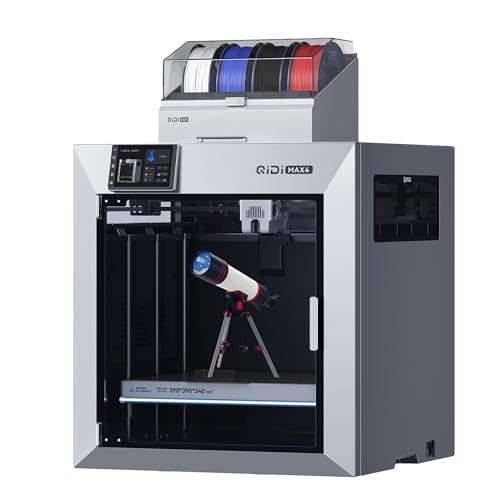
- 390 × 390 × 340mm build volume
- 65°C heated chamber and hardened nozzle
- Up to 800mm/s with AI print monitoring
Best For: Large prototypes and high-temperature engineering materials
Multi-Material Specialist
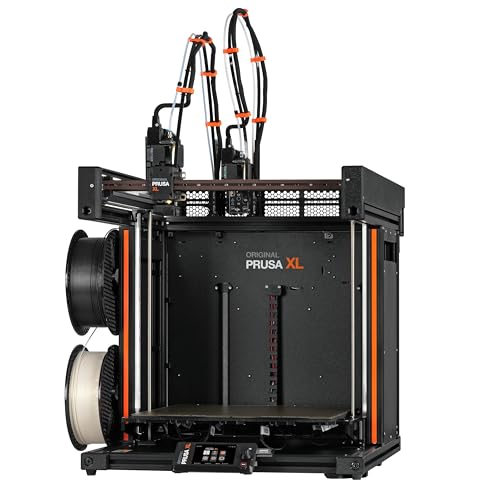
- Two-toolhead material switching
- 14.17-inch cubed build volume
- Segmented heated bed and CoreXY motion
Best For: Complex prototypes and soluble-support applications
Industrial Multicolor Workhorse

- Four independent extruders
- 65°C chamber and HEPA13 filtration
- 600mm/s speed with CoreXY architecture
Best For: High-throughput multicolor engineering prints
Streamlined Production Starter

- 500mm/s high-speed printing
- Enclosed design with automatic leveling
- Optional AMS supports up to 16 colors
Best For: Fast everyday prototyping and accessible professional workflows
DIY Professional Pick

- Enclosed CoreXY design with a 55°C actively controlled chamber
- Solder-free DIY assembly with detailed photographic guidance
- Offline-capable operation for schools and businesses
Best For: Hands-on users who need privacy and engineering-material support
Multimaterial Productivity Pick
Snapmaker U1 4-Toolhead Printer

- Four independent toolheads change in approximately five seconds
- Supports multicolor, mixed-material, and soluble-support printing
- 500 mm/s CoreXY printing across a 270 mm cubed build volume
Best For: Creators and workshops prioritizing efficient multicolor production
Large-Format Speed Pick
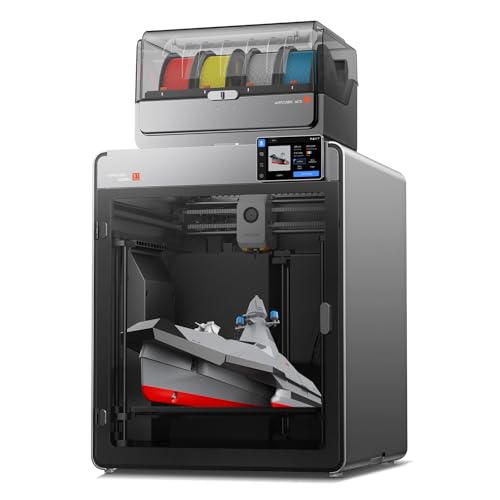
- 350 mm cubed build volume for large prototypes and enclosures
- Up to 600 mm/s printing with a 65°C heated chamber
- Four-color printing included, expandable to 16 colors
Best For: Engineers and makers producing large, fast, multicolor parts
Industrial Multi-Material Pick

- Four independent toolheads limit purge waste
- 65°C heated chamber supports engineering filaments
- CoreXY printing reaches up to 600mm/s
Best For: Professional multi-material and engineering-part production
Large-Format Production Pick

- 350mm cubed build volume handles large parts
- Up to 16 colors with four connected CFS units
- 60°C chamber and 350°C nozzle support engineering filaments
Best For: Large-format, batch, and automated professional printing
Streamlined Workflow Pick

- Prints up to 600mm/s with active flow compensation
- AMS 2 Pro enables multi-color printing and filament drying
- Automatic calibration and AI failure detection simplify setup
Best For: Fast, automated professional prototyping and multi-color work
Large-Format Powerhouse – QIDI Max4 Combo
For professionals seeking 3d printers for professionals, the QIDI Max4 Combo combines a generous 390 × 390 × 340mm build volume with a 65°C active heated chamber. It is designed for large prototypes, molds, industrial parts, and demanding engineering materials.
Best For: Professionals printing large, high-temperature, or abrasive-material parts.
Pros:
- Large build area supports many full-size parts without splitting.
- Closed-loop X/Y motors, 800mm/s speed, and 30,000mm/s² acceleration support fast, precise production.
- Hardened-steel nozzle and high-flow hotend handle materials including carbon-fiber-reinforced nylon.
- AI failure monitoring and optional QIDI BOX expansion support a more automated workflow.
Cons:
- At 120 pounds, it requires substantial space and a sturdy setup.
- The Polar Cooler is sold separately.
- Multi-color printing requires the separately connected QIDI BOX.
The Max4 Combo is a strong choice when build volume and engineering-material capability matter more than compactness. Its heated chamber and monitoring features make it particularly practical for demanding professional workflows.
Multi-Material Specialist – Original Prusa XL
The Original Prusa XL is a large-format option for professionals who need reliable multi-material printing. Its two-toolhead system, segmented heated bed, and CoreXY motion platform support functional prototypes, complex parts, and soluble support structures.
Best For: Engineering teams, studios, and advanced makers producing complex multi-material prints.
Pros:
- Dual toolheads enable material switching and soluble-support workflows.
- Large 14.17-inch cubed build volume accommodates substantial parts.
- Segmented bed heating helps reduce warping and improve energy efficiency.
- PrusaSlicer integration, included materials, and lifetime technical assistance support a professional workflow.
Cons:
- The large 35.43 × 31.49 × 31.49-inch footprint needs considerable workspace.
- Several components require quick assembly after transport.
- This version has two toolheads rather than the larger toolhead configurations available in the XL range.
The Prusa XL is compelling for users who value controlled material changes and an established software ecosystem. It is especially suited to repeatable prototyping where support materials and large-format accuracy are priorities.
Industrial Multicolor Workhorse – Flashforge Creator 5 Pro
For production-minded buyers comparing 3d printers for professionals, the Flashforge Creator 5 Pro offers four independent extruders, a 65°C active chamber, and speeds up to 600mm/s. Its sealed enclosure and HEPA13 filtration also make it suitable for more controlled work environments.
Best For: Professional multicolor printing with engineering-grade materials and high throughput.
Pros:
- Four independent extruders provide true color and material separation with less purge waste.
- Active chamber heating supports ABS, ASA, PC, and Nylon printing in varied room conditions.
- HEPA13 filtration and a sealed enclosure help manage particles and odors.
- CoreXY architecture, automatic leveling, and 600mm/s printing support efficient production.
Cons:
- The 256mm³ build volume is smaller than the large-format options in this roundup.
- Its advanced toolhead system may be more capability than needed for simple single-material jobs.
- It weighs about 30.9 pounds, so it still requires a dedicated stable location.
The Creator 5 Pro stands out when independent toolheads and workplace-oriented enclosure features are more important than maximum build size. It offers a well-rounded balance of speed, material flexibility, and operational convenience.
Streamlined Production Starter – Bambu Lab P1S
The Bambu Lab P1S is a practical entry point for professionals who want a ready-to-use enclosed printer with fast operation and automated bed leveling. It supports common materials such as PLA, PETG, TPU, PVA, PET, and ABS, while an optional AMS enables multicolor printing.
Best For: Professionals wanting quick setup, reliable everyday printing, and optional multicolor capability.
Pros:
- Ready-to-use design can be set up in about 15 minutes.
- 500mm/s speed and 20,000mm/s² acceleration support rapid iteration.
- Enclosed construction improves performance with advanced filaments.
- Automatic bed leveling simplifies first-layer preparation.
Cons:
- Multicolor printing requires the separately connected Bambu Lab AMS.
- Carbon- and glass-fiber-reinforced polymers are not recommended.
- It is capable of PA and PC but is primarily positioned around more common filaments.
The P1S is a sensible choice for teams that prioritize straightforward setup and fast day-to-day printing over maximum build volume or specialized abrasive-material capability. Its enclosed design and optional AMS provide room to expand as workflows become more demanding.
DIY Professional Pick – Prusa CORE One+ Kit
The Original Prusa CORE One+ is a strong option among 3d printers for professionals who want hands-on control, reliable CoreXY performance, and an enclosed workspace for engineering materials. Its solder-free kit format requires assembly, but the process is supported by photographic instructions and hardware templates.
Best For: Professionals, advanced makers, schools, and businesses that value serviceability, offline operation, and technical involvement.
Pros:
- All-steel enclosed CoreXY frame supports fast, detailed printing.
- Actively controlled chamber reaches 55°C and supports materials including carbon fiber, Nylon, ASA, and PC-Blend.
- Offline-capable operation helps keep designs stored locally.
- One-click printing and access to more than one million Printables models simplify workflows.
Cons:
- DIY assembly typically takes 15–20 hours.
- The kit format may be less convenient than a fully assembled printer.
- Its 16.3 x 17.5 x 21.8-inch footprint and 53.9-pound weight require dedicated space.
The CORE One+ is particularly compelling when privacy, material flexibility, and a deeper understanding of the machine matter as much as print speed. Choose it if you are comfortable assembling the printer and want an enclosed professional platform.
Multimaterial Productivity Pick – Snapmaker U1 4-Toolhead Printer
The Snapmaker U1 stands out among 3d printers for professionals who regularly create multicolor prototypes, functional parts, or mixed-material models. Its four independent toolheads reduce changeover time and waste while maintaining a 270 x 270 x 270 mm CoreXY build volume.
Best For: Workshops, small businesses, professional creators, and users producing multicolor or mixed-material parts.
Pros:
- Four toolheads switch in about five seconds without repeated filament purging.
- Supports combinations such as rigid materials, flexible TPU, and water-soluble supports.
- Automatic offset calibration, vibration compensation, and extrusion tuning reduce manual setup.
- CoreXY motion system reaches up to 500 mm/s with remote app control and AI-powered monitoring.
Cons:
- The 22.6 x 13 x 14.2-inch printer and 57.9-pound weight require substantial workspace.
- Four-toolhead workflows may be more capability than users need for single-material printing.
- Advanced material and multicolor projects can require more planning than basic prints.
The U1 is a productivity-focused choice when tool changes, material variety, and reduced waste directly affect your workflow. Its calibration and monitoring features also make a comparatively complex professional setup easier to manage.
Large-Format Speed Pick – Anycubic Kobra S1 Max Combo
The Anycubic Kobra S1 Max Combo is designed for professionals who need large parts, rapid production, and broader material capability. Its 350 x 350 x 350 mm build volume can accommodate full-size prototypes and enclosures, while the enclosed CoreXY structure and heated chamber target demanding projects.
Best For: Engineers, makers, and production-oriented users printing large prototypes, enclosures, and multicolor models.
Pros:
- Large 350 x 350 x 350 mm build volume allows many parts to print in one piece.
- Up to 600 mm/s speed and 20,000 mm/s² acceleration shorten production time.
- 65°C heated chamber and 350°C hotend support materials such as ABS, ASA, TPU, and PLA.
- ACE 2 Pro enables four-color printing out of the box, expandable to 16 colors.
Cons:
- At 77.8 pounds and 21 x 23 x 19 inches, it needs significant floor or bench space.
- Expansion to 16 colors requires additional ACE 2 Pro boxes.
- Its large format may be unnecessary for users primarily printing small parts.
Choose the Kobra S1 Max Combo when part size and throughput are the deciding factors. The combination of a large enclosed chamber, high-speed CoreXY design, and expandable color system makes it a flexible platform for demanding prototype work.
Industrial Multi-Material Pick – FLASHFORGE Creator 5 Pro
For professionals seeking 3d printers for professionals, the FLASHFORGE Creator 5 Pro emphasizes efficient multi-material production, demanding engineering filaments, and high-speed CoreXY motion. Its four independent toolheads switch in about seven seconds without filament flushing, helping reduce waste during color or material changes.
Best For: Engineering teams and production users printing multi-color parts or durable components in materials such as ABS, PC, and PA.
Pros:
- Four toolheads reduce purge waste and can improve multi-color printing efficiency.
- Active heated chamber reaches 65°C for better control with advanced filaments.
- CoreXY architecture supports speeds up to 600mm/s with vibration compensation.
- HEPA 13 and activated-carbon filtration help manage particles and fumes.
Cons:
- Its 39-pound, enclosed design is more substantial than a basic desktop printer.
- The feature set is geared toward professional workflows rather than simple entry-level use.
The Creator 5 Pro stands out when material efficiency, enclosed high-temperature printing, and automated calibration matter more than a minimal setup. Its built-in camera and remote-control support also suit users monitoring ongoing production.
Large-Format Production Pick – Creality K2 Plus Combo
The Creality K2 Plus Combo is a strong option among 3d printers for professionals who need a large build area, rapid output, and automated monitoring. Its 350 × 350 × 350mm volume accommodates larger parts or batches, while the CFS system can support up to 16 colors when four units are connected.
Best For: Professional users producing large models, batch runs, or multi-color parts with high-temperature engineering materials.
Pros:
- Large 350 × 350 × 350mm build volume reduces the need to split large models.
- Up to 600mm/s printing and 30,000mm/s² acceleration support faster production.
- 60°C temperature control and a 350°C hardened-steel-tip nozzle handle demanding filaments.
- Dual AI cameras and 18 sensors automate monitoring and detect several print issues.
Cons:
- At 70.4 pounds, it requires a sturdy, dedicated workspace.
- Access to 16-color printing requires connecting four CFS units.
Choose the K2 Plus Combo when build volume and automation are central to the workflow. Its rigid frame, dual Z-axis system, and active temperature control are designed to support consistent large-format printing, while the CFS adds color flexibility.
Streamlined Workflow Pick – Bambu Lab P2S Combo
The Bambu Lab P2S Combo targets professionals who want fast, repeatable printing with a comparatively streamlined workflow. It combines printing speeds up to 600mm/s, automatic calibration, AI failure detection, and the AMS 2 Pro for multi-color or multi-material output with filament drying.
Best For: Design teams and professional users who value quick setup, automated quality control, and integrated multi-color workflows.
Pros:
- PMSM Servo Extruder and active flow-rate compensation support sharp, consistent layers.
- Automatic calibration, quick-swap nozzles, and AI failure detection simplify operation.
- AMS 2 Pro provides multi-color or multi-material printing and dries filament to 65°C.
- Adaptive airflow can cool overhangs or maintain a chamber temperature up to 50°C.
Cons:
- Multi-color printing requires the Combo version with AMS 2 Pro.
- The supplied notes do not specify the printer’s build volume.
The P2S Combo is compelling for professional environments that prioritize an efficient path from model to finished print. Its software ecosystem, automated setup, material drying, and airflow management reduce routine intervention while preserving high-speed output.
How We Picked the Best 3d Printers for Professionals
We focused on capabilities that matter in professional environments: repeatable print quality, useful build volume, thermal control, material compatibility, automation, maintenance requirements, and workflow efficiency. We also considered whether each printer is best suited to rapid prototyping, functional parts, larger components, color or multi-material work, or light production.
The lineup includes enclosed high-speed CoreXY systems, large-format printers, multi-toolhead machines, and ready-to-use models. Because professional needs vary widely, no single printer is ideal for every team.
Quick Comparison
| Priority | Look For | Best-Fit Type |
|---|---|---|
| Fast prototyping | High acceleration, automatic calibration, dependable first layers | High-speed enclosed CoreXY printer |
| Engineering materials | Heated chamber, high nozzle temperature, enclosed build area | Industrial or actively heated-chamber model |
| Large parts | Build volume of at least 350 mm in each major dimension | Large-format printer |
| Multi-color work | Multiple toolheads or a reliable material system | Tool-changing or AMS/CFS-equipped printer |
| Lower waste | Independent toolheads and efficient changeover | Multi-toolhead system |
Key Buying Factors for 3d Printers for Professionals
Build Volume and Throughput
Measure the largest parts you expect to print, then allow room for orientation, supports, and batch production. A larger build area is valuable only if the printer can maintain consistent results across it. For teams producing many smaller parts, speed, reliability, and unattended operation may matter more than maximum dimensions.
Materials and Thermal Control
PLA and PETG are easy starting points, while ABS, ASA, nylon, polycarbonate, and fiber-filled materials demand better enclosure design, hot-end capability, and often a heated chamber. An actively heated chamber can improve dimensional stability and layer adhesion for demanding engineering polymers.
Toolheads, Color, and Waste
Automatic material systems offer convenience for color changes and support materials, but purging can increase waste and print time. Independent toolheads or tool-changing designs can reduce contamination and make multi-material jobs more efficient, though they may add calibration and mechanical complexity.
Reliability and Workflow
Features such as automatic bed leveling, input shaping, filament monitoring, cameras, air filtration, power-loss recovery, and remote management can reduce hands-on labor. Check replacement-part availability, software maturity, and whether your team can service the machine without lengthy downtime.
Space, Safety, and Total Cost
Account for the printer’s footprint, ventilation, noise, electrical requirements, consumables, maintenance, and post-processing equipment. HEPA filtration and an enclosed chamber are useful in shared workspaces, but they do not eliminate the need to follow material-specific ventilation and safety guidance.
Who Should Buy Which 3d Printers for Professionals?
Choose a large-format model if your work involves oversized prototypes, fixtures, housings, or consolidated assemblies. Select an actively heated-chamber printer when stronger engineering materials and dimensional consistency are central to the job.
For rapid iteration and general-purpose production, a fast enclosed CoreXY printer with strong automation is usually the most practical choice. Multi-toolhead systems make more sense for frequent color changes, soluble or specialized supports, and lower-waste multi-material workflows. A printer bundled with an automated material system is convenient for teams that value simple color switching and minimal setup.
Before buying, match the machine to your materials, average part size, expected weekly hours, and staff expertise. The best 3d Printers for Professionals are the ones that deliver predictable output at an acceptable cost per usable part—not necessarily the fastest or most feature-packed option.