
The best 3D printers for crafting projects make it easier to turn digital designs into organizers, decorations, cosplay accessories, gifts, and practical household creations. The right model depends on your preferred materials, workspace, print size, and tolerance for setup and maintenance.
These 10 picks cover approachable starter machines, compact printers for smaller crafts, high-speed models, multicolor systems, and a kid-friendly 3D pen alternative. Use the guide below to narrow the list by features that matter most for your projects.
Best 10 3d Printers for Crafting Projects Picks for 2026
Best Beginner Multicolor Pick

- Fast, precise printing with 10,000 mm/s² acceleration
- Automatic calibration simplifies setup
- AMS lite enables multicolor printing
Best For: Beginners and home crafters seeking quiet, easy printing
Best Native Four-Color Option

- Native four-color printing with expansion up to 19 colors
- 600 mm/s maximum speed and 260 mm build volume
- Supports rigid and flexible filament types
Best For: Makers and shared creative spaces producing large multicolor designs
Best Enclosed Performance Pick

- 500 mm/s speed with 20,000 mm/s² acceleration
- Enclosed design supports advanced filaments
- AMS connection enables up to 16 colors
Best For: Makers wanting fast, enclosed, higher-performance crafting prints
Best Compact Family Starter

- Fully assembled with five-minute setup
- 3,500+ models and 25+ DIY projects in the app
- Compact, quiet design with auto leveling
Best For: Kids, families, and beginners making small home or STEM projects
Best Multi-Color Workhorse

- Up to 600 mm/s printing with precise layers
- AMS 2 Pro enables multi-color and multi-material work
- Automatic calibration and AI failure detection
Best For: Frequent crafters making detailed, colorful projects
Best Kid-Friendly Creative Tool
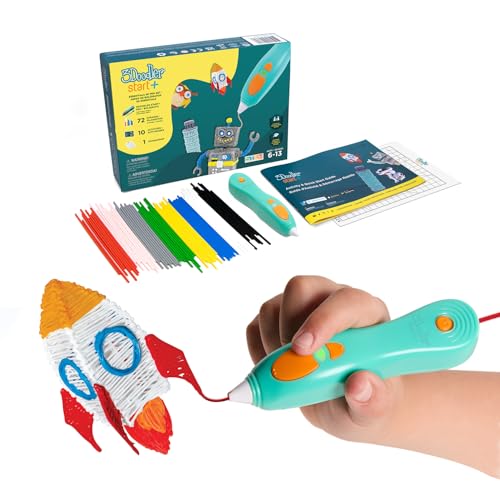
- Child-safe design with no hot parts
- Includes plastics, stencils, DoodlePad, and activity guide
- Encourages screen-free STEM creativity
Best For: Children ages 6+ learning 3D crafting
Best for AI-Powered Personalization

- Turns portraits into 3D models with CubeMe AI
- Four-color printing with claimed 50% less waste
- Pre-assembled setup and AI print-failure monitoring
Best For: Personalized figurines and colorful larger crafts
Best Beginner Crafting Pick
Bambu Lab A1 mini + LED Lamp Kit

- Includes a creative LED Lamp Kit
- Automatic calibration and simple setup
- Quiet, compact, connected printing
Best For: Beginners making décor, gifts, and small creative projects
Best for Fast Craft Production

- CoreXY platform supports high-speed printing
- Automatic leveling simplifies setup
- 220 mm³ build volume and remote monitoring
Best For: Rapid prototypes and repeated craft components
Best Family-Friendly Mini Printer

- Fully assembled with quick guided setup
- App includes creative and STEM modules
- Compact, quiet, and supports WiFi printing
Best For: Families and beginners making small DIY or STEM projects
Best Beginner Multicolor Pick – Bambu Lab A1
For crafters who want reliable results without a lengthy setup, the Bambu Lab A1 is a practical choice among 3d printers for crafting projects. Its automatic calibration, active flow-rate compensation, and quiet operation help simplify detailed prints.
Best For: Beginners, kids, and crafters making detailed PLA-style projects with optional multicolor capability.
Pros:
- 10,000 mm/s² acceleration supports fast, precise printing.
- Automatic bed leveling and Z-offset calibration reduce setup work.
- Quiet operation, a simplified touchscreen, and a quick-swap nozzle suit home crafting.
- Supports multicolor printing when paired with AMS lite.
Cons:
- AMS lite is required for multicolor printing and is not included with the standard printer.
- The printer weighs 22 pounds, so it is not especially lightweight.
The A1 is a well-rounded option for makers who value ease of use and consistent everyday output. Choose the A1 Combo or add AMS lite separately if colorful crafts are a priority.
Best Native Four-Color Option – Anycubic Kobra X
The Anycubic Kobra X stands out for ambitious makers who want multicolor crafting projects without starting with a separate color module. It combines native four-color printing, a large build volume, automatic leveling, and broad filament compatibility.
Best For: Makers, schools, and makerspaces creating larger, colorful projects with PLA, PETG, TPU, PVA, or ASA.
Pros:
- Built-in four-color printing can expand to up to 19 colors with four ACE 2 Pro units.
- Up to 600 mm/s speed and reduced filament purging can shorten print times and material use.
- 49-point automatic leveling helps produce a consistent first layer.
- Wi-Fi, LAN, app control, AI monitoring, and a 260 x 260 x 260 mm build volume add flexibility.
Cons:
- Filament is not included.
- Additional ACE 2 Pro units are needed to reach the expanded color range.
- ACE 2 Pro and ACE Pro accessories are incompatible with each other.
With its large build area and native four-color setup, the Kobra X is geared toward crafters who want more material and color flexibility. Budget separately for filament and any expansion hardware.
Best Enclosed Performance Pick – Bambu Lab P1S
The Bambu Lab P1S is a strong choice for crafting projects that benefit from speed and an enclosed build area. It arrives ready to use, includes automatic bed leveling, and supports a range of common and more advanced filaments.
Best For: Experienced beginners and makers who want fast, enclosed printing for creative projects and optional multicolor work.
Pros:
- 500 mm/s printing speed and 20,000 mm/s² acceleration support rapid production.
- The enclosed design improves performance with advanced filaments.
- Automatic bed leveling helps simplify setup and improve print consistency.
- Can support up to 16 colors when connected to a Bambu Lab AMS.
Cons:
- Bambu Lab AMS is required for multicolor or multimaterial printing.
- Carbon- or glass-fiber-reinforced polymer is not recommended.
- At 38.9 pounds, it is relatively heavy for a desktop printer.
The P1S makes sense for crafters who prioritize speed, enclosure, and material versatility over a compact footprint. Its multicolor features require an additional AMS system.
Best Compact Family Starter – Entina Tina2C
The Entina Tina2C is designed for approachable crafting projects at home, with a fully assembled body, five-minute setup, and app access to thousands of ready-to-print models. Its small footprint and quiet operation make it suitable for desks, family spaces, and STEM activities.
Best For: First-time users, kids, families, and educators exploring small creative or STEM projects.
Pros:
- Fully assembled with auto leveling and guided setup for quick first prints.
- Poloprint Cloud includes more than 3,500 models and 25-plus DIY projects.
- Wi-Fi app control includes AI-powered text-to-3D, photo-to-3D, and model search tools.
- Quiet printing, power-loss recovery, a flexible magnetic bed, and quick-swap nozzle improve convenience.
Cons:
- The 3.9 x 3.9 x 3.9-inch build volume limits project size.
- Wi-Fi uses the 2.4GHz band.
- Its compact format is better suited to small projects than large craft pieces.
The Tina2C is an inviting entry point for households that want guided, low-maintenance 3D printing. Its model library and compact design are especially useful when learning matters more than large build capacity.
Best Multi-Color Workhorse – Bambu Lab P2S Combo
For serious 3d printers for crafting projects, the Bambu Lab P2S Combo combines high-speed FDM printing with multi-color and multi-material capability through the included AMS 2 Pro. Automatic calibration, quick-swap nozzles, AI failure detection, and a ready-to-print setup in about 15 minutes make it a practical choice for detailed craft pieces and repeat projects.
Best For: Crafters who want fast, precise, multi-color prints and a more advanced workflow.
Pros:
- Prints at up to 600 mm/s while maintaining sharp, smooth layers.
- AMS 2 Pro supports multi-color and multi-material printing with filament drying up to 65°C.
- Automatic calibration, AI failure detection, and quick-swap nozzles simplify operation.
- Adaptive airflow supports both crisp overhangs and heat retention for engineering-grade materials.
Cons:
- The printer itself does not support multi-color printing without the Combo version.
- At 46.3 pounds, it is relatively heavy and needs a stable workspace.
The P2S Combo is a strong fit when crafting demands speed, consistent detail, and colorful results. Its advanced features may be more than occasional hobbyists need, but they can streamline frequent or ambitious projects.
Best Kid-Friendly Creative Tool – 3Doodler Start+ Essentials
The 3Doodler Start+ Essentials is a hands-on alternative to traditional 3d printers for crafting projects, letting children draw three-dimensional shapes directly with a pen. Its child-safe design, included stencils, DoodlePad, and activity guide make it suited to screen-free creative play rather than conventional printer-based fabrication.
Best For: Children ages 6 and up who want a safe, beginner-friendly introduction to 3D crafting.
Pros:
- Designed without hot parts, with a nozzle and plastic that can be touched without burn risks.
- Includes 72 mixed-color Start+ plastic strands, 10 stencils, a DoodlePad/Doodlemat, and an activity guide.
- Supports screen-free STEM learning and creative experimentation.
- Offers faster charging and a safety standby mode.
Cons:
- It is a 3D pen rather than an automated printer, so creations are drawn by hand.
- It uses only 3Doodler Start plastic filaments.
This set is a better match for supervised creative learning than for producing precise, repeatable models. Its approachable design and included supplies give young makers plenty to explore right away.
Best for AI-Powered Personalization – Creality SPARKX i7 Combo
The Creality SPARKX i7 Combo is an appealing option among 3d printers for crafting projects when personalization matters. Its CubeMe AI can turn a portrait into a 3D model, while the CFS Lite enables four-color printing. With 95% pre-assembly, auto-leveling, failure detection, and a generous build area, it is designed to get beginners creating quickly.
Best For: Makers creating personalized figurines, colorful accessories, and larger craft models.
Pros:
- CubeMe AI can generate a 3D model from an uploaded portrait.
- Four-color printing is designed to reduce waste by 50% compared with traditional multicolor systems.
- Arrives 95% pre-assembled and can be ready to print in about five minutes.
- AI monitoring detects issues such as spaghetti, air printing, tangles, and build plate problems.
Cons:
- The printer is fairly large, measuring 16.6 by 17.9 by 18.5 inches.
- Its 33-pound weight still calls for a dedicated, stable location.
- Some features, including AI portrait modeling and multicolor printing, depend on the Combo setup and associated systems.
The SPARKX i7 Combo stands out for fast setup and personalized creations, especially if AI-assisted modeling is part of your crafting workflow. Its 260 × 260 × 255 mm build volume also leaves room for both miniatures and larger projects.
Best Beginner Crafting Pick – Bambu Lab A1 mini + LED Lamp Kit
For anyone searching for 3d printers for crafting projects, the Bambu Lab A1 mini is a ready-to-use option that combines automatic calibration, quiet operation, and a bundled LED Lamp Kit. It is a practical choice for turning printed designs into décor, gifts, and functional creative projects without a complicated setup.
Best For: Beginners making decorative lights, personalized gifts, toys, and small home projects.
Pros:
- Includes an LED Lamp Kit for printable lighting projects.
- Automatic calibration and simple setup help reduce troubleshooting.
- MakerWorld models and Bambu Handy app support a connected workflow.
- Compact, quiet design fits home workspaces and studios.
Cons:
- The compact design may be less suitable for larger projects.
- The included lamp kit is most useful for compatible lamp models.
The A1 mini stands out when ease of use and creative versatility matter more than maximum build capacity. Its included lighting kit gives crafting-focused beginners an immediate project path beyond standard prints.
Best for Fast Craft Production – FLASHFORGE Adventurer 5M
The FLASHFORGE Adventurer 5M is a strong option among 3d printers for crafting projects when speed and repeatable results are priorities. Its CoreXY structure, automatic leveling, direct-drive extruder, and 220 × 220 × 220 mm print area support everything from rapid prototypes to batches of craft components.
Best For: Crafters who need fast prototypes, repeated parts, and flexible nozzle or material options.
Pros:
- Advertised travel speeds reach up to 600 mm/s with high acceleration.
- Automatic bed leveling helps simplify first-layer setup.
- Quick nozzle changes and a dual-sided PEI platform improve workflow flexibility.
- Remote monitoring and alerts are available through Flash Studio.
Cons:
- Its 22-pound weight and larger footprint are less convenient for very small workspaces.
- Some nozzle sizes are optional rather than included.
This printer is best suited to makers who value throughput and adjustment options. The combination of a generous build volume, fast operation, and remote monitoring makes it practical for producing multiple craft pieces efficiently.
Best Family-Friendly Mini Printer – Entina Tina2C
The Entina Tina2C is a compact, fully assembled choice for families and first-time makers exploring 3d printers for crafting projects. Guided app setup, a 3.9 × 3.9 × 3.9-inch print volume, auto-leveling, and access to creative modules make it approachable for small DIY builds and STEM activities.
Best For: Families, students, and beginners creating small models, STEM projects, and hands-on DIY designs.
Pros:
- Fully assembled and designed to start printing in as fast as 8 minutes.
- Poloprint Cloud offers AI-powered search, photo-to-print features, and 25+ creative modules.
- Supports WiFi and TF card offline printing.
- Compact, quiet design includes auto-leveling and a flexible magnetic build plate.
Cons:
- The small 3.9-inch cubed print volume limits project size.
- Its feature set is oriented toward beginner and educational use rather than larger builds.
The Tina2C is an especially accessible starting point for home crafting and learning. Its small footprint and guided software make it easy to explore 3D printing, while the limited build volume keeps projects focused on smaller creations.
How We Picked the Best 3d Printers for Crafting Projects
We focused on features that have a direct effect on crafting results and day-to-day usability: print quality, setup time, automatic bed leveling, dependable material handling, build volume, speed, noise, connectivity, and safety. We also considered whether each machine suits beginners, children, experienced makers, or households that want multicolor output.
Because crafting needs vary, the selection includes both standard FDM printers and a 3D pen. FDM printers are better for repeatable parts and larger designs, while a 3D pen can be simpler for hands-on drawing, decorating, and supervised children’s projects.
Quick Comparison
- Best all-around beginner option: Bambu Lab A1.
- Best compact choice: Bambu Lab A1 mini or Entina Tina2C.
- Best for multicolor crafting: Bambu Lab P2S Combo, Anycubic Kobra X, or Creality SPARKX i7 Combo.
- Best for enclosed printing: Bambu Lab P1S.
- Best for speed: FLASHFORGE Adventurer 5M.
- Best hands-on option for children: 3Doodler Start+.
Key Buying Factors for 3d Printers for Crafting Projects
Build Volume and Workspace
Check the printer’s maximum build dimensions against the objects you plan to make. Compact models save desk space and work well for ornaments, miniatures, labels, and small accessories. A larger platform is more useful for cosplay components, storage pieces, and batches of smaller items.
Materials and Temperature Control
PLA is a practical starting material for decorative crafts and prototypes. If you expect to use tougher or more temperature-sensitive filaments, look for a direct-drive extruder, a heated bed, and an enclosure where appropriate. Confirm supported materials before buying specialty filament.
Ease of Use
Automatic leveling, a preassembled frame, guided software, Wi-Fi, and reliable first-layer performance can save substantial time. These features matter especially for beginners, classrooms, and families. A simpler machine may be preferable if you want fewer settings to manage.
Color, Speed, and Detail
Multicolor systems can reduce painting and make display pieces more vivid, but they may use extra filament and add complexity. High-speed printing is useful for repeated projects, though layer quality, cooling, and model design still influence the final finish.
Who Should Buy Which 3d Printers for Crafting Projects?
Beginners and families should start with a ready-to-use model such as the Bambu Lab A1, A1 mini, or Entina Tina2C. Serious hobby crafters may prefer the P1S or Adventurer 5M for greater capability and faster production. Multicolor makers should consider a printer-and-material system such as the P2S Combo, Kobra X, or SPARKX i7 Combo. Children or hands-on learners may get the most accessible creative experience from the 3Doodler Start+ under appropriate supervision.